
FontMetrics ----- 绘制文本,获取文本高度
Canvas 绘制文本时,使用FontMetrics对象,计算位置的坐标。
 public static class FontMetrics {

     /**

      * The maximum distance above the baseline for the tallest glyph in

      * the font at a given text size.

      */

     public float   top;

     /**

      * The recommended distance above the baseline for singled spaced text.

      */

     public float   ascent;

     /**

      * The recommended distance below the baseline for singled spaced text.

      */

     public float   descent;

     /**

      * The maximum distance below the baseline for the lowest glyph in

      * the font at a given text size.

      */

     public float   bottom;

     /**

      * The recommended additional space to add between lines of text.

      */

     public float   leading;

 }
它的各基准线可以参考下图:
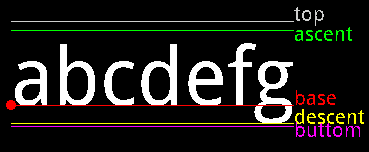
 /** 绘制FontMetrics对象的各种线 */

 mPaint.reset();

 mPaint.setColor(Color.WHITE);

 mPaint.setTextSize(80);

 // FontMetrics对象

 FontMetrics fontMetrics = mPaint.getFontMetrics();

 String text = "abcdefg";

 // 计算每一个坐标

 float textWidth = mPaint.measureText(text);

 float baseX = 30;

 float baseY = 700;

 float topY = baseY + fontMetrics.top;

 float ascentY = baseY + fontMetrics.ascent;

 float descentY = baseY + fontMetrics.descent;

 float bottomY = baseY + fontMetrics.bottom;

 // 绘制文本

 canvas.drawText(text, baseX, baseY, mPaint);

 // BaseLine描画

 mPaint.setColor(Color.RED);

 canvas.drawLine(baseX, baseY, baseX + textWidth, baseY, mPaint);

 mPaint.setTextSize(20);

 canvas.drawText("base", baseX + textWidth, baseY, mPaint);

 // Base描画

 canvas.drawCircle(baseX, baseY, 5, mPaint);

 // TopLine描画

 mPaint.setColor(Color.LTGRAY);

 canvas.drawLine(baseX, topY, baseX + textWidth, topY, mPaint);

 canvas.drawText("top", baseX + textWidth, topY, mPaint);

 // AscentLine描画

 mPaint.setColor(Color.GREEN);

 canvas.drawLine(baseX, ascentY, baseX + textWidth, ascentY, mPaint);

 canvas.drawText("ascent", baseX + textWidth, ascentY + 10, mPaint);

 // DescentLine描画

 mPaint.setColor(Color.YELLOW);

 canvas.drawLine(baseX, descentY, baseX + textWidth, descentY, mPaint);

 canvas.drawText("descent", baseX + textWidth, descentY, mPaint);

 // ButtomLine描画

 mPaint.setColor(Color.MAGENTA);

 canvas.drawLine(baseX, bottomY, baseX + textWidth, bottomY, mPaint);

 canvas.drawText("buttom", baseX + textWidth, bottomY + 10, mPaint);
相信通过以上程序,能够很好的理解topLine,buttomLine,baseLine,ascentLine,descentLine。
另外:Paint类有两个方法
 /**

  * Return the distance above (negative) the baseline (ascent) based on the

  * current typeface and text size.

  *

  * @return the distance above (negative) the baseline (ascent) based on the

  *         current typeface and text size.

  */

 public native float ascent();

 /**

  * Return the distance below (positive) the baseline (descent) based on the

  * current typeface and text size.

  *

  * @return the distance below (positive) the baseline (descent) based on

  *         the current typeface and text size.

  */

 public native float descent();
ascent():the distance above the baseline(baseline以上的height)
descent():the distance below the baseline(baseline以下的height)
所以ascent() + descent() 可以看成文字的height。
到此为止,怎么获取文字的height和width都已经揭晓了:
获取height : mPaint.ascent() + mPaint.descent()
获取width : mPaint.measureText(text)
FontMetrics ----- 绘制文本,获取文本高度的更多相关文章
- jquery设置文本框值 与获取文本框的值
<!DOCTYPE html> <html> <head lang="en"> <meta charset="UTF-8&quo ...
- iOS 动态计算文本内容的高度
关于ios 下动态计算文本内容的高度,经过查阅和网上搜素,现在看到的有以下几种方法: 1. // 获取字符串的大小 ios6 - (CGSize)getStringRect_:(NSString* ...
- 【NLP】Python NLTK获取文本语料和词汇资源
Python NLTK 获取文本语料和词汇资源 作者:白宁超 2016年11月7日13:15:24 摘要:NLTK是由宾夕法尼亚大学计算机和信息科学使用python语言实现的一种自然语言工具包,其收集 ...
- textarea文本域的高度随内容的变化而变化
用css控制textarea文本域的高度随内容的变化而变化,不出现滚动条. CSS代码: 复制代码 代码如下: .t_area{ width:300px; overflow-y:visible } & ...
- 使用contenteditable+div模拟textarea文本域实现高度自适应
使用contenteditable+div模拟textarea文本域实现高度自适应 开发过程中由于需要在发送消息的时候需要有一个可以高度自适应的文本域,一开始是使用textarea并搭配auto-si ...
- iOS之自动调节输入文本框的高度
//自动调节输入文本框的高度 - (void)textViewDidChange:(UITableView *)textView{ float height; if ([[[UIDevice curr ...
- js/jquery获取文本框的值与改变文本框的值
我们就用它来学习获取文本框的值及改变文本框的值. 代码如下 复制代码 <script>function get1(){ document.getElementById("txtb ...
- Jquery实现textarea根据文本内容自适应高度
本文给大家分享的是Jquery实现textarea根据文本内容自适应高度,这些在平时的项目中挺实用的,所以抽空封装了一个文本框根据输入内容自适应高度的插件,这里推荐给小伙伴们. autoTextare ...
- jquery获取文本框的内容
使用jquery获取文本框的内容有以下几种: 1.根据ID取值(id属性): // javascript <script type="text/javascript"> ...
- 【原】文本图片自适应高度小bug以及解决办法
自定义cell的文本图片自适应高度代码,如果存在自定义的cell赋值封装,就必须将自适应高度代码写在这个方法中
随机推荐
- QQ群共享文件下载很慢解决办法
QQ群共享文件下载很慢解决办法.我们经常会不群里面共享文件,文件文件稍大,下载非常慢.家庭是20M的网速,一般正常下载能够达到2.5MB左右,而在QQ群实际下载网速却只有80KB左右.如果要下1G,就 ...
- UML系列01之 UML用例图
UML,全称是Unified Modeling Language,中文是"统一建模语言".通俗点说,UML是一种创建模型的语言. UML是在开发阶段,说明,可视化,构建和书写一个面 ...
- [Error]configure: error: Package requirements (fuse >= 2.3 glib-2.0 gthread-2.0) were not met:
No package 'fuse' found #sshfs是基于fuse模块的所以要安装fuse No package 'glib-2.0' found No packag ...
- 如何在github上展示作品——为你的项目生成一个快速访问的网址如(DaisyWang88.github.io)
(这里值针对Windos系统的,因为本人用的是Window系统,暂时没有条件在其他平台上测试) 1.创建命名为 <userName>.github.io的仓库. 这里的u ...
- Android 使用全局变量传递数据
使用全局变量传递数据,所谓的全局变量类似于jee开发中的application变量.申明后,全局调用.只有当内存被清理后,才被销毁.否则一直可以调用. 还是使用点击一个button,传递一个数据到另一 ...
- JBOSS集群技术升级版解决方案分享(图示篇)
JBOSS集群技术升级版解决方案分享(实现篇) 前段时间,由于阿堂一直较忙,没有写点什么了,有空时一直在关注"web架构和性能,高并发,Cache层"技术领域的 ...
- PO/POJO/VO/BO/DAO/DTO
PO(persistant object) 持久对象在o/r 映射的时候出现的概念,如果没有o/r映射,就没有这个概念存在了.通常对应数据模型(数据库),本身还有部分业务逻辑的处理.可以看成是与数据库 ...
- Html5 Geolocation demo
<!DOCTYPE html> <head> <meta charset="utf-8"> <title>HTML5 Geoloca ...
- ftp 建立、配置、实用软件 fileZilla server
ftp 建立.配置.实用软件 fileZilla server
- datetimepicker文件
很有诚意先放下载地址百度网盘 最近在做angular的项目,找一个合适的 datepicker ,首选bootstrap-datetimepicker,但是项目中没有到bootstrap, 整理处理下 ...