
wx.Notebook
wx.Notebook
This class represents a notebook control, which manages multiple windows with associated tabs.
To use the class, create a wx.Notebook object and call wx.Notebook.AddPage or wx.Notebook.InsertPage , passing a window to be used as the page. Do not explicitly delete the window for a page that is currently managed bywx.Notebook.
NotebookPage is a typedef for wx.Window.
 Window Styles
This class supports the following styles:
wx.NB_TOP: Place tabs on the top side.wx.NB_LEFT: Place tabs on the left side.wx.NB_RIGHT: Place tabs on the right side.wx.NB_BOTTOM: Place tabs under instead of above the notebook pages.wx.NB_FIXEDWIDTH: (Windows only) All tabs will have same width.wx.NB_MULTILINE: (Windows only) There can be several rows of tabs.wx.NB_NOPAGETHEME: (Windows only) Display a solid colour on notebook pages, and not a gradient, which can reduce performance.wx.NB_FLAT: (WindowsCEonly) Show tabs in a flat style.
The styles wx.NB_LEFT, wx.RIGHT and wx.BOTTOM are not supported under Microsoft Windows XP when using visual themes.
 Events Emitted by this Class
Handlers bound for the following event types will receive a wx.BookCtrlEvent parameter.
- EVT_NOTEBOOK_PAGE_CHANGED: The page selection was changed. Processes a
wxEVT_NOTEBOOK_PAGE_CHANGEDevent. - EVT_NOTEBOOK_PAGE_CHANGING: The page selection is about to be changed. Processes a
wxEVT_NOTEBOOK_PAGE_CHANGINGevent. This event can be vetoed.
 Page backgrounds
On Windows XP, the default theme paints a gradient on the notebook’s pages. If you wish to suppress this theme, for aesthetic or performance reasons, there are three ways of doing it. You can use NB_NOPAGETHEME to disable themed drawing for a particular notebook, you can call wx.SystemOptions.SetOption to disable it for the whole application, or you can disable it for individual pages by using SetBackgroundColour. To disable themed pages globally:
wx.SystemOptions.SetOption("msw.notebook.themed-background", 0)
Set the value to 1 to enable it again. To give a single page a solid background that more or less fits in with the overall theme, use:
col = notebook.GetThemeBackgroundColour()

if col.IsOk():

    page.SetBackgroundColour(col)
On platforms other than Windows, or if the application is not using Windows themes, GetThemeBackgroundColour will return an uninitialised colour object, and the above code will therefore work on all platforms.
See also
wx.BookCtrl , wx.BookCtrlEvent, wx.ImageList, Notebook Sample
 Class Hierarchy
 Inheritance diagram for class Notebook:
 Control Appearance

wxMSW
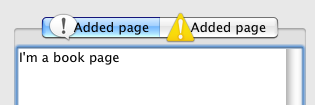
wxMAC
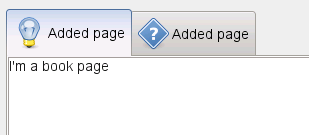
wxGTK
 Methods Summary
__init__ |
Constructs a notebook control. |
ChangeSelection |
Changes the selection to the given page, returning the previous selection. |
Create |
Creates a notebook control. |
GetPageImage |
Returns the image index for the given page. |
GetPageText |
Returns the string for the given page. |
GetRowCount |
Returns the number of rows in the notebook control. |
GetSelection |
Returns the currently selected page, or NOT_FOUND if none was selected. |
GetThemeBackgroundColour |
If running under Windows and themes are enabled for the application, this function returns a suitable colour for painting the background of a notebook page, and can be passed to SetBackgroundColour . |
InsertPage |
Inserts a new page at the specified position. |
SetPadding |
Sets the amount of space around each page’s icon and label, in pixels. |
SetPageImage |
Sets the image index for the given page. |
SetPageText |
Sets the text for the given page. |
SetSelection |
Sets the selection to the given page, returning the previous selection. |
 Properties Summary
RowCount |
See GetRowCount |
Selection |
See GetSelection and SetSelection |
ThemeBackgroundColour |
See GetThemeBackgroundColour |
 Class API
- class
wx.Notebook(BookCtrlBase) -
Possible constructors:
Notebook()

Notebook(parent, id=ID_ANY, pos=DefaultPosition, size=DefaultSize,

         style=0, name=NotebookNameStr)
This class represents a notebook control, which manages multiple windows with associated tabs.
Methods
__init__(self, *args, **kw)-
 Overloaded Implementations:
__init__ (self)
Constructs a notebook control.
__init__ (self, parent, id=ID_ANY, pos=DefaultPosition, size=DefaultSize, style=0, name=NotebookNameStr)
Constructs a notebook control.
Note that sometimes you can reduce flicker by passing the
wx.CLIP_CHILDRENwindow style.Parameters: - parent (wx.Window) – The parent window. Must be not
None. - id (wx.WindowID) – The window identifier.
- pos (wx.Point) – The window position.
- size (wx.Size) – The window size.
- style (long) – The window style. See wx.Notebook.
- name (string) – The name of the control.
- parent (wx.Window) – The parent window. Must be not
ChangeSelection(self, page)-
Changes the selection to the given page, returning the previous selection.
This function behaves as
SetSelectionbut does not generate the page changing events.See User Generated Events vs Programmatically Generated Events for more information.
Parameters: page (int) – Return type: int
Create(self, parent, id=ID_ANY, pos=DefaultPosition, size=DefaultSize, style=0, name=NotebookNameStr)-
Creates a notebook control.
See wx.Notebook for a description of the parameters.
Parameters: Return type: bool
GetPageImage(self, nPage)-
Returns the image index for the given page.
Parameters: nPage (int) – Return type: int
GetPageText(self, nPage)-
Returns the string for the given page.
Parameters: nPage (int) – Return type: string
GetRowCount(self)-
Returns the number of rows in the notebook control.
Return type: int
GetSelection(self)-
Returns the currently selected page, or
NOT_FOUNDif none was selected.Note that this method may return either the previously or newly selected page when called from the
EVT_BOOKCTRL_PAGE_CHANGEDhandler depending on the platform and sowx.BookCtrlEvent.GetSelectionshould be used instead in this case.Return type: int
GetThemeBackgroundColour(self)-
If running under Windows and themes are enabled for the application, this function returns a suitable colour for painting the background of a notebook page, and can be passed to
SetBackgroundColour.Otherwise, an uninitialised colour will be returned.
Return type: wx.Colour
InsertPage(self, index, page, text, select=False, imageId=NO_IMAGE)-
Inserts a new page at the specified position.
Parameters: - index (int) – Specifies the position for the new page.
- page (wx.Window) – Specifies the new page.
- text (string) – Specifies the text for the new page.
- select (bool) – Specifies whether the page should be selected.
- imageId (int) – Specifies the optional image index for the new page.
Return type: bool
Returns: Trueif successful,Falseotherwise.Note
Do not delete the page, it will be deleted by the book control.
See also
SetPadding(self, padding)-
Sets the amount of space around each page’s icon and label, in pixels.
Parameters: padding (wx.Size) – Note
The vertical padding cannot be changed in wxGTK.
SetPageImage(self, page, image)-
Sets the image index for the given page.
image is an index into the image list which was set with
SetImageList.Parameters: - page (int) –
- image (int) –
Return type: bool
SetPageText(self, page, text)-
Sets the text for the given page.
Parameters: - page (int) –
- text (string) –
Return type: bool
SetSelection(self, page)-
Sets the selection to the given page, returning the previous selection.
Notice that the call to this function generates the page changing events, use the
ChangeSelectionfunction if you don’t want these events to be generated.Parameters: page (int) – Return type: int See also
Properties
RowCount-
See
GetRowCount
Selection-
See
GetSelectionandSetSelection
ThemeBackgroundColour
wx.Notebook的更多相关文章
- wx
wx The classes in this module are the most commonly used classes for wxPython, which is why they hav ...
- wx.BookCtrlBase
wx.BookCtrlBase A book control is a convenient way of displaying multiple pages of information, disp ...
- wxpython wx.windows的API
wx.Window is the base class for all windows and represents any visible object on screen. All control ...
- [ZETCODE]wxWidgets教程九:组件专题2
本教程原文链接:http://zetcode.com/gui/wxwidgets/widgetsII/ 翻译:瓶哥 日期:2013年12月15日星期日 邮箱:414236069@qq.com 主页:h ...
- wxWidgets一个界面与数据分离的简单例子
/*************************************************************** * Name: MyApp.h * Purpose: Defines ...
- wxPython Major类
转载自:http://www.yiibai.com/wxpython/wxpython_major_classes.html 原始的 wxWidgets(用C++编写)是一个巨大的类库.GUI类从 ...
- wxpython tab切换页面
最近没事学习下wxpython,发现很少有关于页面切换的demo,这边分享下2中切换的方法.第一种:利用wx.Notebook第二种:利用Sizer布局实现(自己写的),代码没有涉及到什么重构之类的优 ...
- Python 模块之wxpython 的应用
第一个应用程序:“Hello World” 作为传统,我们首先将要写一个小的“Hello World”程序,下面是他的代码: #!/usr/bin/env python import wx app = ...
- wxPython之BoxSizer
1 函数原型 sizer = wx.BoxSizer( integer orient ) 其中的方向(orient)可以是 wx.VERTICAL(垂直) 或 wx.HORIZONTAL(水平). 将 ...
随机推荐
- delete 多表删除的使用(连表删除)
delete 多表删除的使用 1.从数据表t1中把那些id值在数据表t2里有匹配的记录全删除掉 DELETE t1 FROM t1,t2 WHERE t1.id=t2.id 或 DELETE ...
- Qt5 基于TCP传输的发送/接收文件服务器(支持多客户端)
一.实现功能 1.服务器端选择待发送的文件,可以是多个 2.开启服务器,支持多客户端接入,能够实时显示每个客户端接入状态 3.等待所有客户端都处于已连接状态时,依次发送文件集给每个客户端,显示每个客户 ...
- 不是技术牛人,如何拿到国内IT巨头的Offer
原地址:http://blog.csdn.net/lsldd/article/details/13506263 不久前,byvoid面阿里星计划的面试结果截图泄漏,引起无数IT屌丝的羡慕敬仰.看看这些 ...
- mysql root@::1 意义
root@::1 ::1 是IPv6格式的 127.0.0.1
- Vim应用
:q!不保存退出 :set number显示行数 :wq保存并退出 ==先输入100,再输入==.从这行开始向下100行,进行自动缩进对齐
- hdu 5567 sequence1(水)
问题描述 给定长度为n的序列a,求有多少对i,j(i<j),使得∣ai−aj∣ mod b=c 输入描述 若干组数据(大概5组). 每组数据第一行三个整数n(≤n≤),b,c(≤c<b ...
- 关于VMware导入Linux VM找不到网卡的问题
今天遇到一个问题:由于虚拟机升级,导致以前的Linux VM(CentoS 6.7)在新的VMware里面打开,系统提示找不到网卡的问题,在网上找了好多解决办法,基本上都是一样的答案. 与网卡有关的几 ...
- 聚类算法初探(四)K-means
最近由于工作需要,对聚类算法做了一些相关的调研.现将搜集到的资料和自己对算法的一些理解整理如下,供大家参考. 另外在算法代码方面,我也做了一些实现(包括串行和并行),欢迎感兴趣的朋友探讨和交流. 第一 ...
- jQuery--checkbox全选/取消全选
用JavaScript使页面上的一组checkbox全选/取消全选,逻辑很简单,实现代码也没有太难的语法.但使用jQuery实现则更简单,代码也很简洁,精辟! jQuery版本:1.3.2 <h ...
- php安装配置文件 源码和yum版
源码安装 ./configure --prefix=/usr/local/services/php \--with-config-file-path=/usr/local/service/php/et ...