
整理mp4协议重点,将协议读薄
MP4 实际代表的含义是 MPEG-4 Part 14。它只是 MPEG 标准中的 14 部分。它主要参考 ISO/IEC 标准来制定的。MP4 主要作用是可以实现快进快放,边下载边播放的效果。他是基于 MOV,然后发展成自己相关的格式内容。然后和 MP4 相关的文件还有:3GP,M4V 这两种格式。
MP4 的格式稍微比 FLV 复杂一些,它是通过嵌的方式来实现整个数据的携带。换句话说,它的每一段内容,都可以变成一个对象,如果需要播放的话,只要得到相应的对象即可。
MP4 中最基本的单元就是 Box,它内部是通过一个一个独立的 box 拼接而成的。所以,这里,我们先从 Box 的讲解开始。
PS:mp4协议本身没有多复查,没啥特别难理解的地方,或许其唯一的“复杂”点就在于其“大”,嵌套的各种各样的子box,简直就是mux/remuxer的噩梦(gstreamer里面光解析box的代码,就1W多行,还不包含其他的element 逻辑代码)
MP4 box
MP4 box 可以分为 basic box 和 full box。
- basic box: 主要针对的是相关的基础 box。比如 ftyp,moov 等。
- full box: 主要针对视频源的 media box。
这里,再次强调一下,MP4 box 是 MP4的核心。在 decode/encode 过程中,最好把它的基本格式背下来,这样,你写起来会开心很多(经验之谈)。
OK,我们来看一下,Box 的具体结构。
basic box
首先来看一下 basic box 的结构:
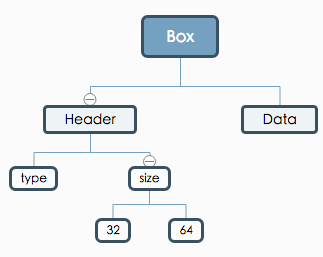
如果用代码来表示就是:
aligned(8) class Box (unsigned int(32) boxtype, optional unsigned int(8)[16] extended_type) {

   unsigned int(32) size;

   unsigned int(32) type = boxtype;

   if (size==1) {

      unsigned int(64) largesize;

   }  else if (size==0) {

      // box extends to end of file

   }

   // 这里针对的是 MP4 extension 的盒子类型。一般不会发生

    if (boxtype==‘uuid’) {

    unsigned int(8)[16] usertype = extended_type;

    }

}
上面代码其实已经说的很清楚了。这里,我在简单的阐述一下。
- size[4B]: 用来代指该 box 的大小,包括 header 和 body。由于其大小有限制,有可能不满足超大的 box。所以,这里有一个判断逻辑,当
size===1时,会出现一个 8B 的largesize字段来存放大小。当size===0时,表示文件的结束。 - type[4B]: 用来标识该 box 的类型,其实内容很简单,就是直接取指定盒子的英文字母的 ASCII 码。因为 boxname 的长度只有 4 个字母,比如'f''t''y''e'。
实际整个盒子的结构可以用下图来表示:

这里需要强调的一点就是,在 MP4 中,默认写入字节序都是 Big-Endian 。所以,在上面,涉及到 4B 8B 等字段内容时,都是以 BE 来写入的。
上面不是说了,box 有两种基本格式吗?
还有一种为 fullBox
full box
full box 和 box 的主要区别是增加了 version 和 flag 字段。它的应用场景不高,主要是在 trak box 中使用。它的基本格式为:
aligned(8) class FullBox(unsigned int(32) boxtype, unsigned int(8) v, bit(24) f) extends Box(boxtype) {

    unsigned int(8) version = v;

    bit(24) flags = f;

}
在实操中,如果你的没有针对 version 和 flags 的业务场景,那么基本上就可以直接设为默认值,比如 0x00。它的基本结构图为:
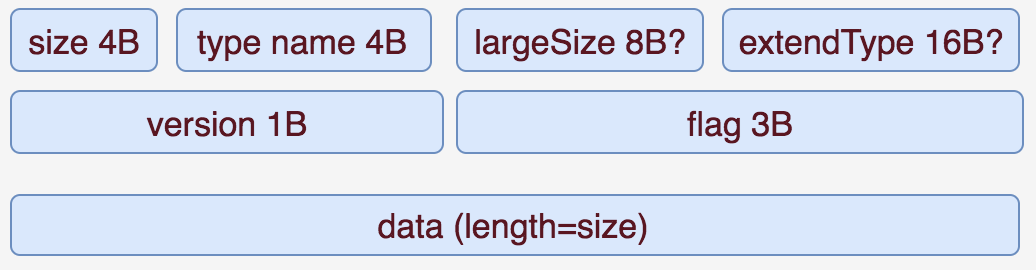
接下来,我们就要正式的来看一下,MP4 中真正用到的一些 Box 了。
这里,我们按照 MP4 box 的划分来进行相关的阐述。先看一张 MP4 给出的结构图:
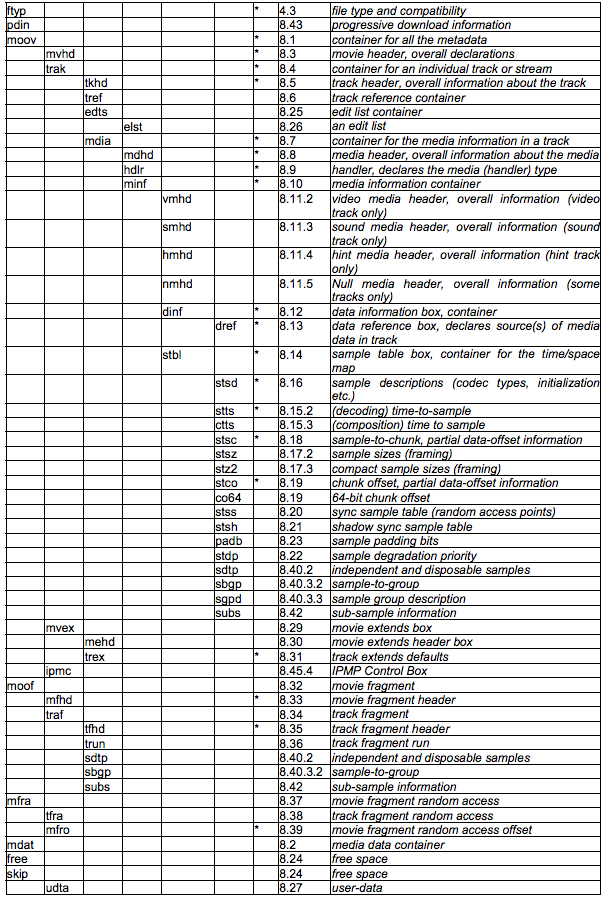
说明一下,我们只讲带星号的 box。其他的因为不是必须 box,我们就选择性的忽略了。不过,里面带星号的 Box 还是挺多的。因为,我们的主要目的是为了生成一个 MP4 文件。一个正常的 MP4 文件的结构并不是所有带星号的 Box 都必须有。
正常播放的 MP4 文件其实还可以分为 unfragmented MP4(简写为 MP4) 和 fragmented MP4(简写为 FMP4)。那这两者具体有什么区别呢?
可以说,完全不同。因为他们本身确定 media stream 播放的方式都是完全不同的模式。
MP4 格式
基本 box 为:
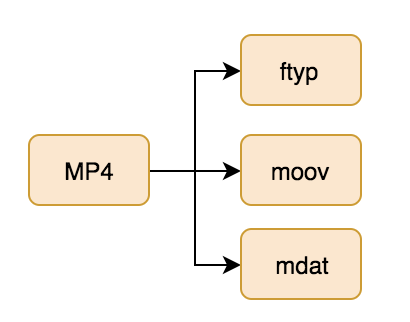
上面这是最基本的 MP4 Box 内容。 较完整的为:
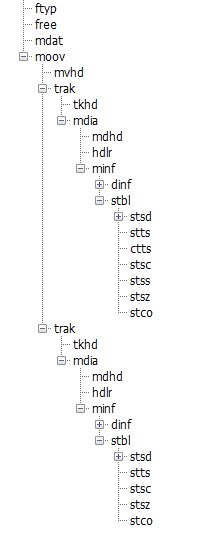
MP4 box 根据 trak 中的 stbl 下的 stts stsc 等基本 box 来完成在 mdat box 中的索引。那 FMP4 是啥呢?
- 非标:非标常用于生成单一 trak 的文件。
- ftyp
- moov
- moof
- mdat
- 标准:用来生成含有多个 trak 的文件。
- ftyp
- moov
- mdat
看起来非标还多一个 box。但在具体编解码的时候,标准解码需要更多关注在如何编码 stbl 下的几个子 box–stts,stco,ctts 等盒子。而非标不需要关注 stbl,只需要将本来处于 stbl 的数据直接抽到 moof 中。并且在转换过程中,moof 里面的格式相比 stbl 来说,是非常简单的。所以,这里,我们主要围绕上面两种的标准,来讲解对应的 Box。
标准 MP4 盒子
ftyp
ftyp 盒子相当于就是该 mp4 的纲领性说明。即,告诉demuxer它的基本解码版本,兼容格式。简而言之,就是用来告诉客户端,该 MP4 的使用的解码标准。通常,ftyp 都是放在 MP4 的开头。
它的格式为:
aligned(8) class FileTypeBox

   extends Box(‘ftyp’) {

   unsigned int(32)  major_brand;

   unsigned int(32)  minor_version;

   unsigned int(32) compatible_brands[];

}
上面的字段一律都是放在 data 字段中(参考,box 的描述)。
- major_brand: 因为兼容性一般可以分为推荐兼容性和默认兼容性。这里 major_brand 就相当于是推荐兼容性。一般而言都是使用
isom这个万金油即可。如果是需要特定的格式,可以自行定义。 - minor_version: 指最低兼容版本。
- compatible_brands: 和 major_brand 类似,通常是针对 MP4 中包含的额外格式,比如,AVC,AAC 等相当于的音视频解码格式。
说这么多概念,还不如给代码实在。这里,我们可以来看一下,对于通用 ftyp box 的创建。
 FTYP: new Uint8Array([

    0x69, 0x73, 0x6F, 0x6D, // major_brand: isom

    0x0, 0x0, 0x0, 0x1, // minor_version: 0x01

    0x69, 0x73, 0x6F, 0x6D, // isom

    0x61, 0x76, 0x63, 0x31 // avc1

  ])
moov
moov box 主要是作为一个很重要的容器盒子存在的,它本身的实际内容并不重要。moov 主要是存放相关的 trak 。其基本格式为:
aligned(8) class MovieExtendsBox extends Box(‘mvex’){ }
mvhd
mvhd 是 moov 下的第一个 box,用来描述 media 的相关信息。其基本内容为:
aligned(8) class MovieHeaderBox extends FullBox(‘mvhd’, version, 0) {

    if (version==1) {

   unsigned int(64)  creation_time;

   unsigned int(64)  modification_time;

   unsigned int(32)  timescale;

   unsigned int(64)  duration;

} else { // version==0

   unsigned int(32)  creation_time;

   unsigned int(32)  modification_time;

   unsigned int(32)  timescale;

   unsigned int(32)  duration;

}

template int(32)  rate = 0x00010000; // typically 1.0

template int(16)  volume = 0x0100;   // typically, full volume

const bit(16)  reserved = 0;

const unsigned int(32)[2]  reserved = 0;

template int(32)[9]  matrix =

{ 0x00010000,0,0,0,0x00010000,0,0,0,0x40000000 };

      // Unity matrix

   bit(32)[6]  pre_defined = 0;

   unsigned int(32)  next_track_ID;

}
- version: 一般默认为 0。
- creation_time: 创建的时间。从 1904 年开始算起,用秒来表示。
- timescale: 时间比例。通过该值和 duration 来算出实际时间
- duration: 持续时间,单位是根据 timescale 来决定的。实际时间为:duration/timescale = xx 秒。
- rate: 播放比例。
- volume: 音量大小。0x0100 为最大值。
- matrix: 不解释。我也不懂
- next_track_ID: 需要比当前 trak_id 最大值还大才行。一般随便填个很大的值即可。
实际上,mvhd 大部分的值,都可以设为固定值:
new Uint8Array([

		0x00, 0x00, 0x00, 0x00, // version(0) + flags

		0x00, 0x00, 0x00, 0x00, // creation_time

		0x00, 0x00, 0x00, 0x00, // modification_time

		(timescale >>> 24) & 0xFF, // timescale: 4 bytes

		(timescale >>> 16) & 0xFF,

		(timescale >>> 8) & 0xFF,

		(timescale) & 0xFF,

		(duration >>> 24) & 0xFF, // duration: 4 bytes

		(duration >>> 16) & 0xFF,

		(duration >>> 8) & 0xFF,

		(duration) & 0xFF,

		0x00, 0x01, 0x00, 0x00, // Preferred rate: 1.0

		0x01, 0x00, 0x00, 0x00, // PreferredVolume(1.0, 2bytes) + reserved(2bytes)

		0x00, 0x00, 0x00, 0x00, // reserved: 4 + 4 bytes

		0x00, 0x00, 0x00, 0x00,

		0x00, 0x01, 0x00, 0x00, // ----begin composition matrix----

		0x00, 0x00, 0x00, 0x00,

		0x00, 0x00, 0x00, 0x00,

		0x00, 0x00, 0x00, 0x00,

		0x00, 0x01, 0x00, 0x00,

		0x00, 0x00, 0x00, 0x00,

		0x00, 0x00, 0x00, 0x00,

		0x00, 0x00, 0x00, 0x00,

		0x40, 0x00, 0x00, 0x00, // ----end composition matrix----

		0x00, 0x00, 0x00, 0x00, // ----begin pre_defined 6 * 4 bytes----

		0x00, 0x00, 0x00, 0x00,

		0x00, 0x00, 0x00, 0x00,

		0x00, 0x00, 0x00, 0x00,

		0x00, 0x00, 0x00, 0x00,

		0x00, 0x00, 0x00, 0x00, // ----end pre_defined 6 * 4 bytes----

		0xFF, 0xFF, 0xFF, 0xFF // next_track_ID

	]);
trak
trak box 就是主要存放相关 media stream 的内容。其基本格式很简单就是简单的 box:
aligned(8) class TrackBox extends Box(‘trak’) { }
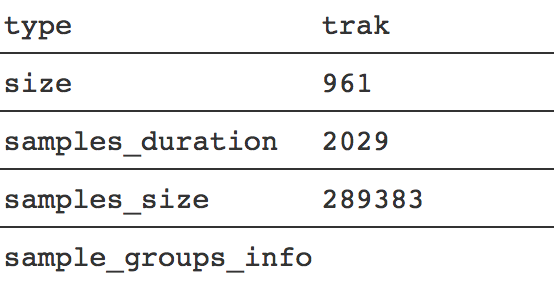
不过,有时候里面也可以带上该 media stream 的相关描述:
tkhd
tkhd 是 trak box 的子一级 box 的内容。主要是用来描述该特定 trak 的相关内容信息。其主要内容为:
aligned(8) class TrackHeaderBox

extends FullBox(‘tkhd’, version, flags){ if (version==1) {

      unsigned int(64)  creation_time;

      unsigned int(64)  modification_time;

      unsigned int(32)  track_ID;

      const unsigned int(32)  reserved = 0;

      unsigned int(64)  duration;

   } else { // version==0

      unsigned int(32)  creation_time;

      unsigned int(32)  modification_time;

      unsigned int(32)  track_ID;

      const unsigned int(32)  reserved = 0;

      unsigned int(32)  duration;

}

const unsigned int(32)[2] reserved = 0;

template int(16) layer = 0;

template int(16) alternate_group = 0;

template int(16) volume = {if track_is_audio 0x0100 else 0};

const unsigned int(16) reserved = 0;

template int(32)[9] matrix=

{ 0x00010000,0,0,0,0x00010000,0,0,0,0x40000000 };

      // unity matrix

   unsigned int(32) width;

   unsigned int(32) height;

}
上面内容确实挺多的,但是,有些并不是一定需要填一些合法值。这里简单说明一下:
- creation_time: 创建时间,非必须
- modification_time: 修改时间,非必须
- track_ID: 指明当前描述的 track ID。
- duration: 当前 track 内容持续的时间。通常结合 timescale 进行相关计算。
- layer: 没啥用。通常用来作为分层 video trak 的使用。
- alternate_group: 可替换 track 源。如果为 0 表示当前 track 没有指定的 track 源替代。非 0 的话,则表示存在多个源的 group。
- volume: 用来确定音量大小。满音量为 1(0x0100)。
- width and height:确定视频的宽高
mdia
mdia 主要用来包裹相关的 media 信息。本身没啥说的,格式为:
aligned(8) class MediaBox extends Box(‘mdia’) { }
mdhd
mdhd 和 tkhd 来说,内容大致都是一样的。不过,tkhd 通常是对指定的 track 设定相关属性和内容。而 mdhd 是针对于独立的 media 来设置的。不过事实上,两者一般都是一样的。
具体格式为:
aligned(8) class MediaHeaderBox extends FullBox(‘mdhd’, version, 0) { if (version==1) {

      unsigned int(64)  creation_time;

      unsigned int(64)  modification_time;

      unsigned int(32)  timescale;

      unsigned int(64)  duration;

   } else { // version==0

      unsigned int(32)  creation_time;

      unsigned int(32)  modification_time;

      unsigned int(32)  timescale;

      unsigned int(32)  duration;

}

bit(1) pad = 0;

unsigned int(5)[3] language; // ISO-639-2/T language code unsigned int(16) pre_defined = 0;

}
里面就有 3 个额外的字段:pad,language,pre_defined。
根据字面意思很好理解:
- pad: 占位符,通常为 0
- language: 表明当前 trak 的语言。因为该字段总长为 15bit,通常是和 pad 组合成为 2B 的长度。
- pre_defined: 默认为 0.
实际代码的计算方式为:
new Uint8Array([

    0x00, 0x00, 0x00, 0x00, // version(0) + flags

    0x00, 0x00, 0x00, 0x00, // creation_time

    0x00, 0x00, 0x00, 0x00, // modification_time

    (timescale >>> 24) & 0xFF, // timescale: 4 bytes

    (timescale >>> 16) & 0xFF,

    (timescale >>> 8) & 0xFF,

    (timescale) & 0xFF,

    (duration >>> 24) & 0xFF, // duration: 4 bytes

    (duration >>> 16) & 0xFF,

    (duration >>> 8) & 0xFF,

    (duration) & 0xFF,

    0x55, 0xC4, // language: und (undetermined)

    0x00, 0x00 // pre_defined = 0

  ])
hdlr
hdlr 是用来设置不同 trak 的处理方式的。常用处理方式如下:
- vide : Video track
- soun : Audio track
- hint : Hint track
- meta : Timed Metadata track
- auxv : Auxiliary Video track
这个,其实就和我们在得到和接收到资源时,设置的 Content-Type 类型字段是一致的,例如 application/javascript。
其基本格式为:
aligned(8) class HandlerBox extends FullBox(‘hdlr’, version = 0, 0) {

unsigned int(32) pre_defined = 0;

unsigned int(32) handler_type;

const unsigned int(32)[3] reserved = 0;

string   name;

}
其中有两字段需要额外说明一下:
- handler_type:是代指具体 trak 的处理类型。也就是我们上面列写的 vide,soun,hint 字段。
- name: 是用来写名字的。其主要不是给机器读的,而是给人读,所以,这里你只要觉得能表述清楚,填啥其实都行。
handler_type 填的值其实就是 string 转换为 hex 之后得到的值。比如:
- vide 为
0x76, 0x69, 0x64, 0x65 - soun 为
0x73, 0x6F, 0x75, 0x6E
minf
minf 是子属内容中,重要的容器 box,用来存放当前 track 的基本描述信息。本身没啥说的,基本格式为:
aligned(8) class MediaInformationBox extends Box(‘minf’) { }
v/smhd
v/smhd 是对当前 trak 的描述 box。vmhd 针对的是 video,smhd 针对的是 audio。这两个盒子在解码中,非不可或缺的(有时候得看播放器),缺了的话,有可能会被认为格式不正确。
我们先来看一下 vmhd 的基本格式:
aligned(8) class VideoMediaHeaderBox

extends FullBox(‘vmhd’, version = 0, 1) {

template unsigned int(16) graphicsmode = 0; // copy, see below

template unsigned int(16)[3] opcolor = {0, 0, 0};

}
这很简单都是一些默认值,我这里就不多说了。
smhd 的格式同样也很简单:
aligned(8) class SoundMediaHeaderBox

   extends FullBox(‘smhd’, version = 0, 0) {

   template int(16) balance = 0;

   const unsigned int(16)  reserved = 0;

}
其中,balance 这个字段相当于和我们通常设置的左声道,右声道有关。
- balance: 该值是一个浮点值,0 为 center,1.0 为 right,-1.0 为 left。
dinf
dinf 是用来说明在 trak 中,media 描述信息的位置。其实本身就是一个容器,没啥内容:
aligned(8) class DataInformationBox extends Box(‘dinf’) { }
dref
dref 是用来设置当前 Box 描述信息的 data_entry。基本格式为:
aligned(8) class DataReferenceBox

   extends FullBox(‘dref’, version = 0, 0) {

   unsigned int(32)  entry_count;

   for (i=1; i <= entry_count; i++) {

    DataEntryBox(entry_version, entry_flags) data_entry; }

}
其中的 DataEntryBox 就是 DataEntryUrlBox/DataEntryUrnBox 中的一个。简单来说,就是 dref 下的子 box – url 或者 urn 这两个 box。其中,entry_version 和 entry_flags 需要额外说明一下。
- entry_version: 用来指明当前 entry 的格式
- entry_flags: 其值不是固定的,但是有一个特殊的值, 0x000001 用来表示当前 media 的数据和 moov 包含的数据一致。
不过,就通常来说,我真的没有用到过有实际数据的 dref 。所以,这里就不衍生来讲了。
url
url box 是由 dref 包裹的子一级 box,里面是对不同的 sample 的描述信息。不过,一般都是附带在其它 box 里。其基本格式为:
aligned(8) class DataEntryUrlBox (bit(24) flags) extends FullBox(‘url ’, version = 0, flags) {

    string location;

}
实际并没有用到过 location 这个字段,所以,一般也就不需要了。
stts
stts 主要是用来存储 refSampleDelta。即,相邻两帧间隔的时间。它基本格式为:
aligned(8) class TimeToSampleBox

   extends FullBox(’stts’, version = 0, 0) {

   unsigned int(32)  entry_count;

      int i;

   for (i=0; i < entry_count; i++) {

      unsigned int(32)  sample_count;

      unsigned int(32)  sample_delta;

   }

}
看代码其实看不出什么,我们结合实际抓包结果,来讲解。现有如下的帧:
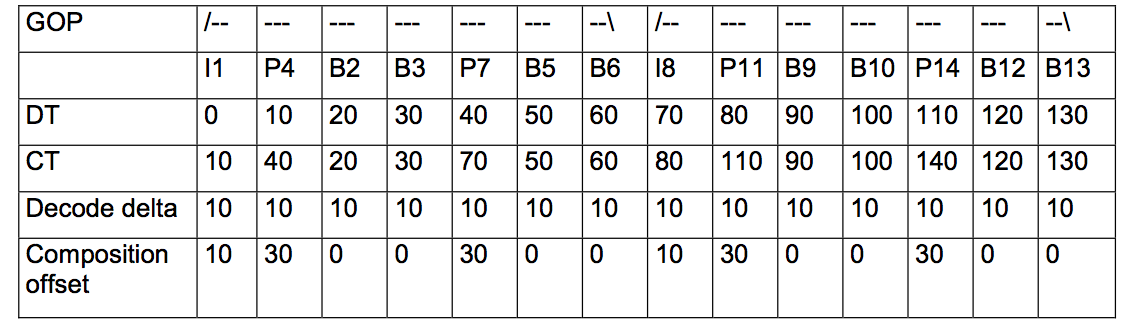
可以看到,上面的 Decode delta 值都是 10。这就对应着 sample_delta 的值。而 sample_count 就对应出现几次的 sample_delta。比如,上面 10 的 delta 出现了 14 次,那么 sample_count 就是 14。
如果对应于 RTMP 中的 Video Msg,那么 sample_delta 就是当前 RTMP Header 中,后面一个的 timeStamp delta。
stco
stco 是 stbl 包里面一个非常关键的 Box。它用来定义每一个 sample 在 mdat 具体的位置。基本格式为:
aligned(8) class ChunkOffsetBox

extends FullBox(‘stco’, version = 0, 0) {

unsigned int(32) entry_count;

for (i=1; i u entry_count; i++) {

      unsigned int(32)  chunk_offset;

   }

}
具体可以参考:
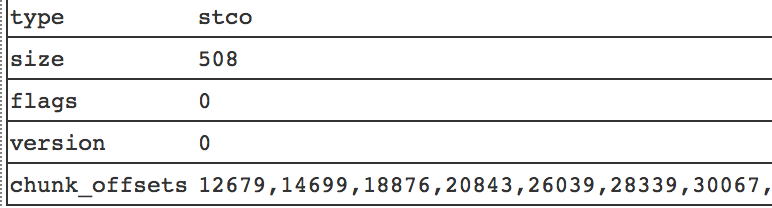
stco 有两种形式,如果你的视频过大的话,就有可能造成 chunkoffset 超过 32bit 的限制。所以,这里针对大 Video 额外创建了一个 co64 的 Box。它的功效等价于 stco,也是用来表示 sample 在 mdat box 中的位置。只是,里面 chunk_offset 是 64bit 的。
aligned(8) class ChunkLargeOffsetBox extends FullBox(‘co64’, version = 0, 0) {

unsigned int(32) entry_count;

for (i=1; i u entry_count; i++) {

      unsigned int(64)  chunk_offset;

   }

}
stsc
stsc 这个 Box 有点绕,并不是它的字段多,而是它的字段意思有点奇怪。其基本格式为:
aligned(8) class SampleToChunkBox

extends FullBox(‘stsc’, version = 0, 0) {

    unsigned int(32) entry_count;

    for (i=1; i u entry_count; i++) {

    unsigned int(32) first_chunk;

    unsigned int(32) samples_per_chunk;

    unsigned int(32) sample_description_index;

    }

}
关键点在于他们里面的三个字段: first_chunk,samples_per_chunk,sample_description_index。
- first_chunk: 每一个 entry 开始的 chunk 位置。
- samples_per_chunk: 每一个 chunk 里面包含多少的 sample
- sample_description_index: 每一个 sample 的描述。一般可以默认设置为 1。
这 3 个字段实际上决定了一个 MP4 中有多少个 chunks,每个 chunks 有多少个 samples。这里顺便普及一下 chunk 和 sample 的相关概念。在 MP4 文件中,最小的基本单位是 Chunk 而不是 Sample。
- sample: 包含最小单元数据的 slice。里面有实际的 NAL 数据。
- chunk: 里面包含的是一个一个的 sample。为了是优化数据的读取,让 I/O 更有效率。
看了上面字段就懂得,感觉你要么是大牛,要么就是在装逼。官方文档和上面一样的描述,但是,看了一遍后,懵逼,再看一遍后,懵逼。所以,这里为了大家更好的理解,这里额外再补充一下。
前面说了,在 MP4 中最小的单位是 chunks,那么通过 stco 中定义的 chunk_offsets 字段,它描述的就是 chunks 在 mdat 中的位置。每一个 stco chunk_offset 就对应于 某一个 index 的 chunks。那么,first_chunk 就是用来定义该 chunk entry 开始的位置。
那这样的话,stsc 需要对每一个 chunk 进行定义吗?
不需要,因为 stsc 是定义一整个 entry,即,如果他们的 samples_per_chunk,sample_description_index 不变的话,那么后续的 chunks 都是用一样的模式。
即,如果你的 stsc 只有:
- first_chunk: 1
- samples_per_chunk: 4
- sample_description_index: 1
也就是说,从第一个 chunk 开始,每通过切分 4 个 sample 划分为一个 chunk,并且每个 sample 的表述信息都是 1。它会按照这样划分方法一直持续到最后。当然,如果你的 sample 最后不能被 4 整除,最后的几段 sample 就会当做特例进行处理。
通常情况下,stsc 的值是不一样的:
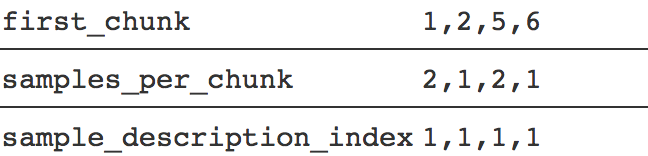
按照上面的情况就是,第 1 个 chunk 包含 2 个 samples。第 2-4 个 chunk 包含 1 个 sample,第 5 个 chunk 包含两个 chunk,第 6 个到最后一个 chunk 包含一个 sample。
ctts
ctts 主要针对 Video 中的 B 帧来确定的。也就是说,如果你视频里面没有 B 帧,那么,ctts 的结构就很简单了。它主要的作用,是用来记录每一个 sample 里面的 cts。格式为:
aligned(8) class CompositionOffsetBox extends FullBox(‘ctts’, version = 0, 0) {

    unsigned int(32) entry_count;

      int i;

   for (i=0; i < entry_count; i++) {

      unsigned int(32)  sample_count;

      unsigned int(32)  sample_offset;

   }

}
还是看实例吧,假如你视频中帧的排列如下:
其中,sample_offset 就是 Composition offset。通过合并一致的 Composition offset,可以得到对应的 sample_count。最终 ctts 的结果为:
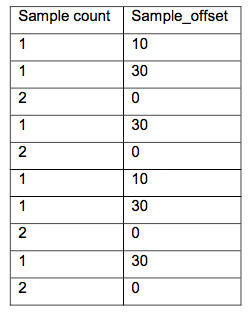
看实例抓包的结果为:
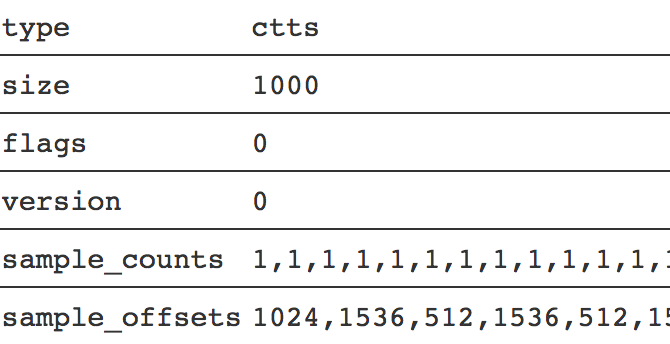
如果,你是针对 RTMP 的 video,由于,其没有 B 帧,那么 ctts 的整个结果,就只有一个 sample_count 和 sample_offset。比如:
sample_count: 100

sample_offset: 0
通常只有 video track 才需要 ctts。
stsz
stsz 是用来存放每一个 sample 的 size 信息的。基本格式为:
aligned(8) class SampleSizeBox extends FullBox(‘stsz’, version = 0, 0) {

unsigned int(32) sample_size;

unsigned int(32) sample_count;

if (sample_size==0) {

    for (i=1; i <= sample_count; i++) {

          unsigned int(32)  entry_size;

    }

    }

}
这个没啥说的,就是所有 sample 的 size 大小,以及相应的描述信息。
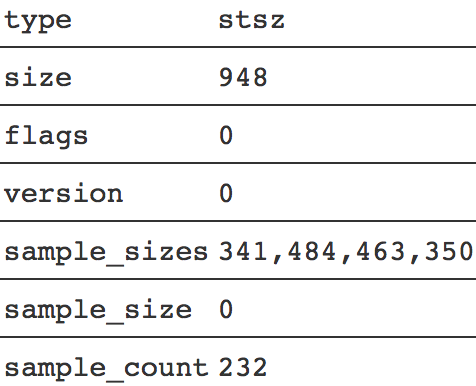
fragmented MP4
前面部分是标准 box 的所有内容。当然,fMP4 里面大部分内容和 MP4 标准格式有很多重复的地方,剩下的就不过多赘述,只把不同的单独挑出来讲解。
mvex
mvex 是 fMP4 的标准盒子。它的作用是告诉解码器这是一个 fMP4 的文件,具体的 samples 信息内容不再放到 trak 里面,而是在每一个 moof 中。基本格式为:
aligned(8) class MovieExtendsBox extends Box(‘mvex’){ }
trex
trex 是 mvex 的子一级 box 用来给 fMP4 的 sample 设置默认值。基本内容为:
aligned(8) class TrackExtendsBox extends FullBox(‘trex’, 0, 0){

    unsigned int(32) track_ID;

    unsigned int(32) default_sample_description_index;

    unsigned int(32) default_sample_duration;

    unsigned int(32) default_sample_size;

    unsigned int(32) default_sample_flags

}
具体设哪一个值,这得看你业务里面具体的要求才行。 如果实在不知道,那就可以直接设置为 0:
new Uint8Array([

		0x00, 0x00, 0x00, 0x00, // version(0) + flags

		(trackId >>> 24) & 0xFF, // track_ID

		(trackId >>> 16) & 0xFF,

		(trackId >>> 8) & 0xFF,

		(trackId) & 0xFF,

		0x00, 0x00, 0x00, 0x01, // default_sample_description_index

		0x00, 0x00, 0x00, 0x00, // default_sample_duration

		0x00, 0x00, 0x00, 0x00, // default_sample_size

		0x00, 0x01, 0x00, 0x01 // default_sample_flags

	])
moof
moof 主要是用来存放 FMP4 的相关内容。它本身没啥太多的内容:
aligned(8) class TrackFragmentBox extends Box(‘traf’){

}
tfhd
tfhd 主要是对指定的 trak 进行相关的默认设置。例如:sample 的时长,大小,偏移量等。不过,这些都可以忽略不设,只要你在其它 box 里面设置完整即可:
aligned(8) class TrackFragmentHeaderBox extends FullBox(‘tfhd’, 0, tf_flags){

	unsigned int(32) track_ID;

// all the following are optional fields

 unsigned int(64) base_data_offset;

 unsigned int(32) sample_description_index;

 unsigned int(32) default_sample_duration;

 unsigned int(32) default_sample_size;

 unsigned int(32) default_sample_flags

}
base_data_offset 是用来计算后面数据偏移量用到的。如果存在则会用上,否则直接是相关开头的偏移。
tfdt
tfdt 主要是用来存放相关 sample 编码的绝对时间的。因为 FMP4 是流式的格式,所以,不像 MP4 一样可以直接根据 sample 直接 seek 到具体位置。这里就需要一个标准时间参考,来快速定位都某个具体的 fragment。
它的基本格式为:
aligned(8) class TrackFragmentBaseMediaDecodeTimeBox extends FullBox(‘tfdt’, version, 0) {

if (version==1) {

	unsigned int(64) baseMediaDecodeTime;

} else { // version==0

	unsigned int(32) baseMediaDecodeTime;

	}

}
baseMediaDecodeTime 基本值是前面所有指定 trak_id 中 samples 持续时长的总和,相当于就是当前 traf 里面第一个 sample 的 dts 值。
trun
trun 存储该 moof 里面相关的 sample 内容。例如,每个 sample 的 size,duration,offset 等。基本内容为:
aligned(8) class TrackRunBox

    extends FullBox(‘trun’, version, tr_flags) {

unsigned int(32) sample_count;

// the following are optional fields

signed int(32) data_offset;

unsigned int(32) first_sample_flags;

// all fields in the following array are optional {

      unsigned int(32)  sample_duration;

      unsigned int(32)  sample_size;

      unsigned int(32)  sample_flags

      if (version == 0)

         { unsigned int(32) sample_composition_time_offset

      else

         { signed int(32) sample_composition_time_offset

   }[ sample_count ]

}
可以说,trun 上面的字段是 traf 里面最重要的标识字段:
tr_flags 是用来表示下列 sample 相关的标识符是否应用到每个字段中:
- 0x000001: data-offset-present,只应用 data-offset
- 0x000004: 只对第一个 sample 应用对应的 flags。剩余 sample flags 就不管了。
- 0x000100: 这个比较重要,表示每个 sample 都有自己的 duration,否则使用默认的
- 0x000200: 每个 sample 有自己的 sample_size,否则使用默认的。
- 0x000400: 对每个 sample 使用自己的 flags。否则,使用默认的。
- 0x000800: 每个 sample 都有自己的 cts 值
后面字段,我们这简单介绍一下。
- data_offset: 用来表示和该 moof 配套的 mdat 中实际数据内容距 moof 开头有多少 byte。相当于就是 moof.byteLength + mdat.headerSize。
- sample_count: 一共有多少个 sample
- first_sample_flags: 主要针对第一个 sample。一般来说,都可以默认设为 0。
后面的几个字段,我就不赘述了,对了,里面的 sample_flags 是一个非常重要的东西,常常用它来表示,到底哪一个 sampel 是对应的 keyFrame。基本计算方法为:
(flags.isLeading << 2) | flags.dependsOn, // sample_flags

(flags.isDepended << 6) | (flags.hasRedundancy << 4) | flags.isNonSync
sdtp
sdtp 主要是用来描述具体某个 sample 是否是 I 帧,是否是 leading frame 等相关属性值,主要用来作为当进行点播回放时的同步参考信息。其内容一共有 4 个:
- is_leading:是否是开头部分。
- 0: 当前 sample 的 leading 属性未知(经常用到)
- 1: 当前 sample 是 leading sample,并且不能被 decoded
- 2: 当前 sample 并不是 leading sample。
- 3: 当前 sample 是 leading sample,并且能被 decoded
- sample_depends_on:是否是 I 帧。
- 0: 该 sample 不知道是否依赖其他帧
- 1: 该 sample 是 B/P 帧
- 2: 该 sample 是 I 帧。
- 3: 保留字
- sample_is_depended_on: 该帧是否被依赖
- 0: 不知道是否被依赖,特指(B/P)
- 1: 被依赖,特指 I 帧
- 3: 保留字
- sample_has_redundancy: 是否有冗余编码
- 0: 不知道是否有冗余
- 1: 有冗余编码
- 2: 没有冗余编码
- 3: 保留字
整个基本格式为:
aligned(8) class SampleDependencyTypeBox extends FullBox(‘sdtp’, version = 0, 0) {

  for (i=0; i < sample_count; i++){

    unsigned int(2) is_leading;

    unsigned int(2) sample_depends_on;

    unsigned int(2) sample_is_depended_on;

    unsigned int(2) sample_has_redundancy;

  }

}
sdtp 对于 video 来说很重要,因为,其内容字段主要就是给 video 相关的帧设计的。而 audio,一般直接采用默认值:
isLeading: 0,

dependsOn: 1,

isDepended: 0,

hasRedundancy: 0
到这里,整个 MP4 和 fMP4 的内容就已经介绍完了。更详细的内容可以参考 MP4 & FMP4 doc。
当然,这里只是非常皮毛的一部分,仅仅知道 box 的内容,并不足够来做一些音视频处理。更多的是关于音视频的基础知识,比如,dts/pts、音视频同步、视频盒子的封装等等。
整理mp4协议重点,将协议读薄的更多相关文章
- (转) HTTP & HTTPS网络协议重点总结(基于SSL/TLS的握手、TCP/IP协议基础、加密学)
HTTP & HTTPS网络协议重点总结(基于SSL/TLS的握手.TCP/IP协议基础.加密学) 原文:http://blog.csdn.net/itermeng/article/detai ...
- RTSP协议、RTMP协议、HTTP协议的区别
理论上RTSP RTMPHTTP都可以做直播和点播,但一般做直播用RTSP RTMP,做点播用HTTP.做视频会议的时候原来用SIP协议,现在基本上被RTMP协议取代了. RTSP. RTMP.HTT ...
- 网络协议 12 - HTTP 协议:常用而不简单
系列文章传送门: 网络协议 1 - 概述 网络协议 2 - IP 是怎么来,又是怎么没的? 网络协议 3 - 从物理层到 MAC 层 网络协议 4 - 交换机与 VLAN:办公室太复杂,我要回学校 网 ...
- FFmpeg实现监控摄像头的RTSP协议转RTMP协议直播
文章来源:http://www.cuplayer.com/player/PlayerCode/RTSP/2014/0706/1419.html FFmpeg实现监控摄像头的RTSP协议转RTMP协议直 ...
- TCP/IP协议与OSI协议
OSI协议是一个理想化的协议,它把网络传输过程分为七层模型,以达到形象化的理解的效果,在实际应用中没有被使用.TCP/IP协议可以看作是它的简化版,是目前应用最广泛的网络协议,许多协议都是以它为基础而 ...
- BitTorrent协议与MagNet协议原理【转】
转自:https://blog.csdn.net/u012785382/article/details/70674875 版权声明:本文为博主原创文章,未经博主允许不得转载. https://blog ...
- 网络协议 12 - HTTP 协议
日常开发中,我们经常会碰到查询网络是否畅通以及域名对应 IP 地址等小需求,这时候用的最多的应该就是 ping 命令了. 那你知道 ping 命令是怎么工作的吗?今天,我们就来一起认识下 ping 命 ...
- Http协议与TCP协议
背景 在日常工作中,经常会遇到某某框架是基于Http协议或者TCP协议,今天,就针对于该协议,整理下 从本质上来说,Http协议与TCP协议是应用在不同网络层,Http协议处于应用层,TCP处于传输层 ...
- 透视RPC协议:SOFA-BOLT协议源码分析
前提 最近在看Netty相关的资料,刚好SOFA-BOLT是一个比较成熟的Netty自定义协议栈实现,于是决定研读SOFA-BOLT的源码,详细分析其协议的组成,简单分析其客户端和服务端的源码实现. ...
- 哈工大 计算机网络 实验二 可靠数据传输协议(停等协议与GBN协议)
计算机网络实验代码与文件可见github:计算机网络实验整理 实验名称 可靠数据传输协议(停等协议与GBN协议) 实验目的: 本次实验的主要目的. 理解可靠数据传输的基本原理:掌握停等协议的工作原理: ...
随机推荐
- 启用多处理器编译--加快VS2013编译
依次打开项目“属性“==>”配置属性“==>”C/C++(或其它语言)“==>”常规“,最后一项,多处理器编译选择是. 官方解释如下: /MP 选项在命令行上以减少总时间编译源文件. ...
- SpringBoot拦截器中service或者redis注入为空的问题
原文:https://my.oschina.net/u/1790105/blog/1490098 这两天遇到SpringBoot拦截器中Bean无法注入问题.下面介绍我的思考过程和解决过程: 1.由于 ...
- github清理,记录一些有趣的项目
1. rhino 一种java做的开源javascript引擎 https://github.com/mozilla/rhino 2. jeewx 国人写的公众号管理后台,集成度有些高,不好剥离.还是 ...
- Echart学习
制表,展示好帮手,自己看官方文档吧,有示例和入门指导 参考:1.http://echarts.baidu.com/tutorial.html#5%20%E5%88%86%E9%92%9F%E4%B8% ...
- javascript的rsa加密和python的rsa解密
先说下目前测试情况:javascript加密后的数据,python无法完成解密,我估计是两者的加密解密方法不同 1.看了这篇文章:http://blog.nsfocus.net/python-js-e ...
- Windows下搭建基于SSH的Git服务器
Git客户端安装 客户端要同时安装在远程服务器和自己的电脑上,下载地址:http://msysgit.github.io/ 选择安装组件 :也可以默认选择; 图标组件(Addition icons) ...
- 外网无法连接Kafka集群(报错:NoBrokersAvailable)
本地Consumer和Producer无法使用远程Kafka服务器的解决方法: 分别修改各台服务器Kafka配置文件server.properties, 在#listeners=PLAINTEXT:/ ...
- javascript 的事件绑定和取消事件
研究fabricjs中发现,它提供canvas.on('mousemove', hh) 来绑定事件, 提供 canvas.off()来取消绑定事件这样的接口,很是方便, 那我们就不妨探究一下内在的实现 ...
- represent states with objects
1. The behavior of objects in the real world is more complex than simply being in one state at a tim ...
- C#文本之XML
格式化XML public static string FormatXML(string XMLstring) { //校验是否是XML报文 if (!XMLstring.Contains(" ...