
ANDROID_MARS学习笔记_S02_008_ANIMATION第二种使用方式:xml
一、简介
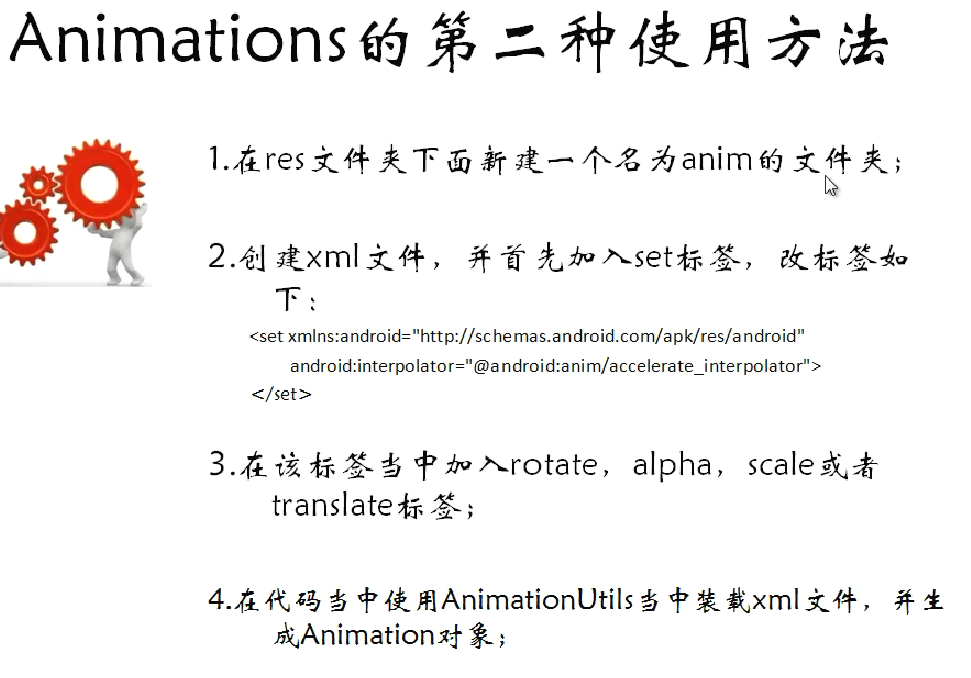
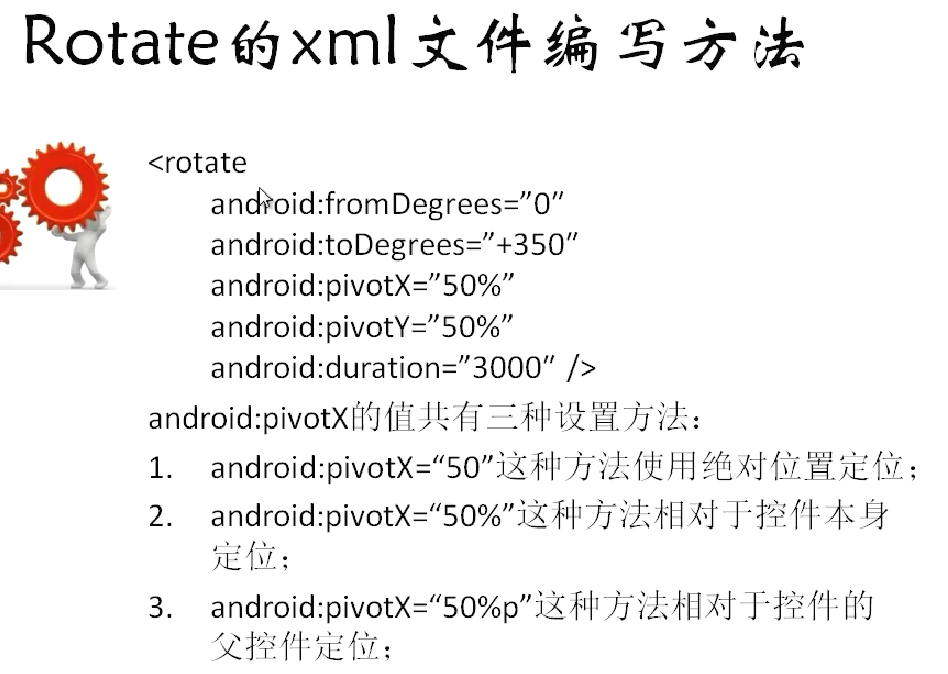
二、代码
1.res\anim下的xml
(1)alpha.xml.xml
 <?xml version="1.0" encoding="utf-8"?>

 <set xmlns:android="http://schemas.android.com/apk/res/android"

     android:interpolator="@android:anim/accelerate_interpolator">

     <alpha

         android:fromAlpha="1.0"

         android:toAlpha="0.0"

         android:startOffset="500"

         android:duration="1000"/>

 </set>
(2)rotate.xml
 <?xml version="1.0" encoding="utf-8"?>

 <set xmlns:android="http://schemas.android.com/apk/res/android"

     android:interpolator="@android:anim/accelerate_interpolator">

     <rotate

         android:fromDegrees="0"

         android:toDegrees="720"

         android:pivotX="50%"

         android:pivotY="100%"

         android:duration="3000"/>

 </set>
(3)scale.xml
 <?xml version="1.0" encoding="utf-8"?>

 <set xmlns:android="http://schemas.android.com/apk/res/android"

     android:interpolator="@android:anim/accelerate_interpolator">

     <scale

         android:fromXScale="1.0"

         android:toXScale="0.0"

         android:fromYScale="1.0"

         android:toYScale="0.0"

         android:pivotX="50%"

         android:pivotY="50%"

         android:duration="2000"/>

 </set>
(4)tranlate.xml
 <?xml version="1.0" encoding="utf-8"?>

 <set xmlns:android="http://schemas.android.com/apk/res/android"

     android:interpolator="@android:anim/accelerate_interpolator">

     <translate

         android:fromXDelta="50%"

         android:toXDelta="100%"

         android:fromYDelta="0%"

         android:toYDelta="100%"

         android:duration="2000"/>

 </set>
2.java
(1)MainActivity.java
 package com.animation2;

 import android.app.Activity;

 import android.os.Bundle;

 import android.view.View;

 import android.view.View.OnClickListener;

 import android.view.animation.Animation;

 import android.view.animation.AnimationUtils;

 import android.widget.Button;

 import android.widget.ImageView;

 public class MainActivity extends Activity {

     private ImageView imageView = null;

     private Button rotateButton = null;

     private Button scaleButton = null;

     private Button alphaButton = null;

     private Button translateButton = null;

     @Override

     protected void onCreate(Bundle savedInstanceState) {

         super.onCreate(savedInstanceState);

         setContentView(R.layout.activity_main);

         imageView = (ImageView) findViewById(R.id.imageViewId);

         rotateButton = (Button) findViewById(R.id.rotateButtonId);

         rotateButton.setOnClickListener(new RotateButtonListener());

         scaleButton = (Button) findViewById(R.id.scaleButtonId);

         scaleButton.setOnClickListener(new ScaleButtonListener());

         alphaButton = (Button) findViewById(R.id.alphaButtonId);

         alphaButton.setOnClickListener(new AlphaButtonListener());

         translateButton = (Button) findViewById(R.id.translateButtonId);

         translateButton.setOnClickListener(new TranslateButtonListener());

     }

     class TranslateButtonListener implements OnClickListener {

         @Override

         public void onClick(View v) {

             Animation animation = AnimationUtils.loadAnimation(MainActivity.this, R.anim.tranlate);

             imageView.startAnimation(animation);

         }

     }

     class AlphaButtonListener implements OnClickListener {

         @Override

         public void onClick(View v) {

             Animation animation = AnimationUtils.loadAnimation(MainActivity.this, R.anim.alpha);

             imageView.startAnimation(animation);

         }

     }

     class ScaleButtonListener implements OnClickListener {

         @Override

         public void onClick(View v) {

             Animation animation = AnimationUtils.loadAnimation(MainActivity.this, R.anim.scale);

             imageView.startAnimation(animation);

         }

     }

     class RotateButtonListener implements OnClickListener {

         @Override

         public void onClick(View v) {

             Animation animation = AnimationUtils.loadAnimation(MainActivity.this, R.anim.rotate);

             imageView.startAnimation(animation);

         }

     }

 }
ANDROID_MARS学习笔记_S02_008_ANIMATION第二种使用方式:xml的更多相关文章
- ANDROID_MARS学习笔记_S02_007_Animation第一种使用方式:代码
一.简介 二.代码1.xml(1)activity_main.xml <?xml version="1.0" encoding="utf-8"?> ...
- JavaScript新手学习笔记3——三种排序方式(冒泡排序、插入排序、快速排序)
每种编程语言学到数组的时候,都会讲到排序算法,当时学C语言的时候,卡在排序算法.今天来总结一下javascript中如何实现三种排序算法. 1.冒泡排序(默认升序排列哦) 原理: 冒泡排序的原理,顾名 ...
- Stealth视频教程学习笔记(第二章)
Stealth视频教程学习笔记(第二章) 本文是对Unity官方视频教程Stealth的学习笔记.在此之前,本人整理了Stealth视频的英文字幕,并放到了优酷上.本文将分别对各个视频进行学习总结,提 ...
- .NET Remoting学习笔记(二)激活方式
目录 .NET Remoting学习笔记(一)概念 .NET Remoting学习笔记(二)激活方式 .NET Remoting学习笔记(三)信道 参考:百度百科 ♂风车车.Net 激活方式概念 在 ...
- 【转载】.NET Remoting学习笔记(二)激活方式
目录 .NET Remoting学习笔记(一)概念 .NET Remoting学习笔记(二)激活方式 .NET Remoting学习笔记(三)信道 参考:百度百科 ♂风车车.Net 激活方式概念 在访 ...
- 红帽学习笔记[RHCSA] 第二周
目录 红帽学习笔记[RHCSA]第二周 环境 第七课[网络配置相关] 在Vmware中添加网卡 将网卡添加到虚拟机上 关于网卡命名规则 配置网络 网络配置命令总结 更改hostname 关于SSH的一 ...
- Introduction to 3D Game Programming with DirectX 12 学习笔记之 --- 第二十章:阴影贴图
原文:Introduction to 3D Game Programming with DirectX 12 学习笔记之 --- 第二十章:阴影贴图 本章介绍一种在游戏和应用中,模拟动态阴影的基本阴影 ...
- Introduction to 3D Game Programming with DirectX 12 学习笔记之 --- 第二十二章:四元数(QUATERNIONS)
原文:Introduction to 3D Game Programming with DirectX 12 学习笔记之 --- 第二十二章:四元数(QUATERNIONS) 学习目标 回顾复数,以及 ...
- Introduction to 3D Game Programming with DirectX 12 学习笔记之 --- 第二十一章:环境光遮蔽(AMBIENT OCCLUSION)
原文:Introduction to 3D Game Programming with DirectX 12 学习笔记之 --- 第二十一章:环境光遮蔽(AMBIENT OCCLUSION) 学习目标 ...
随机推荐
- 重叠I/O之使用完成例程的扩展I/O【系列二】
一 废话 在上一篇文章中,我们介绍了通过等待内核对象来接受I/O完成通知的重叠I/O.除了使用同步对象外,我们还可以使用其它方法,这便是这篇文章要介绍的使用完成例程的扩展I/O.完成例程其实就是回调函 ...
- iOS Core Animation学习总结(3)--动画的基本类型
一. CABasicAnimation (基础动画) 移位: CABasicAnimation *animation = [CABasicAnimation animation]; //keyPath ...
- Easyui-Combobox多选下拉框
因为工作需要,引入combobox多选下拉框,并且获取选择的值并以","分开. 效果如下: 代码如下: <html> <head> <title> ...
- [getLongestLength] 加和为0的最长子串长度
点击这里查看原文 假设一个数组仅仅由1和-1组成,求该数组的和为0的最长子串的长度. 例如: {1,-1,1,-1,1,1,1} 输出:4. 昨天机试的时候做到这道题,不会做,今天思考一下. 普通的解 ...
- undrop for innodb c_parser 源码分析
一,主函数功能: 1,分析命令行参数,保存在全局变量中; 2,打开文件,加载表定义sql,调用分析函数开始处理; 3,打印导入数据的sql语句; 二,文件处理函数,void process_ibfil ...
- 在Windows下用MingW 4.5.2编译FFmpeg
1.下载FFmpeg(http://ffmpeg.org/download.html),解压. 2.进入MingW Shell,cd F:/Qt/ffmpeg(假定解压到F:/Qt/ffmpeg) 3 ...
- Linux启动级别
一共有7种启动级别,分别为: # 0 - halt (Do NOT set initdefault to this) # 1 - Single user mode # 2 - Mult ...
- checked
<!doctype html><html lang="en"> <head> <meta charset="UTF-8" ...
- jquery 在页面中按回车 响应 事件
为了用户方便我们往往会在用户回车之后做一些事,比如登陆的时候,填完表单过后,我们习惯性的会直接按回车,当然要处理这个,jquery是很简单的,我们来看看怎么做吧. $(document).ready( ...
- javascript学习笔记3
一 判断下列数值中哪些于false相等? 0, 0.0, 0.000, -0, -0.0, 000, "0", "0.0", "0.000" ...