
【译】第14节---数据注解-MaxLength/MinLength
MaxLength
MaxLength属性可以应用于域类的字符串或数组类型属性。 EF Code First将设置MaxLength属性中指定的列的大小。 请注意,它也可以与ASP.Net MVC一起用作验证属性。
请看以下示例:
using System.ComponentModel.DataAnnotations;

public class Student

{

    public Student()

    {

    }

    public int StudentID { get; set; }

    [MaxLength()]

    public string StudentName { get; set; }

}
如上面的代码所示,我们已经将MaxLength特性应用于StudentName属性。 所以,Code-First将在Student表中创建一个nvarchar(50)列Student Name,如下所示:
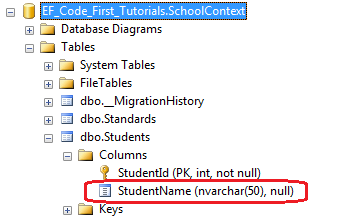
如果将值设置为大于指定大小,则EF还会验证MaxLength属性的属性值。
例如,如果您设置了超过50个字符长StudentName,则EF将抛出EntityValidationError。
MinLength
MinLength属性是一个验证属性。 它对数据库模式没有影响。 如果在MinLength属性中设置小于指定长度的字符串或数组属性的值,则EF将抛出EntityValidationError。
MinLength属性也可以与MaxLength属性一起使用,如下所示:
using System.ComponentModel.DataAnnotations;

public class Student

{

    public Student()

    {

    }

    public int StudentID { get; set; }

    [MaxLength(),MinLength()]

    public string StudentName { get; set; }

}
在上面的例子中,StudentName不能少于2个字符,不能超过50个字符。
【译】第14节---数据注解-MaxLength/MinLength的更多相关文章
- 【译】第15节---数据注解-StringLength
原文:http://www.entityframeworktutorial.net/code-first/stringlength-dataannotations-attribute-in-code- ...
- 【译】第20节---数据注解-InverseProperty
原文:http://www.entityframeworktutorial.net/code-first/inverseproperty-dataannotations-attribute-in-co ...
- 【译】第19节---数据注解-NotMapped
原文:http://www.entityframeworktutorial.net/code-first/notmapped-dataannotations-attribute-in-code-fir ...
- 【译】第18节---数据注解-ForeignKey
原文:http://www.entityframeworktutorial.net/code-first/foreignkey-dataannotations-attribute-in-code-fi ...
- 【译】第17节---数据注解-Column
原文:http://www.entityframeworktutorial.net/code-first/column-dataannotations-attribute-in-code-first. ...
- 【译】第16节---数据注解-Table
原文:http://www.entityframeworktutorial.net/code-first/table-dataannotations-attribute-in-code-first.a ...
- 【译】第13节---数据注解-Required
原文:http://www.entityframeworktutorial.net/code-first/required-attribute-dataannotations-in-code-firs ...
- 【译】第12节---数据注解-ConcurrencyCheck
原文:http://www.entityframeworktutorial.net/code-first/concurrencycheck-dataannotations-attribute-in-c ...
- 【译】第11节---数据注解-TimeStamp
原文:http://www.entityframeworktutorial.net/code-first/TimeStamp-dataannotations-attribute-in-code-fir ...
随机推荐
- python XML文件解析:用xml.dom.minidom来解析xml文件
python解析XML常见的有三种方法: 一是xml.dom.*模块,是W3C DOM API的实现,若需要处理DOM API则该模块很合适, 二是xml.sax.*模块,它是SAX API的实现,这 ...
- locust 的使用
Contents Locust这一款开源性能测试工具.然而,当前在网络上针对Locust的教程极少,不管是中文还是英文,基本都是介绍安装方法和简单的测试案例演示,但对于较复杂测试场景的案例演示却基本没 ...
- Hive中实现group concat功能(不用udf)
在 Hive 中实现将一个字段的多条记录拼接成一个记录: hive> desc t; OK id string str string Time taken: 0.249 seconds hive ...
- 【函数封装】javascript判断是否是微信浏览器
//判断是否是微信浏览器的函数 function isWeiXin(){ //window.navigator.userAgent属性包含了浏览器类型.版本.操作系统类型.浏览器引擎类型等信息,这个属 ...
- Linux基础命令---uniq
uniq 将文件中重复出现的行删除,结果送到标准输出或者指定文件.在使用uniq指令之前,必须使用sort对内容进行排序,否则没有效果.如果没有选项,则将匹配的行合并到第一个匹配项. 此命令的适用范围 ...
- <转>jmeter(十六)配置元件之计数器
本博客转载自:http://www.cnblogs.com/imyalost/category/846346.html 个人感觉不错,对jmeter讲解非常详细,担心以后找不到了,所以转发出来,留着慢 ...
- SQL表分区之二
前面说的给表做表分区,现在有个问题,比如上面我们说的是按照20w为一个分割线,那些现在我们想把这个调整下怎么办?难道要把之前的分区函数和分区方案删了,重新新建分区函数和分区方案嘛? 当然,此方式肯定是 ...
- 通过junit/TestNG+java 实现自动化测试
第一步 安装JDK JDk1.7. 下载地址:http://www.oracle.com/technetwork/java/javase/downloads/jdk7-downloads-188026 ...
- js关于移入移出延迟提示框效果处理
html部分 <div id="div1">我是导航君</div> <div id="div2" style="disp ...
- curl 异步捉取数据类
<?php class RequestLib { /** * GET 请求 * @param string $url */ public static function http_get($ur ...