
Jetson tk1 刷机后要做的几件事
参考简书文章:
http://www.jianshu.com/p/997ede860d74
1. 查看Jetson TK1 L4T版本
head -n 1 /etc/nv_tegra_release
2. 查看系统位数(32/64),当然是32位的了
getconf LONG_BIT
3. 修改密码(ubuntu太长了)
sudo passwd ubuntu(root或对应的用户名)
4. 按照上一篇教程,更新软件源
参考上一篇博客
5. 安装git
sudo apt-get update

sudo apt-get install git
6. 配置postFlash脚本:
git clone https://github.com/jetsonhacks/postFlash.git

cd postFlash

./configureSystem.sh
这个脚本主要帮我们完成了一下一些事:
- Chromium is installed as a browser. Firefox has issues downloading .zip files, so Chromium is a good alternative. Two other applications are also installed, aptitude and git.
- USB 3.0 is enabled. The default is USB 2.0, /boot/extlinux/extlinux.conf must be modified to enable USB 3.0.
- Two scripts are installed in /usr/local/bin. To conserve power, by default the Jetson suspends power to the USB ports when they are not in use. In a desktop environment, this can lead to issues with devices such as cameras and webcams. The first script disables USB autosuspend.
- Also to conserve power, the Jetson manipulates the CPU cores and GPU clock speeds. The second script sets everything up for maximum performance.
7. 安装Grinch Kernel (本人未安装)
这一部分主要参考了以下这篇博客:
Install Grinch Kernel for L4T 21.3 on NVIDIA Jetson TK1
以及以下git中的代码:
https://github.com/jetsonhacks/installGrinch
关于Grinch是什么,为什么Nvidia没有默认安装Grinch:
Many people, especially those coming from desktop platforms, wonder why the Jetson lacks initial support for a wide variety of external peripherals when removed from the box. The reason is that the Jetson is an embedded development kit, which means its main initial intent was to help developers build devices that include the Tegra K1 chip. If you think about it from that perspective, it wouldn’t make much sense to have extra drivers and cruft installed that a device doesn’t use. For example, if you were building a phone, it doesn’t make sense to have drivers for 20 different wireless cards that the phone doesn’t contain.
However, the Jetson is also powerful enough to be a general purpose desktop computer. Desktop computer users have certain expectations, including being able to add devices and drivers, or have support for common devices available. Fortunately the Jetson community, led by user Santyago built a new Linux kernel named Grinch which includes a lot of the features to which most desktop users are accustomed.
安装方式如下:
git clone https://github.com/jetsonhacks/installGrinch.git

cd installGrinch

./installGrinch.sh
8. 安装ROS Indigo
这一部分主要参考了以下几篇文章:
Ubuntu ARM install of ROS Indigo
Robot Operating System (ROS) on NVIDIA Jetson TK1
git clone https://github.com/jetsonhacks/installROS.git

cd installROS
设置Rviz。至于安装脚本为什么没有默认设置RVIZ,我们可以参考官方wiki上的说明:
It is not recommended to run rviz on most ARM-based CPUs. They're generally too slow, and the version of OpenGL that is provided by the software (mesa) libraries it not new enough to start rviz.
'IF' you have a powerful board with a GPU and vendor-supplied OpenGL libraries, it might be possible to run rviz. The IFC6410 and the NVidia Jetson TK1 are two such boards where rviz will run, although neither is fast enough for graphics-heavy tasks such as displaying pointclouds.
Note that rviz will segfault if you have the GTK_IM_MODULE environment variable set, so it's best to unset it in your~/.bashrc:
unset GTK_IM_MODULE
根据官方wiki,设置RVIZ的方式很简单,我们只需在installROS.sh文件中加入如图所示的代码即可:
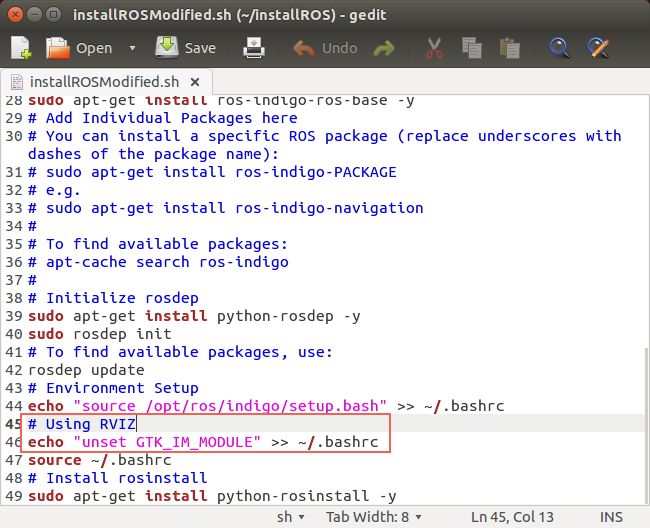 最后,在Terminal 中运行:
./installROS.h
等待一段时间,ROS Indigo就应该安装好了,可以运行 roscore 检查是否安装成功。
9. 安装g++编译器
没有 g++ 编译器,ROS没法跑:
sudo apt-get install g++
10. Hacking for OpenCV(还没做)
这一部分主要参考了以下几篇文章:
ROS, OpenCV and OpenCV4Tegra on the NVIDIA Jetson TK1
http://myzharbot.robot-home.it/blog/software/ros-nvidia-jetson-tx1-jetson-tk1-opencv-ultimate-guide/
需要修改的文件如下:
- /opt/ros/<ros-version>/lib/pkgconfig/cv_bridge.pc
- /opt/ros/<ros-version>/lib/pkgconfig/image_geometry.pc
- /opt/ros/<ros-version>/share/cv_bridge/cmake/cv_bridgeConfig.cmake
- /opt/ros/<ros-version>/share/image_geometry/cmake/image_geometryConfig.cmake
先备份:
sudo cp /opt/ros/indigo/lib/pkgconfig/cv_bridge.pc /opt/ros/indigo/lib/pkgconfig/cv_bridge.pc-bak

sudo cp /opt/ros/indigo/lib/pkgconfig/image_geometry.pc /opt/ros/indigo/lib/pkgconfig/image_geometry.pc-bak

sudo cp /opt/ros/indigo/share/cv_bridge/cmake/cv_bridgeConfig.cmake /opt/ros/indigo/share/cv_bridge/cmake/cv_bridgeConfig.cmake-bak

sudo cp /opt/ros/indigo/share/image_geometry/cmake/image_geometryConfig.cmake /opt/ros/indigo/share/image_geometry/cmake/image_geometryConfig.cmake-bak
对以上每个文件做如下修改:
- remove each instance
/usr/lib/arm-linux-gnueabihf/libopencv_ocl.so.2.4.8; - replace each instance of
/usr/lib/arm-linux-gnueabihf/with/usr/lib; - replace each instance of
2.4.8with2.4.12(or the current version of OpenCV in opencv4tegra package)
sudo gedit /opt/ros/indigo/lib/pkgconfig/cv_bridge.pc &

sudo gedit /opt/ros/indigo/lib/pkgconfig/image_geometry.pc &

sudo gedit /opt/ros/indigo/share/cv_bridge/cmake/cv_bridgeConfig.cmake &

sudo gedit /opt/ros/indigo/share/image_geometry/cmake/image_geometryConfig.cmake &
安装Kinect Driver等后续工作可以参考:
http://www.jianshu.com/p/997ede860d74
Jetson tk1 刷机后要做的几件事的更多相关文章
- 安装 Kali Linux 后需要做的 20 件事
安装 Kali Linux 后需要做的 20 件事 本文含有我觉得有用的每一件事情.本文分为三大部分: 专门针对Kali用户 Kali Linux是来自Debian的一个特殊版本,Kali Linux ...
- 安装 CentOS 7 后必做的七件事
原文 安装 CentOS 7 后必做的七件事 CentOS 是最多人用来运行服务器的 Linux 版本,最新版本是 CentOS 7.当你兴趣勃勃地在一台主机或 VPS 上安装 CentOS 7 后, ...
- 安装Ubuntu 13.04后要做的六件事
2013-05-07 09:23 最新版本的Ubuntu已经新鲜出炉:Ubuntu 13.04,代号为Raring Ringtail.作为幕后开发Ubuntu Linux的公司,Canonica ...
- Ubuntu装完后要做的几件事
Ubuntu装完后要做的几件事 改hosts 无论哪里,改hosts都是第一件事,没hosts咋google.没google咋活.在终端输入命令 sudo gedit /etc/hosts在# The ...
- debian 9 安装后需做的几件事
debian 9 安装后需做的几件事 安装环境:X86 >> Debian 9 Linux/GNU apt源更新 注意连上有线网络 刚安装好的debian系统中,/etc/apt/sour ...
- Jetson tk1 刷机教程
前期准备: 1. Jetson TK1开发板. 2. 安装有ubuntu系统的PC(或者ubuntu虚拟机)切记:不管是PC还是虚拟机,务必确保有大于5G的存储空间,之后安装过程会作详细解释. 3 ...
- Jetson TK1刷机+配置Mini PCI-e无线网卡
最近买了台4K电视,觉得可以当显示器用,但没主机,不知怎的想到了Jetson TK1,于是一冲动买了.因为没网线,而Jetson TK1没有无线网卡,所以也折腾了一番,记录一下,给万一也有像我一样没有 ...
- JETSON TK1 ~ 刷机和克隆固件
1:PC端的ubuntu. 要求必须是正常系统,不可以使用虚拟机.由于烧写过程采用刷机模式,虚拟机刷机易导致刷机问题. 2:驱动包.文件系统和源码下载 1.Driver package(驱动包,相当于 ...
- 安装完CentOS 7 后必做的七件事
CentOS是最多人用来运行服务器的 Linux 版本,最新版本是 CentOS 7.当你兴趣勃勃地在一台主机或 VPS 上安装 CentOS 7 后,首要的工作肯定是加强它的安全性,以下列出的七件事 ...
随机推荐
- IO模型介绍 以及同步异步阻塞非阻塞的区别
阻塞:用户进程访问数据时,如果未完成IO,等待IO操作完成或者进行系统调用来判断IO是否完成非阻塞:用户进程访问数据时,会马上返回一个状态值,无论是否完成 同步:用户进程发起IO(就绪判断)后,轮 ...
- HihoCoder - 1498 Diligent Robots
There are N jobs to be finished. It takes a robot 1 hour to finish one job. At the beginning you hav ...
- Real mode & Protected mode
[转] https://objectkuan.gitbooks.io/ucore-docs/content/lab1/lab1_3_2_1_protection_mode.html 为何要了解Int ...
- 自学Python1.5-Centos内python2识别中文
自学Python之路 自学Python1.5-Centos内python2识别中文 方法一,python推荐使用utf-8编码方案 经验一:在开头声明: # -*- coding: utf-8 -*- ...
- 调用系统命令之subprocess模块
除了常见的os.system和os.popen方法,官方强烈推荐使用subprocess来调用系统命令. 这个库用起来其实很简单,按照惯例先贴一下官文关键点: The subprocess modul ...
- [Cqoi2014]数三角形——组合数
Description: 给定一个nxm的网格,请计算三点都在格点上的三角形共有多少个.下图为4x4的网格上的一个三角形. 注意三角形的三点不能共线. Hint: 1<=m,n<=1000 ...
- A1078. Hashing
The task of this problem is simple: insert a sequence of distinct positive integers into a hash tabl ...
- 跟我一起学习vue2(使用命令行搭建单页应用)[二]
第一步:运行git命令,全局安装 vue-cli $ cnpm install --global vue-cli 第二步: 创建一个基于 webpack 模板的新项目 $ vue init webpa ...
- python3 获取Linux系统信息
系统信息 import platform platform.uname() platform.architecture() CPU信息 /proc/cpuinfo文件包含了系统处理器单元的信息. #! ...
- 使用htpasswd实现Nginx验证访问
Nginx是一个高性能的WEB服务器,越来越多的用户使用,如果您的某个站点不希望对外公开(比如PHPMyAdmin),可以使用htpasswd实现Nginx验证访问. 安装htpasswd htpas ...