
《DSP using MATLAB》Problem 7.34
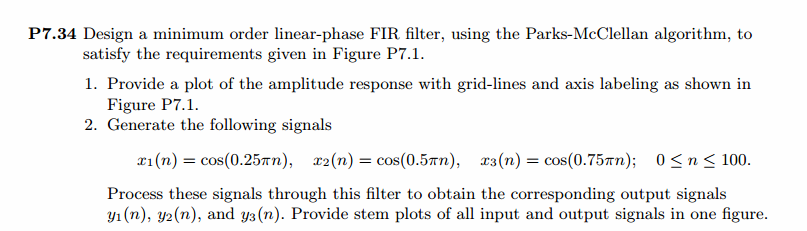
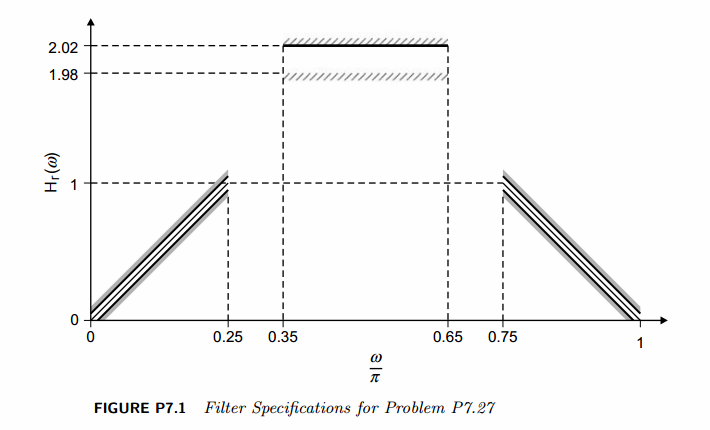
代码:
%% ++++++++++++++++++++++++++++++++++++++++++++++++++++++++++++++++++++++++++++++++

%%            Output Info about this m-file

fprintf('\n***********************************************************\n');

fprintf('        <DSP using MATLAB> Problem 7.34 \n\n');

banner();

%% ++++++++++++++++++++++++++++++++++++++++++++++++++++++++++++++++++++++++++++++++

% bandpass in Fig P7.1

ws1 = 0.25*pi; wp1 = 0.35*pi; wp2 = 0.65*pi; ws2=0.75*pi;

delta1 = 0.05; delta2 = 0.02; delta3 = 0.05;

weights = [1  delta3/delta2  1];

Dw = min((wp1-ws1), (ws2-wp2));

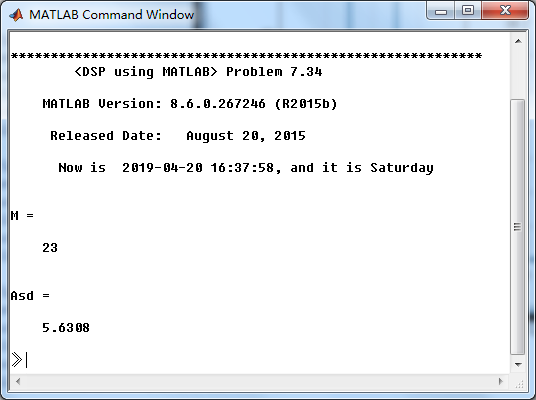
M = ceil((-20*log10((delta1*delta2*delta3)^(1/3)) - 13) / (2.285*Dw) + 1)

deltaH = max([delta1,delta2,delta3]); deltaL = min([delta1,delta2,delta3]);

f = [ 0  ws1 wp1 wp2 ws2  pi]/pi;

m = [ 0  1   2   2   1  0];

h = firpm(M-1, f, m, weights);

[db, mag, pha, grd, w] = freqz_m(h, [1]);

delta_w = 2*pi/1000;

ws1i = floor(ws1/delta_w)+1; wp1i = floor(wp1/delta_w)+1;

wp2i = floor(wp2/delta_w)+1; ws2i = floor(ws2/delta_w)+1;

Asd = -max(db(1:ws1i))

%[Hr, ww, a, L] = Hr_Type1(h);

[Hr,omega,P,L] = ampl_res(h);

l = 0:M-1;

%% -------------------------------------------------

%%                    Plot

%% -------------------------------------------------

figure('NumberTitle', 'off', 'Name', 'Problem 7.34 Parks-McClellan Method')

set(gcf,'Color','white');

subplot(2,2,1); stem(l, h); axis([-1, M, -0.6, 1.3]); grid on;

xlabel('n'); ylabel('h(n)'); title('Actual Impulse Response, M=23');

set(gca,'XTickMode','manual','XTick',[0,M-1])

set(gca,'YTickMode','manual','YTick',[-0.6:0.2:1.4])

subplot(2,2,2); plot(w/pi, db); axis([0, 1, -80, 10]); grid on;

xlabel('frequency in \pi units'); ylabel('Decibels'); title('Magnitude Response in dB ');

set(gca,'XTickMode','manual','XTick',f)

set(gca,'YTickMode','manual','YTick',[-60,-30,0]);

set(gca,'YTickLabelMode','manual','YTickLabel',['60';'30';' 0']);

subplot(2,2,3); plot(omega/pi, Hr); axis([0, 1, -0.2, 2.2]); grid on;

xlabel('frequency in \pi nuits'); ylabel('Hr(w)'); title('Amplitude Response');

set(gca,'XTickMode','manual','XTick',f)

set(gca,'YTickMode','manual','YTick',[0,1,1.98,2.02]);

subplot(2,2,4); axis([0, 1, -deltaH, deltaH]);

sb1w = omega(1:1:ws1i)/pi; sb1e = (Hr(1:1:ws1i)-m(1)); %sb1e = (Hr(1:1:ws1i)-m(1))*weights(1);

pbw = omega(wp1i:wp2i)/pi; pbe = (Hr(wp1i:wp2i)-m(3)); %pbe = (Hr(wp1i:wp2i)-m(3))*weights(2);

sb2w = omega(ws2i:501)/pi; sb2e = (Hr(ws2i:501)-m(5)); %sb2e = (Hr(ws2i:501)-m(5))*weights(3);

plot(sb1w,sb1e,pbw,pbe,sb2w,sb2e); grid on;

xlabel('frequency in \pi units'); ylabel('Hr(w)'); title('Error Response'); %title('Weighted Error');

set(gca,'XTickMode','manual','XTick',f);

%set(gca,'YTickMode','manual','YTick',[-deltaH,0,deltaH]);

figure('NumberTitle', 'off', 'Name', 'Problem 7.34 AmpRes of h(n), Parks-McClellan Method')

set(gcf,'Color','white');

plot(omega/pi, Hr); grid on; %axis([0 1 -100 10]);

xlabel('frequency in \pi units'); ylabel('Hr'); title('Amplitude Response');

set(gca,'YTickMode','manual','YTick',[0, 1, 1.98, 2.02]);

%set(gca,'YTickLabelMode','manual','YTickLabel',['90';'40';' 0']);

set(gca,'XTickMode','manual','XTick',[0,0.25,0.35,0.65,0.75,1]);

%% -------------------------------------------------------

%%       Input is given, and we want the Output

%% -------------------------------------------------------

num = 100;

n_x1 = [0:1:num]; x1 = cos(0.25*pi*n_x1);

n_x2 = n_x1; x2 = cos(0.5*pi*n_x2);

n_x3 = n_x1; x3 = cos(0.75*pi*n_x3);

% Output

y1 = filter(h, 1, x1);

n_y1 = n_x1;

y2 = filter(h, 1, x2);

n_y2 = n_x2;

y3 = filter(h, 1, x3);

n_y3 = n_x3;

figure('NumberTitle', 'off', 'Name', 'Problem 7.34 Input[x1(n)] and Output[y1(n)]');

set(gcf,'Color','white');

subplot(2,1,1); stem(n_x1, x1); axis([-1, 100, -1.2, 1.2]); grid on;

xlabel('n'); ylabel('x1(n)'); title('Input Response, Length=100');

subplot(2,1,2); stem(n_y1, y1); axis([-1, 100, -2, 2]); grid on;

xlabel('n'); ylabel('y1(n)'); title('Output Response');

figure('NumberTitle', 'off', 'Name', 'Problem 7.34 Input[x2(n)] and Output[y2(n)]');

set(gcf,'Color','white');

subplot(2,1,1); stem(n_x2, x2); axis([-1, 100, -1.2, 1.2]); grid on;

xlabel('n'); ylabel('x2(n)'); title('Input Response, Length=100');

subplot(2,1,2); stem(n_y2, y2); axis([-1, 100, -3, 3]); grid on;

xlabel('n'); ylabel('y2(n)'); title('Output Response');

figure('NumberTitle', 'off', 'Name', 'Problem 7.34 Input[x3(n)] and Output[y3(n)]');

set(gcf,'Color','white');

subplot(2,1,1); stem(n_x3, x3); axis([-1, 100, -1.2, 1.2]); grid on;

xlabel('n'); ylabel('x3(n)'); title('Input Response, Length=100');

subplot(2,1,2); stem(n_y3, y3); axis([-1, 100, -2, 2]); grid on;

xlabel('n'); ylabel('y3(n)'); title('Output Response');

% ---------------------------

%    DTFT of x and y

% ---------------------------

MM = 500;

[X1, w1] = dtft1(x1, n_x1, MM);

[Y1, w1] = dtft1(y1, n_y1, MM);

[X2, w1] = dtft1(x2, n_x2, MM);

[Y2, w1] = dtft1(y2, n_y2, MM);

[X3, w1] = dtft1(x3, n_x3, MM);

[Y3, w1] = dtft1(y3, n_y3, MM);

magX1 = abs(X1); angX1 = angle(X1); realX1 = real(X1); imagX1 = imag(X1);

magY1 = abs(Y1); angY1 = angle(Y1); realY1 = real(Y1); imagY1 = imag(Y1);

magX2 = abs(X2); angX2 = angle(X2); realX2 = real(X2); imagX2 = imag(X2);

magY2 = abs(Y2); angY2 = angle(Y2); realY2 = real(Y2); imagY2 = imag(Y2);

magX3 = abs(X3); angX3 = angle(X3); realX3 = real(X3); imagX3 = imag(X3);

magY3 = abs(Y3); angY3 = angle(Y3); realY3 = real(Y3); imagY3 = imag(Y3);

figure('NumberTitle', 'off', 'Name', 'Problem 7.34 DTFT of Input[x1(n)]')

set(gcf,'Color','white');

subplot(2,2,1); plot(w1/pi,magX1); grid on; %axis([0,2,0,15]);

title('Magnitude Part');

xlabel('frequency in \pi units'); ylabel('Magnitude  |X|');

subplot(2,2,3); plot(w1/pi, angX1/pi); grid on; axis([0,2,-1,1]);

title('Angle Part');

xlabel('frequency in \pi units'); ylabel('Radians/\pi');

subplot(2,2,2); plot(w1/pi, realX1); grid on;

title('Real Part');

xlabel('frequency in \pi units'); ylabel('Real');

subplot(2,2,4); plot(w1/pi, imagX1); grid on;

title('Imaginary Part');

xlabel('frequency in \pi units'); ylabel('Imaginary');

figure('NumberTitle', 'off', 'Name', 'Problem 7.34 DTFT of Output[y1(n)]')

set(gcf,'Color','white');

subplot(2,2,1); plot(w1/pi,magY1); grid on; %axis([0,2,0,15]);

title('Magnitude Part');

xlabel('frequency in \pi units'); ylabel('Magnitude  |Y|');

subplot(2,2,3); plot(w1/pi, angY1/pi); grid on; axis([0,2,-1,1]);

title('Angle Part');

xlabel('frequency in \pi units'); ylabel('Radians/\pi');

subplot(2,2,2); plot(w1/pi, realY1); grid on;

title('Real Part');

xlabel('frequency in \pi units'); ylabel('Real');

subplot(2,2,4); plot(w1/pi, imagY1); grid on;

title('Imaginary Part');

xlabel('frequency in \pi units'); ylabel('Imaginary');

figure('NumberTitle', 'off', 'Name', 'Problem 7.34 Magnitude Response')

set(gcf,'Color','white');

subplot(1,2,1); plot(w1/pi,magX1); grid on; %axis([0,2,0,15]);

title('Magnitude Part of Input');

xlabel('frequency in \pi units'); ylabel('Magnitude  |X|');

subplot(1,2,2); plot(w1/pi,magY1); grid on; %axis([0,2,0,15]);

title('Magnitude Part of Output');

xlabel('frequency in \pi units'); ylabel('Magnitude  |Y|');

figure('NumberTitle', 'off', 'Name', 'Problem 7.34 DTFT of Input[x2(n)]')

set(gcf,'Color','white');

subplot(2,2,1); plot(w1/pi,magX2); grid on; %axis([0,2,0,15]);

title('Magnitude Part');

xlabel('frequency in \pi units'); ylabel('Magnitude  |X|');

subplot(2,2,3); plot(w1/pi, angX2/pi); grid on; axis([0,2,-1,1]);

title('Angle Part');

xlabel('frequency in \pi units'); ylabel('Radians/\pi');

subplot(2,2,2); plot(w1/pi, realX2); grid on;

title('Real Part');

xlabel('frequency in \pi units'); ylabel('Real');

subplot(2,2,4); plot(w1/pi, imagX2); grid on;

title('Imaginary Part');

xlabel('frequency in \pi units'); ylabel('Imaginary');

figure('NumberTitle', 'off', 'Name', 'Problem 7.34 DTFT of Output[y2(n)]')

set(gcf,'Color','white');

subplot(2,2,1); plot(w1/pi,magY2); grid on; %axis([0,2,0,15]);

title('Magnitude Part');

xlabel('frequency in \pi units'); ylabel('Magnitude  |Y|');

subplot(2,2,3); plot(w1/pi, angY2/pi); grid on; axis([0,2,-1,1]);

title('Angle Part');

xlabel('frequency in \pi units'); ylabel('Radians/\pi');

subplot(2,2,2); plot(w1/pi, realY2); grid on;

title('Real Part');

xlabel('frequency in \pi units'); ylabel('Real');

subplot(2,2,4); plot(w1/pi, imagY2); grid on;

title('Imaginary Part');

xlabel('frequency in \pi units'); ylabel('Imaginary');

figure('NumberTitle', 'off', 'Name', 'Problem 7.34 Magnitude Response')

set(gcf,'Color','white');

subplot(1,2,1); plot(w1/pi,magX2); grid on; %axis([0,2,0,15]);

title('Magnitude Part of Input');

xlabel('frequency in \pi units'); ylabel('Magnitude  |X|');

subplot(1,2,2); plot(w1/pi,magY2); grid on; %axis([0,2,0,15]);

title('Magnitude Part of Output');

xlabel('frequency in \pi units'); ylabel('Magnitude  |Y|');

figure('NumberTitle', 'off', 'Name', 'Problem 7.34 DTFT of Input[x3(n)]')

set(gcf,'Color','white');

subplot(2,2,1); plot(w1/pi,magX3); grid on; %axis([0,2,0,15]);

title('Magnitude Part');

xlabel('frequency in \pi units'); ylabel('Magnitude  |X|');

subplot(2,2,3); plot(w1/pi, angX3/pi); grid on; axis([0,2,-1,1]);

title('Angle Part');

xlabel('frequency in \pi units'); ylabel('Radians/\pi');

subplot(2,2,2); plot(w1/pi, realX3); grid on;

title('Real Part');

xlabel('frequency in \pi units'); ylabel('Real');

subplot(2,2,4); plot(w1/pi, imagX3); grid on;

title('Imaginary Part');

xlabel('frequency in \pi units'); ylabel('Imaginary');

figure('NumberTitle', 'off', 'Name', 'Problem 7.34 DTFT of Output[y3(n)]')

set(gcf,'Color','white');

subplot(2,2,1); plot(w1/pi,magY3); grid on; %axis([0,2,0,15]);

title('Magnitude Part');

xlabel('frequency in \pi units'); ylabel('Magnitude  |Y|');

subplot(2,2,3); plot(w1/pi, angY3/pi); grid on; axis([0,2,-1,1]);

title('Angle Part');

xlabel('frequency in \pi units'); ylabel('Radians/\pi');

subplot(2,2,2); plot(w1/pi, realY3); grid on;

title('Real Part');

xlabel('frequency in \pi units'); ylabel('Real');

subplot(2,2,4); plot(w1/pi, imagY3); grid on;

title('Imaginary Part');

xlabel('frequency in \pi units'); ylabel('Imaginary');

figure('NumberTitle', 'off', 'Name', 'Problem 7.34 Magnitude Response')

set(gcf,'Color','white');

subplot(1,2,1); plot(w1/pi,magX3); grid on; %axis([0,2,0,15]);

title('Magnitude Part of Input');

xlabel('frequency in \pi units'); ylabel('Magnitude  |X|');

subplot(1,2,2); plot(w1/pi,magY3); grid on; %axis([0,2,0,15]);

title('Magnitude Part of Output');

xlabel('frequency in \pi units'); ylabel('Magnitude  |Y|');
运行结果:
用P-M法设计出来滤波器长度M=23
幅度谱如下

振幅谱如下:

第2个输入,及对应的输出
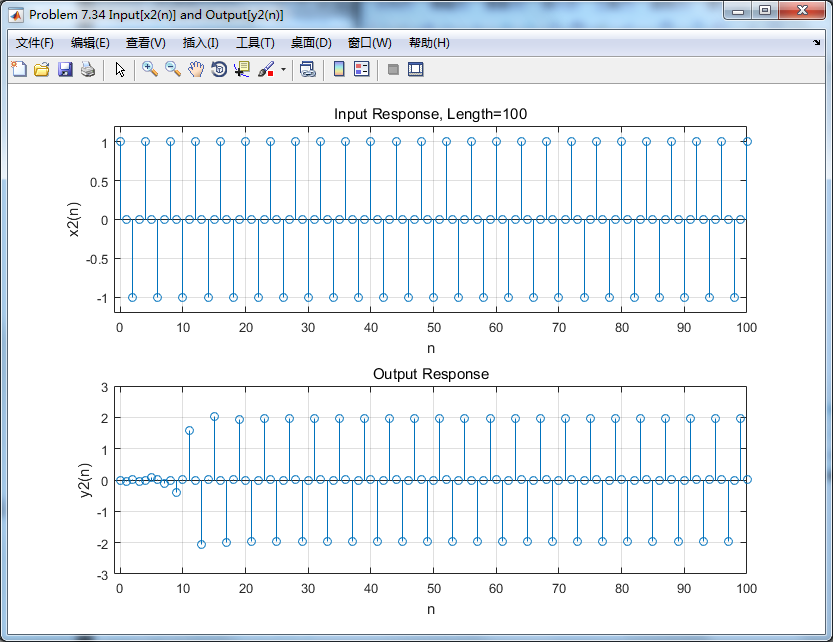
第2个输入输出的谱(DTFT)对比:
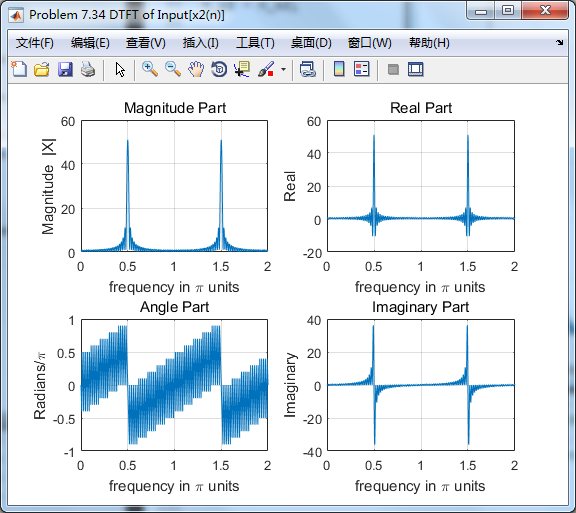
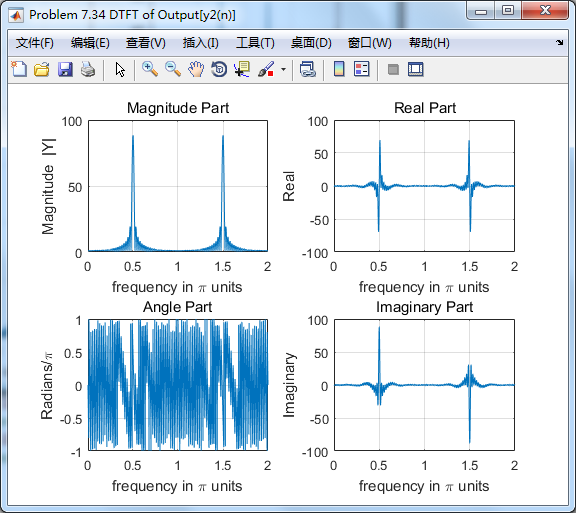

从图中看,输入0.5π分量幅度有所增大,几乎达到原来的2倍。
《DSP using MATLAB》Problem 7.34的更多相关文章
- 《DSP using MATLAB》Problem 5.34
第1小题 代码: %% ++++++++++++++++++++++++++++++++++++++++++++++++++++++++++++++++++++++++++++++++++++++++ ...
- 《DSP using MATLAB》Problem 8.34
今天下了小雨,空气中泛起潮湿的味道,阴冷的感觉袭来,心情受到小小影响. 代码: hp2lpfre子函数 function [wpLP, wsLP, alpha] = hp2lpfre(wphp, ws ...
- 《DSP using MATLAB》Problem 7.12
阻带衰减50dB,我们选Hamming窗 代码: %% ++++++++++++++++++++++++++++++++++++++++++++++++++++++++++++++++++++++++ ...
- 《DSP using MATLAB》Problem 7.35
代码: %% ++++++++++++++++++++++++++++++++++++++++++++++++++++++++++++++++++++++++++++++++ %% Output In ...
- 《DSP using MATLAB》Problem 7.27
代码: %% ++++++++++++++++++++++++++++++++++++++++++++++++++++++++++++++++++++++++++++++++ %% Output In ...
- 《DSP using MATLAB》Problem 7.26
注意:高通的线性相位FIR滤波器,不能是第2类,所以其长度必须为奇数.这里取M=31,过渡带里采样值抄书上的. 代码: %% +++++++++++++++++++++++++++++++++++++ ...
- 《DSP using MATLAB》Problem 7.25
代码: %% ++++++++++++++++++++++++++++++++++++++++++++++++++++++++++++++++++++++++++++++++ %% Output In ...
- 《DSP using MATLAB》Problem 7.24
又到清明时节,…… 注意:带阻滤波器不能用第2类线性相位滤波器实现,我们采用第1类,长度为基数,选M=61 代码: %% +++++++++++++++++++++++++++++++++++++++ ...
- 《DSP using MATLAB》Problem 7.23
%% ++++++++++++++++++++++++++++++++++++++++++++++++++++++++++++++++++++++++++++++++ %% Output Info a ...
随机推荐
- C++ 中vector数组的使用
(1)头文件:#include<vector>.(2)创建vector对象: vector < 类型 > 名字; 例:vector<int> vec;(3) ...
- 关于Unity中资源打包
资源包详细说明 Unity很智能只会打包用到的资源,比如sharedassets0.assets中的shader资源,如果场景中有OBJ用到了shader那么就会有shader打进这个包,如果没有就不 ...
- sql 查询问题
在做数据导出时候,当某个表某字段含有单引号时候老是报错,所以要排除这种情况: sql查询某表某字段值带单引号情况 select 主键码 from 馆藏书目库 where 题名 like '%''%' ...
- mavlink 笔记1
Packet Anatomy This is the anatomy of one packet. It is inspired by the CAN and SAE AS-4 standards. ...
- 万恶之源-python介绍
PATH OF PYTHON (生命短暂,我要学pythonヾ(◍°∇°◍)ノ゙) 一.Python介绍: 简史:Python诞生于1989年的圣诞节, 创始人为Guido van Rossum, 又 ...
- 数据可视化(matplotilb)
一,matplotilb库(数学绘图库) mat数学 plot绘图 lib库 matplotlib.pyplot(缩写mp)->python 最常用接口 mp.plot(水平坐标,垂直坐标数组 ...
- Java基础 ----- 判断对象的类型
1. 判断对象的类型:instanceOf 和 isInstance 或者直接将对象强转给任意一个类型,如果转换成功,则可以确定,如果不成功,在异常提示中可以确定类型 public static vo ...
- LVS/Nginx/HAProxy负载均衡器的对比分析
转自:http://www.blogjava.net/ivanwan/archive/2013/12/25/408014.html LVS的特点是: 抗负载能力强.是工作在网络4层之上仅作分发之用,没 ...
- UBOOT的的 C 语言代码部分
调用一系列的初始化函数 1. 指定初始函数表: init_fnc_t *init_sequence[] = { cpu_init, /* cpu 的基本设置 */ ...
- 关于spring java.lang.IllegalArgumentException: Name for argument type [java.lang.String] 的错误
况描述: web工程在windows环境eclipse下编译部署没有问题,系统升级时需要运维从Git取相应的源码并编译部署到线上机器,部署启动正常没有错误,当访问业务的action时报错,如下. 错误 ...