
Activiti学习笔记11 — 判断节点的使用
一、 创建流程
 <?xml version="1.0" encoding="UTF-8"?>

 <definitions xmlns="http://www.omg.org/spec/BPMN/20100524/MODEL" xmlns:xsi="http://www.w3.org/2001/XMLSchema-instance" xmlns:xsd="http://www.w3.org/2001/XMLSchema" xmlns:activiti="http://activiti.org/bpmn" xmlns:bpmndi="http://www.omg.org/spec/BPMN/20100524/DI" xmlns:omgdc="http://www.omg.org/spec/DD/20100524/DC" xmlns:omgdi="http://www.omg.org/spec/DD/20100524/DI" typeLanguage="http://www.w3.org/2001/XMLSchema" expressionLanguage="http://www.w3.org/1999/XPath" targetNamespace="http://www.activiti.org/test">

   <process id="确定旅游地点" name="确定旅游地点" isExecutable="true">

     <startEvent id="startevent1" name="Start"></startEvent>

     <receiveTask id="申请旅游经费" name="申请旅游经费"></receiveTask>

     <sequenceFlow id="flow1" sourceRef="startevent1" targetRef="申请旅游经费"></sequenceFlow>

     <exclusiveGateway id="exclusivegateway1" name="Exclusive Gateway" default="缺省值"></exclusiveGateway>

     <sequenceFlow id="flow2" sourceRef="申请旅游经费" targetRef="exclusivegateway1"></sequenceFlow>

     <receiveTask id="国外游" name="国外游"></receiveTask>

     <receiveTask id="国内游" name="国内游"></receiveTask>

     <receiveTask id="省内游" name="省内游"></receiveTask>

     <sequenceFlow id="经费大于等于10000" name="经费大于等于10000" sourceRef="exclusivegateway1" targetRef="国外游">

       <conditionExpression xsi:type="tFormalExpression"><![CDATA[${money >= }]]></conditionExpression>

     </sequenceFlow>

     <sequenceFlow id="经费大于1000小于10000" name="经费大于1000小于10000" sourceRef="exclusivegateway1" targetRef="国内游" skipExpression="经费大于1000小于10000">

       <conditionExpression xsi:type="tFormalExpression"><![CDATA[${money >  && money < }]]></conditionExpression>

     </sequenceFlow>

     <sequenceFlow id="缺省值" name="缺省值" sourceRef="exclusivegateway1" targetRef="省内游"></sequenceFlow>

     <endEvent id="endevent1" name="End"></endEvent>

     <sequenceFlow id="flow6" sourceRef="国外游" targetRef="endevent1"></sequenceFlow>

     <sequenceFlow id="flow7" sourceRef="国内游" targetRef="endevent1"></sequenceFlow>

     <sequenceFlow id="flow8" sourceRef="省内游" targetRef="endevent1"></sequenceFlow>

   </process>

   <bpmndi:BPMNDiagram id="BPMNDiagram_确定旅游地点">

     <bpmndi:BPMNPlane bpmnElement="确定旅游地点" id="BPMNPlane_确定旅游地点">

       <bpmndi:BPMNShape bpmnElement="startevent1" id="BPMNShape_startevent1">

         <omgdc:Bounds height="35.0" width="35.0" x="350.0" y="50.0"></omgdc:Bounds>

       </bpmndi:BPMNShape>

       <bpmndi:BPMNShape bpmnElement="申请旅游经费" id="BPMNShape_申请旅游经费">

         <omgdc:Bounds height="55.0" width="105.0" x="315.0" y="150.0"></omgdc:Bounds>

       </bpmndi:BPMNShape>

       <bpmndi:BPMNShape bpmnElement="exclusivegateway1" id="BPMNShape_exclusivegateway1">

         <omgdc:Bounds height="40.0" width="40.0" x="347.0" y="260.0"></omgdc:Bounds>

       </bpmndi:BPMNShape>

       <bpmndi:BPMNShape bpmnElement="国外游" id="BPMNShape_国外游">

         <omgdc:Bounds height="55.0" width="105.0" x="120.0" y="360.0"></omgdc:Bounds>

       </bpmndi:BPMNShape>

       <bpmndi:BPMNShape bpmnElement="国内游" id="BPMNShape_国内游">

         <omgdc:Bounds height="55.0" width="105.0" x="315.0" y="360.0"></omgdc:Bounds>

       </bpmndi:BPMNShape>

       <bpmndi:BPMNShape bpmnElement="省内游" id="BPMNShape_省内游">

         <omgdc:Bounds height="55.0" width="105.0" x="530.0" y="360.0"></omgdc:Bounds>

       </bpmndi:BPMNShape>

       <bpmndi:BPMNShape bpmnElement="endevent1" id="BPMNShape_endevent1">

         <omgdc:Bounds height="35.0" width="35.0" x="350.0" y="490.0"></omgdc:Bounds>

       </bpmndi:BPMNShape>

       <bpmndi:BPMNEdge bpmnElement="flow1" id="BPMNEdge_flow1">

         <omgdi:waypoint x="367.0" y="85.0"></omgdi:waypoint>

         <omgdi:waypoint x="367.0" y="150.0"></omgdi:waypoint>

       </bpmndi:BPMNEdge>

       <bpmndi:BPMNEdge bpmnElement="flow2" id="BPMNEdge_flow2">

         <omgdi:waypoint x="367.0" y="205.0"></omgdi:waypoint>

         <omgdi:waypoint x="367.0" y="260.0"></omgdi:waypoint>

       </bpmndi:BPMNEdge>

       <bpmndi:BPMNEdge bpmnElement="经费大于等于10000" id="BPMNEdge_经费大于等于10000">

         <omgdi:waypoint x="347.0" y="280.0"></omgdi:waypoint>

         <omgdi:waypoint x="173.0" y="280.0"></omgdi:waypoint>

         <omgdi:waypoint x="172.0" y="360.0"></omgdi:waypoint>

         <bpmndi:BPMNLabel>

           <omgdc:Bounds height="42.0" width="100.0" x="191.0" y="260.0"></omgdc:Bounds>

         </bpmndi:BPMNLabel>

       </bpmndi:BPMNEdge>

       <bpmndi:BPMNEdge bpmnElement="经费大于1000小于10000" id="BPMNEdge_经费大于1000小于10000">

         <omgdi:waypoint x="367.0" y="300.0"></omgdi:waypoint>

         <omgdi:waypoint x="367.0" y="360.0"></omgdi:waypoint>

         <bpmndi:BPMNLabel>

           <omgdc:Bounds height="42.0" width="100.0" x="380.0" y="309.0"></omgdc:Bounds>

         </bpmndi:BPMNLabel>

       </bpmndi:BPMNEdge>

       <bpmndi:BPMNEdge bpmnElement="缺省值" id="BPMNEdge_缺省值">

         <omgdi:waypoint x="387.0" y="280.0"></omgdi:waypoint>

         <omgdi:waypoint x="582.0" y="280.0"></omgdi:waypoint>

         <omgdi:waypoint x="582.0" y="360.0"></omgdi:waypoint>

         <bpmndi:BPMNLabel>

           <omgdc:Bounds height="14.0" width="36.0" x="519.0" y="260.0"></omgdc:Bounds>

         </bpmndi:BPMNLabel>

       </bpmndi:BPMNEdge>

       <bpmndi:BPMNEdge bpmnElement="flow6" id="BPMNEdge_flow6">

         <omgdi:waypoint x="172.0" y="415.0"></omgdi:waypoint>

         <omgdi:waypoint x="367.0" y="490.0"></omgdi:waypoint>

       </bpmndi:BPMNEdge>

       <bpmndi:BPMNEdge bpmnElement="flow7" id="BPMNEdge_flow7">

         <omgdi:waypoint x="367.0" y="415.0"></omgdi:waypoint>

         <omgdi:waypoint x="367.0" y="490.0"></omgdi:waypoint>

       </bpmndi:BPMNEdge>

       <bpmndi:BPMNEdge bpmnElement="flow8" id="BPMNEdge_flow8">

         <omgdi:waypoint x="582.0" y="415.0"></omgdi:waypoint>

         <omgdi:waypoint x="367.0" y="490.0"></omgdi:waypoint>

       </bpmndi:BPMNEdge>

     </bpmndi:BPMNPlane>

   </bpmndi:BPMNDiagram>

 </definitions>
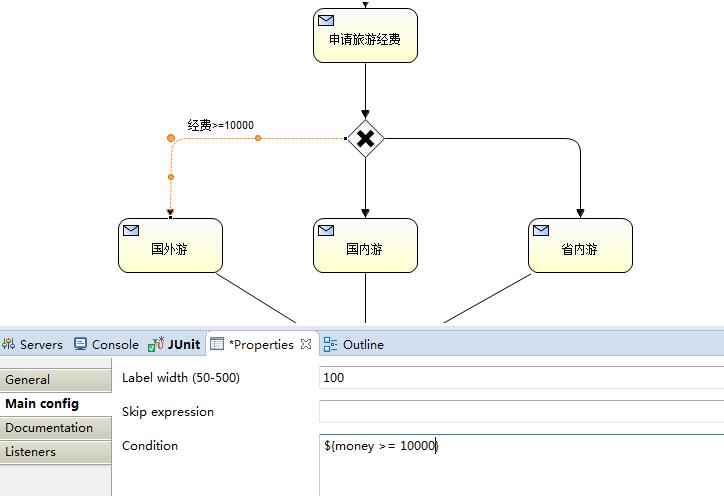
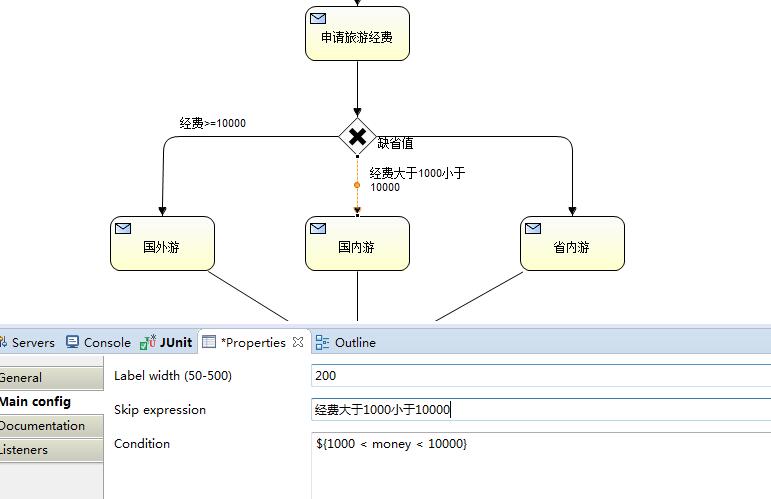


二、发布流程
 /**

      * 2、发布一个流程

      */

     @Test

     public void  testDeployProcess() {

         RepositoryService repositoryService = processEngine.getRepositoryService();

         DeploymentBuilder builder = repositoryService.createDeployment();

         // 加载发布资源

         builder.name("判断分支结点流程测试") // 设置流程显示别名

                 .addClasspathResource("travel.bpmn") // 设置流程规则文件

                 .addClasspathResource("travel.png"); // 设置流程规则的图片

         // 发布流程

         builder.deploy();

     }
三、运行、测试流程
     /**

      * 3、启动流程、执行任务,并查看状态

      */

     @Test

     public void testExcusiveGateway() {

         // 获取服务对象的实例

         RuntimeService runtimeService = processEngine.getRuntimeService();

         String processDefinitionKey = "确定旅游地点";

         // 自动执行与Key相对应的流程的最高版本

         ProcessInstance processInstance = runtimeService.startProcessInstanceByKey(processDefinitionKey);

         String processInstanceId = processInstance.getId();

         logger.info("processInstanceId:" + processInstance.getId());

         //获取当前流程下Execution对象

         Execution e1 = runtimeService

                                             .createExecutionQuery()

                                             .processInstanceId(processInstanceId) //每个流程的唯一标识

                                             .activityId("申请旅游经费")    //每个活动的唯一标识

                                             .singleResult();

         Assert.assertNotNull(e1);

         //执行逻辑,请领导批示旅游经费

         Double money =11500d;

         //把金额放入变量中

         runtimeService.setVariable(e1.getId(), "money", money);

         logger.info("领导批示的旅游经费是: " + money);

         //推动流程流转

         logger.info("executionId: " + e1.getId());

         runtimeService.signal(e1.getId());

         if (money >= 10000d) {

             Execution e2 = runtimeService

                                         .createExecutionQuery()

                                         .processInstanceId(processInstanceId) //每个流程的唯一标识

                                         .activityId("国外游")    //每个活动的唯一标识

                                         .singleResult();

             Assert.assertNotNull(e2);

             logger.info("由于领导指示的经费是:" + runtimeService.getVariable(e2.getId(), "money") + ",所以你可以国外游!" );

             //推动流程流转

             runtimeService.signal(e2.getId());

         } else if ( money > 1000d && money < 10000d ) {

             Execution e2 = runtimeService

                     .createExecutionQuery()

                     .processInstanceId(processInstanceId) //每个流程的唯一标识

                     .activityId("国内游")    //每个活动的唯一标识

                     .singleResult();

             Assert.assertNotNull(e2);

             logger.info("由于领导指示的经费是:" + runtimeService.getVariable(e2.getId(), "money") + ",所以你可以国内游!" );

             //推动流程流转

             runtimeService.signal(e2.getId());

         } else {

             Execution e2 = runtimeService

                     .createExecutionQuery()

                     .processInstanceId(processInstanceId) //每个流程的唯一标识

                     .activityId("省内游")    //每个活动的唯一标识

                     .singleResult();

             Assert.assertNotNull(e2);

             logger.info("由于领导指示的经费是:" + runtimeService.getVariable(e2.getId(), "money") + ",所以你可以省内游!" );

             //推动流程流转

             runtimeService.signal(e2.getId());

         }

         //检查结束状态

         ProcessInstance pInstance = runtimeService

                                                         .createProcessInstanceQuery()

                                                         .processInstanceId(processInstanceId)

                                                         .singleResult();

         Assert.assertNull(pInstance);

         logger.info("判断分支结点流程成功执行!");

     }
四、运行结果
[INFO][2015-12-02 14:39:58,335][com.mcs.activiti.test.TestExclusiveGateway]processInstanceId:170001
[INFO][2015-12-02 14:39:58,641][com.mcs.activiti.test.TestExclusiveGateway]领导批示的旅游经费是: 11500.0
[INFO][2015-12-02 14:39:58,642][com.mcs.activiti.test.TestExclusiveGateway]executionId: 170001
[INFO][2015-12-02 14:39:58,816][com.mcs.activiti.test.TestExclusiveGateway]由于领导指示的经费是:11500.0,所以你可以国外游!
[INFO][2015-12-02 14:39:58,914][com.mcs.activiti.test.TestExclusiveGateway]判断分支结点流程成功执行!
Activiti学习笔记11 — 判断节点的使用的更多相关文章
- Activiti学习笔记目录
1.Activiti学习笔记1 — 下载与开发环境的配置: 2.Activiti学习笔记2 — HelloWorld: 3.Activiti学习笔记3 — 流程定义: 4.Activiti学习笔记4 ...
- activiti学习笔记一
activiti学习笔记 在讲activiti之前我们必须先了解一下什么是工作流,什么是工作流引擎. 在我们的日常工作中,我们会碰到很多流程化的东西,什么是流程化呢,其实通俗来讲就是有一系列固定的步骤 ...
- 并发编程学习笔记(11)----FutureTask的使用及实现
1. Future的使用 Future模式解决的问题是.在实际的运用场景中,可能某一个任务执行起来非常耗时,如果我们线程一直等着该任务执行完成再去执行其他的代码,就会损耗很大的性能,而Future接口 ...
- Spring 源码学习笔记11——Spring事务
Spring 源码学习笔记11--Spring事务 Spring事务是基于Spring Aop的扩展 AOP的知识参见<Spring 源码学习笔记10--Spring AOP> 图片参考了 ...
- Activiti 学习笔记记录(2016-8-31)
上一篇:Activiti 学习笔记记录(二) 导读:上一篇学习了bpmn 画图的常用图形标记.那如何用它们组成一个可用文件呢? 我们知道 bpmn 其实是一个xml 文件
- Activiti 学习笔记记录(二)
上一篇:Activiti 学习笔记记录 导读:对于工作流引擎的使用,我们都知道,需要一个业务事件,比如请假,它会去走一个流程(提交申请->领导审批---(批,不批)---->结束),Act ...
- Ext.Net学习笔记11:Ext.Net GridPanel的用法
Ext.Net学习笔记11:Ext.Net GridPanel的用法 GridPanel是用来显示数据的表格,与ASP.NET中的GridView类似. GridPanel用法 直接看代码: < ...
- SQL反模式学习笔记11 限定列的有效值
目标:限定列的有效值,将一列的有效字段值约束在一个固定的集合中.类似于数据字典. 反模式:在列定义上指定可选值 1. 对某一列定义一个检查约束项,这个约束不允许往列中插入或者更新任何会导致约束失败的值 ...
- golang学习笔记11 golang要用jetbrain的golang这个IDE工具开发才好
golang学习笔记11 golang要用jetbrain的golang这个IDE工具开发才好 jetbrain家的全套ide都很好用,一定要dark背景风格才装B 从File-->s ...
随机推荐
- 3.4 redux 异步
在大多数的前端业务场景中,需要和后端产生异步交互,在本节中,将详细讲解 redux 中的异步方案以及一些异步第三方组件,内容有: redux 异步流 redux-thunk redux-promise ...
- 通过Module读取寄存器的值
1: int eax; 2: _asm_("nop":"=a"(eax)); 3: printk("Get Eax Value:\n"); ...
- Java随机访问文件
使用随机访问文件,我们可以从文件读取以及写入文件.使用文件输入和输出流的读取和写入是顺序过程.使用随机访问文件,可以在文件中的任何位置读取或写入.RandomAccessFile类的一个对象可以进行随 ...
- springboot + zipkin(brave-okhttp实现)
一.前提 1.zipkin基本知识:附8 zipkin 2.启动zipkin server: 2.1.在官网下载服务jar,http://zipkin.io/pages/quickstart.html ...
- zic2xpm - 将 ZIICS 象棋片段 (chess pieces) 转换为 XBoard (XPM/XIM) 片段的工具。
总览 SYNOPSIS zic2xpm file1 [file2 ...] 描述 zic2xpm 将一个或多个 ZIICS 片段文件转换为 XBoard 可用的格式.如果你给出一个以上的文件名,小心同 ...
- easyui datagrid 绑定json对象属性的属性
今天用easyui 的datagrid绑定数据时,后台提供的数据是实体类类型的,其中有一个实体类A的属性b是另一个实体类B类型的,而前台需要显示b的属性c,这下就悲剧了,前台没法直接绑定了,后来脑筋一 ...
- Effective C++之条款2:尽量以const enum inline替换 #define
本文的标题也可以改成“用编译器替换预处理器”: const double AspectRatio = 1.653; //最好使用上述代码替换下述代码: #define ASPECT_RATIO 1.6 ...
- 用python 编写redis 暴力破解密码的程序
本文摘自http://blog.knownsec.com/2015/11/analysis-of-redis-unauthorized-of-expolit/ import redisimport l ...
- Java 基础 - JDK 和 JRE 有什么区别
总结 JRE(Java Runtime Environment),就是 Java 运行环境,包括JVM虚拟机(java.exe等)和基本的类库(rt.jar等). JDK (Java Developm ...
- thinkphp 错误调试
如果需要我们可以使用E方法输出错误信息并中断执行,例如: //输出错误信息,并中止执行 E($msg); 原3.1版本中的halt方法已经废弃,请使用E函数代替.