
Netty学习——基于netty实现简单的客户端聊天小程序
Netty学习——基于netty实现简单的客户端聊天小程序
效果图,聊天程序展示 (TCP编程实现)
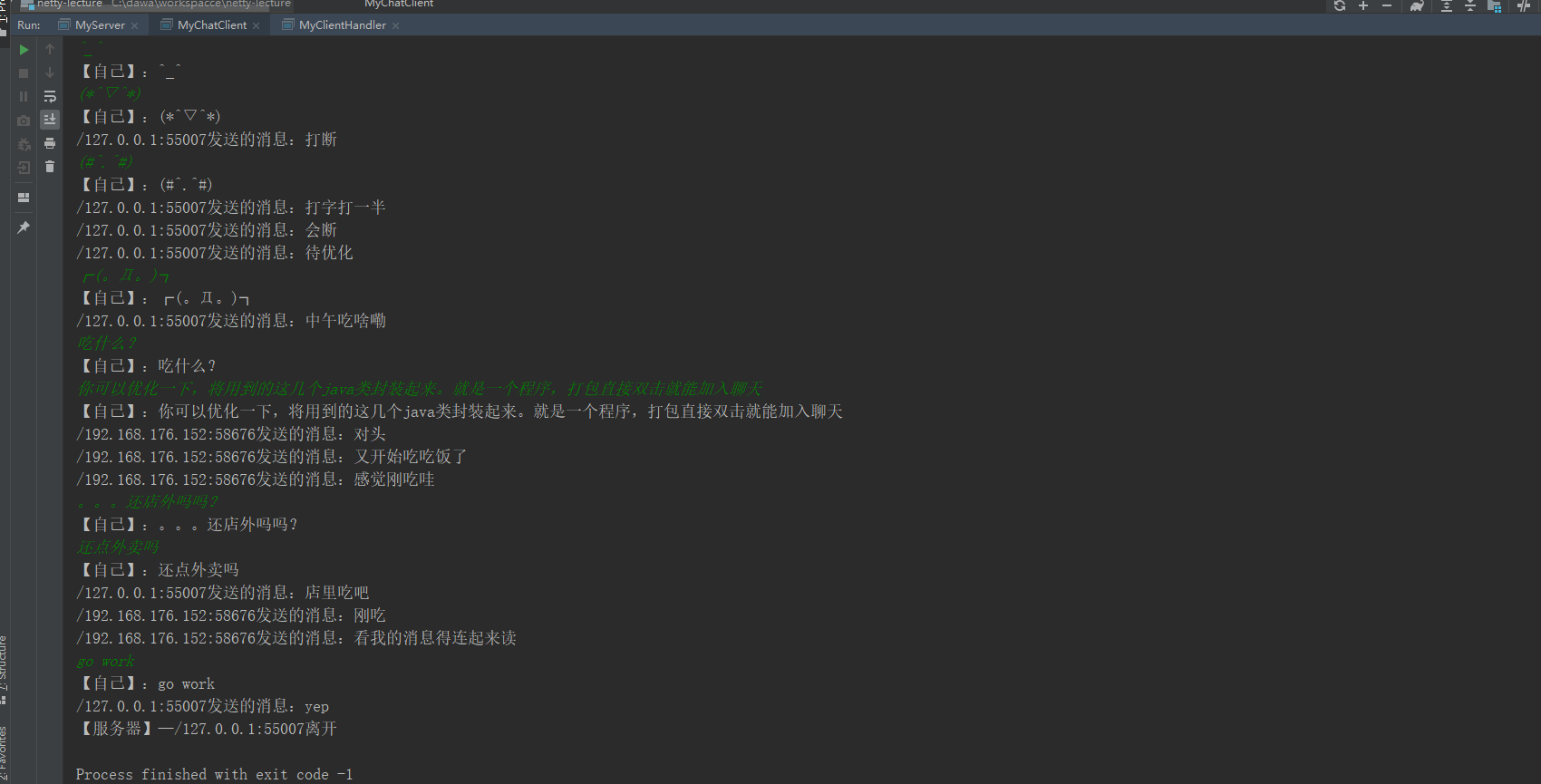
后端代码:
package com.dawa.netty.chatexample;

import io.netty.bootstrap.ServerBootstrap;

import io.netty.channel.ChannelFuture;

import io.netty.channel.EventLoopGroup;

import io.netty.channel.nio.NioEventLoopGroup;

import io.netty.channel.socket.nio.NioServerSocketChannel;

/**

 * @Title: MyChatServer

 * @Author: 大娃

 * @Date: 2019/11/26 09:44

 * @Description: 客户端

 */

public class MyChatServer {

    public static void main(String[] args) throws InterruptedException {

        //定义两个 循环组

        EventLoopGroup bossGroup = new NioEventLoopGroup();

        EventLoopGroup workerGroup = new NioEventLoopGroup();

        try {

            //服务器端 启动类

            ServerBootstrap serverBootstrap = new ServerBootstrap();

            //启动类装载两个 循环组

            serverBootstrap.group(bossGroup, workerGroup).channel(NioServerSocketChannel.class)

                    .childHandler(new MyChatServerInitializer());//初始化器

            ChannelFuture channelFuture = serverBootstrap.bind(8899).sync();

            channelFuture.channel().closeFuture().sync();

        }finally {

            //关闭循环组

            bossGroup.shutdownGracefully();

            workerGroup.shutdownGracefully();

        }

    }

}
package com.dawa.netty.chatexample;

import io.netty.channel.Channel;

import io.netty.channel.ChannelHandlerContext;

import io.netty.channel.SimpleChannelInboundHandler;

import io.netty.channel.group.ChannelGroup;

import io.netty.channel.group.DefaultChannelGroup;

import io.netty.util.concurrent.GlobalEventExecutor;

/**

 * @Title: MyChatServerHandler

 * @Author: 大娃

 * @Date: 2019/11/26 09:54

 * @Description:  消息的广播

 * ABC 三个客户端,分别建立服务器的链接

 * A,第一个用户,没必要通知

 * B,A,B和服务器的控制台都提示  B已经上线,

 * C,ABC和服务器端,都是C上线

 *

 *

 * 自己想的:根据生命周期,当注册的时候,提示已经上线,当注销的时候,提示已经下线。

 * 当发送一个消息到服务器端的时候,服务器端广播一下。  判断如果是自己的IP的话,提示自己。不是的话,显示IP

 *

 * netty都是通过响应的回调方法,来进行实现的

 * 1.当连接建立好的时候,就代表有一个客户端和服务端建立起连接了、。  handlerAdded

 */

public class MyChatServerHandler extends SimpleChannelInboundHandler<String> {

    //用来保存一个个的channel对象的。

    private static ChannelGroup channelGroup = new DefaultChannelGroup(GlobalEventExecutor.INSTANCE);

    //收到任何一个消息之后,的回调函数

    @Override

    protected void channelRead0(ChannelHandlerContext ctx, String msg) throws Exception {

        Channel channel = ctx.channel();

        channelGroup.forEach(ch -> {

            if (channel != ch) {

                ch.writeAndFlush(channel.remoteAddress() + "发送的消息:" + msg + "\n");

            } else {

                ch.writeAndFlush("【自己】" + "发送的消息:" + msg + "\n" );

            }

        });

    }

    @Override

    public void exceptionCaught(ChannelHandlerContext ctx, Throwable cause) throws Exception {

        cause.printStackTrace();

        ctx.close();

    }

    /**

     * 1.当连接建立好的时候,就代表有一个客户端和服务端建立起连接了。  handlerAdded

     * @param ctx

     * @throws Exception

     */

    @Override

    public void handlerAdded(ChannelHandlerContext ctx) throws Exception {

        //1.建立起连接

        Channel channel = ctx.channel();

        //2.进行广播。

        channelGroup.writeAndFlush("【服务器】:" + channel.remoteAddress() + "加入\n");

        //3.添加到组

        channelGroup.add(channel); //服务器端是不是需要将所有已经建立起连接的channel 保存起来? channelGroup

    }

    /**

     * 2.当离开的时候

     * @param ctx

     * @throws Exception

     */

    @Override

    public void handlerRemoved(ChannelHandlerContext ctx) throws Exception {

        Channel channel = ctx.channel();

        channelGroup.writeAndFlush("【服务器】:" + channel.remoteAddress() + "离开 \n ");

        //无需手工的移除,  会自动将断掉的链接移除  。 现在先不管,以后可以看看

        // channelGroup.remove(channel);

    }

    @Override

    public void channelActive(ChannelHandlerContext ctx) throws Exception {

        Channel channel = ctx.channel();

        System.out.println(channel.remoteAddress()+" 上线");

    }

    @Override

    public void channelInactive(ChannelHandlerContext ctx) throws Exception {

        Channel channel = ctx.channel();

        System.out.println(channel.remoteAddress()+" 下线");

    }

}
package com.dawa.netty.chatexample;

import io.netty.channel.ChannelInitializer;

import io.netty.channel.ChannelPipeline;

import io.netty.channel.socket.SocketChannel;

import io.netty.handler.codec.DelimiterBasedFrameDecoder;

import io.netty.handler.codec.Delimiters;

import io.netty.handler.codec.string.StringDecoder;

import io.netty.handler.codec.string.StringEncoder;

import io.netty.util.CharsetUtil;

/**

 * @Title: MyChatServerInitializer

 * @Author: 大娃

 * @Date: 2019/11/26 09:46

 * @Description:

 */

public class MyChatServerInitializer extends ChannelInitializer<SocketChannel> {

    @Override

    protected void initChannel(SocketChannel ch) throws Exception {

        ChannelPipeline pipeline = ch.pipeline();

        //第一个解码器:自带的。 根据分隔符来进行解析

        pipeline.addLast(new DelimiterBasedFrameDecoder(4096, Delimiters.lineDelimiter()));

        pipeline.addLast(new StringDecoder(CharsetUtil.UTF_8));

        pipeline.addLast(new StringEncoder(CharsetUtil.UTF_8));

        //Handler

        pipeline.addLast(new MyChatServerHandler());

    }

}
客户端代码: (别人的电脑都可以模拟终端,启动这个客户端即可连接服务器)
package com.dawa.netty.chatexample;

import io.netty.bootstrap.Bootstrap;

import io.netty.channel.Channel;

import io.netty.channel.EventLoopGroup;

import io.netty.channel.nio.NioEventLoopGroup;

import io.netty.channel.socket.nio.NioSocketChannel;

import java.io.BufferedReader;

import java.io.InputStreamReader;

/**

 * @Title: MyChatClient

 * @Author: 大娃

 * @Date: 2019/11/26 14:39

 * @Description:

 */

public class MyChatClient {

    public static void main(String[] args) throws Exception {

        //循环组,一个就够用了。客户端

        EventLoopGroup eventLoopGroup = new NioEventLoopGroup();

        try {

            //客户端使用的是bootstrap,

            Bootstrap bootstrap = new Bootstrap();

            bootstrap.group(eventLoopGroup).channel(NioSocketChannel.class).handler(new MyChatClientInitializer());

            //注意此处,使用的是connect,不是使用的bind

            Channel channel = bootstrap.connect("localhost", 8899).sync().channel();

            BufferedReader br = new BufferedReader(new InputStreamReader(System.in));

            for (; ; ) {

                channel.writeAndFlush(br.readLine()+ "\r\n");

            }

        } finally {

            eventLoopGroup.shutdownGracefully();

        }

    }

}
package com.dawa.netty.chatexample;

import io.netty.channel.ChannelInitializer;

import io.netty.channel.ChannelPipeline;

import io.netty.channel.socket.SocketChannel;

import io.netty.handler.codec.DelimiterBasedFrameDecoder;

import io.netty.handler.codec.Delimiters;

import io.netty.handler.codec.string.StringDecoder;

import io.netty.handler.codec.string.StringEncoder;

import io.netty.util.CharsetUtil;

/**

 * @Title: MyChatClientInitializer

 * @Author: 大娃

 * @Date: 2019/11/26 14:42

 * @Description:

 */

public class MyChatClientInitializer extends ChannelInitializer<SocketChannel> {

    @Override

    protected void initChannel(SocketChannel ch) throws Exception {

        ChannelPipeline pipeline = ch.pipeline();

        //添加Handler

        ChannelPipeline channelPipeline = ch.pipeline();

        channelPipeline.addLast(new DelimiterBasedFrameDecoder(4096, Delimiters.lineDelimiter()));

        channelPipeline.addLast(new StringDecoder(CharsetUtil.UTF_8));

        channelPipeline.addLast(new StringEncoder(CharsetUtil.UTF_8));

        //添加自己的Handler

        pipeline.addLast(new MyChatClientHandler());

    }

}
package com.dawa.netty.chatexample;

import io.netty.channel.ChannelHandlerContext;

import io.netty.channel.SimpleChannelInboundHandler;

/**

 * @Title: MyChatClientHandler

 * @Author: 大娃

 * @Date: 2019/11/26 14:45

 * @Description:

 */

public class MyChatClientHandler extends SimpleChannelInboundHandler<String> {

    @Override

    protected void channelRead0(ChannelHandlerContext ctx, String msg) throws Exception {

        System.out.println(msg);

    }

}
Netty学习——基于netty实现简单的客户端聊天小程序的更多相关文章
- Netty 聊天小程序
这节讲解基于 Netty 快速实现一个聊天小程序. 一.服务端 1. SimpleChatServerHandler(处理器类) 该类主要实现了接收来自客户端的消息并转发给其他客户端. /** * 服 ...
- VSTO学习笔记(七)基于WPF的Excel分析、转换小程序
原文:VSTO学习笔记(七)基于WPF的Excel分析.转换小程序 近期因为工作的需要,要批量处理Excel文件,于是写了一个小程序,来提升工作效率. 小程序的功能是对Excel进行一些分析.验证,然 ...
- netty使用以及聊天小程序
<从零开始搭建游戏服务器>Netty导入创建Socket服务器 Netty入门教程 Netty 聊天小程序
- Visual Studio 2017中使用正则修改部分内容 如何使用ILAsm与ILDasm修改.Net exe(dll)文件 C#学习-图解教程(1):格式化数字字符串 小程序开发之图片转Base64(C#、.Net) jquery遍历table为每一个单元格取值及赋值 。net加密解密相关方法 .net关于坐标之间一些简单操作
Visual Studio 2017中使用正则修改部分内容 最近在项目中想实现一个小工具,需要根据类的属性<summary>的内容加上相应的[Description]特性,需要实现的效 ...
- 基于gin框架和jwt-go中间件实现小程序用户登陆和token验证
本文核心内容是利用jwt-go中间件来开发golang webapi用户登陆模块的token下发和验证,小程序登陆功能只是一个切入点,这套逻辑同样适用于其他客户端的登陆处理. 小程序登陆逻辑 小程序的 ...
- Winfrom 简单的进度条小程序
使用Winform空间编写简单的进度条小程序: 所需控件:Lable 标签 TextBox 文本框 progressBar 进度条控件 timer 定时器 下面是源码及效果图: /// &l ...
- Netty学习(九)-Netty编解码技术之Marshalling
前面我们讲过protobuf的使用,主流的编解码框架其实还有很多种: ①JBoss的Marshalling包 ②google的Protobuf ③基于Protobuf的Kyro ④Apache的Thr ...
- 基于JAVA网络编程的聊天小程序
package com.neusoft.edu.socket; import java.io.BufferedReader; import java.io.IOException; import ja ...
- 封装简单的API——微信小程序
前几天自己琢磨微信小程序的基本开发,里边用到的技术包括WebAPI,也就是方法的封装. 当然也可以用ASP.NET MVC WCF来写接口.更简单应该就是 WinForm 简单易部署. 这里用的是 2 ...
随机推荐
- Codeforces 游记
早就对这个比赛平台有所耳闻(事实上,之前打过一场div2惨的一批……)今天去打了一场div3. 首先还是吐槽一下这个毛子时区的比赛时间,从十点三十五到零点三十五……这种时间要不是在家根本没法打嘛…… ...
- word转HTML部署到服务器不能运行
已经解决.在网上找的:网址:http://blog.sina.com.cn/s/blog_852ca01901016lyz.html远程调用Excel.Word.PowerPoint,服务器端设置(2 ...
- [考试反思]1105csp-s模拟测试102: 贪婪
还是有点蠢... 多测没清空T3挂40...(只得了人口普查分20) 多测题要把样例复制粘两遍自测一下防止未清空出锅. 然而不算分... 其实到现在了算不算也不重要了吧... 而且其实T3只考虑最长路 ...
- 使用 element-ui 级联插件遇到的坑
需求描述[省市区三级联动] 组件:Cascader 级联选择器 后端需要所选中的地区的名字,如:['北京市', '北京市', '东城区'] 获取后端省市区具体列表的接口返回数据: // 省 - 参数1 ...
- lenovo ubuntu18.04 找不到网络适配器
链接: https://pan.baidu.com/s/1YJl-MfG0tVy9sLx4_otmnA 提取码: smfp https://blog.csdn.net/John_chaos/artic ...
- Python 基础之socket编程(一)
Python 基础之socket编程(一) 可以进行通信玩儿了,感觉不错不错,网络通信就像打电话,我说一句你听一句之后,你再说一句,我听一句,就这样.....下去了.不扯淡了,来来来,看看今天都搞了点 ...
- js 把数组中每个元素的某个字段取出
方法一:map() let cities = [ {city:"北京",bOn:false}, {city:"上海",bOn:false}, {city:&qu ...
- Swoole跟thinkphp5结合开发WebSocket在线聊天通讯系统
ThinkPHP使用Swoole需要安装 think-swoole Composer包,前提系统已经安装好了Swoole PECL 拓展* tp5的项目根目录下执行composer命令安装think- ...
- MathType转Word公式(OMML)
背景 由于之前个人喜欢在Word里做笔记,而有很多笔记里存在着大量的公式.在早期,由于对Word自身的公式的不理解,所以便使用了MathType这个工具来编写公式.但是现在本人已经转战到LatTeX了 ...
- 在校生如何面向面试地学习Java
最近我在博客园里,看到不少在校的同学在学java,而且,在我最近举办的一次直播活动中,也有不少在校生同学来提问,java该怎么学. 对于那些已经工作的同学,哪怕才工作不久,毕竟也能从项目实践里总结和探 ...