
springboot2.x实现oauth2授权码登陆
一 进行授权页
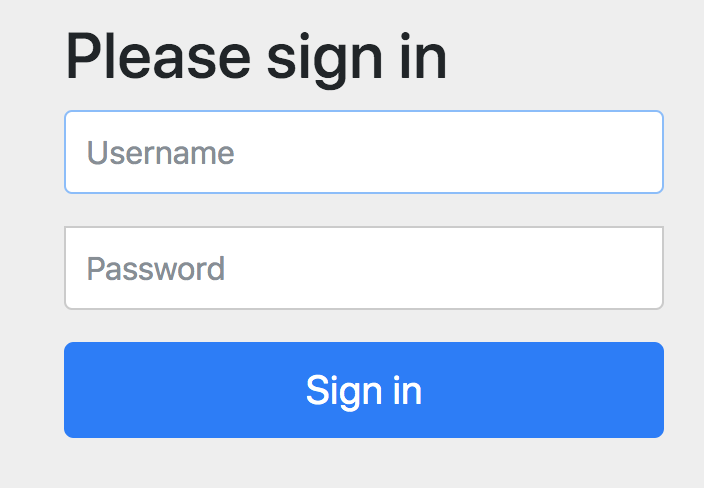
三 授权资源类型
@Override

public void configure(ClientDetailsServiceConfigurer clients) throws Exception {

clients.inMemory()

.withClient(ClientID)

.secret(passwordEncoder.encode(ClientSecret))

.authorizedGrantTypes("authorization_code", "refresh_token",

"password", "implicit")

.scopes("read","write","del","userinfo")

.redirectUris(RedirectURLs);

}

四 接到code

五 获取access_token
@Override
public void configure(AuthorizationServerSecurityConfigurer oauthServer) throws Exception {
  oauthServer.tokenKeyAccess("isAuthenticated()")
      .checkTokenAccess("permitAll()")
      .allowFormAuthenticationForClients();//支持把secret和clientid写在url上,否则需要在头上
}
Authorization Ccode------RFRLFY

access_token_url http://localhost:8081/oauth/token?client_id=android1&code=RFRLFY&grant_type=authorization_code&redirect_uri=http://localhost:8081/callback&client_secret=android1

Access Token Response ---------{"access_token":"faadf3bf-6488-4036-bc3b-21b0a979602c","token_type":"bearer","refresh_token":"1b01f133-c5ab-419f-8125-088c85916ecb","expires_in":,"scope":"read"}
回调页面代码,主要实现了对code的获取,对access_token的组织,然后请求时把access_token带上,这个方法一般会做成公用的过滤器
@Controller

public class UserController {

  @RequestMapping(value = "/callback", method = RequestMethod.GET)

  public ResponseEntity<String> callback(@RequestParam("code") String code) throws JsonProcessingException, IOException {

    ResponseEntity<String> response = null;

    System.out.println("Authorization Ccode------" + code);

    RestTemplate restTemplate = new RestTemplate();

    String access_token_url = "http://localhost:8081/oauth/token";

    access_token_url += "?client_id=android1&code=" + code;

    access_token_url += "&grant_type=authorization_code";

    access_token_url += "&redirect_uri=http://localhost:8081/callback";

    access_token_url += "&client_secret=android1";

    System.out.println("access_token_url " + access_token_url);

    response = restTemplate.exchange(access_token_url, HttpMethod.POST, null, String.class);

    ObjectMapper mapper = new ObjectMapper();

    JsonNode node = mapper.readTree(response.getBody());

    String token = node.path("access_token").asText(); System.out.println("access_token" +access_token);
String url = "http://localhost:8081/index"; HttpHeaders headers1 = new HttpHeaders(); headers1.add("Authorization", "Bearer " + token); HttpEntity<String> entity = new HttpEntity<>(headers1); ResponseEntity<String> result = restTemplate.exchange(url, HttpMethod.GET, entity, String.class); return result; }
六 拿着access_token去请求具体的资源
@Configuration

@EnableResourceServer

@Order(6)

public class ResourceServerConfig extends ResourceServerConfigurerAdapter {

@Override

public void configure(HttpSecurity http) throws Exception {

http.csrf().disable()//禁用了 csrf 功能

.authorizeRequests()//限定签名成功的请求

.antMatchers("/index").access("#oauth2.hasScope('del')") //授权码scopes里需要选中del才可以访问

.antMatchers("/user").authenticated()//签名成功后可访问,不受role限制

.anyRequest().permitAll()//其他没有限定的请求,允许访问

.and().anonymous()//对于没有配置权限的其他请求允许匿名访问

.and().formLogin()//使用 spring security 默认登录页面

.and().httpBasic();//启用http 基础验证

}

}
八 需要注意的地方
如果你对用户进行了角色和权限的配置,对于某些保护接口需要有指定权限才能访问的话,需要重getAuthorities方法,否则,你的权限将会失效!
@Entity
@Data
public class User extends BaseEntity implements UserDetails {
@Id
@GeneratedValue
private Long id;
private String username;
private String password;
private String firstName;
private String lastName;
private String email;
private String imageUrl; @JsonIgnore
@ManyToMany(targetEntity = Role.class, fetch = FetchType.EAGER)
@BatchSize(size = 20)
private Set<Role> roles = new HashSet<>(); @Transient
private Set<GrantedAuthority> authorities = new HashSet<>(); /**
* 注意,这块需要加@Override重写,否则权限无效.
*
* @return
*/
@Override
public Set<GrantedAuthority> getAuthorities() {
Set<GrantedAuthority> authorities = new HashSet<>();
for (Role role : this.roles) {
for (Authority authority : role.getAuthorities()) {
authorities.add(new SimpleGrantedAuthority(authority.getValue()));
}
}
return authorities;
} @Override
public boolean isAccountNonExpired() {
return true;
} @Override
public boolean isAccountNonLocked() {
return true;
} @Override
public boolean isCredentialsNonExpired() {
return true;
} @Override
public boolean isEnabled() {
return true;
}
}
感谢阅读!
springboot2.x实现oauth2授权码登陆的更多相关文章
- 13.详解oauth2授权码流程
13.详解oauth2授权码流程 把登陆系统单独独立出来,可以给自己写的微服务用,也可以给第三方的系统调用我们的服务 显式的和隐式的,两种方式,
- 阶段5 3.微服务项目【学成在线】_day16 Spring Security Oauth2_06-SpringSecurityOauth2研究-Oauth2授权码模式-申请令牌
3.3 Oauth2授权码模式 3.3.1 Oauth2授权模式 Oauth2有以下授权模式: 授权码模式(Authorization Code) 隐式授权模式(Implicit) 密码模式(Reso ...
- Spring Security OAuth2 授权码模式
背景: 由于业务实现中涉及到接入第三方系统(app接入有赞商城等),所以涉及到第三方系统需要获取用户信息(用户手机号.姓名等),为了保证用户信息的安全和接入方式的统一, 采用Oauth2四种模式之一 ...
- 微信授权就是这个原理,Spring Cloud OAuth2 授权码模式
上一篇文章Spring Cloud OAuth2 实现单点登录介绍了使用 password 模式进行身份认证和单点登录.本篇介绍 Spring Cloud OAuth2 的另外一种授权模式-授权码模式 ...
- 阶段5 3.微服务项目【学成在线】_day16 Spring Security Oauth2_07-SpringSecurityOauth2研究-Oauth2授权码模式-资源服务授权测试
下面要完成 5.6两个步骤 3.3.4 资源服务授权 3.3.4.1 资源服务授权流程 资源服务拥有要访问的受保护资源,客户端携带令牌访问资源服务,如果令牌合法则可成功访问资源服务中的资 源,如下图 ...
- asp.net利用QQ邮箱发送邮件,关键在于开启pop并设置授权码为发送密码
public static bool SendEmail(string mailTo, string mailSubject, string mailContent) { ...
- oAuth2授权协议 & 微信授权登陆和绑定 & 多环境共用一个微信开发平台回调设置
OAuth2(open Auth)开放授权协议 授权码模式流程: 1.浏览器(客户端)点击一个比如使用微信登陆按钮 2.会跳到认证服务器页面,让用户选择是否授权 3.如果用户点击授权,那么会跳转到开始 ...
- Spring Cloud2.0之Oauth2环境搭建(授权码模式和密码授权模式)
oauth2 server 微服务授权中心, github源码 https://github.com/spring-cloud/spring-cloud-security 对微服务接口做一些权 ...
- Oauth2.0认证---授权码模式
目录: 1.功能描述 2.客户端的授权模式 3.授权模式认证流程 4.代码实现 1.功能描述 OAuth在"客户端"与"服务提供商"之间,设置了一个授权层(au ...
随机推荐
- python 协程与go协程的区别
进程.线程和协程 进程的定义: 进程,是计算机中已运行程序的实体.程序本身只是指令.数据及其组织形式的描述,进程才是程序的真正运行实例. 线程的定义: 操作系统能够进行运算调度的最小单位.它被包含在进 ...
- Hadoop 维护总结
1. 启动 history ./sbin/mrjobhistorydaemon.sh start historyserver ./sbin/yarn-daemon.sh start proxyserv ...
- LightOJ1284 Lights inside 3D Grid (概率DP)
You are given a 3D grid, which has dimensions X, Y and Z. Each of the X x Y x Z cells contains a lig ...
- UVA-1608
We were afraid of making this problem statement too boring, so we decided to keep it short. A sequen ...
- 冒泡排序 C&&C++
冒泡排序(因为过程像冒泡,所以叫做冒泡排序) 流程: (1)对数组中各个数字,一次比较相邻两个 (2)如果前面大于后面,就交换这两个数据 (3)再用同样的方法继续排,直到外层循环排完 或者 (1) ...
- Java环境变量配置超详细教程
https://blog.csdn.net/Mxdon_on/article/details/89461365 概述 Java的环境配置并不是特别难,但是对刚上手的新手来说确实是一个大问题 首先下载j ...
- Mybatis sql map 小于号配置
Mybatis SQL map配置中出现小于号转义时,通过<![CDATA[查询条件]]>解决. EXCEMPLE: <select id="getComments&quo ...
- eps-07s,编译及其烧写
项目导入 清理并编译 会出现两个bin文件,然后烧写 修改红框中的东西,然后返回操作界面,进行一键烧写 硬件接线图 设备调试
- centos7 php(mariadb)安装pdo
环境:centos7+php5.4.16+mariadb5.5.52 在centos7环境下安装PDO,安装的时候都是自己分开安装的,先装的PHP(httpd)后装的mariadb. 数据库安装完成后 ...
- NodeJS2-2环境&调试----引用系统内置模块,引用第三方模块
引用系统内置模块的方法 08_fs.js // 引用系统内置模块的方法 const fs = require('fs'); const result = fs.readFile('./08_fs.js ...