
if,for,异常,random模块,计算圆周率
一、分支结构
单分支结构
if 一般用于判断选择
score = 95

if score > 90:

    print('优秀')
双分支结构
- if...else
age = 20

if age >= 18:

    print('成年')

else:

    print('未成年')
- 三目运算
age = 19

print('成年') if age >=18 else print('未成年') # 只有双分支有这种写法
- if...elif...elif...else 与 if...if...if...else
# 90以上优秀,70-90良好,70以下不及格

# 法1:

score = 79

if score > 90:

    print('优秀')

elif score > 70:

    print('良好')

else:

    print('不及格')

# 法2:

score = 79

if score > 90:

    print('优秀')

if score > 70 and score < 90:

    print('良好')

else:

    print('不及格')
if...elif...elif...else 执行完if才到elif 执行if就已经筛选了
if...if...if...if 同时判断 (效率低)
二、异常处理
- 捕获异常
try:

    print('----1----')

    f = oen('a.txt', 'r')  # 路径不对, 是错误的代码

    print('----2----')

except:   # 捕获异常

    pass

# 输出结果:

----1----
- 捕获具体异常
try:

    1 / 0

    y = input('请输入数字:')

    y += 10

except TypeError as e:

    print('error:', e)

except ZeroDivisionError as a:

    print('error:', a)

print(x + 10)

# 打印结果:

error: division by zero

11
try:

    1 / 0

    y = input('请输入数字:')

    y += 10

except Exception as e:   # 只要捕捉Exception

    print('error:', e)
不需要记住具体异常,只要捕捉Exception
- finally (无论是否报错,都会执行finally下的代码)
try:

    1 / 0

    y = input('请输入数字:')

    y += 10

except Exception as e:   # 只要捕捉Exception

    print('error:', e)

finally:    # 无论是否报错,都会执行finally下的代码

    print(1)
- raise (可以自定义异常)
s = input('请输入数字:')

# print(s.isalpha())       # isalpha() 如果全是字母,则输出True

if s.isalpha():

    raise TypeError('报错了, 请输入数字')

# 打印结果:

Traceback (most recent call last):

  File "D:/test2.py", line 82, in <module>

    raise TypeError('报错了, 请输入数字')

TypeError: 报错了, 请输入数字
三、循环结构
- while循环
count = 0

while count < 10:

    if count %2 == 0:

        print(count, end=',')

    count += 1

# 打印结果:

0,2,4,6,8,
- for循环
for  i  in  range(21):

    print(i, end=', ')

# 打印结果:

0, 1, 2, 3, 4, 5, 6, 7, 8, 9, 10, 11, 12, 13, 14, 15, 16, 17, 18, 19, 20,
- 循环 + continue
for  i  in  range(21):

    if i == 10:

        continue     #  continue终止本次循环,跳到下次循环

    print(i, end=', ')

# 打印结果:

0, 1, 2, 3, 4, 5, 6, 7, 8, 9, 11, 12, 13, 14, 15, 16, 17, 18, 19, 20,
- 循环 + break
for  i  in  range(21):

    if i == 10:

        break

    print(i, end=', ')

# 打印结果:

0, 1, 2, 3, 4, 5, 6, 7, 8, 9,
四、random模块
- random.randint()
import random

print(random.randint(1,10))  # 随机生成1-10中某个数

print(random.random())  # 在0-1之间默认生成数
- random.random()
import random

random.seed(4)   # 给一个随机数种子

print(random.random())   # 只第一次随机生成,之后生成的数字就一样了

print(random.random())

# 如果不自定义种子,则种子按照当前的时间来
- random.choice()
import random

print(random.choice([1,2,3,4,5]))
- random.shuffle()
import random

lt = [1,2,3,4,5,6]

random.shuffle(lt)    # 打乱列表顺序

print(lt)
五、计算圆周率
- 公式法计算
圆周率计算公式:
\]
pi = 0

k = 0

while True:

    pi += (1 / (16 ** k)) * (4 / (8 * k + 1) - 2 / (8 * k + 4) - 1 / (8 * k + 5) - 1 / (8 * k + 6))

    print(pi)

    k += 1
- 蒙特卡罗方法计算圆周率
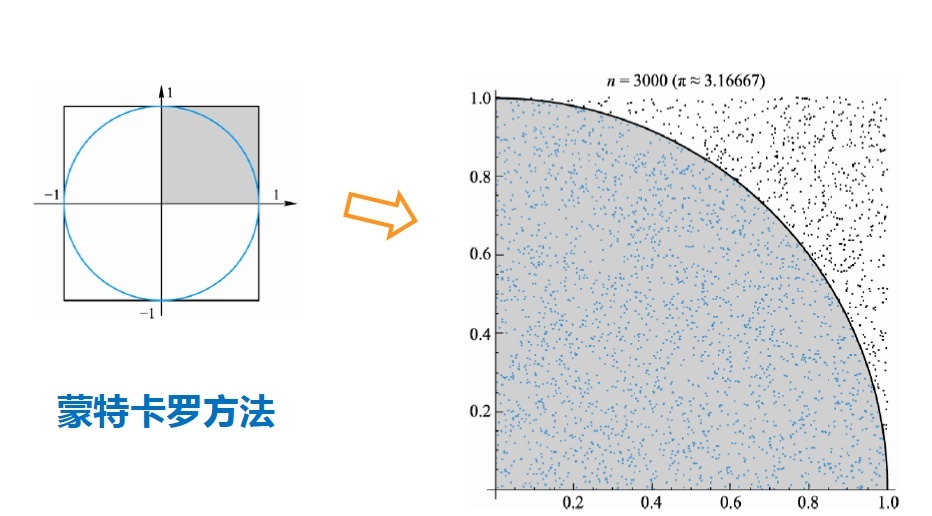
import random

count = 0

for i in range(1000000):

    x, y = random.random(), random.random()

    distance = pow(x**2 + y**2, 0.5)

    if distance < 1:

        count += 1

print(count/1000000*4)
if,for,异常,random模块,计算圆周率的更多相关文章
- 你真的用好了Python的random模块吗?
random模块 用于生成伪随机数 源码位置: Lib/random.py(看看就好,千万别随便修改) 真正意义上的随机数(或者随机事件)在某次产生过程中是按照实验过程中表现的分布概率随机产生的,其结 ...
- collections&time&random模块
一.collections模块 在内置数据类型(dict.list.set.tuple)的基础上,collections模块还提供了几个额外的数据类型:Counter.deque.defaultdic ...
- Python之路(第十三篇)time模块、random模块、string模块、验证码练习
一.time模块 三种时间表示 在Python中,通常有这几种方式来表示时间: 时间戳(timestamp) : 通常来说,时间戳表示的是从1970年1月1日00:00:00开始按秒计算的偏移量.(从 ...
- Python学习笔记:math模块(数学),random模块(随机数)
math模块 math模块用于数学意义上的一些计算,常用的方法有: math.pi:PI的值(3.141592653589793). math.floor(x):返回一个小于等于x的最大整数(浮点类型 ...
- python-Day5-深入正则表达式--冒泡排序-时间复杂度 --常用模块学习:自定义模块--random模块:随机验证码--time & datetime模块
正则表达式 语法: mport re #导入模块名 p = re.compile("^[0-9]") #生成要匹配的正则对象 , ^代表从开头匹配,[0 ...
- Python之数据加密与解密及相关操作(hashlib模块、hmac模块、random模块、base64模块、pycrypto模块)
本文内容 数据加密概述 Python中实现数据加密的模块简介 hashlib与hmac模块介绍 random与secrets模块介绍 base64模块介绍 pycrypto模块介绍 总结 参考文档 提 ...
- python模拟蒙特·卡罗法计算圆周率
蒙特·卡罗方法是一种通过概率来得到问题近似解的方法,在很多领域都有重要的应用,其中就包括圆周率近似值的计问题. 假设有一块边长为2的正方形木板,上面画一个单位圆,然后随意往木板上扔飞镖,落点坐标(x, ...
- random模块、time模块、sys模块、os模块
一.random模块 1.随机取小数 (数学计算) print(random.random()) #取0-1之间的小数 print(random.uniform(3,6)) #uniform( ...
- Python_Mix*random模块,time模块,sys模块,os模块
random模块 作用: 生成随机数(整数,小数,从列表中随机抽值,打乱列表顺序) 常用函数: random.random( )生成随机小数 random.uniform( )取一个范围之间的小数 r ...
随机推荐
- VS2019专业版和企业版激活密钥
Visual Studio 2019 Professional NYWVH-HT4XC-R2WYW-9Y3CM-X4V3Y Visual Studio 2019 EnterpriseBF8Y8-GN2 ...
- yum update 执行报错: error : unpacking of archive failed on file /usr/.../...;5d26ff7c: cpio : symlink
早前已发现有台机一直在报这么个错误, 一用yum update 就报一堆: Error: unpacking rpm package ..... error: xxxx : install faile ...
- 如何下载Youtube上的视频, 字幕, MP3等资源, 方法简单直接!
Youtube不用多说了吧,秒杀国内一众视频平台,没有之一, 既然关注Youtube说明大家对Youtube都是认同的.不用说4K,8K视频,比起国内一些伪4K, 真的良心, 就连广告也是5秒跳过, ...
- remote: http basic: access denied fatal: authentication failed for '‘解决办法
问题描述 由于这个项目代码使用https 进行clone,为什么?因为代码库ssh有问题!fuck! 导致在push代码的时候出现了 remote: http basic: access denied ...
- 洛谷P4169 [Violet]天使玩偶/SJY摆棋子
%%%神仙\(SJY\) 题目大意: 一个二维平面,有两种操作: \(1.\)增加一个点\((x,y)\) \(2.\)询问距离\((x,y)\)曼哈顿最近的一个点有多远 \(n,m\le 300 0 ...
- VS2017 Thrift编译出的Release版本的库调用报错LNK2001
在使用thrift的过程中, 当我使用完thrift debug版本编译出来的库调试完成后, 改成release版本的时候, 就出现了如下错误, 莫名其妙啊, 同一套代码, 那只能是编译库的时候设置和 ...
- 这几款我私藏的Markdown编辑器,今天分享给你
相信很多人都使用 Markdown 来编写文章,Markdown 语法简洁,使用起来很是方便,而且各大平台几乎都已支持 Markdown 语法 那么,如何选择一款趁手的 Markdown 编辑器,就是 ...
- Spark学习笔记01-基础
目录 简介 特性 Spark运行模式 Mac本地安装 本文基于 Spark 2.4.1 进行演示,相关代码可以在我的Github上看到. 简介 Spark是一个分布式集群计算系统,类似Hadoop提供 ...
- MYSQL5.6免安装版在windows下的使用
一.去MYSQL官网下载MYSQL免安装版,由于我的系统是64位的,所以就下载了64位的Mysql版本 http://cdn.mysql.com//Downloads/MySQL-5.6/mysql- ...
- SourceTree 版本跳过bitbucket注册方法
1.安装sourcetree时 需要选择 bitbucket账号,这个令人头疼 当然肯定有办法来跳过这一步 2.关闭当前安装界面 进入 C:\Users\Administrator\AppData ...