
CSS 笔记一(Selectors/ Backgrounds/ Borders/ Margins/ Padding/ Height and Width)
Selectors/ Backgrounds/ Borders/ Margins/ Padding/ Height and Width
CSS Introduction:
- CSS stands for Cascading Style Sheets
- CSS describes how HTML elements are to be displayed on screen, paper, or in other media
CSS Syntax
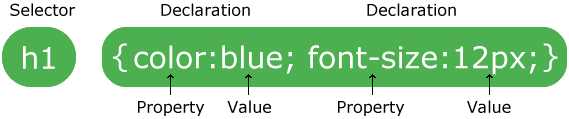
CSS Comments
- A CSS comment starts with /* and ends with */. Comments can also span multiple lines:
Example
  p {

     color: red;

     /* This is a single-line comment */

     text-align: center;

 }

 /* This is

 a multi-line

 comment */
CSS Selectors
- The element Selector
- The id Selector
- The class Selector
- Grouping Selectors
Example
 /* The element Selector */

 p {

     text-align: center;

     color: red;

 }

 /* The id Selector */

 #para1 {

     text-align: center;

     color: red;

 }

 /* The class Selector */

 .center {

     text-align: center;

     color: red;

 }

 p.center {

     text-align: center;

     color: red;

 }

 /* Grouping Selectors */

 h1, h2, p {

     text-align: center;

     color: red;

 }
Three Ways to Insert CSS
- External style sheet
- Internal style sheet
- Inline style
CSS Backgrounds
- background-color
- background-image
- background-repeat
- background-attachment
- background-position
1> Background Color
A color is most often specified by:
- a HEX value - like "#ff0000"
- an RGB value - like "rgb(255,0,0)"
- a valid color name - like "red"
2> Background Image
 body {

     background-image: url("bgdesert.jpg");

 }
3> Background Repeat
background-repeat: repeat|repeat-x|repeat-y|no-repeat|initial|inherit;
| Value | Description | Play it |
|---|---|---|
| repeat | The background image will be repeated both vertically and horizontally. This is default | Play it » |
| repeat-x | The background image will be repeated only horizontally | Play it » |
| repeat-y | The background image will be repeated only vertically | Play it » |
| no-repeat | The background-image will not be repeated | Play it » |
| initial | Sets this property to its default value. | Play it » |
| inherit | Inherits this property from its parent element. |
4> Background Attachment:
background-attachment: scroll|fixed|local|initial|inherit;
| Value | Description |
|---|---|
| scroll | The background scrolls along with the element. This is default |
| fixed | The background is fixed with regard to the viewport |
| local | The background scrolls along with the element's contents |
| initial | Sets this property to its default value. |
| inherit | Inherits this property from its parent element. |
5> Background Position:
background-position: value;
Property Values:
- [left/center/right] [top/center/bottom]
- x% y%
- xpos ypos (any CSS units)
- initial
- inherit
6> Background - Shorthand property
1 body {

     background: #ffffff url("img_tree.png") no-repeat right top;

 }
The order of the property values:
background-colorbackground-imagebackground-repeatbackground-attachmentbackground-position
CSS Borders
1> Border Style
dotted- Defines a dotted borderdashed- Defines a dashed bordersolid- Defines a solid borderdouble- Defines a double bordergroove- Defines a 3D grooved border. The effect depends on the border-color valueridge- Defines a 3D ridged border. The effect depends on the border-color valueinset- Defines a 3D inset border. The effect depends on the border-color valueoutset- Defines a 3D outset border. The effect depends on the border-color valuenone- Defines no borderhidden- Defines a hidden border
Example
 p.dotted {border-style: dotted;}

 p.dashed {border-style: dashed;}

 p.solid {border-style: solid;}

 p.double {border-style: double;}

 p.groove {border-style: groove;}

 p.ridge {border-style: ridge;}

 p.inset {border-style: inset;}

 p.outset {border-style: outset;}

 p.none {border-style: none;}

 p.hidden {border-style: hidden;}

 p.mix {border-style: dotted dashed solid double;}
Result
A dotted border.
A dashed border.
A solid border.
A double border.
A groove border. The effect depends on the border-color value.
A ridge border. The effect depends on the border-color value.
An inset border. The effect depends on the border-color value.
An outset border. The effect depends on the border-color value.
No border.
A hidden border.
A mixed border.
2> Border Width
- A specific size (in px, pt, cm, em, etc)
- Three pre-defined values: thin, medium, or thick.
3> Border Color
4> Border - Shorthand Property
The border property is a shorthand property for the following individual border properties:
border-widthborder-style(required)border-color
Example
 p {

     border: 5px solid red;

 }
CSS Margins
- The CSS margin properties are used to generate space around elements.
- The margin properties set the size of the transparent space OUTSIDE the border.
property values
- auto - the browser calculates the margin
- length - specifies a margin in px, pt, cm, etc.
- % - specifies a margin in % of the width of the containing element
- inherit - specifies that the margin should be inherited from the parent element
Note: It is also possible to use negative values for margins; to overlap content.
CSS Padding
- The CSS padding properties define the white space between the element content and the element border.
- The padding clears an area around the content (inside the border) of an element.
property values
- length - specifies a padding in px, pt, cm, etc.
- % - specifies a padding in % of the width of the containing element
- inherit - specifies that the padding should be inherited from the parent elemen
??Note: The padding is affected by the background color of the element!
CSS Height and Width Dimensions
- The
heightandwidthproperties are used to set the height and width of an element.
1> width,min-width,max-width
2> height,min-height,max-height
CSS 笔记一(Selectors/ Backgrounds/ Borders/ Margins/ Padding/ Height and Width)的更多相关文章
- 关于CSS和JS中用到的各种Height和Width的问题
自己记不住,列一下关于CSS和JS中用到的各类有关Height和Width属性的介绍对比. 所属类别 属性名 意义 其他 浏览器模型 Screen.height 浏览器窗口所在的屏幕的高度(单位像素) ...
- 【CSS】Beginner5:Margins&Padding
1.Properties for spacing-out elements 外边距:A margin is the space space outside something 内边距:padding ...
- CSS中的margin、border、padding区别
CSS padding margin border属性详解 图解CSS padding.margin.border属性W3C组织建议把所有网页上的对像都放在一个盒(box)中,设计师可以通过创建定义来 ...
- [html]CSS中的margin、border、padding区别
图解CSS padding.margin.border属性W3C组织建议把所有网页上的对像都放在一个盒(box)中,设计师可以通过创建定义来控制这个盒的属性,这些对像包括段落.列表.标题.图片以及层. ...
- CSS中的margin、border和padding的区别
aaarticlea/gif;base64,R0lGODlhuQEbAbMAAP8AM8zMzGZmYszMmZmZZkIP/5qE/8zM/wICApmZmf//zP///wAAAAAAAAAAAA
- CSS笔记
初级篇===========================选择器============================元素选择器css:h1{color: red}html:<h1> ...
- html+css笔记
文档结构 1.html文档结构 ①文档类型声明 严格型(标准模式): <!DOCTYpE HTML> HTML5 XHTML 1.0:<!DOCTYpE html pUbL ...
- CSS笔记(十五)CSS3之用户界面
参考:http://www.w3school.com.cn/css3/css3_user_interface.asp 在 CSS3 中,新的用户界面特性包括重设元素尺寸.盒尺寸以及轮廓等. 新的用户界 ...
- CSS笔记(三)背景
CSS 允许应用纯色作为背景,也允许使用背景图像创建相当复杂的效果. 参考:http://www.w3school.com.cn/css/css_background.asp 背景色 p {backg ...
随机推荐
- express3.0安装并使用layout模板
转自:http://cnodejs.org/topic/5073989b01d0b801480520e4 1.安装 express-partials. 方法一:运行 cmd 用 npm install ...
- [zt]系统中常用MIPS指令
指令 功能 应用实例 LB 从存储器中读取一个字节的数据到寄存器中 LB R1, 0(R2) LH 从存储器中读取半个字的数据到寄存器中 LH R1, 0(R2) LW 从存储器中读取一个字的数据到寄 ...
- Logistic Regression Vs Decision Trees Vs SVM: Part I
Classification is one of the major problems that we solve while working on standard business problem ...
- CSS3 Animation
animation:[<animation-name> || <animation-duration> || <animation-timing-function> ...
- 测试常用SQL注入语句大全
转载自Cracer,标题:<渗透常用SQL注入语句大全>,链接http://www.xxxx.com/?p=2226 1.判断有无注入点 整形参数判断 1.直接加' 2.and 1=1 3 ...
- Orale介绍
Oracle数据库: 是甲骨文公司的一款关系数据库管理系统 具有网格计算的框架 数据量大,并发操作比较多,实时性要求高,采取ORACLE数据库 Oracle数据库的体系结构包括物理存储结构和逻辑存储结 ...
- 让Session失效的三种方法
我们设置SESSION失效的时间,是为了确保在用户长时间不与服务器交互的情况下,可以自动退出登录.本文介绍了三种设置SESSION失效的方法,希望对你有帮助. Session对象是HttpSessio ...
- Linux下一些有用的指令
1. 安装源代码包用到的configure 这用来定位安装位置. 用法: ./configure -prefix=<安装目录>, 前提是文件中有configure执行文件.
- Android课程---首学开发
新建一个Activity2类: package com.hanqi.test; import android.app.Activity; import android.os.Bundle; impor ...
- Vim配置文件备忘
"我的配置 """""""""其他"""""&qu ...