
Windows Azure Service Bus (6) 中继(Relay On) 使用VS2013开发Service Bus Relay On
《Windows Azure Platform 系列文章目录》
注意:本文介绍的是国内由世纪互联运维的Windows Azure服务。
项目文件请在这里下载。
我们在使用Azure平台的时候,经常会遇到本地应用和云端应用进行互通互连的情况。
在这种混合云的场景下,我们可以通过以下方式解决:
一.Point-To-Site VPN
将本地的一台设备(Point),与云端的网络(Site)进行互通互联。
- 这里的Point指的就是企业内网的一台主机(VPN客户端)
- 这里的Site是指Azure Virtual Network的网络
- 这样可以实现将企业内网的一台主机与云端网络互通互联,同时通过VPN保证网络的安全性
企业内网的主机需要安装VPN客户端
支持以下客户端操作系统:
Windows 7 (32位和64位)
Windows Server 2008 R2(仅支持64位)
Windows 8(32位和64位)
Windows Server 2012(仅支持64位)
Point-to-Site VPN是使用SSTP VPN协议
有兴趣的读者可以参考笔者之前的文章:
Windows Azure Virtual Network (8) 创建Azure Point-to-Site点到站点 VPN
二.Site-To-Site VPN
将本地的网络(Site)与云端的Azure虚拟网络(Site)进行互通互联。
Site-To-Site VPN的前提要求:
- 企业本地网络需要固定的公网IPV4地址
- 需要微软认证的VPN设备 or Windows Server 2012 RRAS
设备列表请参考:https://msdn.microsoft.com/en-us/library/azure/jj156075.aspx
- VPN设备必须在NAT设备的前面
Site-to-Site VPN是使用IPSec VPN协议
这篇文章我回头再写 :)
以上的方法都可以看出,Azure Virtual Network VPN的方式,都是基于TCP/IP网络协议的。
在很多场景下,实现Point-To-Site和Site-To-Site并不是非常容易。例如以下场景:
- 企业没有固定的公网IPV4地址
- 企业的IT策略,不允许设置Azure Site-To-Site VPN
在这种情况下,就可以使用Azure Service Bus Relay On实现应用层的混合云了。
Azure Service Bus Relay On技术:
- 不依赖于固定公网IPV4或者VPN设备
- 可以穿透NAT和防火墙设备
- 只需要本地数据中心打开HTTP 80端口或HTTPS 443端口
如下图:
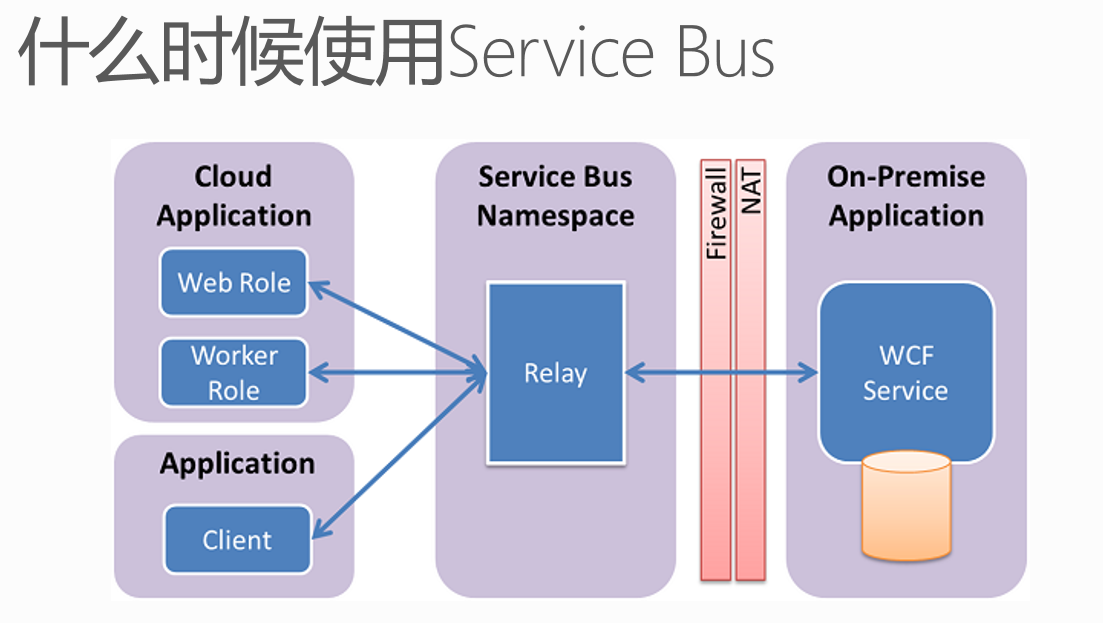
Azure Service Bus Relay On是通过HTTP, HTTPS实现应用的混合云。假设当需要把企业内网WCF应用服务发布到公网,被其他客户端进行调用的时候,只需要在企业内网允许HTTP需要80端口,或者HTTPS需要的443端口即可。
另外,企业内网的WCF应用服务,和客户端(外网)应用服务之间,不是直接调用的。而是首先需要将WCF服务,在Azure Service Bus Relay On进行注册,客户端(外网)应用才能调用被注册的Azure Service Bus Relay On。Azure Service Relay On概念上类似于代理服务器。

注意:Azure Service Bus在企业内网的应用目前只能支持WCF服务。
前面的介绍完了,现在进入Demo演示阶段。笔者模拟以下场景:
1.在企业内网中,有一台Web Service,上面部署了WCF服务
2.通过Azure Service Bus Relay On,将WCF注册到Service Bus上。
3.从Internet上的另外一台客户端机器,通过验证Service Bus的SAS验证方式,来调用Azure Service Bus Relay On上的服务。
以下项目分为三类:
- 使用PowerShell,创建Azure Service Bus Relay On
- 服务器端,将WCF服务注册到Azure Service Bus。因为WCF项目执行的时候,需要宿主,本项目以Windows Console为宿主。
- 客户端,Internet上的机器,调用Azure Service Bus注册的WCF服务
一.使用PowerShell,创建Azure Service Bus Relay On
请读者注意,Azure Service Bus Relay On只能通过PowerShell来创建。如何读者已经通过Management Portal,创建了Azure Service的话,是不能正常使用Relay On功能的。需要删除,然后通过PowerShell重建。
1.我们使用管理员身份,运行Azure PowerShell
2.假设读者有多个Azure订阅的情况下,切换当前订阅
Select-AzureSubscription '[YourSubscriptionName]' -current
3.执行以下代码:
New-AzureSBNamespace -Name '[YourServiceBusName]' -NamespaceType 'Messaging' -Location '[YourLocation]'
例如笔者想创建的Service Bus名称为leiservicebus,位于China East数据中心
New-AzureSBNamespace -Name 'leizhangservicebus' -NamespaceType 'Messaging' -Location 'China East'
以下为执行结果截图:
4.可以在Azure Management Portal查看到创建结果。我们还可以查看Service Bus的连接字符串,如下图:

注意:客户端是否可以连接Azure Service Bus Relay是通过上面的连接字符串来验证的。
以上,创建Azure Service Bus Relay On的工作就完成了。
二.服务器端,将WCF服务注册到Azure Service Bus
接下来,我们使用管理员身份,运行Visual Studio 2013。创建一个新的项目,重名为SBRelay。
1.增加Windows Console Library,命名为SBRelayServer
2.在Program.cs增加以下代码:
using System;

using System.Collections.Generic;

using System.Linq;

using System.Text;

using System.Threading.Tasks;

using System.ServiceModel;

using Foundation;

using Microsoft.ServiceBus;

using System.ServiceModel.Description;

namespace SBRelayServer

{

    class Program

    {

        static void Main(string[] args)

        {

            var tokenProvider = TokenProvider.CreateSharedAccessSignatureTokenProvider("RootManageSharedAccessKey", "+LSd5njWikUZEi+RY/NpkkR/GL3PlpVRGCv23gwKrM0=");

            var serviceHost = new ServiceHost(typeof(EchoService));

            var serviceEndpoint = serviceHost.AddServiceEndpoint(

                typeof(IEcho),

                new NetTcpRelayBinding(),

                "sb://leizhangservicebus.servicebus.chinacloudapi.cn/echo");

            serviceEndpoint.Behaviors.Add(new TransportClientEndpointBehavior(tokenProvider));

            serviceHost.Open();

            Console.WriteLine("Press ENTER to close");

            Console.ReadLine();

            serviceHost.Close();

        }

    }

}
注意:上图的TokenProvider为我们的SAS密钥。
上面的应用程序中,会将本地的WCF注册到云端的Azure Service Bus,地址为sb://leizhangservicebus.servicebus.chinacloudapi.cn/echo
3.记得在项目文件中,使用NuGet,下载Azure Service Bus Package,如下图所示

4.在SBRelayServer项目中,增加EchoService.cs,输入以下代码:
using Foundation;

using System;

using System.Collections.Generic;

using System.Linq;

using System.Text;

using System.Threading.Tasks;

namespace SBRelayServer

{

    class EchoService : IEcho

    {

        public string GetValue()

        {

            return "Hello World!";

        }

    }

}
服务器端会返回给客户端字符串,内容为Hello World!
三.客户端,从客户端调用
1.增加Windows Console Library,命名为SBRelayClient
2.在Program.cs中,增加如下代码:
using Microsoft.ServiceBus;

using System;

using System.Collections.Generic;

using System.Linq;

using System.ServiceModel;

using System.Text;

using System.Threading.Tasks;

using Foundation;

using System.Diagnostics;

namespace SBRelayClient

{

    class Program

    {

        static void Main(string[] args)

        {

            var binding = new NetTcpRelayBinding();

            var channelFactory = new ChannelFactory<IEchoChannel>

            (

               binding,

               new EndpointAddress("sb://leizhangservicebus.servicebus.chinacloudapi.cn/echo")

           );

            channelFactory.Endpoint.EndpointBehaviors.Add(new TransportClientEndpointBehavior { TokenProvider = TokenProvider.CreateSharedAccessSignatureTokenProvider("RootManageSharedAccessKey", "+LSd5njWikUZEi+RY/NpkkR/GL3PlpVRGCv23gwKrM0=") });

            using (var ch = channelFactory.CreateChannel())

            {

                Stopwatch sw = new Stopwatch();

                sw.Start();

                string returnValue = ch.GetValue();

                sw.Stop();

                Console.WriteLine("Get {0} From WCF Server", returnValue);

            }

            Console.ReadLine();

        }

    }

}
上面的代码中,会从服务器读取GetValue方法,返回给客户端字符串。
如何执行该代码?
1.编译项目文件
2.执行服务器端项目,SBRelayServer项目下的SBRelayServer.exe。
3.等到服务器端项目,SBRelayServer.exe命令行显示Press ENTER to close,请不要关闭SBRelayServer.exe
4.执行客户端项目,SBRelayClient项目下的SBRelayClient.exe
5.下图中,左侧为服务器端命令行界面,右侧为客户端命令行结果,其中的Hello World即为服务器的返回值。

本博-三石Blog(下文简称本博),在本博客文章结尾处右下脚未注明转载、来源、出处的作品(内容)均为本博原创,本站对于原创作品内容对其保留版权,请勿随意转载,如若真有需要的朋友可以发Mail联系我;转载本博原创作品(内容)也必须遵循“署名-非商业用途-保持一致”的创作共用协议,请务必以文字链接的形式标明或保留文章原始出处和博客作者(Lei Zhang)的信息,关于本博摄影作品请务必注意保留(www.cnblog.com/threestone)等相关水印版权信息,否则视为侵犯原创版权行为;本博谢绝商业网站转载。版权所有,禁止一切有违中华人民共和国著作权保护法及相关法律和本博(法律)声明的非法及恶意抄袭。
Windows Azure Service Bus (6) 中继(Relay On) 使用VS2013开发Service Bus Relay On的更多相关文章
- Windows Azure Service Bus (3) 队列(Queue) 使用VS2013开发Service Bus Queue
<Windows Azure Platform 系列文章目录> 在之前的Azure Service Bus中,我们已经介绍了Service Bus 队列(Queue)的基本概念. 在本章中 ...
- Windows Azure Service Bus (5) 主题(Topic) 使用VS2013开发Service Bus Topic
<Windows Azure Platform 系列文章目录> 项目文件,请在这里下载 在笔者之前的文章中Windows Azure Service Bus (1) 基础 介绍了Servi ...
- Windows Azure HandBook (5) Azure混合云解决方案
<Windows Azure Platform 系列文章目录> 在很多情况下,我们都会遇到本地私有云和公有云做互通互联的混合云场景.对于这种混合云的场景,微软的Windows Azure会 ...
- Windows Azure Service Bus (4) Service Bus Queue和Storage Queue的区别
<Windows Azure Platform 系列文章目录> 熟悉笔者文章的读者都了解,Azure提供两种不同方式的Queue消息队列: 1.Azure Storage Queue 具体 ...
- Windows Azure Cloud Service (11) PaaS之Web Role, Worker Role(上)
<Windows Azure Platform 系列文章目录> 本文是对Windows Azure Platform (六) Windows Azure应用程序运行环境内容的补充. 我们知 ...
- [Windows Azure] Building worker role B (email sender) for the Windows Azure Email Service application - 5 of 5.
Building worker role B (email sender) for the Windows Azure Email Service application - 5 of 5. This ...
- [Windows Azure] Building worker role A (email scheduler) for the Windows Azure Email Service application - 4 of 5.
Building worker role A (email scheduler) for the Windows Azure Email Service application - 4 of 5. T ...
- [Windows Azure] Windows Azure Web Sites, Cloud Services, and VMs: When to use which?
This document provides guidance on how to make an informed decision in choosing between Windows Azur ...
- [Windows Azure] Windows Azure Execution Models
Windows Azure Execution Models Windows Azure provides different execution models for running applica ...
随机推荐
- Manifesto of the Communist Party
A spectre is haunting Europe – the spectre of communism. All the powers of old Europe have entered i ...
- TCPDF 6.0.036 发布,PHP 的 PDF 操作包
TCPDF 6.0.036 包含对注册色彩的支持. TCPDF是一个用于快速生成PDF文件的PHP5函数包.TCPDF基于FPDF进行扩展和改进.支持UTF-8,Unicode,HTML和XHTML.
- node.js-session问题
在使用express使用session时发现怎么使用session都是undefined最后发现 app.use(express.cookieParser()); app.use(express.se ...
- 如何使用硬盘安装debian8.3?
环境:能开机的windowsxp系统+debian8.3cd+wingrub 大致原理:使用wingrub编辑启动菜单,编辑root根目录,加载相对根目录的linux内核kernel,加载initrd ...
- google搜索技巧汇总
由于不能访问google,可访问ggso.in进行搜索. 简单整理记录一下常用的一些Google搜索技巧:或操作一般搜索时,如果输入多个词,默认是与的关系,如输入词1和词2,即搜索同时包含词1和词2的 ...
- 【腾讯Bugly干货分享】Android ListView与RecyclerView对比浅析--缓存机制
本文来自于腾讯bugly开发者社区,非经作者同意,请勿转载,原文地址:http://dev.qq.com/topic/5811d3e3ab10c62013697408 作者:黄宁源 一,背景 Recy ...
- Backbone源码解析(三):Collection模块
Collection模块式是对分散在项目中model的收集,他可以存储所有的model,构成一个集合,并且通过自身的方法统一操作model.Collection模块包装着若干对象,对象本身不具有一些方 ...
- Java多线程4:synchronized锁机制
脏读 一个常见的概念.在多线程中,难免会出现在多个线程中对同一个对象的实例变量进行并发访问的情况,如果不做正确的同步处理,那么产生的后果就是"脏读",也就是取到的数据其实是被更改过 ...
- Javascript定时器学习笔记
掌握定时器工作原理必知:JavaScript引擎是单线程运行的,浏览器无论在什么时候都只且只有一个线程在运行JavaScript程序. 常言道:setTimeout和setInterval是伪线程. ...
- Hadoop日记Day17---计数器、map规约、分区学习
一.Hadoop计数器 1.1 什么是Hadoop计数器 Haoop是处理大数据的,不适合处理小数据,有些大数据问题是小数据程序是处理不了的,他是一个高延迟的任务,有时处理一个大数据需要花费好几个小时 ...