
.NetCore技术研究-EntityFramework Core 3.0 Preview
前段时间.Net Core 3.0 发布了,Entity Framework Core 3.0 也发布了Preview版。假期用了一上午大致研究了一遍,同时又体验了一把Visual Studio 2019。总结一下分享给大家:
- VS2019 新建.Net Core 3.0 Console应用,添加EFCore相关的Nuget引用
- 增加appSettings.json配置文件,配置数据库连接
- 新建OneToMany模型,使用EF Core完成数据库操作
一、VS2019 新建.Net Core 3.0 Console应用,添加EFCore相关的Nuget引用
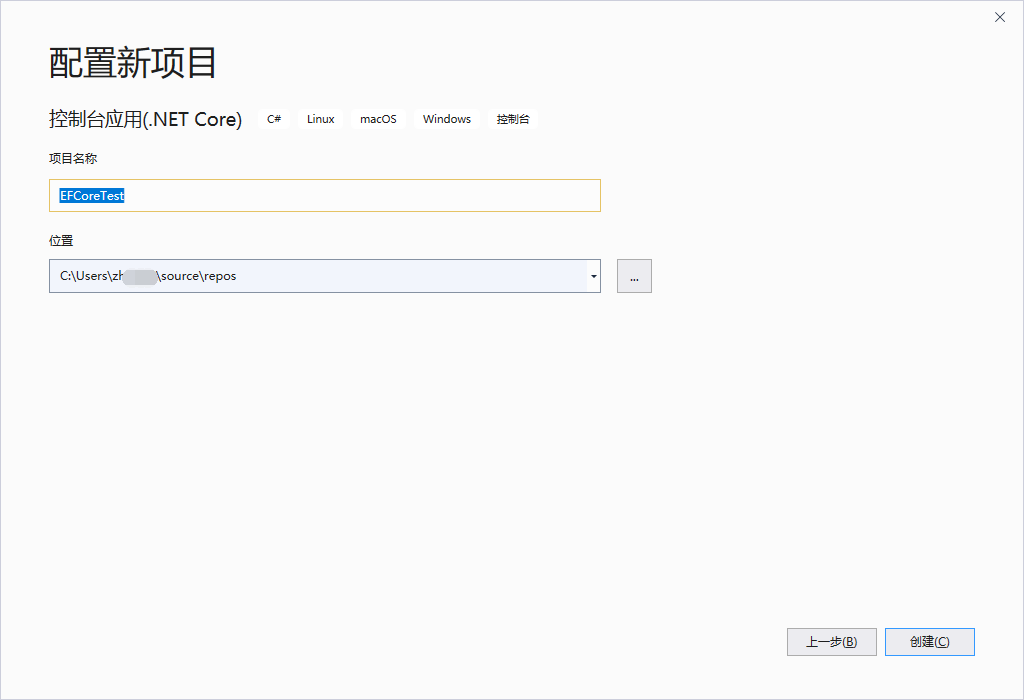
1. 新建.Net Core控制台应用 EFCoreTest

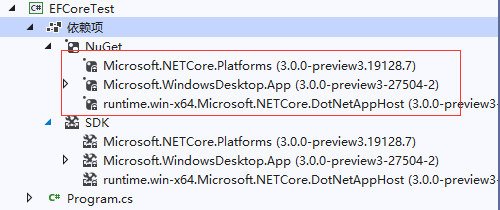
新建完成后,查看项目的依赖性,我们可以看到:
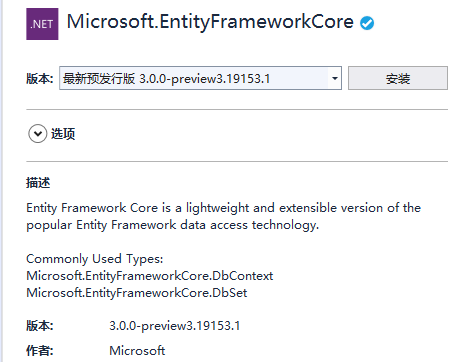
2. 添加Microsoft.EntityFrameworkCore 3.0 Preview版 Nuget引用
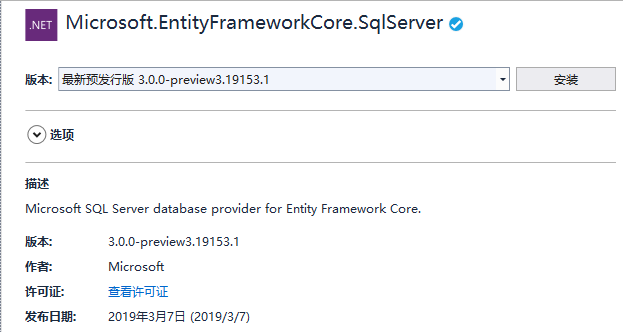
同时添加Microsoft.EntityFrameworkCore.SqlServer3.0 Nuget引用(我们要用到SQL Server)
这样我们就完成了项目的初始化。
二、增加appsettings.json配置文件,配置数据库连接
1. 项目中添加appsettings.json文件
配置文件的内容如下:
{"ConnectionStrings": {"BizDatabase": "Server=127.0.0.1;Database=master;User id=sa;password=******" }}
2. 访问这个appsettings.json配置文件我们需要引用以下Nuget包:版本用的都是:3.0.0-preview3.19153.1
- Microsoft.Extensions.Configuration
- Microsoft.Extensions.Configuration.Json
三、新建OneToMany模型,使用EF Core完成数据库操作
这里以充电站和集控为例,1:M的关联关系。
这里我们同时使用了EF的注解,示例了个性化数据库表结构。以及外键关系
using System;

using System.Collections.Generic;

using System.ComponentModel.DataAnnotations;

using System.ComponentModel.DataAnnotations.Schema;

using System.Text;

namespace EFCoreTest

{

    /// <summary>

    /// 充电站

    /// </summary>

    [Table("Stations")]

    public class ChargeStation

    {

        [Key]

        [Column("ID")]

        public string ID { get; set; }

        [Required]

        [Column("Code")]

        public string Code { get; set; }

        [Required]

        [Column("Name")]

        public string Name { get; set; }

        [Required]

        [Column("MaintainTel")]

        public long MaintainTel { get; set; }

        [ForeignKey("StationID")]

        public virtual List<ChargeStationController> Controllers { get; set; }

    }

}
using System;

using System.Collections.Generic;

using System.ComponentModel.DataAnnotations;

using System.ComponentModel.DataAnnotations.Schema;

using System.Text;

namespace EFCoreTest

{

    /// <summary>

    /// 电站集控

    /// </summary>

    [Table("StationCtrl")]

    public class ChargeStationController

    {

        [Key]

        [Column("ID")]

        public string ID { get; set; }

        [Required]

        [Column("Code")]

        public string Code { get; set; }

        [Required]

        [Column("ControlAddress")]

        public string ControlAddress { get; set; }

        [Required]

        [Column("StationID")]

        [ForeignKey("StationID")]

        public string StationID { get; set; }

    }

}
实体及关联关系搞定后,我们介绍今天的主角 DbContext的实现:ChargeDbContext
ChargeDbContext 有几个重要的属性和方法:
public DbSet<ChargeStation> Stations { get; set; }
public DbSet<ChargeStationController> StationCtrl { get; set; }
重载OnConfiguring方法,加载配置系统、数据库连接串
 public class ChargeDbContext : DbContext

    {

        public DbSet<ChargeStation> Stations { get; set; }

        public DbSet<ChargeStationController> StationCtrl { get; set; }

        protected override void OnConfiguring(DbContextOptionsBuilder optionsBuilder)

        {

            var builder = new ConfigurationBuilder()

           .SetBasePath(Directory.GetCurrentDirectory())

           .AddJsonFile("appsettings.json");

            var configuration = builder.Build();

            var conn = configuration.GetConnectionString("BizDatabase");

            optionsBuilder.UseSqlServer(conn);

        }

    }
至此, 核心主要的EFCore 代码已经完成,我们继续来实现对ChargeStation的数据库操作:
我们在Main函数中实现对ChargeStation和ChargeStationController的删除和保存操作,以下代码,大家用过EF应该很熟悉:
 class Program

    {

        static void Main(string[] args)

        {

            using (var context = new ChargeDbContext())

            {

                foreach (var sta in context.Stations.Include(i => i.Controllers))

                {

                    context.Remove(sta);

                }

                context.SaveChanges();

                var station = new ChargeStation

                {

                    ID = "Station0001",

                    Code = "Station0001",

                    Name = "济南市奥体中路汉庭充电站",

                    MaintainTel = ,

                    Controllers = new System.Collections.Generic.List<ChargeStationController>

                    {

                         new ChargeStationController

                         {

                              ID = "Station0001-101",

                              Code =  "Station0001-101",

                              ControlAddress = "",

                              StationID = "Station0001"

                         }

                    }

                };

                context.Stations.Add(station);

                context.SaveChanges();

                Console.WriteLine("Press any key!");

                Console.ReadKey();

            }

        }

    }
以上即是EntityFramework Core 3.0 Preview 体验和使用分享,后续有会有一篇文章介绍在Debug时,如何Trace SQL语句。
周国庆
2019/4/6
.NetCore技术研究-EntityFramework Core 3.0 Preview的更多相关文章
- .NetCore技术研究-.NET Core迁移前的准备工作
前段时间迁移.NET Core做了大量的试水和评估,今天整理一下分享给大家.大致有以下几个部分: 1. .NET Core的由来 2. 为什么要迁移.NET Core 3. .NET Core3.X主 ...
- 【译】.NET Core 3.0 Preview 3中关于ASP.NET Core的更新内容
.NET Core 3.0 Preview 3已经推出,它包含了一系列关于ASP.NET Core的新的更新. 下面是该预览版的更新列表: Razor组件改进: 单项目模板 新的Razer扩展 E ...
- asp.net core 1.1 项目升级至 asp.net core 2.0 preview 2 与正式版
这两天把一个 asp.net core 1.1 的项目迁移到了 asp.net core 2.0 preview 2 ,在这篇随笔中记录一下. 如果项目在有 global.json 文件,需要删除或修 ...
- 用VS Code体验调试.NET Core 2.0 Preview (传统三层架构)
准备工作 VS Code下载地址:https://vscode.cdn.azure.cn/stable/379d2efb5539b09112c793d3d9a413017d736f89/VSCodeS ...
- EntityFramework Core 2.0执行原始查询如何防止SQL注入?
前言 接下来一段时间我们来讲讲EntityFramework Core基础,精简的内容,深入浅出,希望为想学习EntityFramework Core的童鞋提供一点帮助. EntityFramewor ...
- EntityFramework Core 2.0全局过滤(HasQueryFilter)
前言 EntityFramework Core每一次版本的迭代和更新都会带给我们惊喜,每次都会尽量满足大部分使用者的需求.在EF Core 2.0版本中出现了全局过滤新特性即HasQueryFilte ...
- EntityFramework Core 2.0 Explicitly Compiled Query(显式编译查询)
前言 EntityFramework Core 2.0引入了显式编译查询,在查询数据时预先编译好LINQ查询便于在请求数据时能够立即响应.显式编译查询提供了高可用场景,通过使用显式编译的查询可以提高查 ...
- selenium相关技术研究(从1.0-3.0)
注: 以下内容引自http://www.cnblogs.com/hhudaqiang/p/6550135.html Selenium相关技术研究(从1.0-3.0) 好吧,最近看wxpython有点多 ...
- .NET Core 2.0 Preview 1发布下载和文档
.NET Core 2.0.0 Preview 1 发布于 2017 5.10. 你可以通过 Visual Studio 2017 Preview 15.3, Visual Studio for Ma ...
随机推荐
- Lesnoe Ozero 2017. BSUIR Open 2017
A. Tree Orientation 树形DP,$f[i][j][k]$表示$i$的子树中有$j$个汇点,$i$往父亲的树边方向为$k$的方案数. 转移则需要另一个DP:$g[i][j][k]$表示 ...
- css 浮动布局,清除浮动
浮动的特性: (1)浮动元素有左浮动(float:left)和右浮动(float:right)两种 (2)浮动的元素会向左或向右浮动,碰到父元素边界.其他元素才停下来 (3)相邻浮动的块元素可以并在一 ...
- [LeetCode] Expressive Words 富于表现力的单词
Sometimes people repeat letters to represent extra feeling, such as "hello" -> "he ...
- js_js流程控制
1.表达式.语句 2.流程控制 顺序 分支 循环 分支 循环结构都有一个条件 循环结构:重复做一件事 3元运算符 switch语句(用来做相等性判断--优先考虑) 注意: 1.switch ...
- 学习STM32单片机,从菜鸟到牛人就是这样简单(配视频资料)
我想说,为了学习单片机而去学习单片机的思路不对. 你问,如何系统地入门学习stm32? 本身就是一个错误的问题.假如你会使用8051 , 会写C语言,那么STM32本身并不需要刻意的学习. 你要考虑的 ...
- JAVA的第一次作业
读后感:这个学期开始接触一门新的学科就是JAVA,老师对这么学科介绍了很多,我也从中了解到了许多,它可能是相对于C语言而已可能要更加方便一些,也是现在世界上所用最多的语音(软件方面),C语言都是排在它 ...
- 队列->队列的应用(银行业务模拟)
文字描述 示意图 代码实现 // // Created by Zhenjie Yu on 2019-04-13. // #include <stdio.h> #include <st ...
- 解决spring 用@Value注入配置时候出现中文乱码问题
只要是乱码,很明显需要指定编码格式,为utf-8 <!-- 注解使用properties --> <bean id="configProperties" clas ...
- docker-compose介绍
docker-compose 常用命令 Commands: build Build or rebuild services bundle Generate a Docker bundle from t ...
- 【记录tomcat报错解决办法】tomcat请求组件没有找到的问题
报错原因: An incompatible version 1.1.14 of APR based Apache Tomcat Native library is installed, while T ...