
scapy--初识
常用的包结构:
(1)OSI 5层模型

OSI中的层   功能 TCP/IP协议族

 应用层    文件传输,电子邮件,文件服务,虚拟终端 TFTP,HTTP,SNMP,FTP,SMTP,DNS,Telnet

 传输层    提供端对端的接口 TCP,UDP

 网络层       为数据包选择路由 IP,ICMP,RIP,OSPF,BGP,IGMP

 数据链路层   传输有地址的帧以及错误检测功能 SLIP,CSLIP,PPP,ARP,RARP,MTU

 物理层    以二进制数据形式在物理媒体上传输数据 ISO2110,IEEE802,IEEE802.2
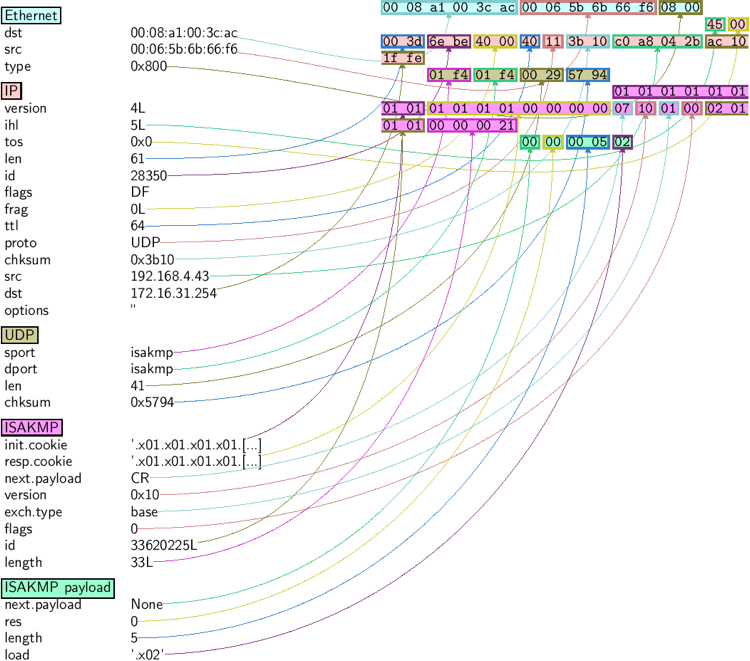
 常用包的数据结构:

>>> ls(Ether)

dst        : DestMACField                        = (None)

src        : SourceMACField                      = (None)

type       : XShortEnumField                     = (36864)

>>> ls(UDP)

sport      : ShortEnumField       = (53)

dport      : ShortEnumField       = (53)

len        : ShortField           = (None)

chksum     : XShortField          = (None)

>>> ls(TCP)

sport      : ShortEnumField                      = (20)

dport      : ShortEnumField                      = (80)

seq        : IntField                            = (0)

ack        : IntField                            = (0)

dataofs    : BitField (4 bits)                   = (None)

reserved   : BitField (3 bits)                   = (0)

flags      : FlagsField (9 bits)                 = (<Flag 2 (S)>)

window     : ShortField                          = (8192)

chksum     : XShortField                         = (None)

urgptr     : ShortField                          = (0)

options    : TCPOptionsField                     = ([])

 >>> ls(IP)

version    : BitField (4 bits)                   = (4)

ihl        : BitField (4 bits)                   = (None)

tos        : XByteField                          = (0)

len        : ShortField                          = (None)

id         : ShortField                          = (1)

flags      : FlagsField (3 bits)                 = (<Flag 0 ()>)

frag       : BitField (13 bits)                  = (0)

ttl        : ByteField                           = (64)

proto      : ByteEnumField                       = (0)

chksum     : XShortField                         = (None)

src        : SourceIPField                       = (None)

dst        : DestIPField                         = (None)

options    : PacketListField                     = ([])

 >>> ls(ARP)

hwtype     : XShortField                         = (1)

ptype      : XShortEnumField                     = (2048)

hwlen      : ByteField                           = (6)

plen       : ByteField                           = (4)

op         : ShortEnumField                      = (1)

hwsrc      : ARPSourceMACField                   = (None)

psrc       : SourceIPField                       = (None)

hwdst      : MACField                            = ('00:00:00:00:00:00')

pdst       : IPField                             = ('0.0.0.0')

>>> ls(ICMP)

type       : ByteEnumField        = (8)

code       : MultiEnumField       = (0)

chksum     : XShortField          = (None)

id         : ConditionalField     = (0)

seq        : ConditionalField     = (0)

ts_ori     : ConditionalField     = (79546771)

ts_rx      : ConditionalField     = (79546771)

ts_tx      : ConditionalField     = (79546771)

gw         : ConditionalField     = ('0.0.0.0')

ptr        : ConditionalField     = (0)

reserved   : ConditionalField     = (0)

addr_mask  : ConditionalField     = ('0.0.0.0')

unused     : ConditionalField     = (0)

>>> ls(DNS)

id         : ShortField           = (0)

qr         : BitField             = (0)

opcode     : BitEnumField         = (0)

aa         : BitField             = (0)

tc         : BitField             = (0)

rd         : BitField             = (0)

ra         : BitField             = (0)

z          : BitField             = (0)

rcode      : BitEnumField         = (0)

qdcount    : DNSRRCountField      = (None)

ancount    : DNSRRCountField      = (None)

nscount    : DNSRRCountField      = (None)

arcount    : DNSRRCountField      = (None)

qd         : DNSQRField           = (None)

an         : DNSRRField           = (None)

ns         : DNSRRField           = (None)

ar         : DNSRRField           = (None)
查看scapy函数

>>> lsc()

IPID_count          : Identify IP id values classes in a list of packets

arpcachepoison      : Poison target's cache with (your MAC,victim's IP) couple

arping              : Send ARP who-has requests to determine which hosts are up

bind_layers         : Bind 2 layers on some specific fields' values

bridge_and_sniff    : Forward traffic between interfaces if1 and if2, sniff and return

chexdump            :  Build a per byte hexadecimal representation

computeNIGroupAddr  : Compute the NI group Address. Can take a FQDN as input parameter

corrupt_bits        : Flip a given percentage or number of bits from a string

corrupt_bytes       : Corrupt a given percentage or number of bytes from a string

defrag              : defrag(plist) -> ([not fragmented], [defragmented],

defragment          : defrag(plist) -> plist defragmented as much as possible

dhcp_request        : --

dyndns_add          : Send a DNS add message to a nameserver for "name" to have a new "rdata"

dyndns_del          : Send a DNS delete message to a nameserver for "name"

etherleak           : Exploit Etherleak flaw

fletcher16_checkbytes:  Calculates the Fletcher-16 checkbytes returned as 2 byte binary-string.

fletcher16_checksum :  Calculates Fletcher-16 checksum of the given buffer.

fragleak            : --

fragleak2           : --

fragment            : Fragment a big IP datagram

fuzz                : Transform a layer into a fuzzy layer by replacing some default values by random objects

getmacbyip          : Return MAC address corresponding to a given IP address

getmacbyip6         : Returns the MAC address corresponding to an IPv6 address

hexdiff             : Show differences between 2 binary strings

hexdump             :  Build a tcpdump like hexadecimal view

hexedit             : --

hexstr              : --

import_hexcap       : --

is_promisc          : Try to guess if target is in Promisc mode. The target is provided by its ip.

linehexdump         :  Build an equivalent view of hexdump() on a single line

ls                  : List  available layers, or infos on a given layer class or name

neighsol            : Sends an ICMPv6 Neighbor Solicitation message to get the MAC address of the neighbor with specified IPv6 address addr

overlap_frag        : Build overlapping fragments to bypass NIPS

promiscping         : Send ARP who-has requests to determine which hosts are in promiscuous mode

rdpcap              : Read a pcap or pcapng file and return a packet list

report_ports        : portscan a target and output a LaTeX table

restart             : Restarts scapy

send                : Send packets at layer 3

sendp               : Send packets at layer 2

sendpfast           : Send packets at layer 2 using tcpreplay for performance

sniff               :

split_layers        : Split 2 layers previously bound

sr                  : Send and receive packets at layer 3

sr1                 : Send packets at layer 3 and return only the first answer

sr1flood            : Flood and receive packets at layer 3 and return only the first answer

srbt                : send and receive using a bluetooth socket

srbt1               : send and receive 1 packet using a bluetooth socket

srflood             : Flood and receive packets at layer 3

srloop              : Send a packet at layer 3 in loop and print the answer each time

srp                 : Send and receive packets at layer 2

srp1                : Send and receive packets at layer 2 and return only the first answer

srp1flood           : Flood and receive packets at layer 2 and return only the first answer

srpflood            : Flood and receive packets at layer 2

srploop             : Send a packet at layer 2 in loop and print the answer each time

tcpdump             : Run tcpdump or tshark on a list of packets

traceroute          : Instant TCP traceroute

traceroute6         : Instant TCP traceroute using IPv6

traceroute_map      : Util function to call traceroute on multiple targets, then

tshark              : Sniff packets and print them calling pkt.summary(), a bit like text wireshark

wireshark           : Run wireshark on a list of packets

wrpcap              : Write a list of packets to a pcap file
scapy--初识的更多相关文章
- Scrapy: 初识Scrapy
1.初识Scrapy Scrapy是为了爬取网站数据,提取结构性数据而编写的应用框架.可以应用在包括数据挖掘,信息处理或者存储历史数据等一系列的程序中. 2.选择一个网站 当需要从某个网站获取信息时, ...
- Android动画效果之初识Property Animation(属性动画)
前言: 前面两篇介绍了Android的Tween Animation(补间动画) Android动画效果之Tween Animation(补间动画).Frame Animation(逐帧动画)Andr ...
- 初识Hadoop
第一部分: 初识Hadoop 一. 谁说大象不能跳舞 业务数据越来越多,用关系型数据库来存储和处理数据越来越感觉吃力,一个查询或者一个导出,要执行很长 ...
- python学习笔记(基础四:模块初识、pyc和PyCodeObject是什么)
一.模块初识(一) 模块,也叫库.库有标准库第三方库. 注意事项:文件名不能和导入的模块名相同 1. sys模块 import sys print(sys.path) #打印环境变量 print(sy ...
- 初识IOS,Label控件的应用。
初识IOS,Label控件的应用. // // ViewController.m // Gua.test // // Created by 郭美男 on 16/5/31. // Copyright © ...
- UI篇(初识君面)
我们的APP要想吸引用户,就要把UI(脸蛋)搞漂亮一点.毕竟好的外貌是增进人际关系的第一步,我们程序员看到一个APP时,第一眼就是看这个软件的功能,不去关心界面是否漂亮,看到好的程序会说"我 ...
- Python导出Excel为Lua/Json/Xml实例教程(一):初识Python
Python导出Excel为Lua/Json/Xml实例教程(一):初识Python 相关链接: Python导出Excel为Lua/Json/Xml实例教程(一):初识Python Python导出 ...
- 初识SpringMvc
初识SpringMvc springMvc简介:SpringMVC也叫Spring Web mvc,属于表现层的框架.Spring MVC是Spring框架的一部分,是在Spring3.0后发布的 s ...
- 初识redis数据类型
初识redis数据类型 1.String(字符串) string是redis最基本的类型,一个key对应一个value. string类型是二进制安全的.意思是redis的string可以包含任何数据 ...
- Redis初识、设计思想与一些学习资源推荐
一.Redis简介 1.什么是Redis Redis 是一个开源的使用ANSI C 语言编写.支持网络.可基于内存亦可持久化的日志型.Key-Value 数据库,并提供多种语言的API.从2010 年 ...
随机推荐
- Day4下午
不会啊. T1 找规律: 辗转相减,加速. #include<iostream> #include<cstring> #include<cstdio> #inclu ...
- php中配置伪静态
mod_rewrite是Apache的一个非常强大的功能,它可以实现伪静态页面.下面我详细说说它的使用方法 1.检测Apache是否支持mod_rewrite 通过php提供的phpinfo()函数查 ...
- NIM(1) 一排石头的游戏
最近在实习面试过程中,一个朋友遇到了该问题,从简单到复杂的思路如下,希望能给遇到相同问题的朋友一些启发和帮助.(内容来源网络和<编程之美>) 1.问题1 100个苹果 桌上有100个苹果, ...
- node安装express时找不到pakage.json文件;判断安装成功?
正常安装命令:express install express --save 报错如下:no such file or directory,open 'C:\Users\Administrator\pa ...
- Android基础Activity篇——销毁活动
销毁活动只需要添加 finish(); 这个方法即可.相当于back键.
- maven struts2工程StrutsPrepareAndExecuteFilter cannot be cast to javax.servlet.Filter
maven搭建struts2工程时报错 严重: Exception starting filter struts2java.lang.ClassCastException: org.apache.st ...
- NFS笔记(二)NFS服务器配置实例
一.NFS服务器配置实例实验拓扑 二.实验要求及环境 2.1实验环境 NFS服务器 IP:192.168.8.5环境:[root@server7 ~]# uname -aLinux server7.c ...
- April 22 2017 Week 16 Saturday
Fear is an essential part of our survival, it keeps us alert. 恐惧是生存的重要部分,它让我们保持警惕. Fear and pain are ...
- C4C和Outlook的集成
从C4C系统下载Outlook的Addin, 安装之后,会在Outlook里看见一个新的面板: 点击Log On登录: 如果需要的话,在Settings里设置proxy. 登录之后,即可立即在outl ...
- VUE的组件DEMO
组件的基本写法可以如下: HTML: <div id="components-demo"> <button-counter self-data="thi ...