
Python--命令行参数解析Demo
写没有操作界面的程序时,最讨厌的就是参数解析问题,尤其是很多参数那种,下面是一个小Demo,拿出来与各位分享:
 # -*- coding:utf8 -*-

 import os

 import datetime

 import sys

 from optparse import OptionParser

 def get_user_paras():

     try:

         opt = OptionParser()

         opt.add_option('--host_ip',

                        dest='host_ip',

                        type=str,

                        help='the ip of the check host')

         opt.add_option('--run',

                        action="store_true",

                        dest="is_run",

                        default=False,

                        help="run the scripts")

         opt.add_option('--view',

                        action="store_false",

                        dest="is_run",

                        default=False,

                        help="only view but not run the scripts")

         opt.add_option('--show_type',

                        dest="show_type",

                        type=int,

                        default=0,

                        help="0 or 1, 0 only show the simple data, 1 show the full data")

         (options, args) = opt.parse_args()

         is_valid_paras = True

         error_messages = []

         host_ip = options.host_ip

         is_run = options.is_run

         show_type = options.show_type

         if not host_ip:

             error_messages.append("host_ip must be set;")

             is_valid_paras = False

         if show_type not in [0, 1]:

             error_messages.append("show_type only can be 0 or 1;")

             is_valid_paras = False

         if is_valid_paras:

             user_paras = {"host_ip": host_ip, "is_run": is_run, "show_type": show_type}

             return user_paras

         else:

             for error_message in error_messages:

                 print(error_message)
               opt.print_help()

             return None

     except Exception as ex:

         print("exception :{0}".format(str(ex)))

         return None

 def main():

     user_paras = get_user_paras()

     if user_paras is None:

         sys.exit(0)

     info = "host_ip:{0}, is_run:{1}, show_type:{2}"

     info = info.format(user_paras["host_ip"],

                        user_paras["is_run"],

                        user_paras["show_type"])

     print(info)

 if __name__ == '__main__':

     main()
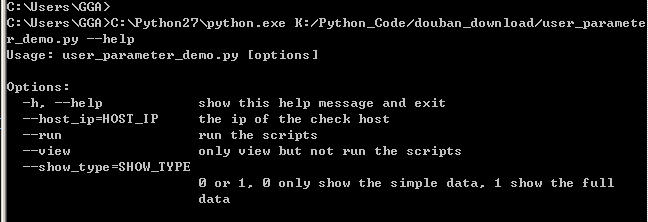
当使用OptionParser时,会自动增加--help和-h参数,也会自动生成参数帮助,如:
对于代码:
opt.add_option('--run',

               action="store_true",

               dest="is_run",

               default=False,

               help="run the scripts")
--run 表示参数名
action表示将参数值如何处理,常用的有store/store_true/store_false,store即字面意思,store_true即将True作为参数值传递给参数,store_false将False作为参数值传递给参数
dest表示命令行参数解析后的参数名,
上面代码中--run作为命令行参数传递进来,由于action为store_true,因此参数值为True,解析后的参数名为is_run,通过(options, args) = opt.parse_args() 赋值后,便可以使用options.is_run来放问参数值。
更多帮助:https://docs.python.org/2/library/optparse.html
##========================================================##
对于参数较多或者参数值较大的情况,个人还是比较喜欢使用参数配置文件来实现,简单而且方便编辑,如创建一个run_config.py文件:
# -*- coding:utf8 -*-

# run config

class RunConfig(object):

    is_run = True

    show_status = 1

    host_ip = "192.167.1.1"

    run_scripts = """

SELECT *

FROM TB001

WHERE ID >1000

AND C1<300

"""
然后在其他文件中访问:
# -*- coding:utf8 -*-

from run_config import RunConfig

def main():

    print("is_run:{0},  host_ip:{1}".format(RunConfig.is_run,RunConfig.host_ip))

    print("run_scripts:{0}".format(RunConfig.run_scripts))

if __name__ == '__main__':

    main()
简单粗暴,没那么麻烦,土豹子的做法哈!
##===================================================##

Python--命令行参数解析Demo的更多相关文章
- Python命令行参数解析模块getopt使用实例
Python命令行参数解析模块getopt使用实例 这篇文章主要介绍了Python命令行参数解析模块getopt使用实例,本文讲解了使用语法格式.短选项参数实例.长选项参数实例等内容,需要的朋友可以参 ...
- python命令行参数解析OptionParser类用法实例
python命令行参数解析OptionParser类用法实例 本文实例讲述了python命令行参数解析OptionParser类的用法,分享给大家供大家参考. 具体代码如下: from opt ...
- python命令行参数解析模块argparse和docopt
http://blog.csdn.net/pipisorry/article/details/53046471 还有其他两个模块实现这一功能,getopt(等同于C语言中的getopt())和弃用的o ...
- Python 命令行参数解析
方法1: Python有一个类可以专门处理命令行参数,先看代码: #!/usr/bin/env python # encoding: utf-8 from optparse import Option ...
- Python命令行参数解析模块argparse
当写一个Python脚本时经常会遇到不同参数不同功能的情况,如何做一个更好看的命令帮助信息以及对命令参数解析呢? 这就需要使用argparse模块 #!/usr/bin/env python # -* ...
- Python 命令行参数解析工具 argparse
为什么需要argparse 开门见山,举一个简易计算器代码的例子,其中sys.argv用来读取脚本执行时后面传入的参数. def calculator(x, y, operation): if &qu ...
- Python 中命令行参数解析工具 docopt 安装和应用
什么是 docopt? 1.docopt 是一种 Python 编写的命令行执行脚本的交互语言. 它是一种语言! 它是一种语言! 它是一种语言! 2.使用这种语言可以在自己的脚本中,添加一些规则限制. ...
- $命令行参数解析模块argparse的用法
argparse是python内置的命令行参数解析模块,可以用来为程序配置功能丰富的命令行参数,方便使用,本文总结一下其基本用法. 测试脚本 把以下脚本存在argtest.py文件中: # codin ...
- gflags命令行参数解析
gflags库是google开源的命令行参数解析工具. 安装 官方没有提供二进制库,但是Debian/Ubuntu平台本身提供了二进制库,可以直接git clone https://github.co ...
随机推荐
- [10]APUE:信号
[a] 常用信号 SIGABRT 调用 abort 函数时产生此信号,进程异常终止 SIGALRM 调用 alarm 或 setitimer 函数超时之后产生 SIGCHLD 子进程终止或 stop ...
- 网站内容禁止复制和粘贴、另存为的js代码(转)
1.使右键和复制失效 方法1: 在网页中加入以下代码: 代码如下: <script language="Javascript"> document.oncontextm ...
- TCP/IP入门(3) --传输层
原文:http://blog.csdn.net/zjf280441589/article/category/1854365 传输层的主要功能 1)传输层为应用进程之间提供端到端的逻辑通信(网络层是为主 ...
- ORACLE导入、导出命令使用方法
oracle导入.导出命令使用方法: 给用户增加导入数据权限的操作 第一,启动sql*puls 第二,以system/manager登陆 第三,create user 用户名 IDENTIFIED B ...
- PHP使用XHProf进行性能分析
1. 编译安装 wget http://pecl.php.net/get/xhprof-0.9.3.tgz tar zxvf xhprof-0.9.3.tgz cd xhprof-0.9.3/exte ...
- 自定义actionbar标题
这是我自己封装的一个activity,主要作为所有Activity的基类,可以一键关掉所有的activity, 并共享一个自定义actionbar.直接切入主题吧. 第一步就是创建自定义标题的布局文件 ...
- [UCSD白板题] Changing Money
Problem Introduction In this problem,you will design an algorithm for changing money optimally. Prob ...
- angular文件引入带来的绑定问题
<script src="http://apps.bdimg.com/libs/angular.js/1.4.6/angular.min.js"></script ...
- Android PullToZoomListView实现放大回弹效果
另外一个相同项目的地址https://github.com/Frank-Zhu/PullZoomView 转自http://blog.csdn.net/wangjinyu501/article/det ...
- PPC MPC85xx e500学习笔记
powerpc的内存体系结构 E500内核中包含内存管理单元MMU,其包含两个查找表(TLB0 Transaction Lookside Buffer)和TLB1来实现虚拟地址和物理地址的转化,其中T ...