
WPF 利用RichTextBox 打印出不同颜色的文本
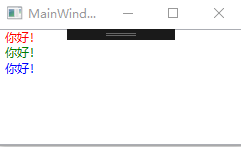
using System.Windows;

using System.Windows.Controls;

using System.Windows.Data;

using System.Windows.Documents;

using System.Windows.Input;

using System.Windows.Media;

using System.Windows.Media.Imaging;

using System.Windows.Navigation;

using System.Windows.Shapes;

namespace WpfApp1

{

    /// <summary>

    /// MainWindow.xaml 的交互逻辑

    /// </summary>

    public partial class MainWindow : Window

    {

        public MainWindow()

        {

            InitializeComponent();

            WriteLog(Brushes.Red,   "你好!\r\n");

            WriteLog(Brushes.Green, "你好!\r\n");

            WriteLog(Brushes.Blue,  "你好!\r\n");

        }

        private void WriteLog(SolidColorBrush color, string v)

        {

            Run run = new Run() { Text = v, Foreground = color };

            myParagraph.Inlines.Add(run);

        }

    }

}
<Window x:Class="WpfApp1.MainWindow"

        xmlns="http://schemas.microsoft.com/winfx/2006/xaml/presentation"

        xmlns:x="http://schemas.microsoft.com/winfx/2006/xaml"

        xmlns:d="http://schemas.microsoft.com/expression/blend/2008"

        xmlns:mc="http://schemas.openxmlformats.org/markup-compatibility/2006"

        xmlns:local="clr-namespace:WpfApp1"

        mc:Ignorable="d"

        Title="MainWindow" Height="" Width="">

    <Grid>

        <RichTextBox>

            <FlowDocument>

                <Paragraph Name="myParagraph"/>

            </FlowDocument>

        </RichTextBox>

    </Grid>

</Window>
WPF 利用RichTextBox 打印出不同颜色的文本的更多相关文章
- WPF之RichTextBox丢失光标仍然选中文本
描述:开发中完成了一个类似于Word的悬浮工具栏功能,选中文本之后可以自动弹出一个工具栏.可以修改字体.字体大小等功能,问题来了,我发现当去进行操作的时候原本选中的RichTextBox的内容的颜色会 ...
- python小技巧---打印出不同颜色的输出
在调试代码时打印常常一种颜色,找个东西真的是很难,在一次听金角大王的视频中听到了个方法,也是喀什使用了,本来不打算做记录了,可是稍微有几天不用,还得翻之前的代码,找着也是听麻烦的,现在在这里做个记录 ...
- java利用反射打印出类的结构
1 输入一个类名:java.lang.String将打印出String类定义的结构,例如: public final class java.lang.String { public java.lang ...
- 如何从40亿整数中找到不存在的一个 webservice Asp.Net Core 轻松学-10分钟使用EFCore连接MSSQL数据库 WPF实战案例-打印 RabbitMQ与.net core(五) topic类型 与 headers类型 的Exchange
如何从40亿整数中找到不存在的一个 前言 给定一个最多包含40亿个随机排列的32位的顺序整数的顺序文件,找出一个不在文件中的32位整数.(在文件中至少确实一个这样的数-为什么?).在具有足够内存的情况 ...
- c c++ 函数入口和出口的hook(gcc 编译选项),然后打印出函数调用关系的方法
GCC Function instrumentation机制可以用来跟踪函数的调用关系,在gcc中对应的选项为“-finstrument-functions”.可查看gcc的man page来获取更详 ...
- 利用JS打印质数
我爱撸码,撸码使我感到快乐!大家好,我是Counter,今天非常愉快,没有前几天的相对比较复杂的逻辑思维在里面,今天来写写,利用JS打印质数,基本上很多面试,会很经常的考到.那废话不多说,直接上代码: ...
- 打印出所有的"水仙花数"
题目:打印出所有的"水仙花数",所谓"水仙花数"是指一个三位数,其各位数字立方和等于该数本身.例如:153是一个"水仙花数",因为153=1 ...
- WPF利用通过父控件属性来获得绑定数据源RelativeSource
WPF利用通过父控件属性来获得绑定数据源RelativeSource 有时候我们不确定作为数据源的对象叫什么名字,但知道作为绑定源与UI布局有相对的关系,如下是一段XAML代码,说明多层布局控件中 ...
- java算法面试题:从类似如下的文本文件中读取出所有的姓名,并打印出重复的姓名和重复的次数,并按重复次数排序 ;读取docx 读取doc 使用poi 相关jar包提集提供下载
从类似如下的文本文件中读取出所有的姓名,并打印出重复的姓名和重复的次数,并按重复次数排序 1,张三,28 2,李四,35 3,张三,28 4,王五,35 5,张三,28 6,李四,35 7,赵六,28 ...
随机推荐
- vue 2.0 + elementUI 实现面包屑导航栏
Main.js 9种响应式面包屑导航和分步导航指示器UI设计 var routeList = []; router.beforeEach((to, from, next) => { var in ...
- Spring Cloud-Ribbon负载均衡策略类IRule(五)
IRule IRule AbstractloadBalancerRule 负载均衡策略抽象类 负责获得负载均衡器 保存在内部 通过负载均衡器维护的信息 作为分配的依据 public abstract ...
- C#的WaitHandle : 管理多线程状态
有时候,我们创建了多线程,需要知道是否都完成了各自的工作.比如说,开启了多线程的下载,如何终止所有的线程并且在确保所有线程都终止之后才继续执行程序的退出呢? public partial class ...
- hdu 4857 逆向拓扑排序+反向输出
/*一组测试实例 4 4 2 3 1 2 4 */ #include<stdio.h> #include<string.h> #include<queue> usi ...
- C++ exit 与 return 浅析
[摘要] 本文从代码形式.经常使用方式,相关概念,调用关系和比較分析,这5个维度浅析 exit 与 return 在C++的同样点与差别. [常见形式] exit(0): 正常执行程序并退出程序. ...
- 当前插入的线段能完整覆盖存在的几条线段 树状数组 HDU 5372 Segment Game
http://acm.hdu.edu.cn/showproblem.php? pid=5372 Segment Game Time Limit: 3000/1500 MS (Java/Others) ...
- spring之注解(一)概述
Spring的核心是依赖注入(DI),而依赖注入的基础是依赖信息的配置.这些配置称之为元数据. 在之前的的学习中.一直採用的是基于xml的配置,这些元数据配置在spring内部被注冊成为BeanDef ...
- 【cl】基本数据类型
8种基本数据类型 整数的演示:任何数据在内存中都是2进制的数据 内存中没有10进制没有16进制 byte 范围: -128 ~127 short 范围:-32768 ~ 32768 int 范围:-2 ...
- string字符串常量池在内存中的位置
这里仅仅是举个简单的样例说明字符串常量池在内存中的位置. 闲言少叙,直接上代码. <span style="font-size: large;">import java ...
- Nginx 源码安装和调优
常见web架构: LAMP =Linux+Apache+Mysql+PHP LNMP =Linux+Nginx+Mysql+PHP nginx概述: 知道:1 不知道:2 Nginx (&q ...