
WinForm 创建与读写配置文件
(转自:http://www.cnblogs.com/SkySoot/archive/2012/02/08/2342941.html)
1. 创建 app.config 文件:
右击项目名称,选择“添加”→“添加新建项”,在出现的“添加新项”对话框中,选择“添加应用程序配置文件”;如果项目以前没有配置文件,则默认的文件名称为“app.config”,单击“确定”。
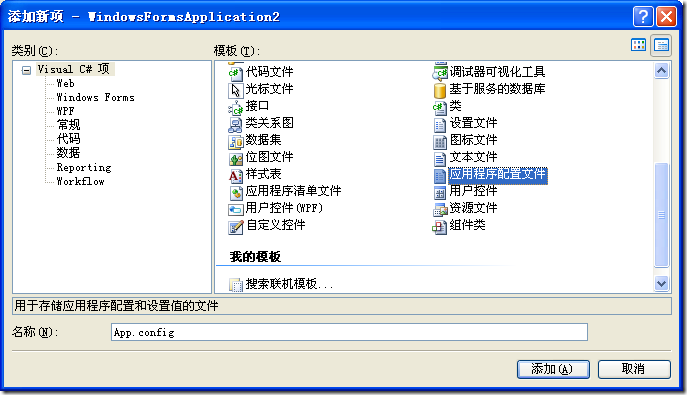
出现在设计器视图中的app.config文件为:
<?xml version="1.0" encoding="utf-8" ?>
<configuration>
</configuration>
2. 在配置文件中配置节点,本文以 connectionStrings 为例:
<?xml version="1.0" encoding="utf-8" ?>
<configuration>
<!--数据库连接字符串-->
<connectionStrings>
<add name="ConnectionToNorthwind" connectionString="Data Source=localhost;Initial Catalog=Northwind;UserID=sa;password=sa"
providerName="System.Data.SqlClient"/>
</connectionStrings>
</configuration>
3. 读取 connectionStrings 配置节:
要使用以下的代码访问 app.config 文件,除了 Useing System.Configuration 外,还必须在此项目添加对 System.Configuration.dll 的引用。
/// <summary>
/// 获取指定名称的数据库连接字符串
/// </summary>
/// <param name="connectionName">连接名</param>
/// <returns>连接字符串</returns>
private static string GetConnectionString(string connectionName)
{
return ConfigurationManager.ConnectionStrings[connectionName].ConnectionString.ToString();
}
4. 更新 connectionStrings 配置节:
///<summary>
///更新连接字符串
///</summary>
///<param name="newName">连接字符串名称</param>
///<param name="newConString">连接字符串内容</param>
///<param name="newProviderName">数据提供程序名称</param>
private static void UpdateConnectionString(string newName, string newConString, string newProviderName)
{
// 将当前应用程序的配置文件作为 System.Configuration.Configuration 对象打开
Configuration config = ConfigurationManager.OpenExeConfiguration(ConfigurationUserLevel.None);
// 存在此连接,则先删除
if (ConfigurationManager.ConnectionStrings[newName] != null)
{
config.ConnectionStrings.ConnectionStrings.Remove(newName);
}
// 新建一个连接字符串
ConnectionStringSettings newConStr = new ConnectionStringSettings(newName, newConString, newProviderName);
// 将新的连接字符串添加到配置文件中.
config.ConnectionStrings.ConnectionStrings.Add(newConStr);
// 保存对配置文件所作的更改
config.Save(ConfigurationSaveMode.Modified);
// 强制重新载入配置文件的ConnectionStrings配置节
ConfigurationManager.RefreshSection("ConnectionStrings");
}
WinForm 创建与读写配置文件的更多相关文章
- C# 创建与读写配置文件
配置文件内容为 <?xml version="1.0" encoding="utf-8" ?> <configuration> < ...
- 两种读写配置文件的方案(app.config与web.config通用)
第一种方法:采用MS现有的ConfigurationManager来进行读写 using System.Configuration; namespace Zwj.TEMS.Common { publi ...
- C读写配置文件
在项目开发中,经常需要读取应用配置文件的初始化参数,用于应用在启动前进行一些初始化配置.比如:Eclipse,参数项包含主题.字体大小.颜色.Jdk安装位置.自动提示等.Eclispe配置的文件格式是 ...
- Python自动化测试 -ConfigParser模块读写配置文件
C#之所以容易让人感兴趣,是因为安装完Visual Studio, 就可以很简单的直接写程序了,不需要做如何配置. 对新手来说,这是非常好的“初体验”, 会激发初学者的自信和兴趣. 而有些语言的开发环 ...
- python 读写配置文件
使用python读写配置文件,写个demo测试一下. #!/usr/bin/env python import os import ConfigParser # 如果文件不存在,就穿件文件. if o ...
- Python-通过configparser读写配置文件
Python读写配置文件: 1.创建配置文件(文件名以.conf或.ini结束的文件表示配置文件) 2.导入所需模块 OS, configparser >>> import os & ...
- QT QSettings读写配置文件
QT QSettings读写配置文件 需要用一个配置文件来保存程序的初始值,同时也需要做保存修改后的值. 那么借助于QSetting 就可以达到目的. 注意,生成的是 ini 文件! //1.创建和读 ...
- 用ConfigParser模块读写配置文件——Python
对于功能较多.考虑用户体验的程序,配置功能是必不可少的,如何存储程序的各种配置? 1)可以用全局变量,不过全局变量具有易失性,程序崩溃或者关闭之后配置就没了,再者配置太多,将变量分配到哪里也是需要考虑 ...
- 使用ConfigurationManager类读写配置文件
使用ConfigurationManager类 读写配置文件app.config,以下为代码: view plaincopy to clipboard print? using System; usi ...
随机推荐
- 基于UDP的套接字、粘包问题
一.基于UDP的套接字 UDP服务端 ss = socket() #创建一个服务器的套接字 ss.bind() #绑定服务器套接字 inf_loop: #服务器无限循环 cs = ss.recvfro ...
- (转)VLC播放RTP打包发送的.264文件
VLC播放RTP打包发送的.264文件 1,要有一个发送RTP包的264文件的服务器; 具体代码如下: rtp.h #include <WinSock2.h> #pragma commen ...
- Centos学习笔记1-基本部分
1:查看系统的使用状态: 谁在线:who 网络连接状态:netstat –a 后台执行程序:ps –aux 2:关机 关机:shutdown 或者 shutdown –h now 重启:rebo ...
- PHP逐字符读取数据
<?php $file = fopen("Minot.txt", "r") or exit("Unable to open file!" ...
- Linq To Object多字段组合唯一校验
1.第一种方式 if(partsSalesOrderTypes.GroupBy(entity => new { entity.Name, entity.Code }).Any(array =&g ...
- java基础知识框图
- 关于 ActionBar、ToolBar、StatusBar 的开发经验整理
一.ActionBar.ToolBar概述 1.1 ActionBar 1.2 ToolBar 1.3 StatusBar StatusBar 是一个半透明阴影,View 可以伸展到其后面. 1.4 ...
- ZOJ 3261 Connections in Galaxy War (逆向+带权并查集)
题意:有N个星球,每个星球有自己的武力值.星球之间有M条无向边,连通的两个点可以相互呼叫支援,前提是对方的武力值要大于自己.当武力值最大的伙伴有多个时,选择编号最小的.有Q次操作,destroy为切断 ...
- day1 python判断输入的密码是否正确
_username = 'leon' _password = 'zyl' username = input("username:") password = input(" ...
- 20145201 《Java程序设计》第六周学习总结
20145201 <Java程序设计>第六周学习总结 教材学习内容总结 本周学习了课本第十.十一章内容,即输入/输出.线程与并行API. 第十章 输入输出 10.1 InputStream ...