
android软件简约记账app开发day05-记账页面条目代码优化和bug解决
android软件简约记账app开发day05-记账页面条目代码优化和bug解决
今天还是因为该bug又极大的耽误了项目进程,该开发文档都要没有时间来写了。
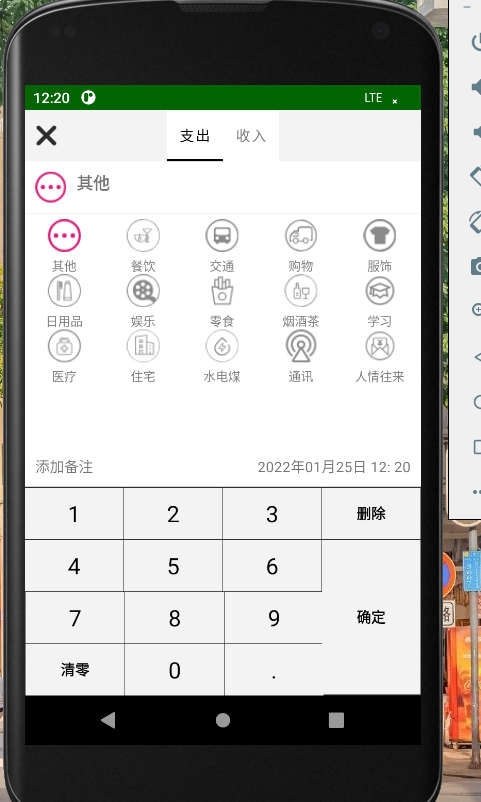
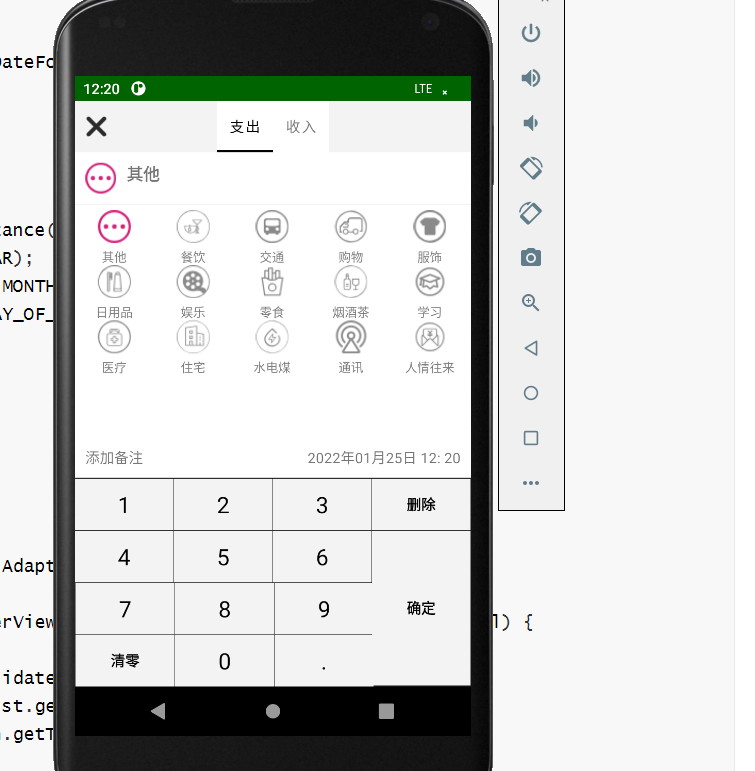
先说bug吧,在昨天已经实现了页面图标的展示,并且可以左右滑动来切换时支出还时收入页面,可就是在页面上部不显示支出和收入,这让我百思不得其解,翻看项目目录也不知道时那里的问题,我首先试了试Debug来看一下,我打了几个断点,可以当我点击那个晓聪子按钮时,他还让我下载什么东西,我心想我就调试一下,你就每一步就给我走不就完了,还要下载什么东西,真是无语,算了,还是下吧,可我这一点击download,这要下载的东西可多啊,愣是下了得有5分钟,当我下载完后,本以为点击debug按钮后该bug就能简简单单的解决时,知识砂纸擦屁股给我露了一手啊,这来来回回跳转的类得有百十来个,我点啊点,看呀看,是又点不玩,又看不到,来回挑战java类,也还不加载页面,我心想写个日志看看能打印出什么来不,可他就是出不来,什么也输出不了。
其次我就放弃了调试,选择从头梳理一下逻辑,既然能加载,说明记一笔可以点击,并且页面可以跳转,条目可以显示,说明从数据库角度来说没有问题,我相当于又从头看了一下所有昨天写的代码,终于我点进了写的适配器类RecordPagerAdapter我发现在我定义的String[] titles={"支出","收入"};竟然是灰的,这属实让我心头一紧,我立马就发现了
public CharSequence getPageTitle(int position) {

    return titles[position];

}
该类没改return,当然这是改过之后的,这、啊这、啊这这这、哎,我就无语,怎么能有我这么菜的人。
现在看着写起来也就四五百字,这可是四五个小时才发现的。。。。。。
接下来,让我来优化一下代码,稍微、简单的优化一下,把outcomefragment和incomefragment两个类的相同部分抽取一下,写成baserecordfragment类,在用两个类继承一下。
package com.open.tally.frag_record;
import android.inputmethodservice.Keyboard;
import android.inputmethodservice.KeyboardView;
import android.os.Bundle;
import androidx.annotation.Nullable;
import androidx.fragment.app.Fragment;
import android.text.TextUtils;
import android.view.LayoutInflater;
import android.view.View;
import android.view.ViewGroup;
import android.widget.AdapterView;
import android.widget.EditText;
import android.widget.GridView;
import android.widget.ImageView;
import android.widget.TextView;
import com.open.tally.R;
import com.open.tally.db.AccountBean;
import com.open.tally.db.DBManager;
import com.open.tally.db.TypeBean;
import com.open.tally.util.KeyBoardUtils;
import java.text.SimpleDateFormat;
import java.util.ArrayList;
import java.util.Calendar;
import java.util.Date;
import java.util.GregorianCalendar;
import java.util.List;
/**
* 记录页面的支出模块
*/
public class BaseRecordFragment extends Fragment {
KeyboardView keyboardView;
EditText moneyEt;
ImageView typeIv;
TextView typeTv, beizhuTv, timeTv;
GridView typeGv;
List<TypeBean> typeList;
TypeBaseAdapter adapter;
AccountBean accountBean;//保存到数据库中使用的封装类
@Override
public void onCreate(@Nullable Bundle savedInstanceState) {
super.onCreate(savedInstanceState);
accountBean=new AccountBean();
accountBean.setTypename("其他");
accountBean.setsImageId(R.mipmap.ic_qita_fs);
}
public BaseRecordFragment() {
// Required empty public constructor
}
@Override
public View onCreateView(LayoutInflater inflater, ViewGroup container,
Bundle savedInstanceState) {
// Inflate the layout for this fragment
View view = inflater.inflate(R.layout.fragment_outcome, container, false);
initView(view);
setInitTime();
loadDataToGV();
setGVListener();//设置每一项的gradeView的点击事件
return view;
}
/**
* 获取当前时间
*/
private void setInitTime(){
Date date=new Date();
SimpleDateFormat sdf = new SimpleDateFormat("yyyy年MM月dd日 HH: mm");
String time=sdf.format(date);
timeTv.setText(time);
accountBean.setTime(time);
Calendar calendar=Calendar.getInstance();
int year=calendar.get(Calendar.YEAR);
int month = calendar.get(Calendar.MONTH)+1;
int day = calendar.get(Calendar.DAY_OF_MONTH);
accountBean.setYear(year);
accountBean.setMonth(month);
accountBean.setDay(day);
}
/**
* 设置每一项的gradeView的点击事件
*/
private void setGVListener() {
typeGv.setOnItemClickListener(new AdapterView.OnItemClickListener() {
@Override
public void onItemClick(AdapterView<?> adapterView, View view, int i, long l) {
adapter.selectPos=i;
adapter.notifyDataSetInvalidated();
TypeBean typeBean = typeList.get(i);
String typename = typeBean.getTypename();
typeTv.setText(typename);
int simageId = typeBean.getSimageId();
typeIv.setImageResource(simageId);
accountBean.setsImageId(simageId);
accountBean.setTypename(typename);
}
});
}
/**
* 给GridView填充数据的方法
*/
private void loadDataToGV(){
typeList=new ArrayList<>();
adapter = new TypeBaseAdapter(getContext(), typeList);
typeGv.setAdapter(adapter);
//获取数据库当中数据源
List<TypeBean> outlist = DBManager.getTypeList(0);
typeList.addAll(outlist);
adapter.notifyDataSetChanged();
}
private void initView(View view) {
keyboardView = view.findViewById(R.id.frag_record_keyboard);
moneyEt = view.findViewById(R.id.frag_record_et_money);
typeIv = view.findViewById(R.id.frag_record_iv);
typeGv = view.findViewById(R.id.frag_record_gv);
typeTv = view.findViewById(R.id.frag_record_tv_type);
beizhuTv = view.findViewById(R.id.frag_record_tv_beizhu);
timeTv = view.findViewById(R.id.frag_record_tv_time);
//显示自定义软键盘
KeyBoardUtils keyBoardUtils = new KeyBoardUtils(keyboardView, moneyEt);
keyBoardUtils.showKeyboard();
//设置接口监听确定按钮被点击了
keyBoardUtils.setOnEnsureListener(new KeyBoardUtils.OnEnsureListener() {
@Override
public void onEnsure() {
//获取收入钱数
String moneyStr = moneyEt.getText().toString();
if (!TextUtils.isEmpty(moneyStr)||moneyStr.equals("0")){
getActivity().finish();
return;
}
float money=Float.parseFloat(moneyStr);
accountBean.setMoney(money);
//点击了确定按钮
//获取用户输入的信息
//返回上一级界面
getActivity().finish();
}
});
}
}最后写了一个账单类来存储用户打算存的账单信息。
package com.open.tally.db;
/**
* 将数据插入到数据库的封装类
*/
public class AccountBean {
int id;
String typename;
int sImageId;
String beizhu;
float money;
String time;
int year;
int month;
int day;
int kind;//收入1,支出0
public AccountBean() {
}
public AccountBean(int id, String typename, int sImageId, String beizhu, float money, String time, int year, int month, int day, int kind) {
this.id = id;
this.typename = typename;
this.sImageId = sImageId;
this.beizhu = beizhu;
this.money = money;
this.time = time;
this.year = year;
this.month = month;
this.day = day;
this.kind = kind;
}
public int getId() {
return id;
}
public void setId(int id) {
this.id = id;
}
public String getTypename() {
return typename;
}
public void setTypename(String typename) {
this.typename = typename;
}
public int getsImageId() {
return sImageId;
}
public void setsImageId(int sImageId) {
this.sImageId = sImageId;
}
public String getBeizhu() {
return beizhu;
}
public void setBeizhu(String beizhu) {
this.beizhu = beizhu;
}
public float getMoney() {
return money;
}
public void setMoney(float money) {
this.money = money;
}
public String getTime() {
return time;
}
public void setTime(String time) {
this.time = time;
}
public int getYear() {
return year;
}
public void setYear(int year) {
this.year = year;
}
public int getMonth() {
return month;
}
public void setMonth(int month) {
this.month = month;
}
public int getDay() {
return day;
}
public void setDay(int day) {
this.day = day;
}
public int getKind() {
return kind;
}
public void setKind(int kind) {
this.kind = kind;
}
}
好了明天再见把,呜呜呜~~~~~
android软件简约记账app开发day05-记账页面条目代码优化和bug解决的更多相关文章
- android软件简约记账app开发day08-时间对话框的书写+改bug,改bug
android软件简约记账app开发day08-时间对话框的书写+改bug,改bug 绘制对话跨页面 在添加记账信息功能中,我提供了用户添加备注添加事件的功能,设计是点击时间会弹出一个时间对话框供用户 ...
- android软件简约记账app开发day06-将记账条目添加到数据库并且绘制备注页面
android软件简约记账app开发day06-将记账条目添加到数据库并且绘制备注页面 首先写添加到数据库 在DBOpenHelper中添加创建记账表的语句 //创建记账表 sql = "c ...
- android软件简约记账app开发day10-主页面模块--头信息的展示,和之后功能完善的目标。
android软件简约记账app开发day10-主页面模块--头信息的展示,和之后功能完善的目标. 今天来写主界面头信息的展示,也就是将第一天的写的layout中的item_main_top展示到主界 ...
- android软件简约记账app开发day09-主页面模块,收支记账信息的展示
android软件简约记账app开发day09-主页面模块,收支记账信息的展示 我们第一天已经绘制了记账条目的界面,也在主界面设置了LietView来展示记账条目,今天来实现记账后再主界面的展示效果 ...
- android软件简约记账app开发day07-备注界面完善
android软件简约记账app开发day07-备注界面完善 ## 昨天我们已经绘制了备注页面,今天来用Java代码组装完善一下. 首先我们新建BeiZhuDialog类关联备注页面,并且实现点击接口 ...
- android软件简约记账app开发day04-记账页面条目的代码书写
android软件简约记账app开发day04-记账页面条目的代码书写 在前三天我们完成了基本的界面展示,从今天开始,我们进入到后台逻辑代码的编写中,今天开发记账条目的代码 我们在主页面点击记一笔图标 ...
- android软件简约记账app开发day03-自定义键盘的书写
android软件简约记账app开发day03-自定义键盘的书写 我们在fragment界面使用了自定义的keybroad键盘,所以今天我们来书写自定义的键盘代码 新建util包,新建keyboard ...
- android软件简约记账app开发day02-收入支出明细页面绘制
android软件简约记账app开发day02-收入支出明细页面绘制 效果图 列表界面绘制 新建layout文件-item_mainlv.xml大体使用绝对布局,嵌套相对布局,嵌套文本内容实现 < ...
- android软件简约记账app开发day01-今日收支明细的界面绘制
android软件简约记账app开发day01-今日收支明细的界面绘制 导入素材 导入在阿里iconfront图标库下载的字体图标分为大小两种,分别导入到项目目录mipmap-hdpi和mipmap- ...
随机推荐
- 你能用Java覆盖静态方法吗?如果我在子类中创建相同的方法是编译时错误?
不,你不能在Java中覆盖静态方法,但在子类中声明一个完全相同的方法不是编译时错误,这称为隐藏在Java中的方法.你不能覆盖Java中的静态方法,因为方法覆盖基于运行时的动态绑定,静态方法在编译时使用 ...
- Dubbo 的整体架构设计有哪些分层?
接口服务层(Service):该层与业务逻辑相关,根据 provider 和 consumer 的 业务设计对应的接口和实现 配置层(Config):对外配置接口,以 ServiceConfig 和 ...
- 什么是Hystrix断路器?我们需要它吗?
由于某些原因,employee-consumer公开服务会引发异常.情况下使用Hystrix我们定义了回退方法.如果在公开服务中发生异常,则回退方法返回一些默认值 . 如果firstPage metho ...
- java-规约-OOP
public class OOP { /** * 避免通过一个类的对象引用访问此类的静态变量或者静态方法 * 直接通过类名去访问 */ // 错误使用例子: public static void ma ...
- docker-compose安装和使用
安装:https://my.oschina.net/thinwonton/blog/2985886 docker-compose和Dockerfile结合使用,创建django项目和postgres数 ...
- 列举 IoC 的一些好处?
IoC 的一些好处是:它将最小化应用程序中的代码量.它将使您的应用程序易于测试,因为它不需要单元测试用例中的任何单例 或 JNDI 查找机制.它以最小的影响和最少的侵入机制促进松耦合.它支持即时的实例 ...
- spring boot 自动装配的原理
参考: https://blog.csdn.net/Dongguabai/article/details/80865599.如有侵权,请联系本人删除! 入口: import org.springfra ...
- 使用 Docker, 7 个命令部署一个 Mesos 集群
这个教程将给你展示怎样使用 Docker 容器提供一个单节点的 Mesos 集群(未来的一篇文章将展示怎样很容易的扩展这个到多个节点或者是见底部更新).这意味着你可以使用 7 个命令启动整个集群!不需 ...
- ubuntu sublime text3 python 配置 sublime text3 python 配置
ubuntu sublime text3 python 配置 1.安装sublime text 3 安装过程非常简单,在terminal中输入: sudo add-apt-repository ...
- css文字颜色渐变的3种实现
在web前端开发过程中,UI设计师经常会设计一些带渐变文字的设计图,在以前我们只能用png的图片来代替文字,今天可以实现使用纯CSS实现渐变文字了.下面就介绍3中实现方式供大家参考! 基础样式: .g ...