
卡尔曼滤波—Simple Kalman Filter for 2D tracking with OpenCV
之前有关卡尔曼滤波的例子都比较简单,只能用于简单的理解卡尔曼滤波的基本步骤。现在让我们来看看卡尔曼滤波在实际中到底能做些什么吧。这里有一个使用卡尔曼滤波在窗口内跟踪鼠标移动的例子,原作者主页:http://home.wlu.edu/~levys/
首先,第一步是选取状态变量,这里选择系统状态变量为x=[x, y]T ,即状态变量选为鼠标在窗口内的位置。通过鼠标事件响应的回调函数可以获得鼠标当前位置,即观测值z = [x, y]T.对于这一问题外界控制量u=0. 观测噪声和系统噪声的选择需要靠实验或其它方式确定,这里先采用默认值以简化问题。则系统状态方程可以写为:
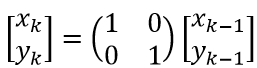
同样可以写出观测值和状态变量之间的关系,可知矩阵F和矩阵H均为2阶单位矩阵。
下面使用Python和OpenCV来解决这一问题。tinyekf.py文件中定义了EKF抽象类,使用时需要自己定义一个类(继承EKF),并实现非线性函数f(x),h(x)和雅可比矩阵JF,JH的计算。扩展卡尔曼滤波(EKF)同样能解决线性问题。
tinyekf.py:
 '''

     Extended Kalman Filter in Python

 '''

 import numpy as np

 from abc import ABCMeta, abstractmethod

 class EKF(object):

     __metaclass__ = ABCMeta

     def __init__(self, n, m, pval=0.1, qval=1e-4, rval=0.1):

         '''

         Creates a KF object with n states, m observables, and specified values for

         prediction noise covariance pval, process noise covariance qval, and

         measurement noise covariance rval.

         '''

         # No previous prediction noise covariance

         self.P_pre = None

         # Current state is zero, with diagonal noise covariance matrix

         self.x = np.zeros((n,1))

         self.P_post = np.eye(n) * pval

         # Get state transition and measurement Jacobians from implementing class

         self.F = self.getF(self.x)

         self.H = self.getH(self.x)

         # Set up covariance matrices for process noise and measurement noise

         self.Q = np.eye(n) * qval

         self.R = np.eye(m) * rval

         # Identity matrix will be usefel later

         self.I = np.eye(n)

     def step(self, z):

         '''

         Runs one step of the EKF on observations z, where z is a tuple of length M.

         Returns a NumPy array representing the updated state.

         '''

         # Predict ----------------------------------------------------

         self.x = self.f(self.x)

         self.P_pre = self.F * self.P_post * self.F.T + self.Q

         # Update -----------------------------------------------------

         G = np.dot(self.P_pre * self.H.T, np.linalg.inv(self.H * self.P_pre * self.H.T + self.R))

         self.x += np.dot(G, (np.array(z) - self.h(self.x).T).T)

         self.P_post = np.dot(self.I - np.dot(G, self.H), self.P_pre)

         # return self.x.asarray()

         return self.x

     @abstractmethod

     def f(self, x):

         '''

         Your implementing class should define this method for the state transition function f(x),

         returning a NumPy array of n elements.  Typically this is just the identity function np.copy(x).

         '''

         raise NotImplementedError()

     @abstractmethod

     def getF(self, x):

         '''

         Your implementing class should define this method for returning the n x n Jacobian matrix F of the

         state transition function as a NumPy array.  Typically this is just the identity matrix np.eye(n).

         '''

         raise NotImplementedError()

     @abstractmethod

     def h(self, x):

         '''

         Your implementing class should define this method for the observation function h(x), returning

         a NumPy array of m elements. For example, your function might include a component that

         turns barometric pressure into altitude in meters.

         '''

         raise NotImplementedError()

     @abstractmethod

     def getH(self, x):

         '''

         Your implementing class should define this method for returning the m x n Jacobian matirx H of the

         observation function as a NumPy array.

         '''

         raise NotImplementedError()
kalman_mousetracker.py:
 # -*- coding: utf-8 -*-

 '''

 kalman_mousetracker.py - OpenCV mouse-tracking demo using TinyEKF

 '''

 # This delay will affect the Kalman update rate

 DELAY_MSEC = 20        # 卡尔曼滤波计算时间间隔,单位为ms

 WINDOW_NAME = 'Kalman Mousetracker [ESC to quit]'    # 窗口名称

 WINDOW_SIZE = 500                                    # 窗口大小

 import cv2

 import numpy as np

 from sys import exit

 from tinyekf import EKF

 class TrackerEKF(EKF):

     '''

     An EKF for mouse tracking

     '''

     def __init__(self):

         EKF.__init__(self, 2, 2, pval=1, qval=0.001, rval=0.1)

     def f(self, x):

         # State-transition function is identity

         return np.copy(x)

     def getF(self, x):

         # So state-transition Jacobian is identity matrix

         return np.eye(2)

     def h(self, x):

         # Observation function is identity

         return x

     def getH(self, x):

         # So observation Jacobian is identity matrix

         return np.eye(2)

 class MouseInfo(object):

     '''

     A class to store X,Y points

     '''

     def __init__(self):

         self.x, self.y = -1, -1

     # If you print an object then its __str__ method will get called

     # The __str__ is intended to be as human-readable as possible

     def __str__(self):

         return '%4d %4d' % (self.x, self.y)

 def mouseCallback(event, x, y, flags, mouse_info):

     '''

     Callback to update a MouseInfo object with new X,Y coordinates

     '''

     mouse_info.x = x

     mouse_info.y = y

 def drawCross(img, center, r, g, b):

     '''

     Draws a cross a the specified X,Y coordinates with color RGB

     '''

     d = 5               # 调整d改变X标记大小

     thickness = 2        # 线宽

     color = (r, g, b)    # 标记颜色

     ctrx = center[0]    # 标记中心点的x坐标

     ctry = center[1]    # 标记中心点的y坐标

     # Python: cv2.line(img, pt1, pt2, color[, thickness[, lineType[, shift ] ] ])--> None

     # lineType参数之一: CV_AA - antialiased line

     cv2.line(img, (ctrx - d, ctry - d), (ctrx + d, ctry + d), color, thickness, cv2.CV_AA)

     cv2.line(img, (ctrx + d, ctry - d), (ctrx - d, ctry + d), color, thickness, cv2.CV_AA)

 def drawLines(img, points, r, g, b):

     '''

     Draws lines

     '''

     # Python: cv2.polylines(img, pts, isClosed, color[, thickness[, lineType[, shift ] ] ]) -->None

     # 参数pts: Array of polygonal curves

     cv2.polylines(img, [np.int32(points)], isClosed=False, color=(r, g, b))

 def newImage():

     '''

     Returns a new image

     '''

     return np.zeros((500,500,3), np.uint8) # 创建矩阵,用于保存图像内容

 if __name__ == '__main__':

     # Create a new image in a named window

     img = newImage()

     cv2.namedWindow(WINDOW_NAME)

     # Create an X,Y mouse info object and set the window's mouse callback to modify it

     mouse_info = MouseInfo()    # mouse_info用于存贮当前鼠标位置

     # 设置鼠标事件回调函数

     # 参数1:name – Window name

     # 参数2:onMouse – Mouse callback.

     # 参数3:param – The optional parameter passed to the callback.

     cv2.setMouseCallback(WINDOW_NAME, mouseCallback, mouse_info)

     # Loop until mouse inside window

     while True:

         if mouse_info.x > 0 and mouse_info.y > 0:    # 鼠标进入窗口内

             break

         cv2.imshow(WINDOW_NAME, img) # 鼠标没进入窗口内则一直显示黑色背景

         if cv2.waitKey(1) == 27:     # 检测是否按下ESC键

             exit(0)

     # These will get the trajectories for mouse location and Kalman estiamte

     measured_points = []    # 测量值列表

     kalman_points = []      # 估计值列表

     # Create a new Kalman filter for mouse tracking

     kalfilt = TrackerEKF()

     # Loop till user hits escape

     while True:

         # Serve up a fresh image

         img = newImage()

         # Grab current mouse position and add it to the trajectory

         measured = (mouse_info.x, mouse_info.y)

         measured_points.append(measured)    # 注意:程序运行时间越长(或者计算间隔越小)列表长度会越大

         # Update the Kalman filter with the mouse point, getting the estimate.

         estimate = kalfilt.step((mouse_info.x, mouse_info.y))

         # Add the estimate to the trajectory

         estimated = [int(c)     for c in estimate]

         kalman_points.append(estimated)        # kalman_points为2D point列表,存放每次计算出的估计值坐标

         # Display the trajectories and current points

         drawLines(img, kalman_points,   0,   255, 0)    # 绘制跟踪点移动路径

         drawCross(img, estimated,       255, 255, 255)    # X标记点,代表卡尔曼滤波估计位置

         drawLines(img, measured_points, 255, 255, 0)    # 绘制鼠标移动路径

         drawCross(img, measured, 0,   0,   255)            # X标记点,代表鼠标当前位置

         # Delay for specified interval, quitting on ESC

         cv2.imshow(WINDOW_NAME, img)    # image每隔DELAY_MSEC毫秒就刷新一次

         if cv2.waitKey(DELAY_MSEC) & 0xFF == 27:

             break

     #  close the window and de-allocate any associated memory usage.

     cv2.destroyAllWindows()
程序执行效的果如下图所示:
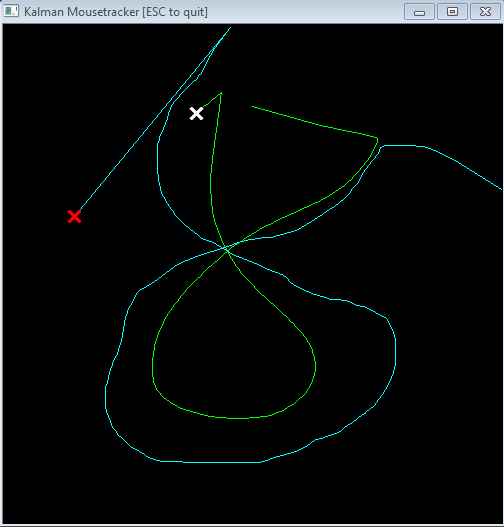
跟踪的效果与程序中的两个参数有关:qval代表了模型噪声(即模型准确度,obviously all moedls are not able to describe the motion perfectly,thus each model contains a probabilistic part),rval代表了观测噪声。使用观测值修正预测值的表达式为:

其中卡尔曼增益K的表达式为:

从上面公式可以看出当R趋于0,即测量误差非常小时,估计的结果更接近测量值。当P趋向0时,估计的结果更接近预测值。因此,当程序中rval的值相比qval小得多时跟踪进行的很流畅(卡尔曼滤波的估计值更偏向观测值)。但是当rval比qval小时(从感性上理解这个小),跟踪就出现了滞后,这说明需要更合理的鼠标运动模型,如Constant Velocity Model或Constant Acceleration Model。可以参考论文: Empirical evaluation of vehicular models for ego motion estimation.2011 IEEE Intelligent Vehicles Symposium (IV), 534–539. doi:10.1109/IVS.2011.5940526. 论文中提到不同的模型主要适用于不同的情境,例如高速公路上汽车加减速过程较少,而在闹市区汽车需要频繁加减速,此时用CA模型就比用CV模型合适。In general,more sophisticated models outperform simpler ones, especially in situations where the assumption of the simple models are no longer true. 这就是我认为卡尔曼滤波中最难的部分:根据问题建立合理的模型。
根据参考[3]中的叙述:If you have a badly defined model, you will not get a good estimate. But you can relax your model by increasing your estimated error. This will let the Kalman filter rely more on the measurement values, but still allow some noise removal.
即当你建立的模型不准确时,可以将与模型误差有关的参数Q调大,此时估计值将更加依赖观测值而不是通过模型得到的预测值。既然模型不准确,为什么还要用卡尔曼滤波,直接从传感器获取观测值不就好了吗?可是有时传感器获得的数据也不那么准确,而且传感器测量精度越高价格也越贵:Sensors are noisy. The world is full of data and events that we want to measure and track, but we cannot rely on sensors to give us perfect information. 因此,就我目前浅显的理解卡尔曼滤波是一种折衷(trade off)的方法,当模型更准时估计值更接近模型的预测,当传感器测量值更准时估计值更接近测量值。
参考:
[1] http://home.wlu.edu/~levys/kalman_tutorial/
[3] https://www.cs.cornell.edu/courses/cs4758/2012sp/materials/mi63slides.pdf
卡尔曼滤波—Simple Kalman Filter for 2D tracking with OpenCV的更多相关文章
- 卡尔曼滤波(Kalman Filter) 的进一步讨论
我们在上一篇文章中通过一个简单的样例算是入门卡尔曼滤波了.本文将以此为基础讨论一些技术细节. 卡尔曼滤波(Kalman Filter) http://blog.csdn.net/baimafujinj ...
- 卡尔曼滤波(Kalman Filter)在目标边框预测中的应用
1.卡尔曼滤波的导论 卡尔曼滤波器(Kalman Filter),是由匈牙利数学家Rudolf Emil Kalman发明,并以其名字命名.卡尔曼出生于1930年匈牙利首都布达佩斯.1953,1954 ...
- 卡尔曼滤波(Kalman Filter)
一.引言 以下我们引用文献[1]中的一段话作为本文的開始: 想象你在黄昏时分看着一仅仅小鸟飞行穿过浓密的丛林.你仅仅能隐隐约约.断断续续地瞥见小鸟运动的闪现.你试图努力地猜測小鸟在哪里以及下一时刻它会 ...
- 卡尔曼滤波(Kalman Filter) ZZ
一.引言 以下我们引用文献[1]中的一段话作为本文的開始: 想象你在黄昏时分看着一仅仅小鸟飞行穿过浓密的丛林.你仅仅能隐隐约约.断断续续地瞥见小鸟运动的闪现.你试图努力地猜測小鸟在哪里以及下一时刻它会 ...
- Kalman filter, Laser/Lidar measurement
You can download this project from https://github.com/lionzheng10/LaserMeasurement The laser measure ...
- GMM+Kalman Filter+Blob 目标跟踪
转 http://www.cnblogs.com/YangQiaoblog/p/5462453.html ==========图片版================================== ...
- (转) How a Kalman filter works, in pictures
How a Kalman filter works, in pictures I have to tell you about the Kalman filter, because what it d ...
- [Math]理解卡尔曼滤波器 (Understanding Kalman Filter) zz
1. 卡尔曼滤波器介绍 卡尔曼滤波器的介绍, 见 Wiki 这篇文章主要是翻译了 Understanding the Basis of the Kalman Filter Via a Simple a ...
- [Math]理解卡尔曼滤波器 (Understanding Kalman Filter)
1. 卡尔曼滤波器介绍 卡尔曼滤波器的介绍, 见 Wiki 这篇文章主要是翻译了 Understanding the Basis of the Kalman Filter Via a Simple a ...
随机推荐
- zw版【转发·台湾nvp系列Delphi例程】HALCON SetGray
zw版[转发·台湾nvp系列Delphi例程]HALCON SetGray SetGray_Delphi.PNG unit Unit1;interfaceuses Windows, Messages, ...
- 《Focus On 3D Terrain Programming》中一段代码的注释二
取自<Focus On 3D Terrain Programming>中的一段: bool CTERRAIN::MakeTerrainFault( int iSize, int iIter ...
- Swift常量和变量
常量和变量由一个特定名称来表示,如maxNumber 或者 message.常量所指向的是一个特定类型的值, 如数字10或者字符”hello”.变量的值可以根据需要不断修改,而常量的值是不能够被二次修 ...
- linux设备驱动归纳总结(四):4.单处理器下的竞态和并发【转】
本文转载自:http://blog.chinaunix.net/uid-25014876-id-67005.html linux设备驱动归纳总结(四):4.单处理器下的竞态和并发 xxxxxxxxxx ...
- 为什么很多人用keepalived来实现redis故障转移
目前,Redis还没有一个类似于MySQL Proxy或Oracle RAC的官方HA方案.Redis作者有一个名为Redis Sentinel的计划 ,据称将会有监控,报警和自动故障转移三大功能,非 ...
- 专为物联网开发的开源操作系统Contiki(转)
专为物联网开发的开源操作系统Contiki(转) (2012-04-19 15:31:09) 原文网址:http://blog.sina.com.cn/s/blog_6de000c201010z7n ...
- java map 遍历
转自http://rain-2372.iteye.com/blog/1615615 package com.spring.test_B11_aop1; import java.util.HashMap ...
- HDU 2767:Proving Equivalences(强连通)
http://acm.hdu.edu.cn/showproblem.php?pid=2767 题意:给出n个点m条边,问在m条边的基础上,最小再添加多少条边可以让图变成强连通.思路:强连通分量缩点后找 ...
- Asp.net Vnext Filters
ASP.NET MVC 提供Filters(筛选器)之前或之后调用操作方法执行筛选逻辑,和AOP面向切面编程一样. 本文已经同步到<Asp.net Vnext 系列教程 >中] 本章主要介 ...
- Javascript页面之间参数传递 (前端)
一.来源:tongfang [系统管理员] --[系统管理] 的"SysLeftNavView.ascx.cs 用户插件 usercontrol 左侧菜单导航: <li>< ...