
ListBox复选框拓展
Toolkit的LongListMutiSelector的复选框功能,想必许多人都需要吧!然而系统本身控件ListBox虽然也有多选功能,可是外观上却缺乏复选框,选择效果只是颜色变化。于是在上一个项目中只好选择LongListMutiSeletor作为列表的控件,项目结束后就有个想法对ListBox进行拓展,使ListBox列表可以拥有复选框。
之前为了修改LongListMutiSelector在白色背景下滚动条无法显示的问题,曾经仔细看了一下LongListMutiSelector相关的一些模版,发现LongListMutiSelector的复选框其实来自LongListMutiSelectorItem模版中的Checkbox。于是心中就有个想法,对ListBox的模版进行修改添加上Checkbox,然后再绑定上ListBox本身IsSelected属性,这样就可以实现复选框了。
说做就做,首先对模版进行拓展,添加Checkbox。
<Style TargetType="control:ListBoxItemEx">

        <Setter Property="Background" Value="Transparent"/>

        <Setter Property="BorderThickness" Value=""/>

        <Setter Property="BorderBrush" Value="Transparent"/>

        <Setter Property="Padding" Value=""/>

        <Setter Property="HorizontalContentAlignment" Value="Left"/>

        <Setter Property="VerticalContentAlignment" Value="Top"/>

        <Setter Property="Template">

            <Setter.Value>

                <ControlTemplate TargetType="control:ListBoxItemEx">

                    <Border x:Name="LayoutRoot" BorderBrush="{TemplateBinding BorderBrush}" BorderThickness="{TemplateBinding BorderThickness}" Background="{TemplateBinding Background}" HorizontalAlignment="{TemplateBinding HorizontalAlignment}" VerticalAlignment="{TemplateBinding VerticalAlignment}">

                        <VisualStateManager.VisualStateGroups>

                            <VisualStateGroup x:Name="CommonStates">

                                <VisualState x:Name="Normal"/>

                                <VisualState x:Name="MouseOver"/>

                                <VisualState x:Name="Disabled">

                                    <Storyboard>

                                        <ObjectAnimationUsingKeyFrames Storyboard.TargetProperty="Background" Storyboard.TargetName="LayoutRoot">

                                            <DiscreteObjectKeyFrame KeyTime="" Value="{StaticResource TransparentBrush}"/>

                                        </ObjectAnimationUsingKeyFrames>

                                        <DoubleAnimation Duration="" To=".5" Storyboard.TargetProperty="Opacity" Storyboard.TargetName="ContentContainer"/>

                                    </Storyboard>

                                </VisualState>

                            </VisualStateGroup>

                            <VisualStateGroup x:Name="SelectionStates">

                                <VisualState x:Name="Unselected"/>

                                <VisualState x:Name="Selected">

                                    <Storyboard>

                                        <!--<ObjectAnimationUsingKeyFrames Storyboard.TargetProperty="Foreground" Storyboard.TargetName="ContentContainer">

                                            <DiscreteObjectKeyFrame KeyTime="" Value="{StaticResource PhoneAccentBrush}"/>

                                        </ObjectAnimationUsingKeyFrames>-->

                                    </Storyboard>

                                </VisualState>

                            </VisualStateGroup>

                            <VisualStateGroup x:Name="FocusStates"/>

                        </VisualStateManager.VisualStateGroups>

                        <Grid>

                            <Grid.ColumnDefinitions>

                                <ColumnDefinition Width="Auto"/>

                                <ColumnDefinition Width="*"/>

                            </Grid.ColumnDefinitions>

                            <CheckBox x:Name="checkBox" Grid.Column="" IsChecked="{TemplateBinding IsSelected}" Visibility="Collapsed"/>

                            <ContentControl x:Name="ContentContainer" Grid.Column="" ContentTemplate="{TemplateBinding ContentTemplate}" Content="{TemplateBinding Content}" Foreground="{TemplateBinding Foreground}" HorizontalContentAlignment="{TemplateBinding HorizontalContentAlignment}" Margin="{TemplateBinding Padding}" VerticalContentAlignment="{TemplateBinding VerticalContentAlignment}"/>

                        </Grid>

                    </Border>

                </ControlTemplate>

            </Setter.Value>

        </Setter>

    </Style>
其次,再对ListBox进行继承拓展。增加SelectionEable属性,当属性更改显示或隐藏复选框。
 public ItemSelectionMode SelectionEable

        {

            get { return (ItemSelectionMode)GetValue(SelectionEableProperty); }

            set { SetValue(SelectionEableProperty, value); }

        }

        public static readonly DependencyProperty SelectionEableProperty = DependencyProperty.Register(

            "SelectionEable",

            typeof(ItemSelectionMode),

            typeof(ListBoxItemEx),

            new PropertyMetadata(ItemSelectionMode.Normal, OnSelectionEableChanged));

        private static void OnSelectionEableChanged(DependencyObject d, DependencyPropertyChangedEventArgs e)

        {

            ListBoxItemEx item = d as ListBoxItemEx;

            if (item.checkBox != null)

            {

                ItemSelectionMode mode = (ItemSelectionMode)e.NewValue;

                switch (mode)

                {

                    case ItemSelectionMode.Normal:

                        item.checkBox.Visibility = Visibility.Collapsed;

                        break;

                    case ItemSelectionMode.Selection:

                        item.checkBox.Visibility = Visibility.Visible;

                        break;

                }

            }

        }
Ok在页面前台写下以下代码,就会发现设计视图中的ListBoxItem有了复选框。
<MyControls:ListBoxItemEx SelectionEable="Selection">

            测试选项

        </MyControls:ListBoxItemEx>
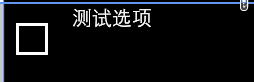
拓展完ListBoxItem后事情还没完,这只是ListBoxItem有了复选框,ListBox并没有,还要对ListBox进行拓展才行。
同样拓展一个SlectionEable属性,并且将该属性和它的Item的SelectonEable属性关联起来。其次还得重载ListBox的GetContainerForItemOverride方法,返回一个重载后的ListBoxItemEx对象作为列表生产每一项内容的承载容器。这样就完成了对ListBox复选框的拓展。

ps:实际测试中发现复选框的IsChecked属性和ListBoxItem的IsSelected属性并没有同步,后面仔细查看文档后发现TemplateBinding并不能进行双向绑定,即前台Checkbox的勾选变化不会同步到IsSelected属性,而只有Binding和StaticResource可以进行双向绑定,于是将TemplateBinding改为Binding,Mode为TwoWay,这样就可以双向绑定了。
ListBox复选框拓展的更多相关文章
- (七)对话框,单选框(radiobox),复选框(checkbox),列表框(ListBox),组合框(CComboBox),水平滚动条(Horizontal scroll bar),微调(旋转)spincontrol,列表视图控件CListCtrl,静态控件static
1,模态对话框和非模态对话框 // 模态对话框 void CMainFrame::OnDialogExec() { // TODO: 在此添加命令处理程序代码 // 创建对话框对象 CDialog d ...
- 【转】纯CSS设置Checkbox复选框控件的样式
Checkbox复选框是一个可能每一个网站都在使用的HTML元素,但大多数人并不给它们设置样式,所以在绝大多数网站它们看起来是一样的.为什么不把你的网站中的Checkbox设置一个与众不同的样式,甚至 ...
- 对jquery操作复选框
摘要:jquery操作复选框.使用更简洁易懂,思路清晰,逻辑更明了,很实用 <!DOCTYPE html> <html> <head> <meta chars ...
- MVC树控件,mvc中应用treeview,实现复选框树的多层级表单控件
类似于多层级的角色与权限控制功能,用MVC实现MVC树控件,mvc中应用treeview,实现复选框树的多层级表单控件.最近我们的项目中需要用到树型菜单,以前使用WebForm时,树型菜单有微软提供的 ...
- jquery复选框 选中事件 及其判断是否被选中
jquery复选框 选中事件 及其判断是否被选中 (2014-07-25 14:03:54) 转载▼ 标签: jquery复选框选中事件 分类: extjs jquery 今天做了 显示和不显示密 ...
- 复选框css
input, select, button, textarea{ -webkit-appearance:none; }该属性会导致复选框失去选择效果
- 案例1.通过Jquery来处理复选框
实现以下功能: 1:选中第一个复选框,那么下面所有的复选框都选中,去除选中第一个复选框,下面的都不选中 2:当点击全选按钮,上面足球.篮球.游泳.唱歌 全部选中 3:当点击全不选按钮,上面四个全部取消 ...
- 【Telerik】实现列表单元格中添加复选框,进行状态(是、否)判断
前台界面: 需求:实现对每条细则是否必备进行判断,必备就勾选,否则不勾选. 首先:要保证列表GridView是可编辑的(IsReadOnly=false) 表格代码 其次:单元格的数据绑定要保证是双向 ...
- 如何在select下拉列表中添加复选框?
近来在给一个公司做考试系统的项目,遇到的问题不少,但其中的几个让我对表单的使用颇为感兴趣,前端程序员都知道,下拉列表有select标签,复选框有checkbox,但是两者合在一起却少有人去研究,当时接 ...
随机推荐
- qt超强绘图控件qwt - 安装及配置
qwt是一个基于LGPL版权协议的开源项目, 可生成各种统计图.它为具有技术专业背景的程序提供GUI组件和一组实用类,其目标是以基于2D方式的窗体部件来显示数据, 数据源以数值,数组或一组浮点数等方式 ...
- Linux中/usr与/var目录详解
/usr文件系统 /usr 文件系统经常很大,因为所有程序安装在这里. /usr 里的所有文件一般来自Linux distribution:本地安装的程序和其他东西在/usr/local 下.这样可能 ...
- linux修改history
1.cat ~/.bash_history cat -n ~/.bash_history [以行数的形式查看] 2.history | more Enter 键盘 ----------一行一行 空 ...
- org.apache.hadoop.conf-Configurable
从包名可以看出这个包里面都是配置相关的类:从类名上可以看出这是一个接口,或者说配置类接口.内容很少. package org.apache.hadoop.conf; /** Something tha ...
- 1.7.4.1 Function Queries-函数查询
1 . Function Queries 函数查询使你可以使用一个或者多个数字字段的实际的值生成一个关联的得分(score),函数查询支持DixMax,eDisMax,标准的查询解析. 函数查询使用函 ...
- Solr 删除数据的几种方式
原文出处:http://blog.chenlb.com/2010/03/solr-delete-data.html 有时候需要删除 Solr 中的数据(特别是不重做索引的系统中,在重做索引期间).删除 ...
- ASUS K751笔记本电脑使用U盘启动
ASUS K751笔记本电脑缺省是不能使用U盘启动的.即使开机按ESC键出现启动设备选项菜单,选择了U盘也一样会从硬盘启动. 为此需进行如下步骤: 开机按F2进入bios如下设置: Security- ...
- 搭建第一个web项目:jasperReports+ireport制作pdf报表
一:jasperReports介绍: 在web应用中,必须面临大量的报表问题,即将数据库中的数据形成报表并进行打印.传统开发只能使用html页面设计报表,效率低且不支持别的格式.所以jasperRep ...
- ASP.Net 验证控件 RangeValidator
RangeValidator 定义和用法 RangeValidator 控件用于检测用户输入的值是否介于两个值之间.可以对不同类型的值进行比较,比如数字.日期以及字符. 注释:如果输入控件为空,验证不 ...
- 在网页中制作icon图标
用字体在网页中画icon图标 第一步:获取字体资源IconMoon网站https://icomoon.io iconMoon中有很多免费小图标可用,还能设置下载图标的使用属性(通过网站中设立的按钮pr ...