
5Spring动态代理开发小结
5Spring动态代理开发小结
1.为什么要有动态代理?
好处
1.利于程序维护

2.利于原始类功能的增强

3.得益于JDK或者CGlib等动态代理技术使得程序扩展性很强
为什么说使得程序扩展性很强?
静态代理运行一个增强类需要编译为.class文件,再进入到虚拟机之中运行,如果增加一个功能,就需要重新编译文件造成维护上的灾难

动态代理会使用JDK或者CGlib等动态代理技术在JVM直接生成字节码文件也称为动态字节码文件,直接可以在虚拟机中运行,且可以在不重新编译前提下运行
2.如何开发动态代理对象
1.MethodBeforeAdvice
1.需要原始对象,被代理对象(Target)
被代理对象的接口
import org.User;

public interface UserService {

    //这个User只是象征性的传入个对象

    public void register(User user);

    public Boolean login(String name, String password);

}
原始对象
import org.User;

public class UserServiceImpl implements UserService {

    @Override

    public void register(User user) {

        System.out.println("UserServiceImpl.register");

    }

    @Override

    public Boolean login(String name, String password) {

        System.out.println("UserServiceImpl.login "+name+" "+password );

        return true;

    }

}
2.编写额外功能,它实现MethodBeforeAdvice接口(增强类)
实现MethodBeforeAdvice 的运行在目标类之前
import org.springframework.aop.MethodBeforeAdvice;

import java.lang.reflect.Method;

public class UserPoxyBefore implements MethodBeforeAdvice {

    @Override

    public void before(Method method, Object[] args, Object target) throws Throwable {

        System.out.println("UserPoxyBefore.before");

    }

}
3.在配置文件定义切入点
首先得实现原始类和增强类
  <bean id="UserServicePiont" class="org.Service.UserServiceImpl"/>

  <bean id="UserPoxyBefore" class="org.Service.UserPoxyBefore"  />
再定义切入点
- pointcut表示切入的地方,而里面的expression指定切入的方法,也就是使用这个增强类的地点
- advisor指定用哪个增强类在哪个切入点
<aop:config  >

        <aop:pointcut id="UserPoxyPC" expression="execution(* *(..))"/>

        <aop:advisor advice-ref="UserPoxyBefore" pointcut-ref="UserPoxyPC"/>

    </aop:config>
3.调用
调用时的注意事项可以看这个点这个
@Test

    public void test2() {

        ApplicationContext context=new ClassPathXmlApplicationContext("/ApplicationContext2.XML");

       UserService userService= (UserService) context.getBean("UserServicePiont");

        userService.login("SY", "123456");

        userService.register(new User());

    }
结果,可见代理类确实使用了
UserPoxyBefore.before

UserServiceImpl.login SY 123456

UserPoxyBefore.before

UserServiceImpl.register
2.MethodInterceptor(方法拦截器)
实现的MethodInterceptor可以运行在原始方法前中后
1.实现MethodInterceptor接口
在前面准备好了原始类接着直接开发增强功能就好,开发步骤和上面的一致,只不过第二步变为实现MethodInterceptor接口,如下
import org.aopalliance.intercept.MethodInterceptor;

import org.aopalliance.intercept.MethodInvocation;

public class Intercepter implements MethodInterceptor {

    @Override

    public Object invoke(MethodInvocation invocation) throws Throwable {

        return null;

    }

}
之后添加
- invocation.proceed() 基本低效为原始方法
		Object ret=invocation.proceed();

        System.out.println("Intercepter.invoke");//增强的功能
组装起来
import org.aopalliance.intercept.MethodInterceptor;

import org.aopalliance.intercept.MethodInvocation;

public class Intercepter implements MethodInterceptor {

    @Override

    public Object invoke(MethodInvocation invocation) throws Throwable {

        Object ret=invocation.proceed();

        System.out.println("Intercepter.invoke");

        return ret;

    }

}
2.配置文件
实现Intercepter 即可,后续配置和上面一致
<bean id= "intercepter" class="org.Service.Intercepter"/>

<aop:config  >

        <aop:pointcut id="UserPoxyPC" expression="execution(* *(..))"/>

        <aop:advisor advice-ref="intercepter" pointcut-ref="UserPoxyPC"/>

    </aop:config>
3.运行
直接运行上面的调用代码,不用改动,也体现了程序扩展性
结果
UserServiceImpl.login SY 123456

Intercepter.invoke

UserServiceImpl.register

Intercepter.invoke
4.如何让运行intercepter在原始方法的任意位置
由于invocation.proceed() 基本低效为原始方法,所以只需要把invocation.proceed() 放在不同位置即可
如调换位置
import org.aopalliance.intercept.MethodInterceptor;

import org.aopalliance.intercept.MethodInvocation;

public class Intercepter implements MethodInterceptor {

    @Override

    public Object invoke(MethodInvocation invocation) throws Throwable {

        System.out.println("Intercepter.invoke");

        Object ret=invocation.proceed();

        return ret;

    }

}
运行结果,可以看到运行位置不同了
Intercepter.invoke

UserServiceImpl.login SY 123456

Intercepter.invoke

UserServiceImpl.register
3.对MethodBeforeAdvice的before方法参数分析
对于before有三个参数
- Method method
- Object[] args
- Object target
我们在它的接口实现设置断点

接着DEBUG 测试方法
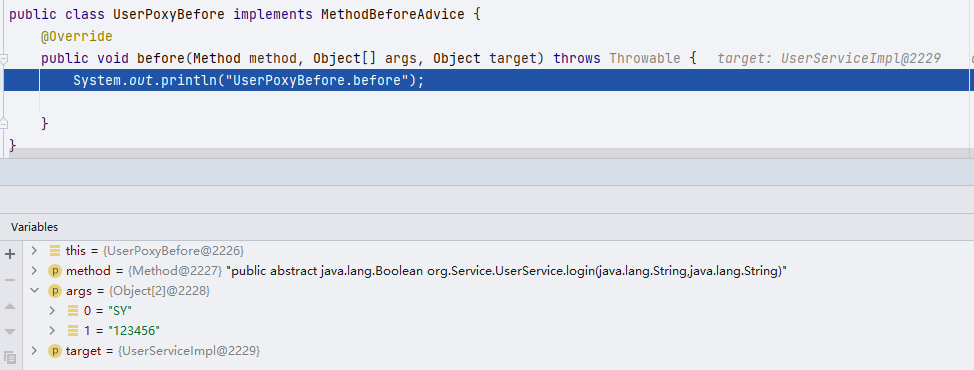
看到method就是原始类的方法,也就是在配置文件定义的目标方法(pointcut里的expression)

args 就是原始类的方法传输的参数

target就是目标类,和JDK动态代理极其类似
接着继续DEBUG
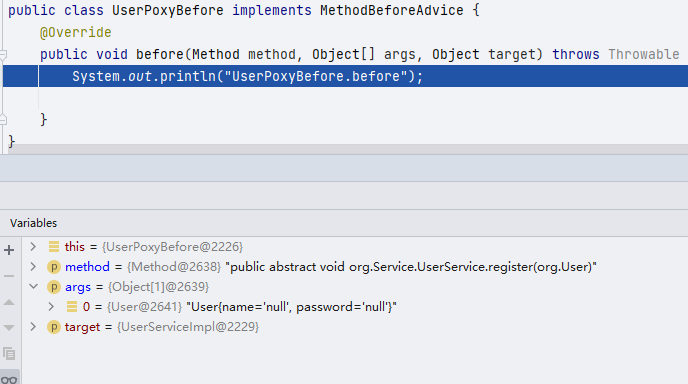
情况和上面一样,User我没有注入数据所以为null
对于MethodInterceptor也大致相同,就不再过多分析
5Spring动态代理开发小结的更多相关文章
- Mybaits之Mapper动态代理开发
Mybaits之Mapper动态代理开发 开发规范: Mapper接口开发方法只需要程序员与Mapper接口(相当于Dao接口),由Mybatis框架根据接口定义创建接口的动态代理对象,代理对象的方法 ...
- java框架之MyBatis(1)-入门&动态代理开发
前言 学MyBatis的原因 1.目前最主流的持久层框架为 Hibernate 与 MyBatis,而且国内公司目前使用 Mybatis 的要比 Hibernate 要多. 2.Hibernate 学 ...
- MyBatis使用Mapper动态代理开发Dao层
开发规范 Mapper接口开发方法只需要程序员编写Mapper接口(相当于Dao接口),由Mybatis框架根据接口定义创建接口的动态代理对象,代理对象的方法体同原始Dao接口实现类方法. Mappe ...
- Mybatis框架三:DAO层开发、Mapper动态代理开发
这里是最基本的搭建:http://www.cnblogs.com/xuyiqing/p/8600888.html 接下来做到了简单的增删改查:http://www.cnblogs.com/xuyiqi ...
- MyBatis开发Dao的原始Dao开发和Mapper动态代理开发
目录 咳咳...初学者看文字(Mapper接口开发四个规范)属实有点费劲,博主我就废了点劲做了如下图,方便理解: 原始Dao开发方式 1. 编写映射文件 3.编写Dao实现类 4.编写Dao测试 Ma ...
- 一张图带你看懂原始dao与SQL动态代理开发的区别-Mybatis
//转载请注明出处:https://www.cnblogs.com/nreg/p/11156167.html 1.项目结构区别: 2.开发区别: 注:其中原始dao开发的实现类UserDaoImpl ...
- JavaWeb_(Mybatis框架)Mapper动态代理开发_三
系列博文: JavaWeb_(Mybatis框架)JDBC操作数据库和Mybatis框架操作数据库区别_一 传送门 JavaWeb_(Mybatis框架)使用Mybatis对表进行增.删.改.查操作_ ...
- MyBatis - Mapper动态代理开发
Mapper接口开发方法编写Mapper接口(相当于Dao接口),由Mybatis框架根据接口定义创建接口的动态代理对象. Mapper接口开发方式是基于入门程序的基础上,对 控制程序 进行分层开发, ...
- MyBatis 动态代理开发
MyBatis 动态代理开发 § Mapper.xml文件中的namespace与mapper接口的类路径相同. § Mapper接口方法名和Mapper.xml中定义的每个statement的i ...
随机推荐
- SpringBoot整合Swagger2及使用
简介 swagger是一个流行的API开发框架,这个框架以"开放API声明"(OpenAPI Specification,OAS)为基础, 对整个API的开发周期都提供了相应的解决 ...
- 死磕Spring之AOP篇 - Spring AOP总览
该系列文章是本人在学习 Spring 的过程中总结下来的,里面涉及到相关源码,可能对读者不太友好,请结合我的源码注释 Spring 源码分析 GitHub 地址 进行阅读. Spring 版本:5.1 ...
- 磁盘挖矿时代开启——GitHub 热点速览 v.21.16
作者:HelloGitHub-小鱼干 本周的 GitHub 热点非常经常,因为一贫如洗的小鱼干突然发现了发家致富之道:磁盘挖矿.chia-blockchain 是一个将磁盘作为计算资源的项目,简而言之 ...
- 我自横刀向天笑,手写Spring IOC容器,快来Look Look!
目录 IOC分析 IOC是什么 IOC能够带来什么好处 IOC容器是做什么工作的 IOC容器是否是工厂模式的实例 IOC设计实现 设计IOC需要什么 定义接口 一:Bean工厂接口 二:Bean定义的 ...
- 【Azure Developer】使用Java代码启动Azure VM(虚拟机)
问题描述 在使用Java的启动Azure VM的过程中,遇见了com.azure.core.management.exception.ManagementException: Status code ...
- [高清文字版]R语言实战(可复制文字PDF)
电子书资源:R语言实战 书籍简介 <R语言实战>从解决实际问题入手,尽量跳脱统计学的理论阐述来讨论R语言及其应用,讲解清晰透澈,极具实用性.作者不仅高度概括了R语言的强大功能.展示了各 ...
- Python 3.10 中新的功能和变化
随着最后一个alpha版发布,Python 3.10 的功能更改全面敲定! 现在,正是体验Python 3.10 新功能的理想时间!正如标题所言,本文将给大家分享Python 3.10中所有重要的功能 ...
- Linux内核软中断
1 软中断概述 软中断是实现中断下半部的一种手段,与2.5以前版本的下半段机制不同.软中断可以同时运行在不同的CPU上. 1.1 软中断的表示 内核中用结构体softirq_action表示一个软中断 ...
- 【秒懂音视频开发】21_显示BMP图片
文本的主要内容是:使用SDL显示一张BMP图片,算是为后面的<播放YUV>做准备. 为什么是显示BMP图片?而不是显示JPG或PNG图片? 因为SDL内置了加载BMP的API,使用起来会更 ...
- 08- Tomcat入门与环境搭建部署
环境搭建:网站文件(开发人员提供),相关软件(web服务器,应用服务器,数据库软件),硬件(服务器设备上),网络环境. 开发人员提供:部署文档说明书(操作系统版本,硬件配置,服务器软件及相关版本,部署 ...