
iCloud无法导入vCard问题。fix the error when import vcard/vcf to icloud.
问题描述:当登录icloud.com,进入通讯录的时候,导入VCF格式的联系人的时候会报错。如图:
1.从outlook的联系人中选一个联系人,导出联系人卡片-vCard文件
(如果是塞班手机,可以用export tool工具导出vcf格式文件,export tools支持如下版本和手机
- Required : Symbian s60v3 & Sybmian s60v5
- Compatible Devices : Symbian s60v3 & Sybmian s60v5 Phone: Nokia E5-00, E50, E51, E52, E55, E60, E61, E62, E63, E65, E66, E7, E70, E71, E72, E73, E75, E90, N71, N73, N75, N76, N77, N78, N79, N8, N80, N81, N82, N85, N86, N91, N92, N93, N95, N96, N97, 3250, 5228, 5230, 5235, 5250, 5320, 5500, 5530, 5630, 5700, 5730, 5800, 6110, 6120, 6124, 6210, 6220, 6290, 6650, 6710, 6720, 6730, 6760, 6788, 6790, X5, X6, C5, C6, C7
)
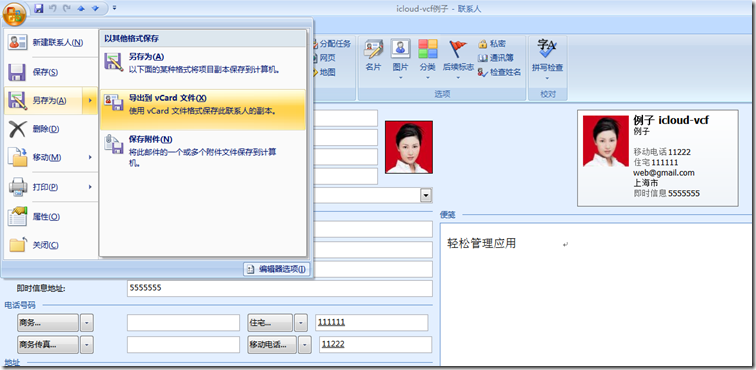
2.登录icloud,进入联系人,点击导入vCard,选择刚才的vcf文件
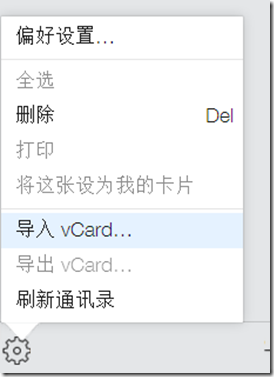
3.报错如下
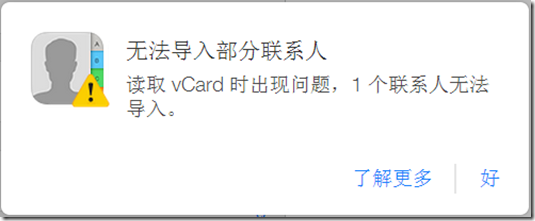
如果是英文的icloud,报错如下:

点击:了解更多:http://support.apple.com/kb/HT4489?viewlocale=zh_CN
显示如下限制:
通讯录
- 联系人卡片总数:25,000
- 联系人卡片的最大大小:256 KB
- 联系人照片的最大大小:224 KB
- 联系人小组的最大大小:256 KB
- 所有联系人卡片的最大大小:
- 卡片文本:24 MB
- 卡片照片:100 MB
- 联系人照片支持的文件类型:JPEG、JPG、BMP、PNG、GIF
- vCard 导入限制:
- vCard 总数:25,000
- vCard 的最大大小:256 KB(照片 + 文本)
- vCard 的最大照片大小:224 KB
单个联系人导入的解决办法:
1.将vcf文件导入gmail
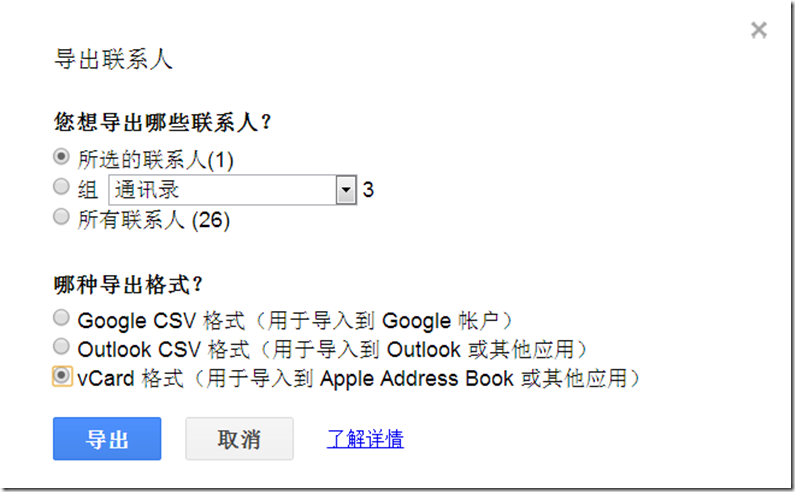
2.从gmail导出vcard格式文件
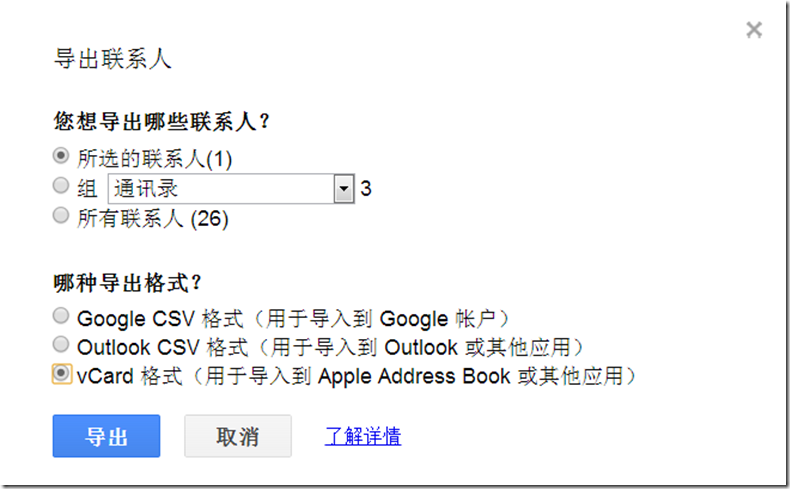
3.将vcard文件导入icloud,成功!
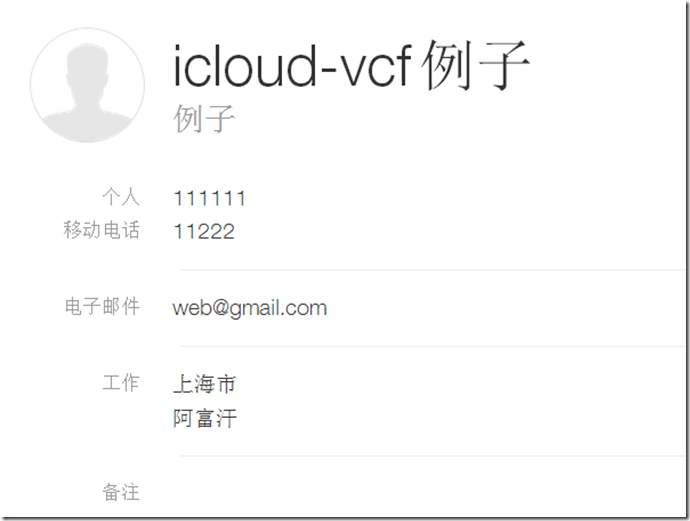
批量联系人导入的解决办法
1. On outlook 2010, go to file, options, mail, and in the compose messages section select *plain text* from the dropdown box, then hit OK. THIS IS VERY IMPORTANT, for the next action to work.
2. now go to CONTACTS, hit ctrl+a (will select all your contacts), then go up to the ribbon and on the SHARE section, where it reads Forward Contact, click on the dropdown and select *As Business Cards* (if you don´t do step one, outlook will crash attempting to create images of the vcards for each contact on an email message).
3.if you did right, now you have a new email window opened, with all your vcards as attachment. select all the Vcards and copy.
4.create a folder in C: and paste all those vcards in there.
5.time to merge all vcards into a single one, for them to be uploaded into your GMAIL account, follow the instructions here http://www.creativeworld9.com/2011/04/how-to-combine-all-vcf-files-to-single.htm l. this link will teach you how to merge various VCF using the command prompt.
7.Once you managed to create one single .vcf files with all your contacts (don´t try to open it cause you will see nothing), go to your gmail account and import them. to do that, on the left upper corner of the screen, 3rd row, you’ll see the word *GMAIL*, click the dropdown there and select contacts. Moving along the same row, go to *More*, click the dropdown and select *import contacts*, then select the VCF file and voilà….you contacts are now in GMAIL.
8.Now we will export the contacts select ALL contacts (if you have more than 100 contacts, you will need to do this in 3 or 4 pieces, selecting no more than 100 contacts to export) , then hit *more* and select *export contacts*. Use the last option, *vCard format (for importing into Apple Address Book or another application)*.
9. this will give you a VCF files with all the contacts, in a format that ICLOUD will accept with no issues, then just sync your idevice, and that is it.
参见:https://discussions.apple.com/thread/3648480?start=0&tstart=0
iCloud无法导入vCard问题。fix the error when import vcard/vcf to icloud.的更多相关文章
- LR_问题_在导入wsdl时出现parsing error
问题描述:使用LR录制webservice协议的脚本,在导入wsdl时出现parsing error,详见图 问题解决:在导入wsdl时输入的地址错误,只指定了地址的虚拟目录名称,未指定方法名称,应该 ...
- ERROR 3009 (HY000): Column count of mysql.user is wrong. Expected 45, found 42. Created with MySQL 50560, now running 50725. Please use mysql_upgrade to fix this error.
centos7.5 登入mysql,进行授权报错 问题: mysql> grant all privileges on *.* to 'lvhanzhi'@'%' identified by ' ...
- 导入Unity插件时出现Failed to import package with error: Couldn't decompress package
导入Unity插件时出现Failed to import package with error: Couldn't decompress package 一开始以为压缩包本身有问题,坏了 后来发现在父 ...
- [转]ADT中通过DDMS导入文件出错ddms transfer error: Read-only file system,Failed to push selection: Read-only file system
[已解决] 原文 http://www.crifan.com/ddms_import_file_error_transfer_error_read_only_file_system/ 想要通过adt ...
- Column count of mysql.user is wrong. Expected 43, found 42. Created with MySQL 50518, now running 50641. Please use mysql_upgrade to fix this error.
出现问题: Column count of mysql.user is wrong. Expected 43, found 42. Created with MySQL 50518, now runn ...
- 升级CUDA版本导致VS2010错误:未找到导入的项目XXX,请确认<Import>声明中的路径正确,且磁盘上存在该文件
转自:http://www.cnblogs.com/yeahgis/p/3853420.html VS2010错误:未找到导入的项目XXX,请确认<Import>声明中的路径正确,且磁盘上 ...
- Eclipse error: “The import XXX cannot be resolved”
解决 Eclipse error: “The import XXX cannot be resolved” eclipse中修改: 1. 项目-->Properties-->java bu ...
- 导入AppiumLibrary报错: ImportError: cannot import name 'InvalidArgumentException
导入AppiumLibrary报错: ImportError: cannot import name 'InvalidArgumentException报错原因 selenium.common.exc ...
- Import Error:cannot import name main解决方案
在Ubuntu上安装软件,不小心升级了pip,导致使用时报错如下: Import Error:cannot import name main 后来发现是因为将pip更新为10.0.0后库里面的函数有所 ...
随机推荐
- python接口自动化测试十九:函数
# 函数 a = [1, 3, 6, 4, 85, 32, 46]print(sum(a)) # sum,求和函数 def add(): a = 1, b = 2, return a + bprint ...
- <a>标签缺少href 属性,鼠标经过不会出现手型
声明: web小白的笔记,欢迎大神指点.联系QQ:1522025433. 直接看实例吧! <!doctype html> <html> <head> <met ...
- ECMAscript5 新增数组内函数
indexOf() 格式:数组.indexOf(item, start) 功能:从start这个下标开始,查找item在数组中的第一次出现的下标. 参数:item 我们要去查找的元素 start从哪个 ...
- jmeter常用组件
测试计划(Test Plan) 是使用 JMeter 进行测试的起点,它是其它 JMeter 测试元件的容器. 线程组(Thread Group) 代表一定数量的并发用户,它可以用来模拟并发用户发送请 ...
- 2018-2019 2 20165203 《网络对抗技术》 Exp2 后门原理与实践
2018-2019 2 20165203 <网络对抗技术> Exp2 后门原理与实践 实验内容 1.使用netcat获取主机操作Shell,cron启动 (0.5分) 2.使用socat获 ...
- TOP排行新闻列表。
效果图: <!DOCTYPE html PUBLIC "-//W3C//DTD XHTML 1.0 Transitional//EN" "http://www.w3 ...
- 解决git仓库从http转为ssh所要处理的问题
https://www.cnblogs.com/lusecond/p/7607198.html 为了方便,一般我们克隆仓库的时候会选择http或者https协议 git clone https://g ...
- 线程池 多线程运行结束后 如何关闭? ExecutorService的正确关闭方法
前言 最近在使用ExecutorService的时候,对于与ExecutorService相关的概念有些迷糊, 加上本身ExecutorService内部的有些方法名在取名上也容易让使用者误解,导致 ...
- 在Ubuntu下解决 adb devices :???????????? no permissions 方法
http://sdvdxl.blog.51cto.com/3845763/1126539 MODE表示读取模式,0666表示任何人都可以访问. 最后 adb devices查看
- 在vim中注释多行
使用查找替换的方法 在linux中,文本每一行的起始标志是^,结束标志为$,因此使用vim搜索^并替换为^#即可. :10,20s/^/#/g 表示将10-20行添加注释,同理取消注释为: :10,2 ...