
CentOS7安装ffmpeg
首先在官网http://ffmpeg.org/download.html下载ffmpeg-4.2.1.tar.bz2
以下为安装步骤:
1、使用工具将源码包上传至Linux主机

2、解压源码包
进入该文件夹下:cd /usr/ffmpeg/(这里我是安装到usr目录下新建的ffmpeg文件夹中)
解压该源码包:tar -jxvf ffmpeg-4.2.1.tar.bz2
[bhsoft@localhost ~]$ cd /usr/ffmpeg/
[bhsoft@localhost ffmpeg]$ tar -jxvf ffmpeg-4.2.1.tar.bz2

3、进入到解压完成的ffmpeg-4.2.1目录下安装yasm(如已安装跳过此步骤)
安装yasm命令:yum install yasm
[bhsoft@localhost ffmpeg]$ cd ffmpeg-4.2.1/
[bhsoft@localhost ffmpeg-4.2.1]$ yuminstallyasm

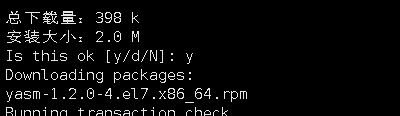
中间遇到Is this ok 选择y,如图
4、
Normal
0
7.8 磅
0
2
false
false
false
EN-US
ZH-CN
X-NONE
/* Style Definitions */
table.MsoNormalTable
{mso-style-name:普通表格;
mso-tstyle-rowband-size:0;
mso-tstyle-colband-size:0;
mso-style-noshow:yes;
mso-style-priority:99;
mso-style-parent:"";
mso-padding-alt:0cm 5.4pt 0cm 5.4pt;
mso-para-margin:0cm;
mso-para-margin-bottom:.0001pt;
mso-pagination:widow-orphan;
font-size:10.0pt;
font-family:"Times New Roman",serif;}
安装yasm完毕后执行命令
[bhsoft@localhost ffmpeg-4.2.1]$ ./configure --enable-shared --prefix=/usr/ffmpeg
5、执行make命令(这一步时间比较长,请耐心等待)
Normal
0
7.8 磅
0
2
false
false
false
EN-US
ZH-CN
X-NONE
/* Style Definitions */
table.MsoNormalTable
{mso-style-name:普通表格;
mso-tstyle-rowband-size:0;
mso-tstyle-colband-size:0;
mso-style-noshow:yes;
mso-style-priority:99;
mso-style-parent:"";
mso-padding-alt:0cm 5.4pt 0cm 5.4pt;
mso-para-margin:0cm;
mso-para-margin-bottom:.0001pt;
mso-pagination:widow-orphan;
font-size:10.0pt;
font-family:"Times New Roman",serif;}
[bhsoft@localhost ffmpeg-4.2.1]$ make
6、
Normal
0
7.8 磅
0
2
false
false
false
EN-US
ZH-CN
X-NONE
/* Style Definitions */
table.MsoNormalTable
{mso-style-name:普通表格;
mso-tstyle-rowband-size:0;
mso-tstyle-colband-size:0;
mso-style-noshow:yes;
mso-style-priority:99;
mso-style-parent:"";
mso-padding-alt:0cm 5.4pt 0cm 5.4pt;
mso-para-margin:0cm;
mso-para-margin-bottom:.0001pt;
mso-pagination:widow-orphan;
font-size:10.0pt;
font-family:"Times New Roman",serif;}
执行make install(安装)命令
[bhsoft@localhost ffmpeg-4.2.1]$ make install
7、
Normal
0
7.8 磅
0
2
false
false
false
EN-US
ZH-CN
X-NONE
/* Style Definitions */
table.MsoNormalTable
{mso-style-name:普通表格;
mso-tstyle-rowband-size:0;
mso-tstyle-colband-size:0;
mso-style-noshow:yes;
mso-style-priority:99;
mso-style-parent:"";
mso-padding-alt:0cm 5.4pt 0cm 5.4pt;
mso-para-margin:0cm;
mso-para-margin-bottom:.0001pt;
mso-pagination:widow-orphan;
font-size:10.0pt;
font-family:"Times New Roman",serif;}
修改文件/etc/ld.so.conf
使用 vim /etc/ld.so.conf命令打开文件
[bhsoft@localhost ffmpeg-4.2.1]$ vim /etc/ld.so.conf
在文件后面添加 /usr/ffmpeg/lib/
然后执行ldconfig命令使其生效
[bhsoft@localhost ffmpeg-4.2.1]$ldconfig
8、
Normal
0
7.8 磅
0
2
false
false
false
EN-US
ZH-CN
X-NONE
/* Style Definitions */
table.MsoNormalTable
{mso-style-name:普通表格;
mso-tstyle-rowband-size:0;
mso-tstyle-colband-size:0;
mso-style-noshow:yes;
mso-style-priority:99;
mso-style-parent:"";
mso-padding-alt:0cm 5.4pt 0cm 5.4pt;
mso-para-margin:0cm;
mso-para-margin-bottom:.0001pt;
mso-pagination:widow-orphan;
font-size:10.0pt;
font-family:"Times New Roman",serif;}
配置环境变量
[bhsoft@localhost ffmpeg-4.2.1]$ vim /etc/profil
使用 vim /etc/profile命令打开profile文件,在文件末添加环境变量:
#set ffmpeg environment

PATH=$PATH:/usr/ffmpeg/bin

export PATH
随后执行 source /etc/profile使配置生效
[bhsoft@localhost ffmpeg-4.2.1]$ source /etc/profile
9、查看是否配置成功
Normal
0
7.8 磅
0
2
false
false
false
EN-US
ZH-CN
X-NONE
/* Style Definitions */
table.MsoNormalTable
{mso-style-name:普通表格;
mso-tstyle-rowband-size:0;
mso-tstyle-colband-size:0;
mso-style-noshow:yes;
mso-style-priority:99;
mso-style-parent:"";
mso-padding-alt:0cm 5.4pt 0cm 5.4pt;
mso-para-margin:0cm;
mso-para-margin-bottom:.0001pt;
mso-pagination:widow-orphan;
font-size:10.0pt;
font-family:"Times New Roman",serif;}
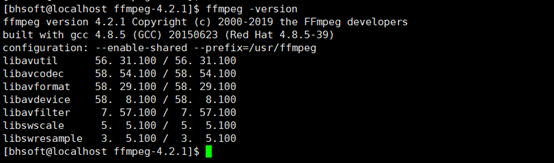
用命令ffmpeg -version查看,出现下图信息即安装成功
  Normal

  0

  7.8 磅

  0

  2

  false

  false

  false

  EN-US

  ZH-CN

  X-NONE


 /* Style Definitions */

 table.MsoNormalTable

	{mso-style-name:普通表格;

	mso-tstyle-rowband-size:0;

	mso-tstyle-colband-size:0;

	mso-style-noshow:yes;

	mso-style-priority:99;

	mso-style-parent:"";

	mso-padding-alt:0cm 5.4pt 0cm 5.4pt;

	mso-para-margin:0cm;

	mso-para-margin-bottom:.0001pt;

	mso-pagination:widow-orphan;

	font-size:10.0pt;

	font-family:"Times New Roman",serif;}


  Normal

  0

  7.8 磅

  0

  2

  false

  false

  false

  EN-US

  ZH-CN

  X-NONE


 /* Style Definitions */

 table.MsoNormalTable

	{mso-style-name:普通表格;

	mso-tstyle-rowband-size:0;

	mso-tstyle-colband-size:0;

	mso-style-noshow:yes;

	mso-style-priority:99;

	mso-style-parent:"";

	mso-padding-alt:0cm 5.4pt 0cm 5.4pt;

	mso-para-margin:0cm;

	mso-para-margin-bottom:.0001pt;

	mso-pagination:widow-orphan;

	font-size:10.0pt;

	font-family:"Times New Roman",serif;}
Normal
0
7.8 磅
0
2
false
false
false
EN-US
ZH-CN
X-NONE
/* Style Definitions */
table.MsoNormalTable
{mso-style-name:普通表格;
mso-tstyle-rowband-size:0;
mso-tstyle-colband-size:0;
mso-style-noshow:yes;
mso-style-priority:99;
mso-style-parent:"";
mso-padding-alt:0cm 5.4pt 0cm 5.4pt;
mso-para-margin:0cm;
mso-para-margin-bottom:.0001pt;
mso-pagination:widow-orphan;
font-size:10.0pt;
font-family:"Times New Roman",serif;}
CentOS7安装ffmpeg的更多相关文章
- centos7 安装 ffmpeg
升级系统 yum install epel-release -yyum update -y 安装Nux Dextop Yum源 由于centos 没有官方软件包,我们可以使用第三方YUM源(Nux D ...
- CentOS7 安装ffmpeg
安装EPEL Release,因为安装需要使用其他的repo源,所以需要EPEL支持:yum install -y epel-release#如果出现缺少Code提示,可以: sudo rpm --i ...
- 在CentOS7 安装ffmpeg
参考自:https://linuxize.com/post/how-to-install-ffmpeg-on-centos-7/ 首先切换至root用户 yum install epel-releas ...
- CentOs7.5安装FFmpeg
一.FFmpeg简介 FFmpeg是一个自由软件,可以运行音频和视频多种格式的录影.转换.流功能,包含了libavcodec ─这是一个用于多个项目中音频和视频的解码器库,以及libavformat— ...
- centos7上安装ffmpeg
FFmpeg介绍 FFmpeg是一个开源免费跨平台的视频和音频流方案,属于自由软件,采用LGPL或GPL许可证(依据你选择的组件).它提供了录制.转换以及流化音视频的完整解决方案.它包含了非常先进的音 ...
- centos7 yum安装ffmpeg,以及ffmpeg的简单用法
yum install ffmpeg: 安装EPEL Release,因为安装需要使用其他的repo源,所以需要EPEL支持: yum install -y epel-release #如果出现缺少C ...
- docker下centos7编译安装ffmpeg
1.安装基础命令 docker下精简版centos没有make等命令,先安装: yum -y install gcc automake autoconf libtool make yum instal ...
- cent7安装ffmpeg
FFmpeg是一个领先的多媒体框架工具集,几乎能够对任何格式的音视频文件进行解码,编码,转码,复用,解复用,流式传输,过滤和播放. 不管这些音视频文件所采用的格式是由某些标准委员会,社区还是公司设计的 ...
- # centos7下FFmpeg环境部署记录
# centos7下FFmpeg环境部署记录 随着视频在网站上的应用越来越多,越来越多的网站服务器需要支持视频转码,视频压缩,FFmpeg是目前最好用的网站服务器后台转码程序,应用最多.FFmpeg是 ...
随机推荐
- 线程池&进程池
线程池&进程池 池子解决什么问题? 1.创建/销毁线程伴随着系统开销,如果过于频繁会影响系统运行效率 2.线程并发数量过多,抢占系统资源,从而导致系统阻塞甚至死机 3.能够刚好的控制和管理池子 ...
- 微信小程序实现,可滑动、可点击
tab.wxml: 全部 中奖 未中奖 全部 中奖 未中奖 tab.wxss: .swiper-tab { width: 100%; border-bottom: 2rpx solid #ccc; t ...
- WIN2003+IIS6环境SSL证书的安装
下载LOFTER我的照片书 | 一.解压证书文件.证书文件解压后,找到后缀为.pfx的压缩包,进行解压到固定位置.(一般放在网站根目录)
- 《Windows内核安全与驱动开发》 5.1&5.2 内核与应用方面的编程
<Windows内核安全与驱动开发>阅读笔记 -- 索引目录 <Windows内核安全与驱动开发> 5.1&5.2 内核与应用方面的编程 一.生成控制设备 如果一个驱 ...
- Python爬虫从入门到精通——基本库re的使用:正则表达式【华为云技术分享】
置顶:华为云618大促火热进行中,全场1折起,免费抽主机,消费满额送P30 Pro,点此抢购. 正则表达式是处理字符串的强大工具,它有自己特定的语法结构,有了它,实现字符串的检索.替换.匹配验证都不在 ...
- Tensorflow Serving Docker compose 部署服务细节(Ubuntu)
[摘要] Tensorflow Serving 是tf模型持久化的重要工具,本篇介绍如何通过Docker compose搭建并调试TensorFlow Serving TensorFlow Servi ...
- 数据库Oracle数字函数
数字函数不多: ROUND(arg1):四舍五入保留整数. arg1:数字类型.原数字. arg2:整数类型.小数点保留的位数. SQL> select round(1256.564,2) fr ...
- HTML_body中常用的标签部分
meta: <!DOCTYPE html> <html> <head> <meta charset="utf-8" /> <t ...
- [TimLinux] Python IDE工具
1. 首推IDE工具PyCharm JetBrains公司推出的系列IDE工具中支持Python编译语言的开发工具,基本上可以认为是行业第一IDE工具了,分为社区版和专业版,可以创建纯Python单文 ...
- [TimLinux] JavaScript position为fixed时支持水平滚动条
1. 固定定位 position: fixed;设置好之后,元素在浏览器窗口中的位置就固定住了,这个时候,不论是水平移动滚动条,还是垂直移动滚动条,元素是打死都不会动的. 但是当用fixed定位的元素 ...