
Xamarin.Forms一些常见问题
安装
1、查看Xaramin.Forms的版本
在vs项目中查看引用的包(Xamarin.Forms)的版本,或者直接进文件夹看 C:\Microsoft\Xamarin\NuGet\xamarin.forms\
可以通过 NuGet 更新到最新的 Xamarin 版本。
开发
XAML
1、xaml中用到的StaticResource的定义
<Setter Property="FontFamily" Value="{StaticResource MontserratRegular}" />
一般在App.xaml中的<Application.Resources><ResourceDictionary>中定义
2、xaml中实例化对象
在xaml上面定义的命名空间别名, xmlns:behaviors="clr-namespace:SkillPool.Core.Behaviors"
使用的时候其实是 实例化的过,例如,类:EventToCommandBehavior,可绑定属性:EventName、Command
<Entry.Behaviors>

<behaviors:EventToCommandBehavior EventName="TextChanged"

Command="{Binding ValidateUserNameCommand}" />

</Entry.Behaviors>
3、xaml中定义一些按平台OnPlatform显示的资源值(Padding、Height)
 <OnPlatform x:Key="GridPadding"

                        x:TypeArguments="Thickness">

                <On Platform="iOS" Value="20,0,10,15" />

                <On Platform="Android, UWP, WinRT, WinPhone" Value="20,15,10,15" />

            </OnPlatform>

            <OnPlatform x:Key="GridHeightRequest"

                        x:TypeArguments="x:Double">

                <On Platform="iOS" Value="135" />

                <On Platform="Android, UWP, WinRT, WinPhone" Value="150" />

            </OnPlatform>

            <OnPlatform x:Key="PaddingTop"

                        x:TypeArguments="x:Double">

                <On Platform="iOS" Value="0" />

                <On Platform="Android, UWP, WinRT, WinPhone" Value="15" />

            </OnPlatform>

            <OnPlatform x:Key="FirstRowHeight"

                        x:TypeArguments="GridLength">

                <On Platform="iOS" Value="65" />

                <On Platform="Android, UWP, WinRT, WinPhone" Value="80" />

            </OnPlatform>

Padding="{StaticResource GridPadding}"

HeightRequest="{StaticResource GridHeightRequest}"

<Grid.RowDefinitions>

<RowDefinition Height="{StaticResource FirstRowHeight}"/>

<RowDefinition Height="30"/>

<RowDefinition Height="40"/>

</Grid.RowDefinitions>
x:TypeArguments的类型,取决于控件的属性的类型(查看其定义就知道了),可能位于以下两个命名空间中:
xmlns="http://xamarin.com/schemas/2014/forms"
xmlns:x="http://schemas.microsoft.com/winfx/2009/xaml"
还可以有简便写法:
 <Style TargetType="Label">

 <Setter Property="FontSize" Value="{d:OnPlatform Android=15,Default=12}"/>

<Setter Property="BackgroundColor" Value="{OnPlatform Android='Red',Default='Yellow'}"/>

 </Style>
4、Xaml中引用控件通过Name和x:Reference
<StackLayout.GestureRecognizers>

                        <TapGestureRecognizer

                        Command="{Binding ChildFolderShowOrHideCommand}" NumberOfTapsRequired="1" CommandParameter="{x:Reference childenImg}" />

                </StackLayout.GestureRecognizers>

                <Image x:Name="childenImg" Margin="0" HeightRequest="20" WidthRequest="12" VerticalOptions="Center" HorizontalOptions="StartAndExpand"

                       Source="{Binding ChilrensIsVisible,Mode=OneWay,Converter={StaticResource MailChilrenFolderVisibleConverter}}" IsVisible="{Binding IsHaveChilren,Mode=OneWay}" />
5、布局中Label被挤压
在一行布局中,第一个Labe(长度很短),第二个Label(长度可能很长),他们样式不同,第三个是一些图片。需要不换行显示,第二个label截断就好。但是以下xaml在实际中,当第二个label很长时,会造成第一个label显示不全,给它设置长度都不行,设置HorizontalOptions="FillAndExpand"也不行
<StackLayout Grid.Row="4" Orientation="Horizontal" Margin="0,3,0,0">

                    <Label  Margin="0" Text="发件人"   FontSize="15" TextColor="Black" />

                        <Label  Margin="0" Text="huy casfdf@as.com1afdgadhh23456" MaxLines="1" FontSize="15" FontAttributes="Bold" TextColor="#1c86ee"

                       HorizontalOptions="FillAndExpand" LineBreakMode="MiddleTruncation"  />

                        <Label

                    FontSize="15"  Text="cadsffs.com" TextColor="Black" IsVisible="False" LineBreakMode="MiddleTruncation" />

                        <ImageButton

                   Style="{StaticResource ImageButtonSmallStyle}" Source="SenderEncrypt.png"/>

                        <ImageButton

                   Style="{StaticResource ImageButtonSmallStyle}" Source="SenderSignature.png" />

                        <ImageButton

                   Style="{StaticResource ImageButtonSmallStyle}" Source="lv1.png"/>

                        <ImageButton

                   Style="{StaticResource ImageButtonSmallStyle}" Source="authenticated.png"/>

            </StackLayout>
不过想到Grid布局,以下可以解决:
<StackLayout Grid.Row="4" Orientation="Horizontal" Margin="0,3,0,0">

                    <Label  Margin="0" Text="发件人"   FontSize="15" TextColor="Black" />

                        <Label  Margin="0" Text="huy casfdf@as.com1afdgadhh23456" MaxLines="1" FontSize="15" FontAttributes="Bold" TextColor="#1c86ee"

                       HorizontalOptions="FillAndExpand" LineBreakMode="MiddleTruncation"  />

                        <Label

                    FontSize="15"  Text="cadsffs.com" TextColor="Black" IsVisible="False" LineBreakMode="MiddleTruncation" />

                        <ImageButton

                   Style="{StaticResource ImageButtonSmallStyle}" Source="SenderEncrypt.png"/>

                        <ImageButton

                   Style="{StaticResource ImageButtonSmallStyle}" Source="SenderSignature.png" />

                        <ImageButton

                   Style="{StaticResource ImageButtonSmallStyle}" Source="lv1.png"/>

                        <ImageButton

                   Style="{StaticResource ImageButtonSmallStyle}" Source="authenticated.png"/>

            </StackLayout>
6、W/StaticLayout: maxLineHeight should not be -1. maxLines:1 lineCount:1
查看了下xaml中是否有行相关的设置,删掉试试,什么原因暂时没搞清
7、页面的静态资源无法自动提示
发现xaml中格式字符串引起的,<Label TextColor="Gray" FontSize="15" VerticalOptions="Center" Text="{Binding MailDetailModel.MailDate,StringFormat='{0:yyyy-MM-dd HH:mm:ss}' }"/>
将StringFormat改为Converter去做转换则可以了。
8、ImageButton的单击命令去切换图片显示的时候,图像不知怎么的就变小了,改了Aspect属性也不行
可以改为用Image控件,添加GestureRecognizers去做切换图片,图像大小不会变
ViewModel绑定
1、在ViewModel中引用xaml中用x:Name定义的变量
首先获取页面:Application.Current.MainPage as MailIndexView;
然后取定义的变量(或者控件),但是控件需要在xaml中命名如下,
x:Name="tabSelectedLayout" x:FieldModifier="Public"
2、控件的Binding 必须是属性,不能是字段
自定义控件
细微的样式更改,用效果;复杂的外观和行为自定义,用自定义呈现器。
1、自定义控件 属性更改事件的两种用法
自定义控件包括多个控件时,若子控件Editor的属性例如Placeholder 需要通过使用自定义控件时 传过来。则需要将Editor的属性绑定到自定义控件上,有两种方式:
- 在属性的OnPropertyChanged(); 事件中设置
private static void OnPlaceholderChanged(BindableObject bindable, object oldValue, object newValue)
{
if (bindable is AutoCompleteView autocomplete)
{
autocomplete.Placeholder = (string)newValue;
autocomplete.Editor.Placeholder = autocomplete.Placeholder;
}
}
- 在xaml中指定, Placeholder="{Binding Placeholder,Source={x:Reference fm}}",(同时就不用定义OnPropertyChanged参数及事件)
<Frame xmlns="http://xamarin.com/schemas/2014/forms"

             xmlns:x="http://schemas.microsoft.com/winfx/2009/xaml"

             xmlns:d="http://xamarin.com/schemas/2014/forms/design"

             xmlns:mc="http://schemas.openxmlformats.org/markup-compatibility/2006"

             mc:Ignorable="d"

             xmlns:behavior="clr-namespace:MeSince.Behaviors"

             xmlns:effect="clr-namespace:MeSince.Effects"

             x:Class="MeSince.Controls.RoundRadiusEntry" x:Name="fm" HeightRequest="40" Padding="5,0,5,0" CornerRadius="4" HasShadow="False" Margin="0">

    <StackLayout Orientation="Horizontal" Padding="0" Margin="0" VerticalOptions="FillAndExpand">

        <Entry x:Name="entry" Text="{Binding Text,Source={x:Reference fm}}" Placeholder="{Binding Placeholder,Source={x:Reference fm}}"
调试
1、System.Reflection.TargetInvocationException
Message=Exception has been thrown by the target of an invocation. 调用的目标引发异常。
1.1、注:遇到报错,首先从VS中看下有没有具体的原因,而不是一开始就去 Internet找解决方案。
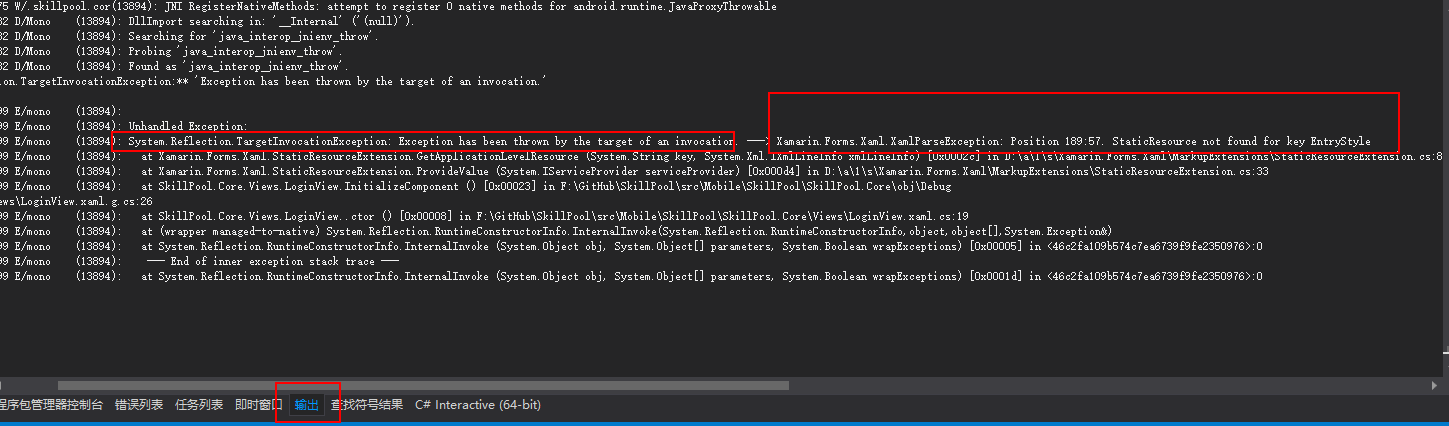
很明显看出是XAML解析错误:EntryStyle资源不存在导致。
1.2、若输出中没有明显的提示,则用断点调试,定位到哪一块代码报错的,再去分析问题
例如,今天遇到这个问题,将事件改为命令在Viewmodel中执行,始终报上面的错,定位到问题是如下xaml:
<?xml version="1.0" encoding="utf-8" ?>

<TabbedPage xmlns="http://xamarin.com/schemas/2014/forms"

             xmlns:x="http://schemas.microsoft.com/winfx/2009/xaml"

             xmlns:d="http://xamarin.com/schemas/2014/forms/design"

             xmlns:mc="http://schemas.openxmlformats.org/markup-compatibility/2006"

             mc:Ignorable="d"

             x:Class="MeSince.Views.Main.BottomTabbedPageView"

             xmlns:viewModelBase="clr-namespace:MeSince.ViewModels.Base"

             viewModelBase:ViewModelLocator.AutoWireViewModel="True"

            xmlns:behaviors="clr-namespace:MeSince.Behaviors"

            xmlns:converters="clr-namespace:MeSince.Converters"

           >

    <TabbedPage.Behaviors>

        <behaviors:EventToCommandBehavior EventName="CurrentPageChanged" Command="{Binding CurrentPageChangedCommand}" />

    </TabbedPage.Behaviors>
看了下EventToCommandBehavior的定义,发现其中base.OnAttachedTo(visualElement);
visualElement的类型定义的是View,,而发现我需要附加行为的是TabbedPage(类型是Page,和View是不同的),于是改为它们的父类VisualElement,问题解决。
即:将
public class EventToCommandBehavior : BindableBehavior<View>
改为
public class EventToCommandBehavior : BindableBehavior<VisualElement>
2、UWP.exe 已附件有调试器,但没有将该调试器配置为调试此未经处理的异常。若要调试此异常,必须分离当前的调试器
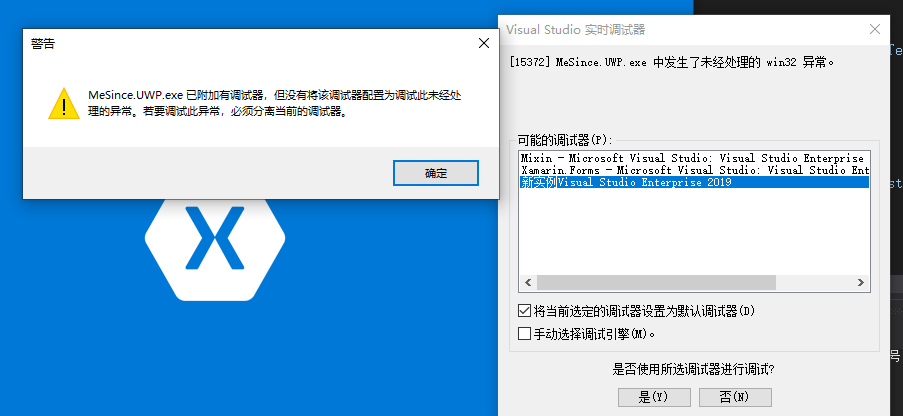
解决方案:尝试“清理解决方案”,然后在文件资源管理器中打开项目,再删除 bin 和 obj 文件夹。
https://docs.microsoft.com/zh-cn/previous-versions/hh972445(v=vs.140)?redirectedfrom=MSDN
3、调试CollectionView报错
报错:The class, property, or method you are attempting to use ('VerifyCollectionViewFlagEnabled') is part of CollectionView; to use it, you must opt-in by calling Forms.SetFlags("CollectionView_Experimental") before calling Forms.Init().
意思是:您尝试使用的类,属性或方法(“ VerifyCollectionViewFlagEnabled”)是CollectionView的一部分; 要使用它,您必须在调用Forms.Init()之前通过调用Forms.SetFlags(“ CollectionView_Experimental”)选择加入。
在特定平台初始化代码中加入,
protected override void OnCreate(Bundle savedInstanceState)

{

    global::Xamarin.Forms.Forms.SetFlags("CollectionView_Experimental");

}
4、Specified cast is not valid 指定的转换无效
在xaml页面初始化(InitializeComponent ())时报错,但是没有具体的信息。
思路:
- 看下ViewModel的绑定属性是否有误;
- 控件属性的类型是否正确,eg: <BoxView CornerRadius="{StaticResource cornerRadius}" />,CornerRadius的类型是CornerRadius而不是Double,CornerRadius写成了x:Double就会报上面的错误。
<OnPlatform x:Key="cornerRadius"

x:TypeArguments="CornerRadius">

<On Platform="iOS" Value="3" />

<On Platform="Android, UWP, WinRT, WinPhone" Value="5" />

</OnPlatform>
其它参考:Xamarin深坑集锦
Xamarin.Forms一些常见问题的更多相关文章
- xamarin.forms新建项目android编译错误
vs2015 update3 新建的xamarin.forms项目中的android项目编译错误.提示缺少android_m2repository_r22.zip,96659D653BDE0FAEDB ...
- Xamarin.Forms 简介
An Introduction to Xamarin.Forms 来源:http://developer.xamarin.com/guides/cross-platform/xamarin-forms ...
- Xamarin.Forms 免费电子书
Xamarin Evolve 正在举行,现在已经放出2本免费的Xamarin.Forms 免费电子书,据现场的同学说这两天还有Xamarin.Forms 重磅消息发布: Creating Mobile ...
- 老司机学新平台 - Xamarin Forms开发框架之MvvmCross插件精选
在前两篇老司机学Xamarin系列中,简单介绍了Xamarin开发环境的搭建以及Prism和MvvmCross这两个开发框架.不同的框架,往往不仅仅使用不同的架构风格,同时社区活跃度不同,各种功能模块 ...
- 老司机学新平台 - Xamarin Forms开发框架二探 (Prism vs MvvmCross)
在上一篇Xamarin开发环境及开发框架初探中,曾简单提到MvvmCross这个Xamarin下的开发框架.最近又评估了一些别的,发现老牌Mvvm框架Prism现在也支持Xamarin Forms了, ...
- 使用Xamarin.Forms平台开发移动应用指南
下载书:链接: http://pan.baidu.com/s/1c29H9KG 密码: 7esm 注:捣鼓虚拟机把Hyper-V关闭,后来Xamarin搞挂了,所以暂停翻译. 第1章 Xamarin. ...
- Xamarin.Forms.Platform.Perspex, Xamarin Forms 的 Perspex(号称下一代WPF) 实现
Perspex, 跨平台的UI框架,加上Xamarin Forms的跨平台的中间层,这样同一套代码就可跨几乎所有已知平台,这其中包括旧版Windows, Linux及Mac OS. 目前,基本控件可显 ...
- 为 Xamarin.Forms 做个跑马灯控件
前段时间,私下用 Xamarin.Forms 做了个商业项目的演示版.很多被国内App玩坏了的控件/效果,XF上都没有或是找不到对应的实现,没有办法只能亲自上阵写了几个,效果还行,就是有BUG. 这个 ...
- Xamarin.Forms介绍
On May 28, 2014, Xamarin introduced Xamarin.Forms, which allows you to write user-interface code tha ...
随机推荐
- python中 jsonchema 与 shema 效率比较
前面几篇文章总结了python中jsonschema与schema的用法,这里测试一下两者的效率: 上代码: import time from jsonschema import validate, ...
- Git新建分支,分支合并,版本回退详解
一.git基本命令 git拉取仓库代码 #拉取master代码 git clone git仓库地址 #拉取分支代码 git clone -b 分支名称 git仓库地址 2.git添加代码到本地仓库 g ...
- css 光标
<style> div{width:100;height:50;float:left;border:1px solid red;margin:1px;} </style> &l ...
- 百度webuploader如何实现秒传与断点续传
因为这是小众需求,所以默认没有做在webuploader里面,而只是提供hook接口,让用户很简单的扩展此功能. 那么,都有哪些重要的hook接口呢? before-send-file 此hook在文 ...
- kylin2.4.1订单案例详细构建流程
一.Hive订单数据仓库构建: hive表创建可以在命令行中直接完成,也可以在Hue中完成,本文在Hue中的完成,如下图: 下文的样例文本文件下载地址:https://files-cdn.cnblog ...
- 设计模式之(六)原型模式(ProtoType)
认识原型模式 原型模式是比较简单的设计模式.废话不多说,直接看定义:用原型实例指定创建对象的种类,并通过拷贝这些原型创建新的对象.通过实例指定种类,种类就是初始化的类,然后通过拷贝创建对象.先展示一个 ...
- mybatis关联映射一对一
在项目开发中,会存在一对一的关系,比如一个人只有一个身份证,一个身份证只能给一个人使用,这就是一对一关系.一对一关系使用主外键关联. table.sql,在数据库中创建如下两个表并插入数据 CREAT ...
- jQuery源码二之extend的实现
extend是jQuery中一个比较核心的代码,如果有查看jQuery的源码的话,就会发现jQuery在多处调用了extend方法. 作用 对任意对象进行扩展 扩展某个实例对象 对jquery本身的实 ...
- 冬虫夏草winterwormsummerherb英语
“中药之王”--冬虫夏草WinterwormSummerherb King of Chinese medicine --WinterwormSummerherb “冬天是虫,夏天是草,冬虫夏草是个宝. ...
- 英语apyrite红碧玺apyrite单词
红碧玺(apyrite)是粉红.桃红.玫瑰红.深红.紫红等以红色调为主的碧玺,矿物学上主要属于锂电气石和镁电气石.红色起因可能与微量锰及锂和铯有关. 红色是碧玺中价值最高的,其中以紫红色和玫瑰红色最佳 ...