
OpenCASCADE Make Primitives-Sphere
OpenCASCADE Make Primitives-Sphere
Abstract. The sphere is the simplest topology shape of the BRep structure. But there are several import concept of the sphere edges, such as degenerated edge and seam edge. So construct a sphere by code, you will learn these.
Key Words. OpenCASCADE, Sphere, BRep
1. Introduction
球 体(sphere)是边界表示法(BRep)中最简单的一个拓朴形状了,因为它直接由球面来构造。但是其中包含了一些重要的概念,如退化边 (degenerated edge)、衔接边(seam edge)。由代码手工来构造一个球体,可以学习这些概念。首先要知道OpenCASCADE中球面的参数方程:

在Draw Test Harness中显示如下图所示:
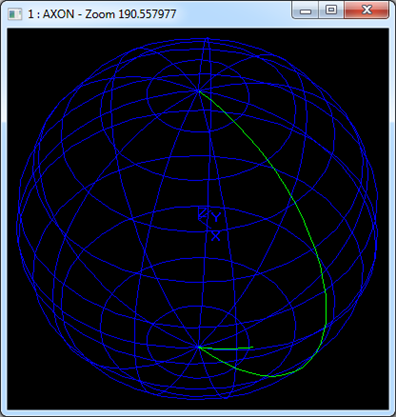
Figure 1.1 Sphere in Draw Test Harness
由球面的参数方程可知,当参数u=0或2PI时,对应球面上的点就是上图所示的绿线,实际上是由两个线重合在一起了。
当参数v=-PI/2或PI/2时,对应球面上两个极点,因为球面的两个极点处法向为零,而球面在两个极点处的法向是存在的,所以这样的点即为边退化而成,称为退化边。
三维曲线圆的参数方程如下所示:

通过代码从点开始来构造一个球体,从而来加深理解OpenCASCADE的BRep表示法。
2.Make the Sphere
2.1 Make Vertex
从顶点开始来创建球体。因为球体就是一个球面,为了得到Face的Wire,需要构造一个闭合的区域。这里选择两个极点作为球体的顶点。创建球体的两个极点,程序代码如下所示:
aBuilder.MakeVertex(aNorthPole, aPoints[0], Precision::Confusion());
aBuilder.MakeVertex(aSouthPole, aPoints[1], Precision::Confusion());
2.2 Make Edge
为了得到闭合的Wire,需要四条边,其中在球面两个极点处的两条退化边,还有连接两个极点的重合的衔接边。创建边的代码如下所示:
aBuilder.MakeEdge(aSeamEdge, new Geom_Circle(aCircle), Precision::Confusion());
// there is no 3D geometry curve in the degenerated edge.
aBuilder.MakeEdge(aNorthEdge);
aBuilder.Degenerated(aNorthEdge, Standard_True);
// there is no 3D geometry curve in the degenerated edge.
aBuilder.MakeEdge(aSouthEdge);
aBuilder.Degenerated(aSouthEdge, Standard_True);
// set the vertex info of the seam edges.
{
TopoDS_Vertex V1 = aNorthPole;
TopoDS_Vertex V2 = aSouthPole;
V1.Reverse();
aBuilder.Add(aSeamEdge, V1);
aBuilder.Add(aSeamEdge, V2);
aBuilder.UpdateVertex(V1, ElCLib::Parameter(aCircle, aPoints[0]), aSeamEdge, Precision::Confusion());
aBuilder.UpdateVertex(V2, ElCLib::Parameter(aCircle, aPoints[1]), aSeamEdge, Precision::Confusion());
BRepTools::Update(aSeamEdge);
}
// set the vertex info of the north degenerated edge.
{
TopoDS_Vertex V1 = aNorthPole;
TopoDS_Vertex V2 = aNorthPole;
V2.Reverse();
aBuilder.Add(aNorthEdge, V1);
aBuilder.Add(aNorthEdge, V2);
BRepTools::Update(aNorthEdge);
}
// set the vertex info of the south degenerated edge.
{
TopoDS_Vertex V1 = aSouthPole;
TopoDS_Vertex V2 = aSouthPole;
V2.Reverse();
aBuilder.Add(aSouthEdge, V1);
aBuilder.Add(aSouthEdge, V2);
BRepTools::Update(aSouthEdge);
}
由上述代码可知,衔接边中包含了几何信息:三维曲线圆;退化边中未包含几何信息,但将其退化边属性设置为true。之后将边上顶点在曲线上对应的参数值设置到边中,退化边不需要设置。
2.3 Make Wire
创建Wire需要确保组成Wire的边要闭合。程序代码如下所示:
aBuilder.MakeWire(aWire);
// add edges to the wire.
{
TopoDS_Edge E1 = aNorthEdge;
TopoDS_Edge E2 = aSeamEdge;
TopoDS_Edge E3 = aSouthEdge;
TopoDS_Edge E4 = aSeamEdge;
E1.Reverse();
E4.Reverse();
aBuilder.Add(aWire, E1);
aBuilder.Add(aWire, E2);
aBuilder.Add(aWire, E3);
aBuilder.Add(aWire, E4);
BRepTools::Update(aWire);
}
2.4 Make Face
创建面后,将边与面关联起来至关重要,即PCurve的设置。程序代码如下所示:
aBuilder.MakeFace(aFace, new Geom_SphericalSurface(aSphere), Precision::Confusion());
// set the pcurve info between edge and face.
{
aBuilder.Range(aNorthEdge, 0.0, 2 * M_PI);
aBuilder.UpdateEdge(aNorthEdge, new Geom2d_Line(aLines[0]), aFace, Precision::Confusion());
aBuilder.Range(aSeamEdge, 1.5 * M_PI, 2.5 * M_PI);
aBuilder.UpdateEdge(aSeamEdge, new Geom2d_Line(aLines[1]), new Geom2d_Line(aLines[2]), aFace, Precision::Confusion());
aBuilder.Continuity(aSeamEdge, aFace, aFace, GeomAbs_CN);
aBuilder.Range(aSouthEdge, 0.0, 2 * M_PI);
aBuilder.UpdateEdge(aSouthEdge, new Geom2d_Line(aLines[3]), aFace, Precision::Confusion());
BRepTools::Update(aFace);
}
由上述代码可知,球面中包含了一个几何的曲面。创建球面后,将相关的边与面关联起来。参数曲线PCurve的范围Range在球面的参数空间中应该闭合。其中两个退化边的范围都是从0到2PI,而衔接边的范围设置不当,会产生不正确的结果,如下图所示:
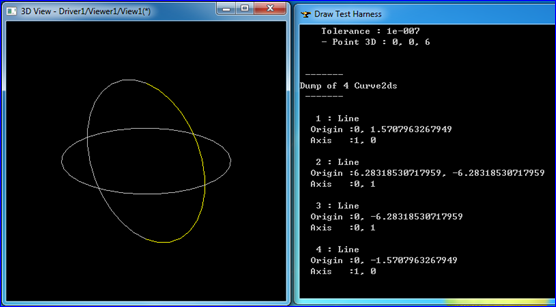
Figure 2.4.1 Seam Edge Range[-PI/2, PI/2]
线框模式显示正常,但是不能切换到渲染模式,即不能显示出面。结合其PCurve的范围可以发现组成Wire的边的PCurve不能闭合。
当Seam边的三维曲线方向不当时,会不与球面的Seam重合,如下图所示:
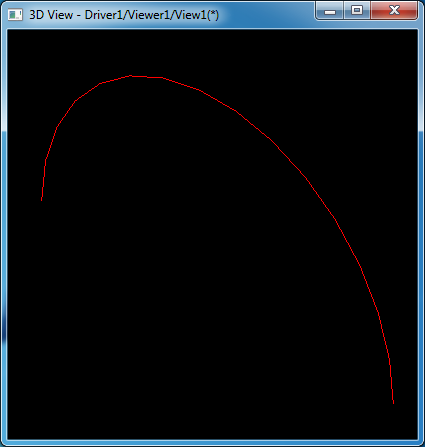
Figure 2.4.2 Circle in Seam Edge Range [-PI/2, PI/2]
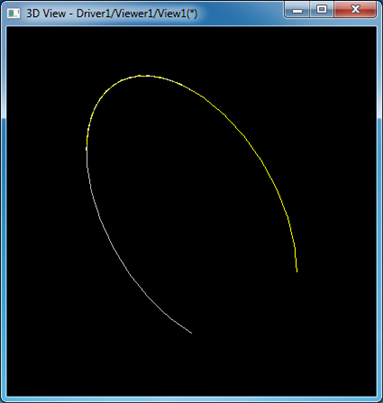
Figure 2.4.3 Wrong Seam Edge Geometry Curve
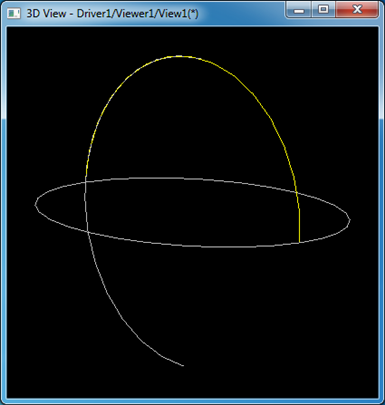
Figure 2.4.4 Wrong Seam Edge Geometry Curve
3. Test the Sphere
正确生成球体后导出为brep文件即可以在Draw Test Harness中来显示及进行一些操作来验证结果的正确性。在Draw Test Harness中打开brep文件并显示球体如下图所示:
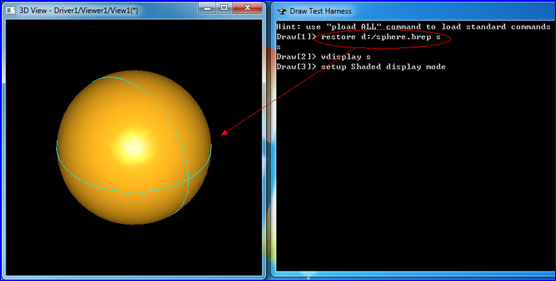
Figure 3.1 Show the Sphere from file in Draw Test Harness
将其与一个长方体进行布尔运算,效果如下图所示:
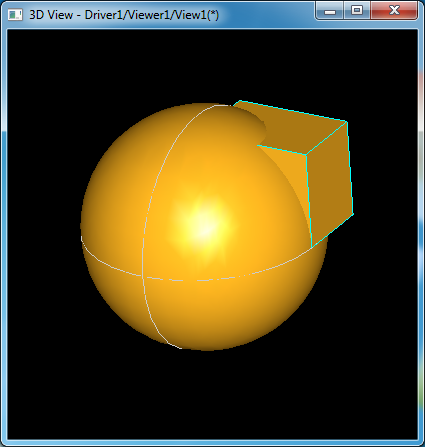
Figure 3.2 Spher and a Box
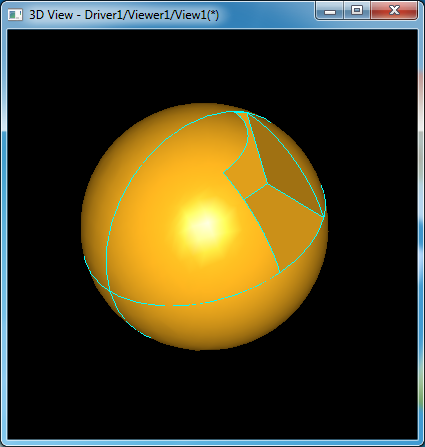
Figure 3.3 Sphere cut a Box
由上图可知,球体与长方体布尔运算结果正确。
4. Conclusion
通过生成一个球体,示例了特殊边的构造,如退化边和衔接边。需要注意的事项还是组成Wire的所有边中的PCurve必须在面的参数空间中闭合。由PCurve可知,球面对应的参数空间不是几何曲面的范围,而是在v方向上偏移了2PI。
5. References
1. OpenCascade Primitives BRep - Sphere,
http://www.cppblog.com/eryar/archive/2014/03/22/206279.html
2. PCurve - Curve on Surface,
http://www.cppblog.com/eryar/archive/2014/03/15/206180.html
3. Topology and Geometry in OpenCascade-Face,
http://www.cppblog.com/eryar/archive/2013/09/12/203199.html
PDF Version and Source code: OpenCASCADE Make Primitives - Sphere
OpenCASCADE Make Primitives-Sphere的更多相关文章
- VehicleCamera解读
坐标系: z-axis ^ | | y-axis | / | / |/ +----------------> x-axis 围绕Z轴旋转叫做偏航角,Yaw:围绕X轴旋转叫做 俯仰角,Pitch: ...
- Away3d 基础 1 ---对一个简单类的解释
转自:http://www.cnblogs.com/nooon/archive/2009/05/16/1458334.html 原英文地址: http://www.flashmagazine.com/ ...
- Away 3d 入门demo
Away3d是不错的开源Flash 3D引擎,现在最新的版本是4.0,在这个例子中我们使用现在比较稳定的3.6版本,4.0API相较之前变化较大,支持最新的flash player11硬件加速 现在写 ...
- 【转】PV3D的小练习~太阳系八大行星
转自:http://hi.baidu.com/boycy/item/70d1ba53bc8c3a958c12eddf http://www.cnblogs.com/flash3d/archive/20 ...
- OpenCascade Primitives BRep - Sphere
OpenCascade Primitives BRep - Sphere eryar@163.com Abstract. BRep is short for Boundary Representati ...
- OpenCascade Primitives BRep-Cone
OpenCascade Primitives BRep-Cone eryar@163.com Abstract. BRep is short for Boundary Representation. ...
- OpenCascade Primitives BRep-Torus
OpenCascade Primitives BRep-Torus eryar@163.com Abstract. BRep is short for Boundary Representation. ...
- OpenCascade Primitives BRep-Cylinder
OpenCascade Primitives BRep-Cylinder eryar@163.com Abstract. BRep is short for Boundary Representati ...
- OpenCascade Primitives BRep - Box
OpenCascade Primitives BRep - Box eryar@163.com Abstract. BRep is short for Boundary Representation. ...
随机推荐
- DOM性能瓶颈与Javascript性能优化
这两天比较闲,写了两篇关于JS性能缺陷与解决方案的文章(<JS特性性能缺陷及JIT的解决方案>,<Javascript垃圾回收浅析>),主要描述了untyped,GC带来的问题 ...
- linux install mysql
sudo apt-get install mysql-server #此处会输入root的密码,设置的密码要记住 sudo apt-get install mysql-client sudo apt- ...
- android studio安卓项目出现Error: Default Activity Not Found错误无法编译的解决方案
项目明明是没有问题的,有时候突然就出现Error: Default Activity Not Found错误,以前出现过我重新安装了android studio 都没有用,后来在网上(http://s ...
- mysql数据库导出模型到powerdesigner,PDM图形窗口中显示数据列的中文注释
1,mysql数据库导出模型到powerdesigner 2,CRL+Shift+X 3,复制以下内容,执行 '******************************************** ...
- 优化curl并发使用
经典curl并发的处理流程:首先将所有的URL压入并发队列, 然后执行并发过程, 等待所有请求接收完之后进行数据的解析等后续处理. 在实际的处理过程中, 受网络传输的影响, 部分URL的内容会优先于其 ...
- spring里的controller之间的跳转
未测试: this.getServletContext().getRequestDispatcher("/rentHouse.htm?method=display").forwar ...
- 喜马拉雅FM抓包之旅
一.概述 最近学院组织安排大面积实习工作,今天刚刚发布了喜马拉雅FM实习生招聘的面试通知.通知要求:公司采用开放式题目的方式进行筛选,申请的同学须完成如下题目 写程序输出喜马拉雅FM上与"卓 ...
- xml中DTD解析
DTD的作用是"文档类型的定义" DTD申明始终以<!DOCTYPE开头(开头后空一格). 本标签一共有三种写法 一.内部DTD: <!DOCTYPE 根元素 [ 文档 ...
- js弹出框、对话框、提示框、弹窗总结
一.JS的三种最常见的对话框 //====================== JS最常用三种弹出对话框 ======================== //弹出对话框并输出一段提示信息 funct ...
- 使用C#和Excel进行报表开发(三)-生成统计图(Chart)
有的Web项目选用Excel作为报表方案,在服务器端生成Excel文件,然后传送到客户端,由客户端进行打印.在国内的环境下,相对PDF方式,Excel的安装率应该比pdf阅读器的安装率要高,同时,微软 ...