
UI5-技术篇-SAPUI5创建自定义控件
转载:https://www.nabisoft.com/tutorials/sapui5/creating-custom-controls-in-sapui5
https://sapui5.hana.ondemand.com/#/topic/8dcab0011d274051808f959800cabf9f
1.在SAPUI5中创建自定义控件并加载显示。
<!DOCTYPE html>
<html lang="en">
<head>
<meta charset="utf-8">
<meta http-equiv="X-UA-Compatible" content="IE=edge">
<title>Creating Custom Controls in SAPUI5 Demo</title> <script id="sap-ui-bootstrap"
src="https://openui5.hana.ondemand.com/1.44.19/resources/sap-ui-core.js"
data-sap-ui-theme="sap_belize"
data-sap-ui-libs="sap.m"
data-sap-ui-compatVersion="edge"
data-sap-ui-preload="async"></script> <!-- XMLView (usually in a separate file) -->
<script id="myXmlView" type="ui5/xmlview">
<mvc:View
controllerName="nabisoft.my.Controller"
xmlns:mvc="sap.ui.core.mvc"
xmlns="nabisoft.bookstore.controls"> <!-- use our custom control, implementation see below -->
<!-- works w/o namespace prefix because the default is set to "nabisoft.bookstore.controls" -->
<Book
id="myBook"
height="auto"
title="My Book in XMLView"
author="My Author"
description="This is a Book about..."
price="11.99"
currencyCode="USD"
comments="Great book!,A must have!,I liked chapter 6 the most!"
numberOfPages="349"
coverPictureUrl="https://lorempixel.com/150/200/"
expressDelivery="true"
buy="onBuy" /> </mvc:View>
</script> <script>
sap.ui.getCore().attachInit(function () {
"use strict"; //### custom currency datatype (usually in a separate file) ###
/**
* A string type that represents currency codes that are currently supported
* by our little application. Currently only "USD" and "EUR" is supported
*/
sap.ui.define("nabisoft/bookstore/datatypes/CurrencyCode",[
"sap/ui/base/DataType"
], function(DataType) {
"use strict"; return DataType.createType(
"nabisoft.bookstore.datatypes.CurrencyCode",
{
isValid : function(sValue) {
return sValue === "EUR" || sValue === "USD";
},
},
DataType.getType("string")
);
}, true); //### Custom Control (usually in separate files) ###
sap.ui.define("nabisoft/bookstore/controls/Book",[ // remove the first parameter in "real" apps
"sap/ui/core/Control",
"sap/m/Button",
"sap/m/Image",
"sap/m/Link",
"sap/m/Text"
], function(Control, Button, Image, Link, Text) {
"use strict"; var Book = Control.extend("nabisoft.bookstore.controls.Book", {
// the control API:
metadata : {
properties : {
/* Business Object properties */
title : {type : "string"},
author : {type : "string"},
description : {type : "string"},
price : {type : "float"},
currencyCode : {type : "nabisoft.bookstore.datatypes.CurrencyCode", defaultValue : "USD"}, //BUG defaultValue is not validated
comments : {type : "string[]", defaultValue: []},
numberOfPages : {type : "int"},
coverPictureUrl : {type : "string"}, // usueally you would use "sap.ui.core.URI" for type
expressDelivery : {type : "boolean", defaultValue : false}, /* other (configuration) properties */
width : {type : "sap.ui.core.CSSSize", defaultValue : "400px"},
height : {type : "sap.ui.core.CSSSize", defaultValue : "400px"}, // only for demonstration
someObject : {type : "object"},
whatever : {type : "any"}
}, aggregations : {
_buyButton : {type : "sap.m.Button", multiple : false, visibility: "hidden"},
coverPicture : {type : "sap.m.Image", multiple : false, visibility: "public"}
}, associations: {
relatedBooks : {type : "nabisoft.bookstore.controls.Book", multiple : true, singularName: "relatedBook"}
}, events : {
buy : {enablePreventDefault : true}
}
}, // be careful with this, better avoid it!
// See why at https://www.nabisoft.com/tutorials/sapui5/why-initializing-properties-on-prototypes-can-have-nasty-side-effects-in-sapui5
//_oLink : null, init : function(){
var oControl = this, oBuyBtn, oCoverPic; this._oLink = new Link();
//do something with the link
//... //create a button for buying that book
oBuyBtn = new Button({
text: "Buy this book",
press: function (oEvent) {
oControl.fireBuy({
someData : "some data I want to pass along with the event object"
});
}
});
this.setAggregation("_buyButton", oBuyBtn); //create and initialize the cover picture, but we don't have a src yet
oCoverPic = new Image({
decorative: true,
width: "150px",
height: "200px",
tooltip: "Cover of book"
});
oCoverPic.addStyleClass("nsBookCvrPic");
this.setCoverPicture(oCoverPic); }, onAfterRendering: function (){
//called after instance has been rendered (it's in the DOM)
}, _somePrivateMethod : function () { /*do someting...*/ }, somePublicMethod : function () { /*do someting...*/ }, renderer : { render : function(oRm, oControl) { oRm.write("<div");
oRm.writeControlData(oControl); oRm.addClass("nsBook");
oRm.writeClasses(); oRm.addStyle("width", oControl.getWidth());
oRm.addStyle("height", oControl.getHeight());
oRm.writeStyles(); oRm.write(">"); //content: oRm.write("<div>");
oRm.renderControl(oControl.getCoverPicture());
oRm.write("</div>"); //we don't do any fancy stuff because we are lazy ;-)
//oRm.writeEscaped("<div>escape this</div>");
oRm.write("<div>");
oRm.write("<div>Title : "+oControl.getTitle()+"</div>");
oRm.write("<div>Author : "+oControl.getAuthor()+"</div>");
oRm.write("<div>Description : "+oControl.getDescription()+"</div>");
oRm.write("<div>Price : "+oControl.getPrice().toFixed(2)+" "+oControl.getCurrencyCode() +"</div>");
oRm.write("<div>Comments : <br>"+oControl.getComments().join("<br>")+"</div>");
oRm.write("<div>Pages : "+oControl.getNumberOfPages()+"</div>");
oRm.write("<div>Express Delivery : "+oControl.getExpressDelivery()+"</div>");
oRm.write("<div>");
oRm.renderControl(oControl.getAggregation("_buyButton"));
oRm.write("</div>");
oRm.write("</div>"); oRm.write("</div>"); // close the nsBook div
}
}
}); //overwrite setter
nabisoft.bookstore.controls.Book.prototype.setCoverPictureUrl = function (sVal) {
if (sVal) {
this.setProperty("coverPictureUrl", sVal, /*suppressInvalidate*/ true); //do not re-render
this.getCoverPicture().setSrc(sVal);
}
}; nabisoft.bookstore.controls.Book.prototype.exit = function () {
/* release resources that are not released by the SAPUI5 framework */
if (this._oLink){
this._oLink.destroy();
delete this._oLink;
}
}; return Book; }); //### Controller (usually in a separate file) ###
sap.ui.define([
"sap/ui/core/mvc/Controller"
], function (Controller) {
"use strict"; return Controller.extend("nabisoft.my.Controller", {
onInit : function () {
var oBook = this.byId("myBook");
oBook.addEventDelegate({
onAfterRendering: function(){
//called after the instance has been rendered (it's in the DOM)
}
});
},
onBuy : function(oEvent){
var oBook = oEvent.getSource();
alert("Buy event received: '" + oBook.getTitle() + "' by " + oBook.getAuthor());
},
onAfterRendering: function(){
//called after the view has been rendered (it's in the DOM)
}
});
}); //### place the XMLView somewhere into DOM (usually in a separate file) ###
sap.ui.xmlview({
viewContent : jQuery("#myXmlView").html()
}).placeAt("contentXMLView"); //### or we create an instance via JavaScript and place it into the DOM (XMLView is preferred in real apps)
// in a perfect world we would use dependency injection, but this is just an imperfect tutorial :-)
var oBook = new nabisoft.bookstore.controls.Book({
height:"auto",
title: "My Book via JavaScript",
author: "My Author",
description: "This is a Book about...",
price: 49.90,
currencyCode: "EUR",
comments: ["Great book!", "A must have!", "I liked chapter 6 the most!"],
numberOfPages: 293,
coverPictureUrl: "https://lorempixel.com/150/200/",
expressDelivery: true,
relatedBooks: [],
buy : function(oEvent){
var oBook = oEvent.getSource();
alert("Buy event received: '" + oBook.getTitle() + "' by " + oBook.getAuthor());
}
});
oBook.addEventDelegate({
onAfterRendering: function(){
//called after the instance has been rendered (it's in the DOM)
}
});
oBook.placeAt("contentPlayinJs");
});
</script> </head> <body class="sapUiBody" role="application">
<div id="contentXMLView" style="padding:10px"></div>
<hr style="margin:20px;">
<div id="contentPlayinJs" style="padding:10px"></div>
</body> </html>
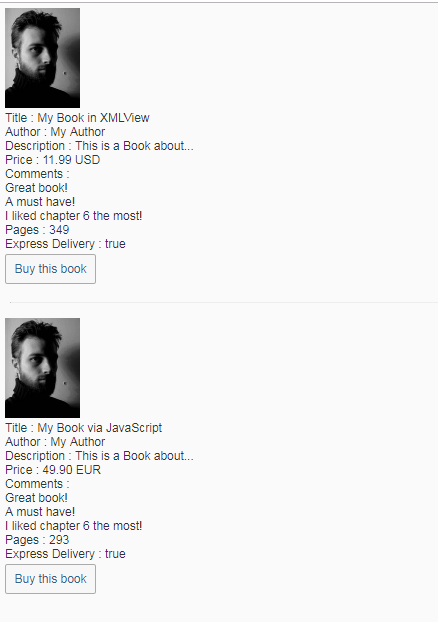
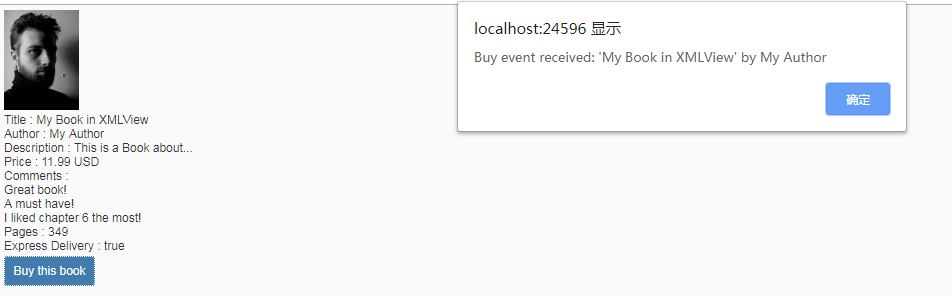
2.页面测试

UI5-技术篇-SAPUI5创建自定义控件的更多相关文章
- [翻译]使用Swift在Xcode中创建自定义控件
使用Swift在Xcode中创建自定义控件 原文 IBDesignable and IBInspectable With IBDesignable and IBInspectable, develop ...
- Android学习之基础知识五—创建自定义控件
下面是控件和布局的继承关系: 从上面我们看到: 1.所有控件都是直接或间接继承View,所有的布局都是直接或间接继承ViewGroup 2.View是Android中最基本的UI组件,各种组件其实就是 ...
- WPF 创建自定义控件及自定义事件
1 创建自定义控件及自定义事件 /// <summary> /// 演示用的自定义控件 /// </summary> public class ExtButton : Butt ...
- Andriod - 创建自定义控件
控件和布局的继承结构: 可以看到,我们所用的所有控件都是直接或间接继承自 View的,所用的所有布局都是直接或间接继承自 ViewGroup 的.View 是 Android 中一种最基本的 UI 组 ...
- WPF创建自定义控件并运用
此项目源码:https://github.com/lizhiqiang0204/WpfCustomControlLibrary1 首先创建自定义控件库项目 项目名称命名为:WpfCustomContr ...
- Android中创建自定义控件
1.创建一个TitleLayout继承LinearLayout: //创建自定义控件 public class TitleLayout extends LinearLayout { private f ...
- android#嵌入式布局并创建自定义控件
一.如何在android中嵌入布局文件: 新建一个布局title.xml,该文件为公共文件 <LinearLayout xmlns:android="http://schemas.an ...
- Android Studio 之创建自定义控件
•前言 常用控件和布局的继承结构,如下图所示: 可以看到,我们所用的所有的控件都是直接或者间接的继承自View的: 所用的所有布局都是直接或者间接继承自ViewGroup的: View 是 Andro ...
- Android开发系列之创建自定义控件
Android开发过程中我们经常需要定义自己的控件,一方面基于复用的角度考虑,一方面也是基于逻辑处理思维的角度考虑.在这篇博客里面,笔者想要介绍.总结几种Android自定义控件的方法,如果有什么不对 ...
随机推荐
- LeetCode_401. Binary Watch
401. Binary Watch Easy A binary watch has 4 LEDs on the top which represent the hours (0-11), and th ...
- Codeforces 1029B. Creating the Contest 动态规划O(nlogn)解法 及 单调队列O(n)解法
题目链接:http://codeforces.com/problemset/problem/1029/B 题目大意:从数组a中选出一些数组成数组b,要求 b[i+1]<=b[i]*2 . 一开始 ...
- __proto__和prototype的一些理解
var Person = function(name) { this.name = name; } var p = new Person(); new操作符的操作是 var p = {} p.__pr ...
- c# .net 查找并安装CA根证书
https CA根证书 用的是证书指纹来查找. 在用 collection.Find 之前 ,X509Store 一定要打开(Open),否则找到的数量(X509Certificate2Collect ...
- 如何提高程序员的键盘使用效率(搬砖工人的自我修养(tucao))
高软第一次作业 程序员使用键盘最常用的技能 搬运自:https://learnku.com/articles/22806 括号内为个人吐槽 1.尊重操作系统特性(如Mac OS的某些键位自定义设 ...
- Error: python-devel conflicts with python-2.7.5-68.el7.x86_64
yum install yum-utils -y package-cleanup --cleandupes yum -y install python-devel yum -y install pyt ...
- Appium移动自动化测试-----(二)安装 Android SDK
安装Android SDK Android SDK(Software Development Kit,软件开发工具包)提供了 Android API 库和开发工具构建,测试和调试应用程序.简单来讲,A ...
- 虚拟机中使用Samba实现文件共享
首先我们给虚拟机安装samba服务(如果搭的是别的仓库记得开仓库) 输入命令:yum install samba samba服务的配置文件在,我们来看一下/etc/samba/smb.conf 输入命 ...
- 学习开始记录一下,java 还是python?
2019.11.24开始正式开始学习JAVA. 在 bilibili站看了三天,大神们的对此问题的分析,介绍,我选择了JAVA开发语言. 在看了高淇老师的JAVA300视频,感觉比较对路,特别是第一章 ...
- 字符串的分隔方法 split()
java中的split()的方法 string.split([separator,[limit]]) 参数 string (必选),要被分解的 String 对象或文字.该对象不会被 split 方法 ...