
轻量的web框架Bottle
简洁的web框架Bottle
简介
Bottle是一个非常简洁,轻量web框架,与django形成鲜明的对比,它只由一个单文件组成,文件总共只有3700多行代码,依赖只有python标准库。但是麻雀虽小五脏俱全,基本的功能都有实现,很适合做一些小的web应用
开始使用
首先使用pip install bottle安装
然后是一个官方文档中的例子:
from bottle import route, run @route('/hello') def hello(): return "Hello World!" run(host='localhost', port=8080, debug=True)
what? 只有5行代码,只有一个文件,就能跑了?
这真是太简洁了,我觉得非常适合我们写一些小的web页面应用,比起使用django要快速的多
还可以用下边这种方式启动:
from bottle import  Bottle

bt = Bottle()

@bt.route('/hello')

def hello():

    return "Hello World!"

bt.run(host='localhost', port=8080, debug=True)
Bottle的实例对象同样拥有这些方法
url路由
静态路由
通过上面的例子可以看到,Bottle框架的路由方式是通过装饰器来实现的,像这样@bt.route(‘/hello’),这种方式和和flask的路由方式一样,同django就有大不同了
如果习惯了django的路由方式,再看到Bottle这种装饰器路由的方式,一定会觉得这样真是很快速,至少这是在同一个文件里
刚才的例子当中的路由方式是静态路由,下面是动态路由的方式
动态路由
我们看一下几种动态路由的方式
@route ('/ wiki / <pagename>' )    # pagename会成为参数

       def show_wiki_page (pagename):

@route('/object/<id:int>')         # 使用过滤器,id为名称,int是匹配方式,并且会自动转为int型

 def callback(id):     assert isinstance(id, int)

 @route('/show/<name:re:[a-z]+>')    # 可以使用正则表达式

 def callback(name):     assert name.isalpha()

 @route('/static/<path:path>')   # path的意义为以非贪婪的方式匹配包括斜杠字符在内的所有字符,并且可用于匹配多个路径段。

 def callback(path):     return static_file(path, ...)

# 等等
HTTP请求方法路由
这意味只匹配允许的请求方式
from bottle import get, post

@get('/login')    # get方式的login

@post('/login')    # post方式的login

#get(),post(),put(),delete()或patch()

@route('/hello/', method='POST')  #通过参数决定,
内置模板
我们返回给客户端的内容不仅仅是字符串,更多的是html文件,如何返回html文件呢?
from bottle import  Bottle,template

bt = Bottle()

@bt.route('/hello')

def hello():

    return template('hello.html')

bt.run(host='localhost', port=8080, debug=True)
引入template后就可以使用模板了,那么hello.html是在哪里呢?
查看源码
TEMPLATE_PATH默认是/与/views下,当然也可以配置bottle.TEMPLATE_PATH来改变默认路径
除此之外模板同样允许在html中使用传入的参数,比如这样:
return template('hello.html',name='sfencs')
hello.html中:
hello{{name}}
不仅如此,模板还支持:
- % x = “sfencs” 一行python代码
- <% %> 之间是代码块
- % if True: if语句
% end - % for i in name: for循环语句
% end
使用函数
有一些内置函数可以直接在模板中使用
- include(sub_template, **variables)
可以导入其他的模板文件,例如:
% include('header.html', title='Page Title')

 Page Content

 % include('footer.html')
来导入header与footer,并且可以传入参数
- rebase(name, **variables)
例如:index.html中写:
% rebase('hello.html', title='Page Title')

<p>Page Content ...</p>
hello.html中写:
<html>

<head>

  <title>{{title or 'No title'}}</title>

</head>

<body>

  {{!base}}

</body>

</html>
作用相当于把index.html变为变量名为base的变量在hello.html中使用,并且可以传入参数,在服务的返回的页面还是index.html
from bottle import  Bottle,template

bt = Bottle()

@bt.route('/hello')

def hello():

    return template('index.html')

bt.run(host='localhost', port=8080, debug=True)
- defined(name)
检查变量是否被定义 - get(name, default=None)
获取变量的值 - setdefault(name, default)
变量设置默认值 - 自定义函数
也就是把函数传给模板使用
from bottle import  Bottle,template

bt = Bottle()

@bt.route('/hello')

def hello():

    return template('index.html',func=myfunc)

def myfunc():

    return 'my func'

bt.run(host='localhost', port=8080, debug=True)
index.html中:
{{func()}}
request与response
http请求必然有request与response对象
使用request对象需要引入request
from bottle import request
这时在请求中便可获取request对象中的内容,例如:
from bottle import  Bottle,template

from bottle import request,response

bt = Bottle()

@bt.route('/hello')

def hello():

    print(request.headers)

    return template('index.html')

bt.run(host='localhost', port=8080, debug=True)
request对象中还有很多属性
- request.headers请求头信息
- request.query get请求信息
- request.forms post请求信息
- request.files 上传文件信息
- request.params get和post请求信息
- request.GET get请求信息
- request.POST post和上传信息
- request.cookies cookie信息
- 等等
response对象使用是类似的:
from bottle import  Bottle,template

from bottle import request,response

bt = Bottle()

@bt.route('/hello')

def hello():

    response.add_header('sss','aaa')

    return template('index.html')

bt.run(host='localhost', port=8080, debug=True)
这时在浏览器中能够找到响应头中多了sss
response的属性有:
- response.status_line 状态行
- response.status_code 状态码
- response.headers 响应头
- response.charset 编码
- response.set_cookie 在浏览器上设置cookie
- response.delete_cookie 在浏览器上删除cookie
- 等等
http错误与重定向
使用abort()来返回错误:
from bottle import route, abort @route('/restricted') def restricted(): abort(401, "Sorry, access denied.")
使用redirect()来重定向
from bottle import redirect @route('/wrong/url') def wrong(): redirect("/right/url")
服务器的使用
在执行run方法时,bottle默认使用wsgiref,wsgiref是开发时默认使用的单线程服务器,但通过指定参数可以改变服务器:
run(host='localhost', port=8080,server='paste')
具体可以使用哪些服务器可以参考http://www.bottlepy.org/docs/dev/deployment.html,
这里放一个截图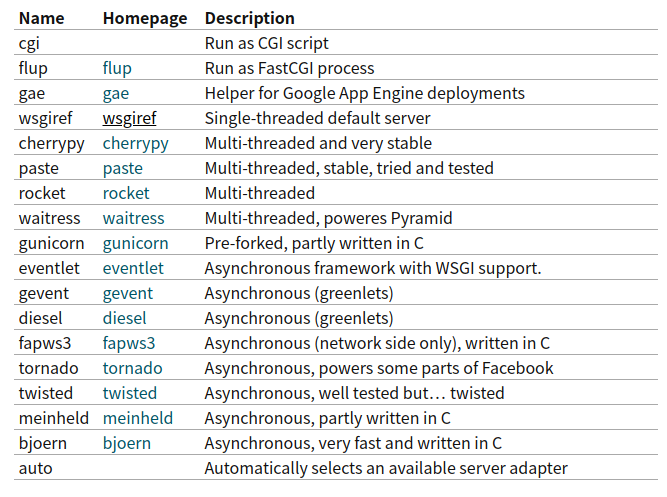
总结
在这里只是对Bottle框架的使用做了一个简单的介绍,具体学习还要参考官方文档
对于简单的web应用使用与web框架源码的学习,我认为Bottle是一个不错的选择。
轻量的web框架Bottle的更多相关文章
- Raspkate - 基于.NET的可运行于树莓派的轻量型Web服务器
最近在业余时间玩玩树莓派,刚开始的时候在树莓派里写一些基于wiringPi库的C语言程序来控制树莓派的GPIO引脚,从而控制LED发光二极管的闪烁,后来觉得,是不是可以使用HTML5+jQuery等流 ...
- 微型 Python Web 框架 Bottle - Heroin blog
微型 Python Web 框架 Bottle - Heroin blog 微型 Python Web 框架 Bottle
- Nancy总结(一)Nancy一个轻量的MVC框架
Nancy是一个基于.net 和Mono 构建的HTTP服务框架,是一个非常轻量级的web框架. 设计用于处理 DELETE, GET, HEAD, OPTIONS, POST, PUT 和 PATC ...
- 轻量型ORM框架Dapper的使用
在真实的项目开发中,可能有些人比较喜欢写SQL语句,但是对于EF这种ORM框架比较排斥,那么轻量型的Dapper就是一个不错的选择,即让你写sql语句了,有进行了关系对象映射.其实对于EF吧,我说下我 ...
- Python Web框架 bottle flask
Bottle Bottle是一个快速.简洁.轻量级的基于WSIG的微型Web框架,此框架只由一个 .py 文件,除了Python的标准库外,其不依赖任何其他模块. 1 2 3 4 pip instal ...
- 基于轻量型Web服务器Raspkate的RESTful API的实现
在上一篇文章中,我们已经了解了Raspkate这一轻量型Web服务器,今天,我们再一起了解下如何基于Raspkate实现简单的RESTful API. 模块 首先让我们了解一下"模块&quo ...
- web框架--bottle
安装 2 3 4 pip install bottle easy_install bottle apt-get install python-bottle wget http://bottlepy.o ...
- 开源 , KoobooJson一款高性能且轻量的JSON框架
KoobooJson - 更小更快的C# JSON序列化工具(基于表达式树构建) 在C#领域,有很多成熟的开源JSON框架,其中最著名且使用最多的是 Newtonsoft.Json ,然而因为版本迭代 ...
- Prism-超轻量的开源框架
http://msdn.microsoft.com/en-us/library/ff648465.aspx prism 是微软模式与实践小组开发的一个进行MVVM模式开发,其中使用依赖注入等一些方法将 ...
随机推荐
- pip/pip3更换国内源
pip/pip3更换国内源 用途:pip更换为国内源,可以大大的提高安装成功率和速度. Windows更换pip/pip3源 打开目录:%appdata% 新增pip文件夹,新建pip.ini文件 给 ...
- 微信分享JS-SDK
微信JS-SDK,提供给开发者的基于微信内的网页开发工具包 使用微信JS-SDK,网页开发者可借助微信高效地使用拍照.选图.语音.位置等手机系统的能力,同时可以直接使用微信分享.扫一扫.卡券.支付等微 ...
- docsify网站文档工具用法总结
docsify , 网站文档动态生成工具,类似gitbook 特性 无需构建,写完文档直接发布 容易使用并且轻量 (~19kB gzipped) 智能的全文搜索 提供多套主题 丰富的 API 支持 E ...
- man mountd(rpc.mountd中文手册)
本人译作集合:http://www.cnblogs.com/f-ck-need-u/p/7048359.html rpc.mountd() System Manager's Manual rpc.mo ...
- Squid实现正向代理及访问控制--技术流ken
Squid及正向代理简介 Squid cache(简称为Squid)是一个流行的自由软件,它符合GNU通用公共许可证.Squid作为网页服务器的前置cache服务器,可以代理用户向web服务器请求数据 ...
- spark之java程序开发
spark之java程序开发 1.Spark中的Java开发的缘由: Spark自身是使用Scala程序开发的,Scala语言是同时具备函数式编程和指令式编程的一种混血语言,而Spark源码是基于Sc ...
- 一个word文档中,多个表格的批量调整(根据窗口调整表格和添加表格水平线)
Sub 自动调整所有表格() ' ' 自动调整所有表格 宏 ' 'Application.Browser.Target = wdBrowseTable For i = 1 To ActiveDocum ...
- cronolog日志切割catalina.out
cronolog日志切割catalina.out (一)解压安装cronolog 1:wget https://files.cnblogs.com/files/crazyzero/cronolog- ...
- vsCode 列选择、列选中、选中列、选中多列(转载)
VSCode列选择快捷键 来源 https://blog.csdn.net/Luyanc/article/details/80502069 VSCode列选择快捷键:Alt+Shift+左键 来一张效 ...
- echarts tab 切换问题整理
一.bootstrap tabs 解决方案 方式一 tab切换echarts无法正常显示 https://blog.csdn.net/cjs68/article/details/78072382 ta ...