
Windows Live Writer代码插件整理
以下code插件命名按照 Windows Live Writer 中显示的插件名

1、Source code plug-in(cnblogs官方推荐)
界面:
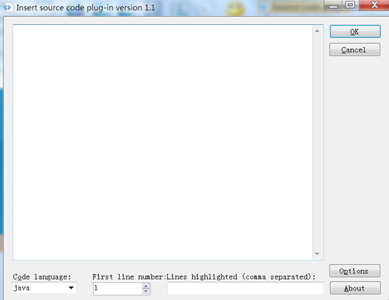

效果:
/**

 * Returns the value in the current thread's copy of this

 * thread-local variable.  If the variable has no value for the

 * current thread, it is first initialized to the value returned

 * by an invocation of the {@link #initialValue} method.

 * 返回当前线程的线程本地变量副本的值

 * 如果当前线程的这个变量还没有赋值,可以通过调用 setInitialValue()方法赋初始值

 *

 * @return the current thread's value of this thread-local

 */

public T get() {

    Thread t = Thread.currentThread();//当前线程

    ThreadLocalMap map = getMap(t);//获取当前线程的 ThreadLocalMap

    //如果ThreadLocalMap不为空

    if (map != null) {

        //以当前 ThreadLocal(线程本地变量)为key,从ThreadLocalMap中获取对应的Entry(key:ThreadLocal,value:Object)

        ThreadLocalMap.Entry e = map.getEntry(this);

        if (e != null)

            return (T)e.value;

    }

    //如果还当前ThreadLocal(线程本地变量)无法获取value,调用初始化value方法

    return setInitialValue();

}
特点:
1、Windows Live Writer编辑和预览效果不一样
2、插入代码后不便于再编辑
3、发布到cnblogs后,效果不错
下载:http://files.cnblogs.com/files/trust-freedom/SourceCodePlugin_version_1.1.zip
2、SyntaxHighlighter
界面:

效果:
/**

 * Returns the value in the current thread's copy of this

 * thread-local variable.  If the variable has no value for the

 * current thread, it is first initialized to the value returned

 * by an invocation of the {@link #initialValue} method.

 * 返回当前线程的线程本地变量副本的值

 * 如果当前线程的这个变量还没有赋值,可以通过调用 setInitialValue()方法赋初始值

 *

 * @return the current thread's value of this thread-local

 */

public T get() {

    Thread t = Thread.currentThread();//当前线程

    ThreadLocalMap map = getMap(t);//获取当前线程的 ThreadLocalMap

    //如果ThreadLocalMap不为空

    if (map != null) {

        //以当前 ThreadLocal(线程本地变量)为key,从ThreadLocalMap中获取对应的Entry(key:ThreadLocal,value:Object)

        ThreadLocalMap.Entry e = map.getEntry(this);

        if (e != null)

            return (T)e.value;

    }

    //如果还当前ThreadLocal(线程本地变量)无法获取value,调用初始化value方法

    return setInitialValue();

}
参考:http://www.cnblogs.com/rollenholt/archive/2012/03/08/2384594.html
特点:
1、Windows Live Writer编辑和预览效果一致
2、插入代码后便于编辑,点击代码块后,右侧显示
3、发布到cnblogs后,和Windows Live Writer效果不完全相同,宽度变小了

下载:http://files.cnblogs.com/files/trust-freedom/SyntaxHighlighter.rar
3、插入代码(cnblogs官方推荐)
界面:

效果:
/**

 * Returns the value in the current thread's copy of this

 * thread-local variable.  If the variable has no value for the

 * current thread, it is first initialized to the value returned

 * by an invocation of the {@link #initialValue} method.

 * 返回当前线程的线程本地变量副本的值

 * 如果当前线程的这个变量还没有赋值,可以通过调用 setInitialValue()方法赋初始值

 *

 * @return the current thread's value of this thread-local

 */

public T get() {

    Thread t = Thread.currentThread();//当前线程

    ThreadLocalMap map = getMap(t);//获取当前线程的 ThreadLocalMap

    //如果ThreadLocalMap不为空

    if (map != null) {

        //以当前 ThreadLocal(线程本地变量)为key,从ThreadLocalMap中获取对应的Entry(key:ThreadLocal,value:Object)

        ThreadLocalMap.Entry e = map.getEntry(this);

        if (e != null)

            return (T)e.value;

    }

    //如果还当前ThreadLocal(线程本地变量)无法获取value,调用初始化value方法

    return setInitialValue();

}
参考:http://www.cnblogs.com/cmt/archive/2012/06/26/live_writer_cnblogs_code_highlight.html
特点:
1、和cnblogs官方的浏览器编辑器的code插件效果差不多,高亮效果还不错
2、Windows Live Writer编辑和预览效果一致
3、无法显示行号
4、隔行不能设置不同颜色
5、插入代码后不便于再编辑,有点类似图片的效果
下载:http://files.cnblogs.com/files/trust-freedom/WindowsLiveWriter.CNBlogs.CodeHighlighter.zip
4、插入代码
界面:

效果:
1: /**
2: * Returns the value in the current thread's copy of this
3: * thread-local variable. If the variable has no value for the
4: * current thread, it is first initialized to the value returned
5: * by an invocation of the {@link #initialValue} method.
6: * 返回当前线程的线程本地变量副本的值
7: * 如果当前线程的这个变量还没有赋值,可以通过调用 setInitialValue()方法赋初始值
8: *
9: * @return the current thread's value of this thread-local
10: */
11: public T get() {
12: Thread t = Thread.currentThread();//当前线程
13: ThreadLocalMap map = getMap(t);//获取当前线程的 ThreadLocalMap
14: //如果ThreadLocalMap不为空
15: if (map != null) {
16: //以当前 ThreadLocal(线程本地变量)为key,从ThreadLocalMap中获取对应的Entry(key:ThreadLocal,value:Object)
17: ThreadLocalMap.Entry e = map.getEntry(this);
18: if (e != null)
19: return (T)e.value;
20: }
21:
22: //如果还当前ThreadLocal(线程本地变量)无法获取value,调用初始化value方法
23: return setInitialValue();
24: }
参考:http://www.cnblogs.com/psunny/archive/2010/03/03/1677693.html
特点:
1、编辑界面可选项较多
2、发不到cnblogs后和Windows Live Writer状态不完全一样,Windows Live Writer中有横向、纵向滚动条,cnblogs中都没有
3、插入代码后不便于再编辑,有点类似图片的效果
下载:http://files.cnblogs.com/files/trust-freedom/WLWSourceCodePluginLib.zip
我也是刚用cnblogs写博客不久,整理了几个觉得还可以的代码插件,欢迎批评指教,如果大家有更好的也欢迎互相交流。
Windows Live Writer代码插件整理的更多相关文章
- Windows Live Writer 代码插件改造
源码和插件都在后面,如果不想看我神神叨叨的可以直接到文章后面下载 一 .找插件 在使用Windows Live Writer 经常要用到插入代码的功能,根据博客园中教程,分别使用了: WindowsL ...
- 【转】Windows Live Writer 代码插件改造
源码和插件都在后面,如果不想看我神神叨叨的可以直接到文章后面下载 一 .找插件 在使用Windows Live Writer 经常要用到插入代码的功能,根据博客园中教程,分别使用了: WindowsL ...
- win7 下的open live writer代码插件
open live writer 是博客园官方推荐的编辑器.恰好被它的各种便利吸引住了,于是花点时间研究一下,结果又用了好长时间,因为代码插件一时安装不了.在这里推荐小伙伴们可以先去看看这篇博文:ht ...
- Windows Live Writer代码高亮插件对比
一.Paste ASVisual Studio Code 参考:http://www.cnblogs.com/mikelij/archive/2010/11/13/1876199.html 插件下载: ...
- open Live Writer 代码插件安装
1,第一步:下载open live writer插件,下载地址:http://www.cnblogs.com/memento/p/5995173.html 2,拷贝文件到Plugins目录(自己建立) ...
- Windows Live Writer测试插件
这是用WLW写的,测试 这是图片: 这是地图: 这是代码: 一会重发
- Windows Live Writer加载代码着色插件步骤
博客园内置支持SyntaxHighlighter代码着色,代码着色语法:<pre class='brush:编程语言'>代码</pre>. 需要注意的是:如何你使用Syntax ...
- 用 Windows Live Writer 和 SyntaxHighlighter 插件写高亮代码
博客园内置支持SyntaxHighlighter代码着色,代码着色语法:<pre class='brush:编程语言'>代码</pre>. 需要注意的是:如何你使用Syntax ...
- 新语言代码高亮及Windows Live Writer插件开发
最近在博客园做一些学习笔记.一个是看apple的swift官方书,另外一个是随学校课堂(SICP)学习scheme. 这两种语言都谈不上普及(或者说swift太新).博客园原来的windows liv ...
随机推荐
- Marshal.Copy将指针拷贝给数组
lpStatuss是一个UNITSTATUS*的指针类型实例,并包含SensorDust字段 //定义一个数组类型 byte[] SensorDust = new byte[30] //将指针类型拷贝 ...
- iPhone开发学习
Xcode6中怎么添加空工程模板 NSBundle 使用(程序的资源) 本地存储数据的简单方式:NSUserDefaults UIApplication隐藏statusBarStyle ...
- php的面向对象
今天PO一段php的面向对象相关知识吧.面向对象的相关概念和理论知识是很抽象的,要结合现实中的事物来理解,这样有助于类比记忆.还有就是要多接触吧,量变引质变这个应该还是一个硬道理吧,有时候量够了的话, ...
- PHP基础知识第一趴
今天来贴一贴我的一张部分php基础知识的思维导图.未完,待续......慢慢'补枪'(为了让引号内的期望输出内容<strong>变成</strong>现实,应该使用双引号?那就 ...
- ActiveMQ(li)
一.ActiveMQ 首先,ActiveMQ不是一个框架,它不是struct,webx,netty这种框架,它更像是tomcat服务器,因为你使用它之前必须启动它,activeMQ和JMS的关系有点类 ...
- 脚本化CSS类-HTML5 classList属性
HTML元素可以有多个CSS类名,class属性保存了一个用空格隔开的类名列表.标识符class在JavaScript中是保留字,所以在JavaScript中可以用className. //如下代码设 ...
- DSP的Gel作用
转自:http://blog.csdn.net/azhgul/article/details/6660960 最近刚在研究Davinci系,特此MARK下,以资后续学习之用. DSP的Gel作用 1 ...
- CSS3 animation 动画
今天看到一个很酷的logo看了下他用的是animation 动画效果,就拿来做例子 浏览器支持 Internet Explorer 10.Firefox 以及 Opera 支持 animation 属 ...
- 利用NetworkExtension库配置VPN
VPN简单说就是连接局域网的一个通道.Ios8之后苹果增加了一个VPN的接口NEVPNManager,它可以方便的添加VPN连接. 首先在你的Xcode内,TARGETS->Capabiliti ...
- Normalize.css的使用及下载
Normalize.css 只是一个很小的CSS文件,但它在默认的HTML元素样式上提供了跨浏览器的高度一致性.相比于传统的CSS reset,Normalize.css是一种现代的.为HTML5准备 ...