
Android 底部菜单固定到底部
今天搞了很久的一个问题,导航菜单没有固定到底部,因为上面是ListView,可是没内容,于是就浮动上去了。
效果如下:
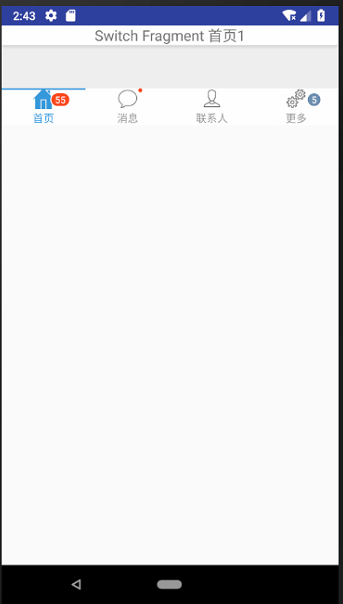
这里采用的是一个碎片,代码是:
<LinearLayout

xmlns:android="http://schemas.android.com/apk/res/android"

android:layout_width="match_parent"

android:layout_height="wrap_content"

android:orientation="vertical"

    >

<TextView

    android:id="@+id/card_title_tv"

    android:layout_width="match_parent"

    android:layout_height="wrap_content"

    android:background="@drawable/background_card"

    android:gravity="center"

    android:textSize="18sp"/>

<ListView

    android:id="@+id/jonrney_list_item"

    android:layout_width="match_parent"

    android:layout_height="match_parent"

    android:layout_marginBottom="48dp"

    />

</LinearLayout>
出问题了,百度了很多,试了很多的办法,没用。
主页面代码:
<?xml version="1.0" encoding="utf-8"?>

<android.support.constraint.ConstraintLayout

    xmlns:android="http://schemas.android.com/apk/res/android"

    xmlns:app="http://schemas.android.com/apk/res-auto"

    xmlns:tl="http://schemas.android.com/apk/res-auto"

    xmlns:tools="http://schemas.android.com/tools"

    android:id="@+id/container"

    android:layout_width="match_parent"

    android:layout_height="wrap_content"

    android:background="#eeeeee"

    android:scrollbars="none"

    >

    <LinearLayout

        android:layout_width="match_parent"

        android:layout_height="match_parent"

        android:orientation="vertical">

        <!--android:background="@color/colorPrimaryDark"-->

        <!--内容-->

        <FrameLayout

            android:id="@+id/fl_change"

            android:layout_weight=""

            android:layout_width="match_parent"

            android:layout_height="match_parent"

            app:layout_constraintLeft_toLeftOf="parent"

            app:layout_constraintRight_toRightOf="parent"

            >

        </FrameLayout>

   <!--  <LinearLayout

        xmlns:android="http://schemas.android.com/apk/res/android"

        android:layout_width="fill_parent"

        android:layout_height="wrap_content"

        android:id="@+id/bottom"

        android:layout_alignParentBottom="true"  >-->

<!--底部-->

        <com.flyco.tablayout.CommonTabLayout

            android:id="@+id/tl_3"

            android:layout_width="match_parent"

            android:layout_height="wrap_content"

            android:background="#ffffff"

            app:layout_constraintBottom_toBottomOf="parent"

            app:layout_constraintLeft_toLeftOf="parent"

            app:layout_constraintRight_toRightOf="parent"

            tl:tl_indicator_gravity="TOP"

            tl:tl_indicator_color="#2C97DE"

            tl:tl_textSelectColor="#2C97DE"

            tl:tl_textUnselectColor="#66000000"

            tl:tl_underline_height="2dp"/>

   <!-- </LinearLayout>-->

        <!--android:layout_alignParentBottom="true"-->

    </LinearLayout>

</android.support.constraint.ConstraintLayout >
最后发现是这段代码惹的麻烦:android:layout_height="wrap_content"
也是自己对这个属性没有了解清楚,不知道从哪里copy来的一个代码,这个属性代码自动浮动,根据内容更改大小。所以就造成了我现在的情况。
所以改成:android:layout_height="match_parent" 就好了。

Android 底部菜单固定到底部的更多相关文章
- 解决 scroll() position:fixed 抖动、导航菜单固定头部(底部)跟随屏幕滚动
一.导航栏或者页脚正常情况下固定在页面的相应位置,当页面滚动后,导航栏或者页脚固定在页面的顶部或者底部的情景 一般就是将该块的代码样式的position设置为fixed.固定在顶部的话,将top设置为 ...
- Android底部菜单的实现
前言:以前制作菜单使用TabHost,但是android 3.0以上就被废弃了,google已经不建议使这个类了.ActionBar也是菜单,不过在头部,算是导航了 ===本文就介绍怎么制作底部菜单= ...
- Xamarin.Android 解决打开软键盘导致底部菜单上移问题
在界面布局中有EditText控件,该控件一旦获取焦点则打开软键盘,如果布局中有底部菜单,那么底部菜单可能会被软键盘顶在其上面,看如下效果: 解决方法:在活动绑定界面之前写上下段代码即可 Window ...
- Android应用主界面底部菜单实现
介绍 现在绝大多数主流的应用主界面,都会包含一个底部菜单,就拿腾讯的QQ与微信来说,看起来是这样的 <---我是底部菜单 原理 在很久以前,可以通过TabActivity实现相关功能,自从Fr ...
- Android自定义控件系列(四)—底部菜单(下)
转载请注明出处:http://www.cnblogs.com/landptf/p/6290862.html 在app中经常会用到底部菜单的控件,每次都需要写好多代码,今天我们用到了前几篇博客里的控件来 ...
- Android中软键盘弹出时底部菜单上移问题
当在Android的layout设计里面如果输入框过多,则在输入弹出软键盘的时候,下面的输入框会有一部分被软件盘挡住,从而不能获取焦点输入. 解决办法: 方法一:在你的activity中的oncrea ...
- [Android] Android 使用 FragmentTabHost + Fragment 实现 微信 底部菜单
Android 使用 FragmentTabHost + Fragment 实现 微信 底部菜单 利用FragmentTabHost实现底部菜单,在该底部菜单中,包括了4个TabSpec,每个TabS ...
- Xamarin.Android 利用Fragment实现底部菜单
效果图: 第一步:添加引用 引用 Crosslight.Xamarin.Android.Support.v7.AppCompat 这个包. 第二步:绘制Main和Fragment界面 fg_home. ...
- [Android] Android 让UI控件固定于底部的几种方法
Android 让UI控件固定于底部的几种方法1.采用linearlayout布局:android:layout_height="0dp" <!-- 这里不能设置fill_p ...
随机推荐
- redis常用性能分析命令
一.连接 src/redis-cli -h 10.20.137.141 -p 6379 >auth 123456789 src/redis-cli -h 10.20.137.141 -p 637 ...
- easyUI设置textbox的值
我们知道<input type="text" class="easyui-validatebox" id="txtrName" nam ...
- git 使用经验与技巧总结 (不断更新中)
git 使用技巧总结 说明: 本地repo已经有啦,对应的远程repo 为tiger, 本地分支为master. 问题一: 当拉取代码的remote repo仓库为tiger, 而现在要将修 ...
- NTC与PTC压敏电阻在电源电路中起的作用
https://wenku.baidu.com/view/e39beafdfab069dc502201f9.html 压敏电阻的作用 http://www.eepw.com.cn/article/27 ...
- 关于CALayer 中的contents(图片) 拉伸
最近做有关 发送图片的功能.微信显示的图片 使用气泡遮罩出来的..而且图片尺寸也不止一种. 既然UIImagView 可以拉伸图片,设置遮罩的CALayer 的content 可不可以. 关键CALa ...
- Oozie-coordinator调度
当有一个复杂的工作流job,希望每天定时执行,使用crontab方式调用需要编写大量的脚本,还要通过大量的判断来控制每个工作流job的执行顺序问题.Oozie中的Coordinator可以让每个工作流 ...
- tmux用于恢复远程屏幕
1.我主要用tmux在远程登陆后,恢复以前会话时候用. 2.tmux创建新会话: tmux new -s 会话名 3.返回控制台: Ctrl+b d ,Ctrl+b命令是tmux前置命令,每次都要先输 ...
- php实现文件下载代码一例
php实现文件下载代码 需要用到header函数来发送相关信息给客户端浏览器,同时再结合filesize函数来读取文件大小并进行下载操作.简单的文件下载只需要使用HTML的连接标记<a>, ...
- vivado中设置多线程编译
VIVADO中一个run编译时支持的线程数如下表:(综合时一般是2线程) Place Route Windows默认 2 2 Linux默认 4 4 Windows开启maxThreads=8 4 4 ...
- lua 工具类(一)
-- -- Author: My Name -- Date: 2013-12-16 18:52:11 -- csv解析 -- -- 去掉字符串左空白 local function trim_left( ...