
Python模块——subprocess
subprocess模块
通过Python去执行一条系统命令或脚本。
三种执行命令的方法
subprocess.run(*popenargs, input=None, timeout=None, check=False, **kwargs) #官方推荐
subprocess.call(*popenargs, timeout=None, **kwargs) #跟上面实现的内容差不多,另一种写法
subprocess.Popen() #上面各种方法的底层封装
run方法
标准写法
subprocess.run(['df','-h'],stderr=subprocess.PIPE,stdout=subprocess.PIPE,check=True)

#check=True代表,如果命令出现错误,程序会抛出异常
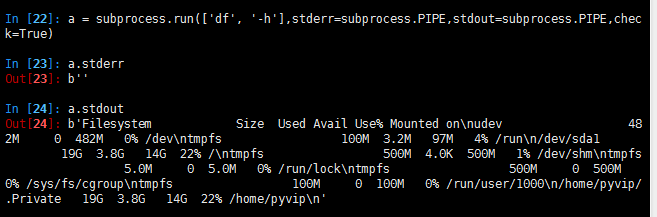
涉及到管道|的命令需要这样写
subprocess.run('df -h|grep disk1',shell=True) #shell=True的意思是这条命令直接交给系统去执行,不需要python负责解析

call方法
#执行命令,返回命令执行状态 , 0 or 非0

>>> retcode = subprocess.call(["ls", "-l"])

#执行命令,如果命令结果为0,就正常返回,否则抛异常

>>> subprocess.check_call(["ls", "-l"])

0

#接收字符串格式命令,返回元组形式,第1个元素是执行状态,第2个是命令结果

>>> subprocess.getstatusoutput('ls /bin/ls')

(0, '/bin/ls')

#接收字符串格式命令,并返回结果

>>> subprocess.getoutput('ls /bin/ls')

'/bin/ls'

#执行命令,并返回结果,注意是返回结果,不是打印,下例结果返回给res

>>> res=subprocess.check_output(['ls','-l'])

>>> res

b'total 0\ndrwxr-xr-x 12 alex staff 408 Nov 2 11:05 OldBoyCRM\n'
Popen方法
常用参数:
- args:shell命令,可以是字符串或者序列类型(如:list,元组)
- stdin, stdout, stderr:分别表示程序的标准输入、输出、错误句柄
- preexec_fn:只在Unix平台下有效,用于指定一个可执行对象(callable object),它将在子进程运行之前被调用
- shell:同上
- cwd:用于设置子进程的当前目录
- env:用于指定子进程的环境变量。如果env = None,子进程的环境变量将从父进程中继承。
下面这2条语句执行会有什么区别?
a=subprocess.run('sleep 10',shell=True,stdout=subprocess.PIPE)

a=subprocess.Popen('sleep 10',shell=True,stdout=subprocess.PIPE)
区别是Popen会在发起命令后立刻返回,而不等命令执行结果。这样的好处是什么呢?
如果你调用的命令或脚本 需要执行10分钟,你的主程序不需卡在这里等10分钟,可以继续往下走,干别的事情,每过一会,通过一个什么方法来检测一下命令是否执行完成就好了。
Popen调用后会返回一个对象,可以通过这个对象拿到命令执行结果或状态等,该对象有以下方法
poll()

Check if child process has terminated. Returns returncode

wait()

Wait for child process to terminate. Returns returncode attribute.

terminate()终止所启动的进程Terminate the process with SIGTERM

kill() 杀死所启动的进程 Kill the process with SIGKILL


send_signal(signal.xxx)发送系统信号

pid 拿到所启动进程的进程号
poll
>>> a=subprocess.Popen('sleep 10',shell=True,stdout=subprocess.PIPE)

>>> a.poll()

>>> a.poll()

>>> a.poll()

0
termiate
>>> a = subprocess.Popen('for i in $(seq 1 100);do sleep 1;echo $i >> /tmp/sleep.log;done',shell=True, cwd='/tmp',stdout=subprocess.PIPE)

>>> a.terminate()

>>>
preexec_fn
>>> def sayhi():

...     print('haha')

...

>>> a = subprocess.Popen('sleep 5',shell=True,stdout=subprocess.PIPE,preexec_fn=sayhi)

>>> a.stdout

<_io.BufferedReader name=3>

>>> a.stdout.read()

b'haha\n'

>>> a.pid

2070
代码案例
import subprocess

from utils import unicode_utils

# 执行cmd或shell命令#

from multiprocessing.dummy import Pool as ThreadPool

def cmd_exec(cmd):

    """

     执行shell命令

     返回命令返回值和结果

    :param cmd:

    :return:

    """

    p = subprocess.Popen(cmd,

                         shell=True,

                         stdin=subprocess.PIPE,

                         stdout=subprocess.PIPE,

                         stderr=subprocess.PIPE)

    stdout, stderr = p.communicate()#从PIPE中读取出PIPE中的文本,放入内存

    if p.returncode != 0:

        return {'code':p.returncode, 'res':unicode_utils.to_str(stderr)}

    return {'code':p.returncode, 'res':unicode_utils.to_str(stdout)}

if __name__ == '__main__':

    pass

    cmd_list =[]

    cmd_list.append('df -h')

    cmd_list.append('ps -ef|grep jav1a|grep -v grep')

    cmd_list.append('ps -ef|grep "pol"')

    cmd_list.append('sh /root/ops/sum.sh')

    # print(cmd_exec(cmd))

    # Make the Pool of workers

    pool = ThreadPool(4)

    # Open the urls in their own threads

    # and return the results

    results = pool.map(cmd_exec, cmd_list)

    # close the pool and wait for the work to finish

    print(results)

    pool.close()

    pool.join()

**************************************

unicode_utils:

def to_str(bytes_or_str):

    """

    把byte类型转换为str

    :param bytes_or_str:

    :return:

    """

    if isinstance(bytes_or_str, bytes):

        value = bytes_or_str.decode('utf-8')

    else:

        value = bytes_or_str

    return value
Python模块——subprocess的更多相关文章
- Python基础篇【第6篇】: Python模块subprocess
subprocess Python中可以执行shell命令的相关模块和函数有: os.system os.spawn* os.popen* --废弃 popen2.* ...
- Python模块subprocess小记
转自:http://www.oschina.net/question/234345_52660 熟悉了Qt的QProcess以后,再回头来看python的subprocess总算不觉得像以前那么恐怖了 ...
- 【转】Python模块subprocess
subprocess 早期的Python版本中,我们主要是通过os.system().os.popen().read()等函数.commands模块来执行命令行指令的,从Python 2.4开始官方文 ...
- Python模块subprocess
subprocess的常用用法 """ Description: Author:Nod Date: Record: #-------------------------- ...
- python模块subprocess学习
当我们想要调用系统命令,可以使用os,commands还有subprocess模块整理如下: os模块: 1. os.system 输出命令结果到屏幕.返回命令执行状态. >>> o ...
- Python模块-subprocess模块
Run()方法 >>> a = subprocess.run(['df','-h']) 文件系统 容量 已用 可用 已用% 挂载点 udev 468M 0 468M 0% /dev ...
- python模块之subprocess
可以执行shell命令的相关模块和函数有: os.system os.spawn* os.popen* --废弃 popen2.* --废弃 commands.* ...
- python模块基础之json,requeste,xml,configparser,logging,subprocess,shutil。
1.json模块 json 用于[字符串]和 [python基本数据类型] 间进行转换(可用于不同语言之前转换),json.loads,将字符串转成python的基本数据类型,json.dum ...
- [转载]Python模块学习 ---- subprocess 创建子进程
[转自]http://blog.sciencenet.cn/blog-600900-499638.html 最近,我们老大要我写一个守护者程序,对服务器进程进行守护.如果服务器不幸挂掉了,守护者能即时 ...
随机推荐
- python的int方法实现数据类型转换
int方法默认以十进制来实现数据类型的转换: 举例: str1=" #给定的内容最好是纯数字,当然也可以是数字再掺杂点别的,最好别掺杂,因为会报错 print(type(str1),str) ...
- 简单了解pytorch的forward
import torch.nn as nn import torch.nn.functional as F import torch.optim as optim from torch.autogra ...
- C++中的覆盖与隐藏(详细讲解)
C++类中覆盖与隐藏一直是一个容易理解出错的地方,接下来我就详细讲解一下区别在何处 覆盖指的是子类覆盖父类函数(被覆盖),特征是: 1.分别位于子类和父类中 2.函数名字与参数都相同 3.父类的函数是 ...
- Python+Selenium学习--自动化测试模型
前言 一个自动化测试框架就是一个集成体系,在这一体系中包含测试功能的函数库.测试数据源.测试对象识别标准,以及种可重用的模块.自动化测试框架在发展的过程中经历了几个阶段,模块驱动测试.数据驱动测试.对 ...
- matlab中mat文件简单存/取
>>abc=[,,,,,]; >>save data save file_name:命令可以将当前项目中变量的值保存到file_name中去,这里的data文件就是mat文件. ...
- [leetcode]97. Interleaving String能否构成交错字符串
Given s1, s2, s3, find whether s3 is formed by the interleaving of s1 and s2. Input: s1 = "aabc ...
- linux命令大全(1)
当用户使用linux系统时,其实在和Shell在打交道,当用户发出指令,其实先将这些指令发送给Shell, 然后由Shell将用户的指令翻译后传送给内核,再由内核来控制硬件的工作. 然后内核将硬件的工 ...
- RQNOJ 3 Jam的计数法
一道模拟题,用的vector比用链表要方便很多,毕竟不需要自己写,因为是递增的,所以每一次你都要去检查最后一位加1之后有没有越界,如果没越界你就可以把他当前的字符删掉替换成他下一位的字符就可以了,如果 ...
- java30
1.类的组合关系 当一个类中的字段是一个类时,就称类依赖于字段这个类,也称这两个类为组合关系 2.快捷键:ctrl+shift+c,多行的// ctrl+shift+/,多行的/-----/ 3.类的 ...
- poj3130 (半平面交
题意:判断是否存在内核. 半平面交存板子. /* gyt Live up to every day */ #include<cstdio> #include<cmath> #i ...