
react native 之 在现有的iOS工程中集成react native
在现有的iOS工程中集成react native, 或者说将react native引入到iOS 项目,是RN和iOS混合开发的必经之路
参考官网教程:https://reactnative.cn/docs/integration-with-existing-apps/
但是会有一些步骤报错,这里记录一下。首先我的项目结构是这样:
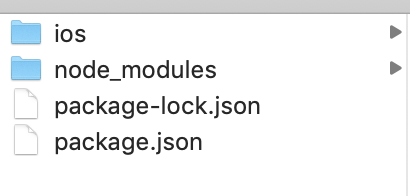
RNTEST 是最外面的文件夹的名字,也是iOS项目的名字。ios/ 下是iOS项目文件。
npm安装RN依赖都没问题,按照官网步骤来
最主要的是
cd ios
pod install
会报错。。。

错误提示是找不到XXX索引库,在Podfile文件中将这些对应的注释掉:
Podfile文件参考:https://github.com/facebook/react-native/blob/v0.60.0/template/ios/Podfile
platform :ios, '9.0'

require_relative '../node_modules/@react-native-community/cli-platform-ios/native_modules'

target 'RNTEST' do

  # Pods for HelloWorld

  pod 'React', :path => '../node_modules/react-native/'

  pod 'React-Core', :path => '../node_modules/react-native'

  #pod 'React-DevSupport', :path => '../node_modules/react-native/React'

  #pod 'React-fishhook', :path => '../node_modules/react-native/Libraries/fishhook'

  pod 'React-RCTActionSheet', :path => '../node_modules/react-native/Libraries/ActionSheetIOS'

  pod 'React-RCTAnimation', :path => '../node_modules/react-native/Libraries/NativeAnimation'

  pod 'React-RCTBlob', :path => '../node_modules/react-native/Libraries/Blob'

  pod 'React-RCTImage', :path => '../node_modules/react-native/Libraries/Image'

  pod 'React-RCTLinking', :path => '../node_modules/react-native/Libraries/LinkingIOS'

  pod 'React-RCTNetwork', :path => '../node_modules/react-native/Libraries/Network'

  pod 'React-RCTSettings', :path => '../node_modules/react-native/Libraries/Settings'

  pod 'React-RCTText', :path => '../node_modules/react-native/Libraries/Text'

  pod 'React-RCTVibration', :path => '../node_modules/react-native/Libraries/Vibration'

  #pod 'React-RCTWebSocket', :path => '../node_modules/react-native/Libraries/WebSocket'

  pod 'React-cxxreact', :path => '../node_modules/react-native/ReactCommon/cxxreact'

  pod 'React-jsi', :path => '../node_modules/react-native/ReactCommon/jsi'

  pod 'React-jsiexecutor', :path => '../node_modules/react-native/ReactCommon/jsiexecutor'

  pod 'React-jsinspector', :path => '../node_modules/react-native/ReactCommon/jsinspector'

  pod 'Yoga', :path => '../node_modules/react-native/ReactCommon/yoga'

  pod 'DoubleConversion', :podspec => '../node_modules/react-native/third-party-podspecs/DoubleConversion.podspec'

  pod 'glog', :podspec => '../node_modules/react-native/third-party-podspecs/glog.podspec'

  pod 'Folly', :podspec => '../node_modules/react-native/third-party-podspecs/Folly.podspec'

  use_native_modules!

end
结果:

之后就是在iOS工程中写相关代码, 可以运行起来,但是在Native调RN时
然后发现又报错了,改了package.json中的版本如下:

就可以了。
iOS项目代码参考的是慕课网上的教程。
要想在iOS中加载一个JSX页面,有两种方式:
一:在控制器导入头文件
//#import <React/RCTBundleURLProvider.h>

//#import <React/RCTRootView.h>

//#import <React/RCTEventEmitter.h>
然后加载JSX中注册的模块
//    NSURL *jsCodeLocation;

//

//    jsCodeLocation = [[RCTBundleURLProvider sharedSettings] jsBundleURLForBundleRoot:@"index" fallbackResource:nil];

//

//    RCTRootView *rootView =

//    [[RCTRootView alloc] initWithBundleURL: jsCodeLocation

//                                moduleName: @"App"

//                         initialProperties:nil

//                             launchOptions: nil];

//    self.view = rootView;
上面这个moduleName (任意取,但是要与OC中一致才能加载对应页面)就是在index.js中的这个:
import {AppRegistry} from 'react-native'

import App from './App';

import App2 from './App2';

AppRegistry.registerComponent('App1',()=>App);

AppRegistry.registerComponent('App2',()=>App2);

AppRegistry.registerComponent('App3',()=>App2);
二:借鉴AppDelegate中加载方式,首先导入头文件,遵循代理,实现代理方法,加载index.js中的模块
//

//  RNPageController.m

//  RNTEST

//

//  Created by LiuWei on 2019/10/18.

//  Copyright © 2019 udc. All rights reserved.

//

#import "RNPageController.h"

//#import <React/RCTBundleURLProvider.h>

//#import <React/RCTRootView.h>

//#import <React/RCTEventEmitter.h>

#import <React/RCTBridge.h>

#import <React/RCTBundleURLProvider.h>

#import <React/RCTRootView.h>

@interface RNPageController ()<RCTBridgeDelegate>

@end

@implementation RNPageController

- (void)viewDidLoad {

    [super viewDidLoad];

    // Do any additional setup after loading the view.

//    [self initRCTRootView];

    RCTBridge *bridge = [[RCTBridge alloc] initWithDelegate:self launchOptions:nil];

    RCTRootView *rootView = [[RCTRootView alloc] initWithBridge:bridge

                                                     moduleName:@"App1"

                                              initialProperties:nil];

    self.view=rootView;

}

//-(void)initRCTRootView{

//    NSURL *jsCodeLocation;

//

//    jsCodeLocation = [[RCTBundleURLProvider sharedSettings] jsBundleURLForBundleRoot:@"index" fallbackResource:nil];

//

//    RCTRootView *rootView =

//    [[RCTRootView alloc] initWithBundleURL: jsCodeLocation

//                                moduleName: @"App"

//                         initialProperties:nil

//                             launchOptions: nil];

//    self.view = rootView;

//}

- (NSURL *)sourceURLForBridge:(RCTBridge *)bridge

{

#if DEBUG

    return [[RCTBundleURLProvider sharedSettings] jsBundleURLForBundleRoot:@"index" fallbackResource:nil];

#else

    return [[NSBundle mainBundle] URLForResource:@"main" withExtension:@"jsbundle"];

#endif

}

@end
以上这种开发方式最终打包 ipa时,
先在ios/ 下创建一个 release_ios/
然后执行命令生成必要的jsbundle文件和图片资源文件
react-native bundle --entry-file index.js --platform ios --dev false --bundle-output release_ios/main.jsbundle --assets-dest release_ios/
--platform ios:代表打包导出的平台为iOS;--dev false:代表关闭JS的开发者模式;-entry-file index.js:代表js的入口文件为index.js;--bundle-output:后面跟的是打包后将JS bundle包导出到的位置;--assets-dest:后面跟的是打包后的一些资源文件导出到的位置;
好了之后将生成必要的jsbundle文件和图片资源文件拖进iOS项目
接下来就可以打包了
特别注意:如果项目用到了CodePush热更新:加载js文件的方式变成这样
...

  NSURL *jsCodeLocation;

#ifdef DEBUG     jsCodeLocation = [[RCTBundleURLProvider sharedSettings] jsBundleURLForBundleRoot:@"index" fallbackResource:nil];

#else     jsCodeLocation = [CodePush bundleURL];

#endif ...
最后Demo地址:https://github.com/nwgdegitHub/OCCallRNDemo.git
react native 之 在现有的iOS工程中集成react native的更多相关文章
- iOS原生项目中集成React Native
1.本文的前提条件是,电脑上已经安装了CocoaPods,React Native相关环境. 2.使用Xcode新建一个工程.EmbedRNMeituan [图1] 3.使用CocoaPods安装Re ...
- iOS原生项目集成React Native模块
今天周末,弄弄Native和React Native之间的交互.首先,先在iOS原生项目中集成React Native模块: 注意事项: 1.因为react native的版本问题,部分细节可能有所不 ...
- iOS 工程中文件变成红色是什么情况
iOS 工程中文件变成红色是原有的文件路径改变了,系统找不到了.
- 使用脚本删除ios工程中未使用图片
使用脚本删除ios工程中未使用图片 最近在读唐巧大神的<iOS开发进阶>,学到了一个大招:使用脚本删除ios中未使用的图片(纸书上有点小问题,参考github上的issue:使用脚本删除i ...
- 把 Reative Native 47 版本集成到已有的 Native iOS 工程中
一.搭建开发环境 http://reactnative.cn/docs/0.46/getting-started.html#content 二.创建一个模板 运行以下命令,创建一个最新版本的 reac ...
- iOS工程中的info.plist文件的完整研究
原地址:http://blog.sina.com.cn/s/blog_947c4a9f0100zf41.html 们建立一个工程后,会在Supporting files下面看到一个"工程名- ...
- iOS工程中的info.plist文件
我们建立一个工程后,会在Supporting files下面看到一个"工程名-Info.plist"的文件,这个是对工程做一些运行期配置的文件,很重要,不能删除. 如果你在网上下载 ...
- 使用 Swift 在 iOS 10 中集成 Siri —— SiriKit 教程
下载 Xcode 8,配置 iOS 10 和 Swift 3 (可选)通过命令行编译 除 非你想使用命令行编译,使用 Swift 3.0 的工具链并不需要对项目做任何改变.如果你想的话,打开 Xcod ...
- iOS开发中集成Reveal
[转]http://blog.devzeng.com/blog/ios-reveal-integrating.html 配置方式一简介有效. Reveal 是一个界面调试工具.使用Reveal,我们可 ...
随机推荐
- 浅谈vue学习之组件通信
vue用组件化简化了我们编写代码的复杂度,组件之间经常会出现数据传递的情况,那么组件之间是怎样通信的呢? 使用props传递数据 组件实例的作用域是孤立的.这意味着不能 (也不应该) 在子组件的模板内 ...
- Android - Unable to add window android.view.ViewRootImpl$W@6518342 -- permission denied for window type 2133
因为跟博主碰到了一样的问题,所以记录一下分析原理 原文链接:https://www.jianshu.com/p/b0364074288a 首先,先介绍下背景环境,第一,是Android7.0,其次,要 ...
- jQuery中this与$(this)的区别总结
这里就谈谈this与$(this)的区别. 1.jQuery中this与$(this)的区别 $("#textbox").hover( function() { this.titl ...
- 树形dp相关
前言 1:与树或图的生成树相关的动态规划. 2:以每棵子树为子结构,在父亲节点合并,注意树具有天然的子结构.这是很优美的很利于dp的. 3:巧妙利用Bfs或Dfs序,可以优化问题,或得到好的解决方法. ...
- C++中的数组操作符重载
1,本文讲述数组操作符重载,上篇博文的字符串类 string 确实强大,但 string 类 对象还具备 C 方式字符串的灵活性吗?还能直接访问单个字符吗? 1,C 方式字符串灵活性是指能够通过数组 ...
- P1969积木大赛
这是2018与2013提高组的真题,可怕,,原题出了两年,是个纯模拟. 读完题后就想写一个朴素的模拟,先遍历层数,再把达到层数的宽度#存起来,再判断是否连续,如果不连续ans++,然后每一次循环都要初 ...
- 思维体操: HDU1022Train Problem I
Train Problem I Time Limit: 2000/1000 MS (Java/Others) Memory Limit: 65536/32768 K (Java/Others) ...
- 请写出一段Python代码实现删除一个list里面的重复元素?
方法1:使用set函数 s=set(list),然后再list(s) 方法2:append def delList(L): L1 = [] for i in L: if i not in L1 ...
- js常见的设计模式一
1.观察者模式 定义一些一对多的关系,将一系列的观察者对目标函数感兴趣,将自己添加进目标函数,当目标函数状态发生改变时,发送通知,以此通知附加在目标上的观察者 /* 目标 */ class subje ...
- 自定义UICollectionViewLayout
UICollectionView在iOS6中第一次被介绍,也是UIKit视图类中的一颗新星.它和UITableView共享API设计,但也在UITableView上做了一些扩展.UICollectio ...