
Socket通讯-C#客户端与Java服务端通讯(发送消息和文件)
设计思路
使用websocket通信,客户端采用C#开发界面,服务端使用Java开发,最终实现Java服务端向C#客户端发送消息和文件,C#客户端实现语音广播的功能。
Java服务端设计
package servlet.websocket;

import java.io.IOException;

import java.util.Map;

import java.util.concurrent.ConcurrentHashMap;

import javax.websocket.OnClose;

import javax.websocket.OnError;

import javax.websocket.OnMessage;

import javax.websocket.OnOpen;

import javax.websocket.Session;

import javax.websocket.server.PathParam;

import javax.websocket.server.ServerEndpoint;

import servlet.Log;

/**

 * websocket服务端

 *

 * @author leibf

 *

 */

@ServerEndpoint(value = "/websocket/{clientId}")

public class WebSocketServer {

    private final Log log = new Log(WebSocketServer.class);

    private Session session;

    private String clientId;

    private static Map<String, WebSocketServer> clients = new ConcurrentHashMap<String, WebSocketServer>();

    // 连接时执行

    @OnOpen

    public void onOpen(@PathParam("clientId") String clientId, Session session) throws IOException {

        this.session = session;

        this.clientId = clientId;

        clients.put(clientId, this);

        log.info("新连接:" + clientId);

    }

    // 关闭时执行

    @OnClose

    public void onClose(@PathParam("clientId") String clientId, Session session) {

        clients.remove(clientId);

        log.info("连接 " + clientId + " 关闭");

    }

    // 收到消息时执行

    @OnMessage

    public void onMessage(String message, Session session) throws IOException {

        log.info("收到用户的消息: "+  message);

        /*if("getMpDefsAndRtDatas".equals(message)){

            String msg = UnityServlet.getInstance().getAllMpDefsAndRtDatas();

            this.sendMessage(session, msg);

        }*/

    }

    // 连接错误时执行

    @OnError

    public void onError(@PathParam("clientId") String clientId, Throwable error, Session session) {

        log.info("用户id为:" + clientId + "的连接发送错误");

        error.printStackTrace();

    }

    /**

     * 发送消息给某个客户端

     * @param message

     * @param To

     * @throws IOException

     */

    public static void sendMessageTo(String message, String To) throws IOException {

        for (WebSocketServer item : clients.values()) {

            if (item.clientId.equals(To))

                item.session.getAsyncRemote().sendText(message);

        }

    }

    /**

     * 发送消息给某些客户端

     * @param message

     * @param To

     * @throws IOException

     */

    public static void sendMessageToSomeone(String message, String To) throws IOException {

        for (WebSocketServer item : clients.values()) {

            if (item.clientId.startsWith(To))

                item.session.getAsyncRemote().sendText(message);

        }

    }

    /**

     * 发送消息给所有客户端

     * @param message

     * @throws IOException

     */

    public static void sendMessageAll(String message) throws IOException {

        for (WebSocketServer item : clients.values()) {

            item.session.getAsyncRemote().sendText(message);

        }

    }

    /**

     * 发送消息

     * @param session

     * @param message

     * @throws IOException

     */

    private void sendMessage(Session session,String message) throws IOException{

        session.getBasicRemote().sendText(message);

    }

}

Java端发送请求指令

String clientId = "broadcast";

try {

    WebSocketServer.sendMessageTo("broadcast",clientId);

} catch (IOException e) {

    e.printStackTrace();

}
C#客户端设计
websocket连接
WebSocket websocket = null;

private void websocket_MessageReceived(object sender, MessageReceivedEventArgs e){

    //接收服务端发来的消息

    MessageReceivedEventArgs responseMsg = (MessageReceivedEventArgs)e;

    string strMsg = responseMsg.Message;

    if(strMsg.Equals("broadcast")){

        websocketToPlay();

    }else if(strMsg.Equals("broadcastStop")){

        websocketToStop(sender,e);

    }

}

private void websocket_Closed(object sender, EventArgs e){

     DisplayStatusInfo("websocket connect failed!");

}

private void websocket_Opened(object sender, EventArgs e){

     DisplayStatusInfo("websocket connect success!");

}

//websocket连接

private void connectWebsocket(){

    websocket = new WebSocket("ws://localhost:8080/FrameServlet/websocket/broadcast");

    websocket.Opened += websocket_Opened;

    websocket.Closed += websocket_Closed;

    websocket.MessageReceived += websocket_MessageReceived;

    websocket.Open();

}
跨线程操作控件 --- InvokeRequired属性与Invoke方法
private delegate void DoLog(string msg);

private void DisplayStatusInfo(string msg)

{

    if (this.InvokeRequired)

    {

        DoLog doLog = new DoLog(DisplayStatusInfo);

        this.Invoke(doLog, new object[] { msg });

     }else{

        if (msg.Trim().Length > 0)

        {

             ListBoxStatus.Items.Insert(0, msg);

             if (ListBoxStatus.Items.Count > 100)

             {

                 ListBoxStatus.Items.RemoveAt(ListBoxStatus.Items.Count - 1);

             }

        }

     }

}
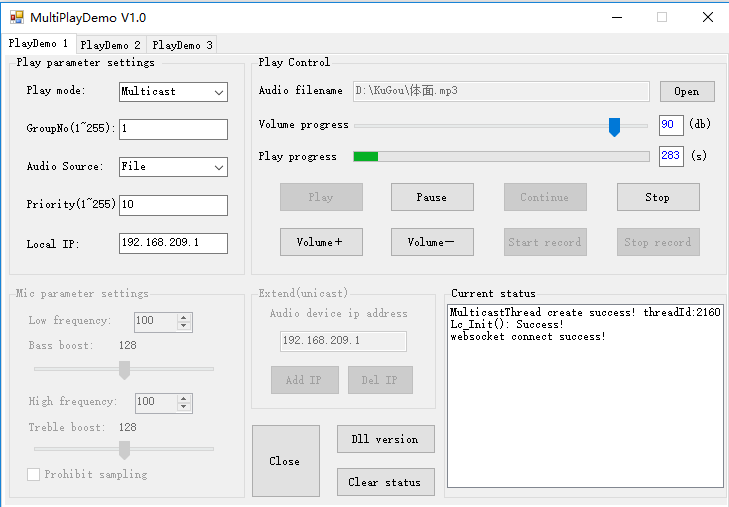
C#客户端界面展示
Socket通讯-C#客户端与Java服务端通讯(发送消息和文件)的更多相关文章
- android客户端向java服务端post发送json
android 端: private void HttpPostData() { try { HttpClient httpclient = new DefaultHttpClient( ...
- C#使用Thrift简介,C#客户端和Java服务端相互交互
C#使用Thrift简介,C#客户端和Java服务端相互交互 本文主要介绍两部分内容: C#中使用Thrift简介 用Java创建一个服务端,用C#创建一个客户端通过thrift与其交互. 用纯C#实 ...
- RPC学习--C#使用Thrift简介,C#客户端和Java服务端相互交互
本文主要介绍两部分内容: C#中使用Thrift简介 用Java创建一个服务端,用C#创建一个客户端通过thrift与其交互. 用纯C#实现Client和Server C#服务端,Java客户端 其中 ...
- java服务端集成极光消息推送--详细开发步骤
1.极光推送账号准备 要使用极光消息推送必须先在官方网站上注册账号,并添加应用. 产品介绍:https://docs.jiguang.cn/jpush/guideline/intro/ 注册开发者账号 ...
- Unity3D客户端和Java服务端使用Protobuf
转自:http://blog.csdn.net/kakashi8841/article/details/17334493 前几天有位网友问我关于Unity3D里面使用Protobuf的方法,一时有事拖 ...
- 3、netty第二个例子,使用netty建立客户端,与服务端通讯
第一个例子中,建立了http的服务器端,可以直接使用curl命令,或者浏览器直接访问. 在第二个例子中,建立一个netty的客户端来主动发送请求,模拟浏览器发送请求. 这里先启动服务端,再启动客户端, ...
- Socket(TCP)客户端请求和服务端监听和链接基础(附例子)
一:基础知识回顾 一: Socket 类 实现 Berkeley 套接字接口. Socket(AddressFamily, SocketType,ProtocolType) 使用指定的地址族.套接字类 ...
- C++客户端访问Java服务端发布的SOAP模式的WebService接口
gSOAP是一个绑定SOAP/XML到C/C++语言的工具,使用它可以 简单快速地开发出SOAP/XML的服务器端和客户端 Step1 使用gsoap-2.8\gsoap\bin\win32\wsdl ...
- Akka(43): Http:SSE-Server Sent Event - 服务端主推消息
因为我了解Akka-http的主要目的不是为了有关Web-Server的编程,而是想实现一套系统集成的api,所以也需要考虑由服务端主动向客户端发送指令的应用场景.比如一个零售店管理平台的服务端在完成 ...
随机推荐
- easyui 功能列传递一行数据
DeleteRow(' + JSON.stringify(row).replace(/"/g, '"') + ',0,' + Pindex + ',' + index + ')
- jconsole性能监控
1.进入tomcat bin目录 vim catalina.sh #!/bin/sh下面加入: #!/bin/shJAVA_OPTS="-Dcom.sun.management.jmxrem ...
- 官方转译:截止2018-12-10,chromedriver与chrome对应关系表
谷歌驱动下载地址: http://npm.taobao.org/mirrors/chromedriver/ http://chromedriver.storage.googleapis.com/ind ...
- [BZOJ2654]:tree(Kruskal+WQS二分)
题目传送门 题目描述 给你一个无向带权连通图,每条边是黑色或白色.让你求一棵最小权的恰好有need条白色边的生成树.题目保证有解. 输入格式 开始标号),边权,颜色(0白色1黑色). 输出格式 一行表 ...
- mybatis 注解方式插入,主键由uuid函数生成
@SelectKey(keyProperty = "record.id", resultType = String.class, before = true, statement ...
- centos7 升级php版本
centos7 默认PHP5.4,版本太低,很多要求至少PHP5.5 1.查看已经安装的PHP组件 yum list installed| grep php php.x86_64 -.el7 @bas ...
- 浏览器端-W3School:HTML DOM cells 集合
ylbtech-浏览器端-W3School:HTML DOM cells 集合 1.返回顶部 1. HTML DOM cells 集合 HTML DOM Table 对象 定义和用法 cells 集合 ...
- leetcode 342. 4的幂(python)
1. 题目描述 给定一个整数 (32 位有符号整数),请编写一个函数来判断它是否是 4 的幂次方. 示例 1: 输入: 16输出: true示例 2: 输入: 5输出: false 2. 思路 参考: ...
- 各种tips汇总
才疏学浅,以下整理的东西有些可能还不成熟,措辞有待改进,但是都是我在敲代码的过程中,一点一滴积累总结的,如有不妥和错误,希望大家指正. 让行及元素变成块级元素的方式: position:absolut ...
- CentOS7 修改网卡名称为eth0 & 在VMWare中添加多网卡配置
目录 目录 前言 在CentOS 7 中为什么这样命名网卡 在RHEL7中使用RHEL6的网卡命名规则 在VMWare中为CentOS7添加网卡设备 前言 无论是RHEL 7.还是CentOS 7都使 ...