
Ajax爬取百度图片
目标网址
Ajax分析
打开审查元素,查看类型为XHR的文件
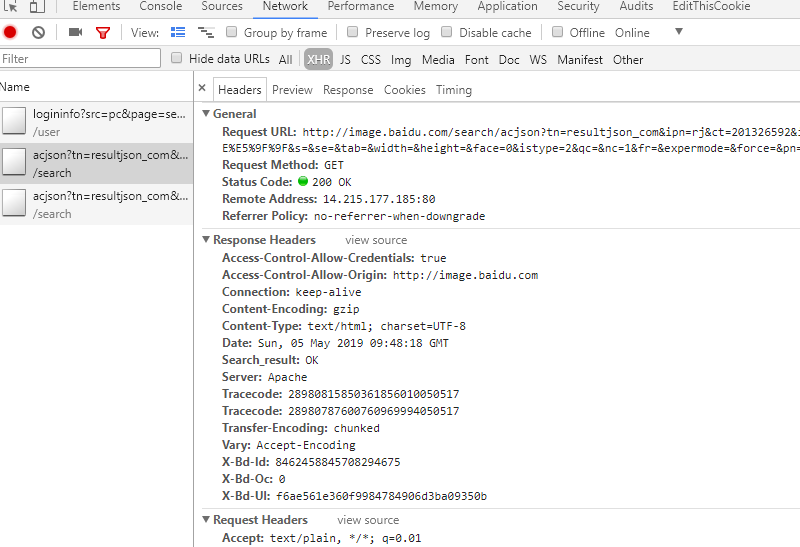
观察得到:
一 请求链接
http://image.baidu.com/search/acjson?tn=resultjson_com&ipn=rj&ct=201326592&is=&fp=result&queryWord=%E5%88%80%E5%89%91%E7%A5%9E%E5%9F%9F&cl=2&lm=-1&ie=utf-8&oe=utf-8&adpicid=&st=-1&z=&ic=&hd=&latest=©right=&word=%E5%88%80%E5%89%91%E7%A5%9E%E5%9F%9F&s=&se=&tab=&width=&height=&face=0&istype=2&qc=&nc=1&fr=&expermode=&force=&pn=30&rn=30&gsm=1e&1557049697443=
二 请求报头
Host:image.baidu.com
Referer:http://image.baidu.com/search/index?tn=baiduimage&ipn=r&ct=201326592&cl=2&lm=-1&st=-1&fm=result&fr=&sf=1&fmq=1557044650972_R&pv=&ic=&nc=1&z=&hd=&latest=©right=&se=1&showtab=0&fb=0&width=&height=&face=0&istype=2&ie=utf-8&sid=&word=%E5%88%80%E5%89%91%E7%A5%9E%E5%9F%9F
User-Agent:Mozilla/5.0 (Windows NT 10.0; WOW64) AppleWebKit/537.36 (KHTML, like Gecko) Chrome/63.0.3239.132 Safari/537.36
X-Requested-With:XMLHttpRequest
三 请求参数
tn:resultjson_com

ipn:rj

ct:201326592

is:

fp:result

queryWord:刀剑神域

cl:2

lm:-1

ie:utf-8

oe:utf-8

adpicid:

st:-1

z:

ic:

hd:

latest:

copyright:

word:刀剑神域

s:

se:

tab:

width:

height:

face:0

istype:2

qc:

nc:1

fr:

expermode:

force:

pn:30

rn:30

gsm:1e

1557049697443:
对比请求参数和请求链接,得到百度图片的base_url
https://image.baidu.com/search/acjson?
去掉请求参数中无效参数(对于我们现在的查询来说)
tn:resultjson_com

ipn:rj

ct:201326592

fp:result

queryWord:刀剑神域

cl:2

lm:-1

ie:utf-8

oe:utf-8

st:-1

word:刀剑神域

face:0

istype:2

nc:1

pn:30

rn:30

gsm:1e
加载分析
注意观察请求参数的pn,多个XHR文件观察得到,参数以0开始,每加载一次就增加30,因此是一个0为首项,30为公差的函数。
网页数据获取与处理
接着打开preview看到
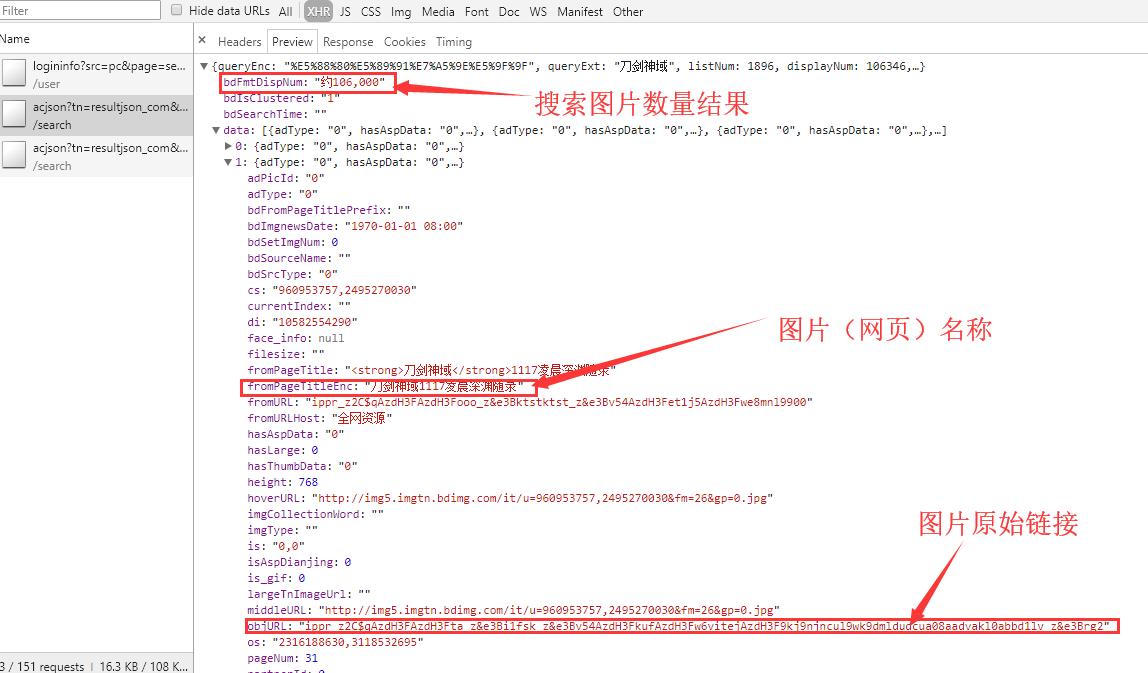
很明显objURL是有反扒机制的,链接经过加密,这里我使用了前辈现成的解密函数
引用链接:点击进入
a ='ippr_z2C$qAzdH3FAzdH3Ffb_z&e3Bftgwt42_z&e3BvgAzdH3F4omlaAzdH3FaamK8iwuzy0kbFPb4D1d0&mla'

# a = '_z2C$q'

str_table = {

    '_z2C$q': ':',

    '_z&e3B': '.',

    'AzdH3F': '/',

}

"""

char_table = {

    'w': 'a',

    'k': 'b',

    'v': 'c',

    '1': 'd',

    'j': 'e',

    'u': 'f',

    '2': 'g',

    'i': 'h',

    't': 'i',

    '3': 'j',

    'h': 'k',

    's': 'l',

    '4': 'm',

    'g': 'n',

    '5': 'o',

    'r': 'p',

    'q': 'q',

    '6': 'r',

    'f': 's',

    'p': 't',

    '7': 'u',

    'e': 'v',

    'o': 'w',

    '8': '1',

    'd': '2',

    'n': '3',

    '9': '4',

    'c': '5',

    'm': '6',

    '0': '7',

    'b': '8',

    'l': '9',

    'a': '0'

}

"""

# char_table = {ord(key): ord(value) for key, value in char_table.items()}

in_table = '0123456789abcdefghijklmnopqrstuvw'

out_table = '7dgjmoru140852vsnkheb963wtqplifca'

# 将in和out中每个字符转化为各自的ascii码,返回一个字典(dict)

char_table = str.maketrans(in_table, out_table)

print('char_table:',char_table)

# for t in a:

        #解码

if True:

    for key, value in str_table.items():

            a = a.replace(key, value)

            print(a)

    a = a.translate(char_table)

    print(a,end='')
程序步骤与细节
爬虫程序的总的步骤分为
- 获取网页的json格式代码
- 处理json格式代码,筛选出图片原始链接与图片名称
- 使用原始链接下载图片并保存
其中我们需要注意的点
- 获取图片名称时,处理相同名称与没有名字的图片。
- 图片名称不能违反文件命名规则。
- 获取的图片原始链为加密链接,需要解密。
代码
import requests
from urllib.parse import urlencode
import os
from multiprocessing.pool import Pool
import time headers={
'Host': 'image.baidu.com',
'Referer': 'https://image.baidu.com/search/index?tn=baiduimage&ipn=r&ct=201326592&cl=2&lm=-1&st=-1&fm=result&fr=&sf=1&fmq=1556979834693_R&pv=&ic=&nc=1&z=&hd=&latest=©right=&se=1&showtab=0&fb=0&width=&height=&face=0&istype=2&ie=utf-8&sid=&word=%E5%88%80%E5%89%91%E7%A5%9E%E5%9F%9F',
'User-Agent': 'Mozilla/5.0 (Windows NT 10.0; WOW64) AppleWebKit/537.36 (KHTML, like Gecko) Chrome/63.0.3239.132 Safari/537.36',
} def get_page(page):
#请求参数
params={
'tn':'resultjson_com',
'ipn':'rj',
'ct':'',
'fp':'result',
'queryWord':'刀剑神域',
'cl':'',
'lm':'-1',
'ie':'utf-8',
'oe':'utf-8',
'st':'-1',
'word':'刀剑神域',
'face':'',
'istype':'',
'nc':'',
'pn':page,
'rn':'',
}
base_url = 'https://image.baidu.com/search/acjson?'
#将基本网页链接与请求参数结合在一起
url = base_url + urlencode(params)
print(url)
try:
#获取网页代码
resp = requests.get(url, headers=headers)
#返回json数据格式代码
if 200 == resp.status_code:
print(resp.json())
return resp.json()
except requests.ConnectionError:
print('获取网页代码出现异常!')
return None def decry(url):
'''破解图片链接'''
str_table = {
'_z2C$q': ':',
'_z&e3B': '.',
'AzdH3F': '/',
}
in_table = u'0123456789abcdefghijklmnopqrstuvw'
out_table = u'7dgjmoru140852vsnkheb963wtqplifca'
# 将和out中每个字符in转化为各自的ascii码,返回一个字典(dict)
char_table = str.maketrans(in_table, out_table) # print(char_table)
# for t in a:
# 解码
if True:
for key, value in str_table.items():
url = url.replace(key, value)
# print(a)
url = url.translate(char_table)
# print(a, end='')
return url n = 1
def get_image(json):
if(json.get('data')):
data=json.get('data')
number = json.get('bdFmtDispNum')
print(number)
for item in data:
if item.get('objURL'):
imageurl = decry(item.get('objURL'))
title = item.get('fromPageTitleEnc')
if title == None:
title = 'pic'+str(n)
n = n + 1
#返回"信息"字典
yield {
'title':title,
'images':imageurl,
} #文件命名规则
def replace(pic_name):
pic_name = pic_name.replace('\\', '-')
pic_name = pic_name.replace('/', '-')
pic_name = pic_name.replace(':', '-')
pic_name = pic_name.replace(':', '-')
pic_name = pic_name.replace('?', '-')
pic_name = pic_name.replace('?', '-')
pic_name = pic_name.replace('"', '-')
pic_name = pic_name.replace('“', '-')
pic_name = pic_name.replace('<', '-')
pic_name = pic_name.replace('>', '-')
pic_name = pic_name.replace('|', '-') return pic_name def save_page(item):
#文件夹名称
file_name = '刀剑神域全集'
if not os.path.exists(file_name):
os.makedirs(file_name) #获取图片链接
response=requests.get(item.get('images'))
#储存图片文件
if response.status_code==200:
pic_name = item.get('title')
pic_name = replace(pic_name)
file_path = file_name + os.path.sep + pic_name + '.jpg'
#判断图片是否已经被下载过
if not os.path.exists(file_path):
with open(file_path, 'wb') as f:
f.write(response.content)
else:
print('已经下载', file_path) def main(page):
json = get_page(page)
for item in get_image(json):
print(item)
save_page(item)
#time.sleep(3) if __name__ == '__main__':
pool = Pool()
pool.map(main, [i for i in range(0, 1800, 30)])
pool.close()
pool.join()

需要修改搜索结果的话,直接修改word关键词就行,或者你自己也要写一个函数,输入搜索的关键词。
Ajax爬取百度图片的更多相关文章
- python爬虫-爬取百度图片
python爬虫-爬取百度图片(转) #!/usr/bin/python# coding=utf-8# 作者 :Y0010026# 创建时间 :2018/12/16 16:16# 文件 :spider ...
- 百度图片爬虫-python版-如何爬取百度图片?
上一篇我写了如何爬取百度网盘的爬虫,在这里还是重温一下,把链接附上: http://www.cnblogs.com/huangxie/p/5473273.html 这一篇我想写写如何爬取百度图片的爬虫 ...
- python 3 爬取百度图片
python 3 爬取百度图片 学习了:https://blog.csdn.net/X_JS612/article/details/78149627
- Python 爬虫实例(1)—— 爬取百度图片
爬取百度图片 在Python 2.7上运行 #!/usr/bin/env python # -*- coding: utf-8 -*- # @Author: loveNight import jso ...
- selenium+chrome浏览器驱动-爬取百度图片
百度图片网页中中,当页面滚动到底部,页面会加载新的内容. 我们通过selenium和谷歌浏览器驱动,执行js,是浏览器不断加载页面,通过抓取页面的图片路径来下载图片. from selenium im ...
- 使用ajax爬取网站图片()
以下内容转载自:https://www.makcyun.top/web_scraping_withpython4.html 文章关于网站使用Ajaxj技术加载页面数据,进行爬取讲的很详细 大致步骤如下 ...
- python爬虫之爬取百度图片
##author:wuhao##爬取指定页码的图片,如果需要爬取某一类的所有图片,整体框架不变,但需要另作分析#import urllib.requestimport urllib.parseimpo ...
- python3爬取百度图片(2018年11月3日有效)
最终目的:能通过输入关键字进行搜索,爬取相应的图片存储到本地或者数据库 首先打开百度图片的网站,搜索任意一个关键字,比如说:水果,得到如下的界面 分析: 1.百度图片搜索结果的页面源代码不包含需要提取 ...
- Python爬虫:通过关键字爬取百度图片
使用工具:Python2.7 点我下载 scrapy框架 sublime text3 一.搭建python(Windows版本) 1.安装python2.7 ---然后在cmd当中输入python,界 ...
随机推荐
- rmdir 删除空目录
1. 命令功能 rmdir:删除空目录,当目录不为空时,命令不能起作用. 2. 语法格式 rmdir [option] directory rmdir 选项 空目录 参数 参数说明 -p 递归 ...
- [BJWC2010]严格次小生成树(LCA,最小生成树)
[BJWC2010]严格次小生成树 题目描述 小C最近学了很多最小生成树的算法,Prim算法.Kurskal算法.消圈算法等等.正当小C洋洋得意之时,小P又来泼小C冷水了.小P说,让小C求出一个无向图 ...
- 定位公众号页面,跳转之后 vuejs 失效问题
是第一个页面的. data () { }, 写成了这样,没写返回 {} 5555~. 网页中死活可以,微信中死活不行. data () { return {} },
- mpvue实现微信小程序(欢迎踩坑)
最近刚使用mpvue完成了微信小程序的开发,写点东西,做个记录. 首先依旧是两个传送门: 微信小程序文档:[https://developers.weixin.qq.com/miniprogram/d ...
- Mac xlwings aem.aemsend.EventError: Command failed: The user has declined permission. (-1743)
aem.aemsend.EventError: Command failed: The user has declined permission. (-1743) 关于mac pycharm 使用xl ...
- 031:verbatim 标签
verbatim 标签: verbatim 标签:默认在 DTL 模板中是会去解析那些特殊字符的.比如 {% 和 %} 以及 {{ 等.如果你在某个代码片段中不想使用 DTL 的解析引擎.那么你可以把 ...
- IDEA git 合并多个commit
当前三个commit,demo1,demo2,demo3 选择demo1右键 选择action 跟着指示操作,最后合并 时间线: Log 框时间线:是从上到下,越来越早. 弹出框时间线:是从上到下,越 ...
- 转载-使用Nodepad++来编辑我们服务器的配置文件
转自------------------ 作者:李阿昀 来源:CSDN 原文:https://blog.csdn.net/yerenyuan_pku/article/details/73128819 ...
- OC + RAC (四) combineLatest和merg
-(void)_test4{ ///RAC combineLatest和merge // combineLatest只有当两个信号都发送了 订阅者才能收到信息 结果一次收到 结果是数组 // merg ...
- JS自定义随机键盘
<!DOCTYPE html> <html lang="en"> <head> <meta charset="UTF-8&quo ...