
React的contextType的使用方法简介
上一篇介绍了Context的使用方法。但是Context会让组件变得不纯粹,因为依赖了全局变量。所以这决定了Context一般不会大规模的使用。所以一般在一个组件中使用一个Context就好。
还拿上一篇的demo来举例。并且修改它。 上一篇的代码:
import React, { Component, createContext } from 'react';

const BatteryContext = createContext();

//声明一个孙组件

class Leaf extends Component {

  render() {

    return (

      <BatteryContext.Consumer>

        {

          battery => <h1>Battery : {battery}</h1>

        }

      </BatteryContext.Consumer>

    )

  }

}

//声明一个子组件

class Middle extends Component {

  render() {

    return <Leaf />

  }

}

class App extends Component {

  render(){

    return (

      <BatteryContext.Provider value={60}>

        <Middle />

      </BatteryContext.Provider>

    );

  }

}

export default App;
接下里我们修改他,使他更加优雅一些:
我们只需要修<Leaf/>组件的代码就可以。
首先我们用static来声明contextType:
static contextType = BatteryContext;
const battery = this.context;
return<h1>Battery : {battery}</h1>
全部代码:
import React, { Component, createContext } from 'react';

const BatteryContext = createContext();

//声明一个孙组件

class Leaf extends Component {

  static contextType = BatteryContext;

  render() {

    const battery = this.context;

    return<h1>Battery : {battery}</h1>

  }

}

//声明一个子组件

class Middle extends Component {

  render() {

    return <Leaf />

  }

}

class App extends Component {

  state = {

    battery: 60,

  }

  render() {

    const { battery } = this.state;

    return (

      <BatteryContext.Provider value={battery}>

        <button

          type="button"

          onClick={() => this.setState({ battery: battery - 1 })}

        >

          减减

        </button>

        <Middle />

      </BatteryContext.Provider>

    );

  }

}

export default App;
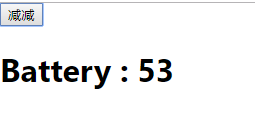
效果图:
React的contextType的使用方法简介的更多相关文章
- React的Context的使用方法简介
context 定义: Context提供了一种方式,能够让数据在组件树中传递,而不必一级一级手动传递. API : createContext(defaultValue?). 使用方法: 首先要引入 ...
- 网络神器Greasemonkey(油猴子)使用方法简介+脚本分享【转载】
推荐下,觉得这个方法有用, 今天艾薇百科来介绍一下功能强大的Greasemonkey,俗称"油猴子",Greasemonkey可以自由定制网页,实现你想要的各种功能.堪称" ...
- Redis Cluster搭建方法简介22211111
Redis Cluster搭建方法简介 (2013-05-29 17:08:57) 转载▼ Redis Cluster即Redis的分布式版本,将是Redis继支持Lua脚本之后的又一重磅 ...
- Monte Carlo方法简介(转载)
Monte Carlo方法简介(转载) 今天向大家介绍一下我现在主要做的这个东东. Monte Carlo方法又称为随机抽样技巧或统计实验方法,属于计算数学的一个分支,它是在上世纪四十年代 ...
- C#——Marshal.StructureToPtr方法简介
目录 MarshalStructureToPtr方法简介 功能及位置 语法 参数说明 异常 备注 举例 本博客(http://blog.csdn.net/livelylittlefish)贴出作者(三 ...
- TabBarController创建及使用方法简介
TabBarController创建及使用方法简介 大致讲解一下TabBarController的创建过程: 首先,我们需要一些视图,如创建UIControllerView类型的view1,view2 ...
- delphi操作文本文件的方法简介
delphi操作文本文件的方法简介减小字体 增大字体 作者佚名来源不详发布时间2008-5-31 10:31:16发布人xuedelphi1 文件类型和标准过程 Delphi同Object ...
- iOS中常用的四种数据持久化方法简介
iOS中常用的四种数据持久化方法简介 iOS中的数据持久化方式,基本上有以下四种:属性列表.对象归档.SQLite3和Core Data 1.属性列表涉及到的主要类:NSUserDefaults,一般 ...
- jQuery的AJAX方法简介及与其他文件$符号冲突的解决办法
一.重要的jQuery AJAX方法简介 $.load(url) 从服务器载入数据 $.get(url,callback) 从服务器请求数据,并执行回调函数 $.post(url,data,callb ...
随机推荐
- Agri-Net —poj1258
Agri-Net Time Limit: 1000MS Memory Limit: 10000K Total Submissions: 44670 Accepted: 18268 Descri ...
- Transform.Find()
代码演示: using System.Collections;using System.Collections.Generic;using UnityEngine; public class Tran ...
- 请教怎么查询ORACLE的历史操作记录!
请问如何查询ORACLE的历史操作记录!!!!!我用的是linux oracle 11g r2,想查一下前几天的数据库的历史操作记录,例如对表的insert,delete,update等等的操作记录, ...
- (二)linux内核准备及编译
1. 内核下载地址 linux内核网站,可以拿到最新的和最近的稳定版本内核: https://www.kernel.org/ 通过网站下载压缩包后解压或者使用git下载到本地: git clone h ...
- UPLOADIFY用法
把下面代码 this.settings.upload_url = SWFUpload.completeURL(this.settings.upload_url); this.settings.but ...
- ORACLE基本用法及常用命令
切换ORACLE用户 su - oracle ---------------------------- 重启数据库 sqlplus sys / as sysdba shutdown immediate ...
- CentOS下Java的安装与环境配置
网上的文章很多,但我还是不知道下次需要看谁的,或是给朋友推荐谁的,索性我都整理出来,方便下次需要的时候能很快的看到或是给朋友链接.两种安装方式:解压安装和包安装 1.安装前检查: 因为安 ...
- Python 多进程异常处理
前言 最近项目用到了Python作为网站的前端,使用的框架是基于线程池的Cherrypy,但是前端依然有一些比较‘重’的模块.由于python的多线程无法很好的利用多核的性质,所以觉得把这些比较‘重’ ...
- 常用开发类库支持--UUID及空值处理Optional
一.java常用类库--UUID --UUID类库的使用非常简单,只需要使用静态方法UUID.randomUUID(就可以正常使用) public class MyUUID { public stat ...
- mongo数据库基本查询语句
D:\MongoDB\Server\3.4\bin>mongo MongoDB shell version v3.-g83c3022fe4 connecting to: mongodb://12 ...