
jackson学习之十(终篇):springboot整合(配置类)
欢迎访问我的GitHub
https://github.com/zq2599/blog_demos
内容:所有原创文章分类汇总及配套源码,涉及Java、Docker、Kubernetes、DevOPS等;
系列文章汇总
- jackson学习之一:基本信息
- jackson学习之二:jackson-core
- jackson学习之三:常用API操作
- jackson学习之四:WRAP_ROOT_VALUE(root对象)
- jackson学习之五:JsonInclude注解
- jackson学习之六:常用类注解
- jackson学习之七:常用Field注解
- jackson学习之八:常用方法注解
- jackson学习之九:springboot整合(配置文件)
- jackson学习之十(终篇):springboot整合(配置类)
本篇概览
- 本文是《jackson学习》系列的终篇,经过前面的一系列实战,相信您已可以熟练使用jackson灵活的执行各种json序列化和反序列化操作,那么,本篇就以轻松的方式来完成整个系列吧;
- 上一篇介绍的是在springboot中通过配置文件对jackson做设置,今天要聊的是另一种常用的jackson配置方式:配置类,就是自己编写代码实例化和配置springboot全局使用的ObjectMapper实例;
源码下载
- 如果您不想编码,可以在GitHub下载所有源码,地址和链接信息如下表所示(https://github.com/zq2599/blog_demos):
| 名称 | 链接 | 备注 |
|---|---|---|
| 项目主页 | https://github.com/zq2599/blog_demos | 该项目在GitHub上的主页 |
| git仓库地址(https) | https://github.com/zq2599/blog_demos.git | 该项目源码的仓库地址,https协议 |
| git仓库地址(ssh) | git@github.com:zq2599/blog_demos.git | 该项目源码的仓库地址,ssh协议 |
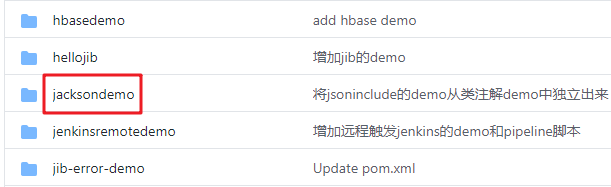
- 这个git项目中有多个文件夹,本章的应用在jacksondemo文件夹下,如下图红框所示:
- jacksondemo是父子结构的工程,本篇的代码在springbootconfigbean子工程中,如下图:

编码
- 在父工程jacksondemo下新增子工程springbootconfigbean,pom.xml如下:
<?xml version="1.0" encoding="UTF-8"?>

<project xmlns="http://maven.apache.org/POM/4.0.0" xmlns:xsi="http://www.w3.org/2001/XMLSchema-instance"

         xsi:schemaLocation="http://maven.apache.org/POM/4.0.0 https://maven.apache.org/xsd/maven-4.0.0.xsd">

    <modelVersion>4.0.0</modelVersion>

    <parent>

        <artifactId>jacksondemo</artifactId>

        <groupId>com.bolingcavalry</groupId>

        <version>1.0-SNAPSHOT</version>

        <relativePath>../pom.xml</relativePath>

    </parent>

    <groupId>com.bolingcavalry</groupId>

    <artifactId>springbootconfigbean</artifactId>

    <version>0.0.1-SNAPSHOT</version>

    <name>springbootconfigbean</name>

    <description>Demo project for Spring Boot with Jackson, configuration from config bean</description>

    <properties>

        <java.version>1.8</java.version>

    </properties>

    <!--不用spring-boot-starter-parent作为parent时的配置-->

    <dependencyManagement>

        <dependencies>

            <dependency>

                <groupId>org.springframework.boot</groupId>

                <artifactId>spring-boot-dependencies</artifactId>

                <version>2.3.3.RELEASE</version>

                <type>pom</type>

                <scope>import</scope>

            </dependency>

        </dependencies>

    </dependencyManagement>

    <dependencies>

        <dependency>

            <groupId>org.springframework.boot</groupId>

            <artifactId>spring-boot-starter-web</artifactId>

        </dependency>

        <dependency>

            <groupId>org.springframework.boot</groupId>

            <artifactId>spring-boot-starter-test</artifactId>

            <scope>test</scope>

            <exclusions>

                <exclusion>

                    <groupId>org.junit.vintage</groupId>

                    <artifactId>junit-vintage-engine</artifactId>

                </exclusion>

            </exclusions>

        </dependency>

        <!-- swagger依赖 -->

        <dependency>

            <groupId>io.springfox</groupId>

            <artifactId>springfox-swagger2</artifactId>

        </dependency>

        <!-- swagger-ui -->

        <dependency>

            <groupId>io.springfox</groupId>

            <artifactId>springfox-swagger-ui</artifactId>

        </dependency>

    </dependencies>

    <build>

        <plugins>

            <plugin>

                <groupId>org.springframework.boot</groupId>

                <artifactId>spring-boot-maven-plugin</artifactId>

            </plugin>

        </plugins>

    </build>

</project>
- 本文最重要的代码是配置类JacksonConfig.java,如下,需要ConditionalOnMissingBean注解避免冲突,另外还给实例指定了名称customizeObjectMapper,如果应用中通过Autowired使用此实例,需要指定这个名字,避免报错"There is more than one bean of 'ObjectMapper ' type":
@Configuration

public class JacksonConfig {

    @Bean("customizeObjectMapper")

    @Primary

    @ConditionalOnMissingBean(ObjectMapper.class)

    public ObjectMapper getObjectMapper(Jackson2ObjectMapperBuilder builder) {

        ObjectMapper mapper = builder.build();

        // 日期格式

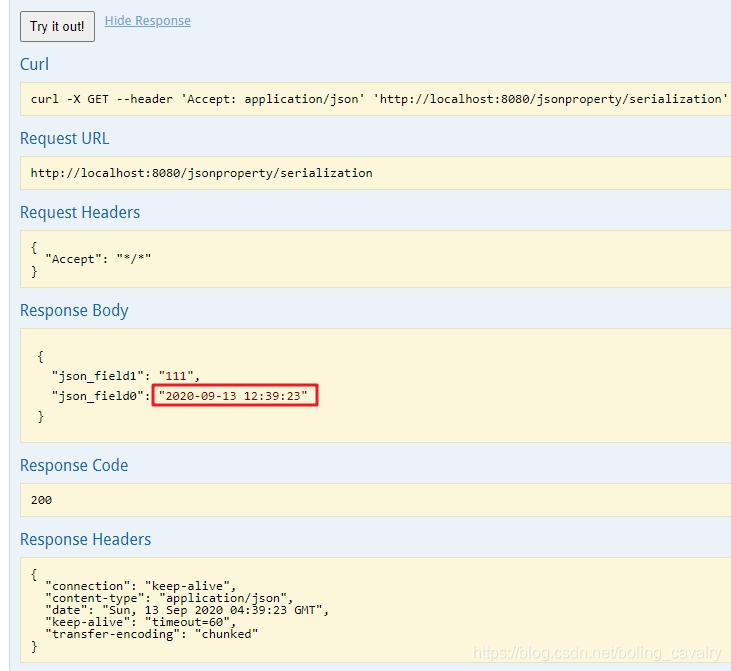
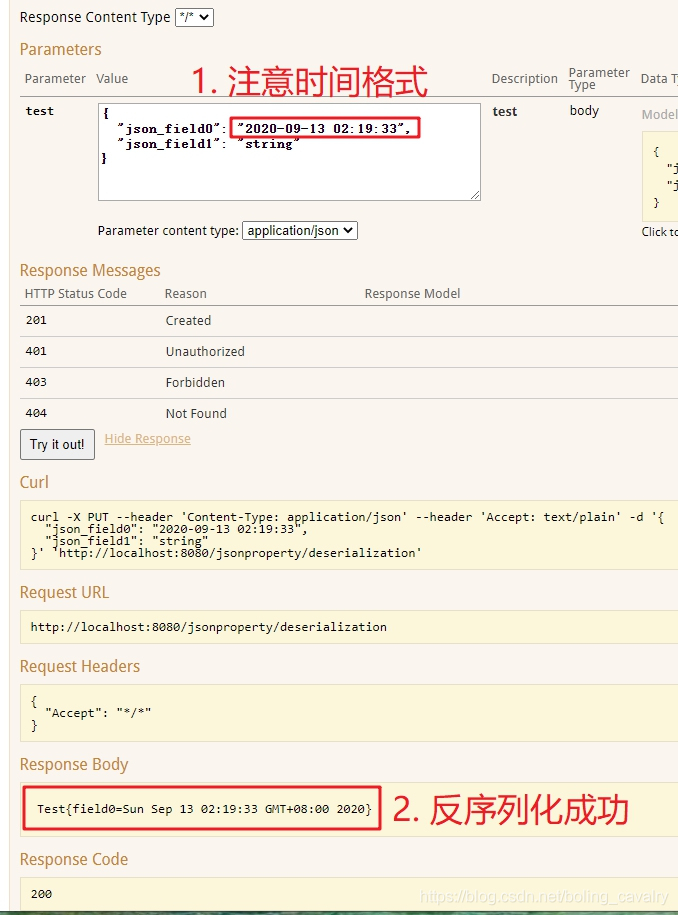
        mapper.setDateFormat(new SimpleDateFormat("yyyy-MM-dd hh:mm:ss"));

        // 美化输出

        mapper.enable(SerializationFeature.INDENT_OUTPUT);

        return mapper;

    }

}
- 对于JacksonConfig.getObjectMapper方法内的设置,如果您想做更多设置,请参考《jackson学习之三:常用API操作》里面的设置内容;
- 启动类依然很简单:
package com.bolingcavalry.springbootconfigbean;

import org.springframework.boot.SpringApplication;

import org.springframework.boot.autoconfigure.SpringBootApplication;

@SpringBootApplication

public class SpringbootConfigBeanApplication {

    public static void main(String[] args) {

        SpringApplication.run(SpringbootConfigBeanApplication.class, args);

    }

}
- swagger配置:
package com.bolingcavalry.springbootconfigbean;

import org.springframework.context.annotation.Bean;

import org.springframework.context.annotation.Configuration;

import springfox.documentation.builders.ApiInfoBuilder;

import springfox.documentation.builders.PathSelectors;

import springfox.documentation.builders.RequestHandlerSelectors;

import springfox.documentation.service.ApiInfo;

import springfox.documentation.service.Contact;

import springfox.documentation.service.Tag;

import springfox.documentation.spi.DocumentationType;

import springfox.documentation.spring.web.plugins.Docket;

import springfox.documentation.swagger2.annotations.EnableSwagger2;

@Configuration

@EnableSwagger2

public class SwaggerConfig {

    @Bean

    public Docket createRestApi() {

        return new Docket(DocumentationType.SWAGGER_2)

                .apiInfo(apiInfo())

                .tags(new Tag("JsonPropertySerializationController", "JsonProperty相关测试"))

                .select()

                // 当前包路径

                .apis(RequestHandlerSelectors.basePackage("com.bolingcavalry.springbootconfigbean.controller"))

                .paths(PathSelectors.any())

                .build();

    }

    //构建 api文档的详细信息函数,注意这里的注解引用的是哪个

    private ApiInfo apiInfo() {

        return new ApiInfoBuilder()

                //页面标题

                .title("SpringBoot整合Jackson(基于配置文件)")

                //创建人

                .contact(new Contact("程序员欣宸", "https://github.com/zq2599/blog_demos", "zq2599@gmail.com"))

                //版本号

                .version("1.0")

                //描述

                .description("API 描述")

                .build();

    }

}
- 最后是测试用的Controller类,要注意的是在使用ObjectMapper实例的地方,用Autowired注解的时候,记得带上Qualifier注解:
package com.bolingcavalry.springbootconfigbean.controller;

import com.bolingcavalry.springbootconfigbean.bean.Test;

import com.fasterxml.jackson.core.JsonProcessingException;

import com.fasterxml.jackson.databind.ObjectMapper;

import io.swagger.annotations.Api;

import io.swagger.annotations.ApiOperation;

import org.slf4j.Logger;

import org.slf4j.LoggerFactory;

import org.springframework.beans.factory.annotation.Autowired;

import org.springframework.beans.factory.annotation.Qualifier;

import org.springframework.web.bind.annotation.RequestBody;

import org.springframework.web.bind.annotation.RequestMapping;

import org.springframework.web.bind.annotation.RequestMethod;

import org.springframework.web.bind.annotation.RestController;

@RestController

@RequestMapping("/jsonproperty")

@Api(tags = {"JsonPropertySerializationController"})

public class JsonPropertySerializationController {

    private static final Logger logger = LoggerFactory.getLogger(JsonPropertySerializationController.class);

    @Qualifier("customizeObjectMapper")

    @Autowired

    ObjectMapper mapper;

    @ApiOperation(value = "测试序列化", notes = "测试序列化")

    @RequestMapping(value = "/serialization", method = RequestMethod.GET)

    public Test serialization() throws JsonProcessingException {

        Test test = new Test();

        logger.info(mapper.writeValueAsString(test));

        return test;

    }

    @ApiOperation(value = "测试反序列化", notes="测试反序列化")

    @RequestMapping(value = "/deserialization",method = RequestMethod.PUT)

    public String deserialization(@RequestBody Test test) {

        return test.toString();

    }

}
验证
- 启动SpringbootConfigBeanApplication后,浏览器打开:http://localhost:8080/swagger-ui.html
- 先验证序列化接口/jsonproperty/serialization:
3. 再验证反序列化接口 /jsonproperty/deserialization:
- 至此,整个《jackson学习》系列就全部完成了,希望这十篇内容能够给您带来一些参考,助您在编码过程中更加得心应手的使用Jackson;
你不孤单,欣宸原创一路相伴
欢迎关注公众号:程序员欣宸
微信搜索「程序员欣宸」,我是欣宸,期待与您一同畅游Java世界...
https://github.com/zq2599/blog_demos
jackson学习之十(终篇):springboot整合(配置类)的更多相关文章
- 从.Net到Java学习第十二篇——SpringBoot+JPA提供跨域接口
从.Net到Java学习系列目录 最近又撸了半个月的前端代码,做app离线存储,然后又花了一周去将过去的wcf项目转webapi,java又被落下了,总感觉我特么像斗地主中的癞子牌,变来变去..... ...
- springboot(十四):springboot整合shiro-登录认证和权限管理(转)
springboot(十四):springboot整合shiro-登录认证和权限管理 .embody{ padding:10px 10px 10px; margin:0 -20px; border-b ...
- SpringBoot系列十二:SpringBoot整合 Shiro
声明:本文来源于MLDN培训视频的课堂笔记,写在这里只是为了方便查阅. 1.概念:SpringBoot 整合 Shiro 2.具体内容 Shiro 是现在最为流行的权限认证开发框架,与它起名的只有最初 ...
- 第三篇 SpringBoot整合log4j2详解
源代码:https://pan.baidu.com/s/1d1Lwv1gIvVNltIKVWeEseA 提取码:wff0 SpringBoot整合Log4j2步骤: 1.删除spring-boot-s ...
- rabbitmq学习(五):springboot整合rabbitmq
一.Springboot对rabbitmq的支持 springboot提供了对rabbitmq的支持,并且大大简化了rabbitmq的相关配置.在springboot中,框架帮我们将不同的交换机划分出 ...
- Redis和springboot 整合redisUtil类
一.引入依赖 <dependency> <groupId>org.springframework.boot</groupId> <artifactId> ...
- Redis和SpringBoot整合RedisUtils类
一.引入依赖 <dependency> <groupId>org.springframework.boot</groupId> <artifactId> ...
- springboot项目配置类
一.在springboot项目中,如果不进行配置,直接访问静态页面是无法访问的,需要进行配置,springboot舍弃了XML文件的配置方式,这里我们采用开发配置类的方式.新建MvcConfig类,加 ...
- SpringBoot第十二篇:整合jsp
作者:追梦1819 原文:https://www.cnblogs.com/yanfei1819/p/10953600.html 版权声明:本文为博主原创文章,转载请附上博文链接! 引言 Sprin ...
随机推荐
- mysql中更改字段属性实际上都做了哪些操作
mysql> set profiling=1; Query OK, 0 rows affected (0.00 sec) mysql> alter table test modify n ...
- win10打开IIS服务并发布网站
1.打开控制面板 win+x后点击控制面板 2.点击程序集下边的解除安装程式 3.点击开启或关闭windows功能 4.找到Internet information services并勾选前面的复选框 ...
- STL_string容器
一.string概念 string是STL的字符串类型,通常用来表示字符串.而在使用string之前,字符串通常是用char*表示的.string与char*都可以用来表示字符串,那么二者有什么区别. ...
- JS实现计算器,带三角函数,根号
极简主义网页计算器. 实现了按键特效,可响应键盘按键,实时显示计算结果. 可切换模式,拓展高级功能,包括根号.三角函数.括号等. 效果如下: 代码如下: html: <!DOCTYPE html ...
- 【JeecgBoot】关于 jeecg-boot 的项目理解、使用心得和改进建议
工欲善其事,必先利其器. 脚手架选型 一年前,我接到为团队落地一个快速开发脚手架的任务. 在月底这节骨眼上,时间紧,任务急,有想自己撸一个脚手架的人都赶紧把这想法收起来吧!这劳民又伤身的事咱肯定是不能 ...
- 提示框,对话框,路由跳转页面,跑马灯,幻灯片及list组件的应用
目录: 主页面的js业务逻辑层 主页面视图层 主页面css属性设置 跳转页面一的js业务逻辑层 跳转页面一的视图层 跳转页面二的视图层 跳转页面三的js业务逻辑层 跳转页面三的视图层 跳转页面三的cs ...
- cisco思科交换机终端远程ssh另一端报错:% ssh connections not permitted from this terminal
故障现象: XSJ-GH10-C3750->ssh 58.64.xx.xx% ssh connections not permitted from this terminal 解决办法: 原因: ...
- RVA与FOA的转换
主要取决于文件对齐与内存对齐的值
- Android字节码优化工具redex初探
https://mp.weixin.qq.com/s/Og2TkGrZR490h9-KO23lmw 背景 apk瘦身和启动时间优化是移动端开发性能优化中经常被提到的两个问题.apk瘦身的常规做法有,s ...
- Prometheus为你的SpringBoot应用保驾护航
前面我们介绍了Prometheus的作用和整体的架构,相信大家对Prometheus有了一定的了解. 具体可以查看这篇文章:https://mp.weixin.qq.com/s/QoAs0-AYy8k ...