
c# Process cmd 执行完回调 Proc_OutputDataReceived mysql mysqldump mysql source备份还原数据
c# Process 执行完回调 Proc_OutputDataReceived
mysql mysqldump mysql source备份还原数据
直接贴代码
前提:mysql5.7
vs2017 3.5
mysql文件夹 C:\Program Files\MySQL\MySQL Server 5.7\bin
备份文件夹 D:\Backup\2018\201812\20181217
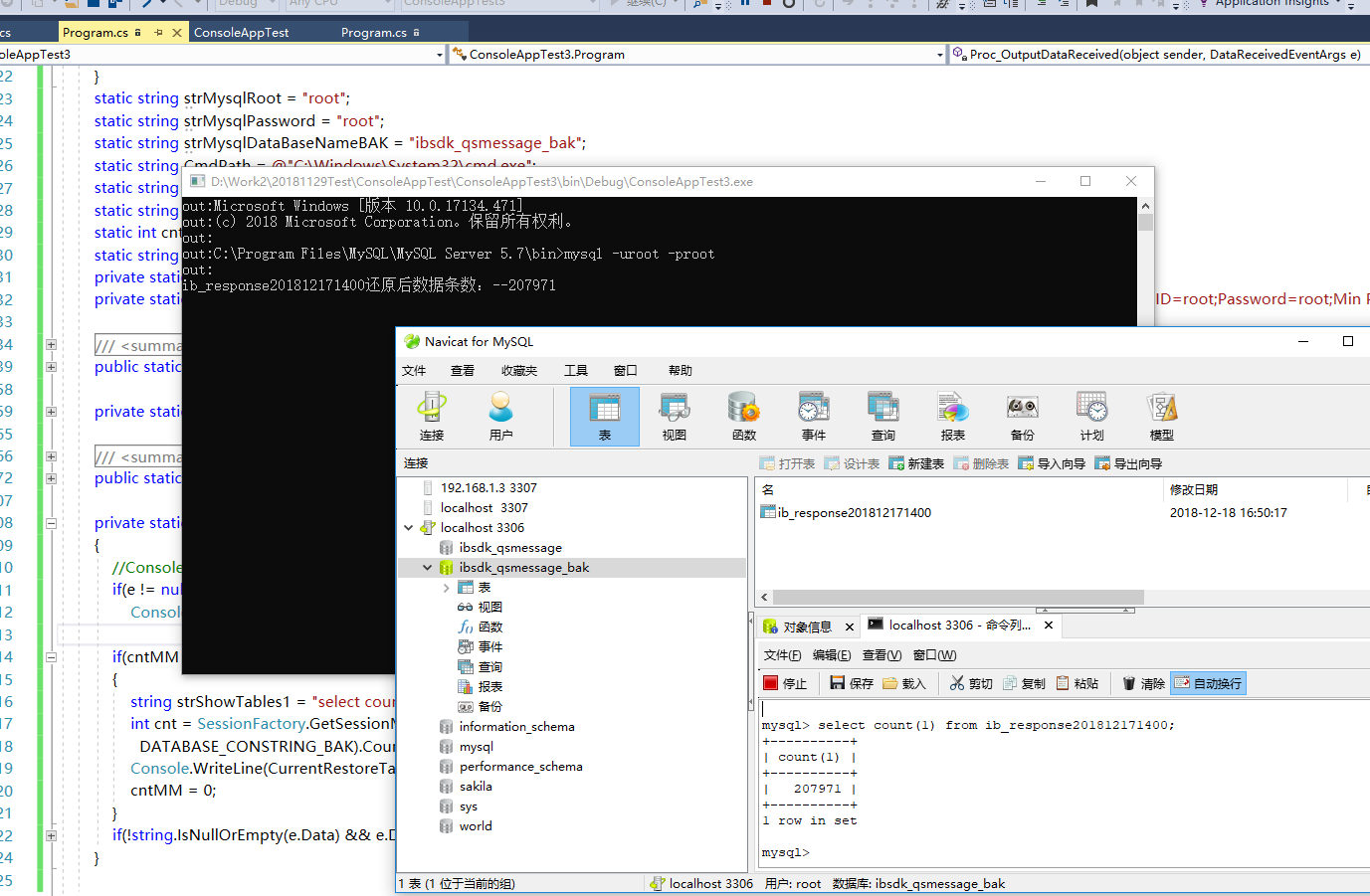
还原:
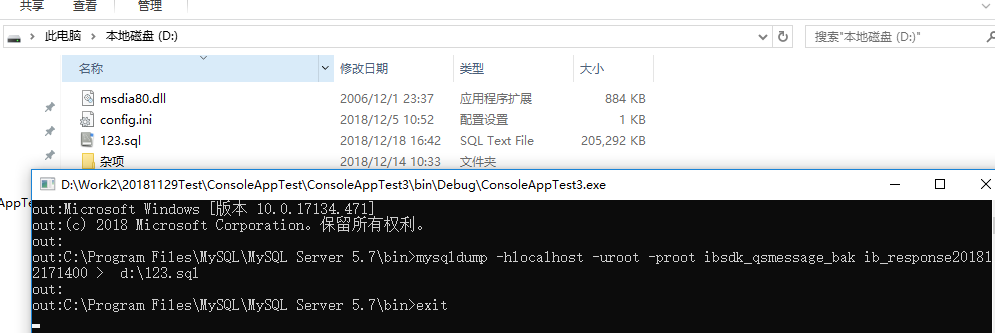
备份:
直接上代码
class Program

{

static void Main(string[] args)

{

string cmdRestore = "source D:\\Backup\\2018\\201812\\20181217\\ib_response201812171400.sql";

///还原

StartCmdRestore(strMysqlFile, new string[] { cmdRestore }, "ib_response201812171400");

//备份

//string cmdBackUp = "mysqldump -hlocalhost -uroot -proot ibsdk_qsmessage_bak ib_response201812171400 > d:\\123.sql";

//StartCmd(strMysqlDumpFile, new string[] { cmdBackUp });

Console.Read();

}

static string strMysqlRoot = "root";

static string strMysqlPassword = "root";

static string strMysqlDataBaseNameBAK = "ibsdk_qsmessage_bak";

static string CmdPath = @"C:\Windows\System32\cmd.exe";

static string strMysqlDumpFile = "C:\\Program Files\\MySQL\\MySQL Server 5.7\\bin\\";

static string strMysqlFile = @"C:\Program Files\MySQL\MySQL Server 5.7\bin\";

static int cntMM = ;

static string CurrentRestoreTableName = string.Empty;

private static string DATABASE_PROVIDER = "MySql.Data.MySqlClient";

private static string DATABASE_CONSTRING_BAK = "Data Source=localhost;Initial Catalog=ibsdk_qsmessage_bak;Persist Security Info=True;User ID=root;Password=root;Min Pool Size=1;Max Pool Size=3;Allow User Variables=True;Allow Zero Datetime = true;";

/// <summary>

/// 执行Cmd命令

/// </summary>

/// <param name="workingDirectory">要启动的进程的目录</param>

/// <param name="command">要执行的命令</param>

public static void StartCmd(string workingDirectory, string[] commands)

{

Process process = new Process();

process.StartInfo.FileName = CmdPath;

process.StartInfo.WorkingDirectory = workingDirectory;

process.StartInfo.UseShellExecute = false;

process.StartInfo.RedirectStandardInput = true;

process.StartInfo.RedirectStandardOutput = true;

process.StartInfo.RedirectStandardError = true;

process.StartInfo.CreateNoWindow = true;

process.OutputDataReceived += Process_OutputDataReceived;

process.Start();

process.BeginOutputReadLine();

//process.StandardInput.WriteLine("cd " + workingDirectory);

process.StandardInput.WriteLine(commands[]);

process.StandardInput.WriteLine("exit");

process.StandardInput.WriteLine("exit");

process.Close();

}

private static void Process_OutputDataReceived(object sender, DataReceivedEventArgs e)

{

if(e != null && e.Data != null)

Console.WriteLine("out:" + e.Data.ToString());

//Console.WriteLine("aaa:" + cnt);

}

/// <summary>

/// 执行Cmd命令

/// </summary>

/// <param name="workingDirectory"></param>

/// <param name="command"></param>

/// <param name="tableName"></param>

public static void StartCmdRestore(string workingDirectory, string[] command, string tableName)

{

//创建进程对象

Process proc = new Process();

//调用dos窗口

proc.StartInfo.FileName = "cmd.exe";

//不显示窗体

proc.StartInfo.CreateNoWindow = true;

//设置dos窗口的目录路径,这里就是自己安装mysql的bin目录

proc.StartInfo.WorkingDirectory = workingDirectory;

//允许输入流

proc.StartInfo.UseShellExecute = false;

proc.StartInfo.RedirectStandardInput = true;

proc.StartInfo.RedirectStandardOutput = true;

proc.StartInfo.RedirectStandardError = true;

proc.EnableRaisingEvents = true;

proc.EnableRaisingEvents = true;//程序退出引发事件

proc.OutputDataReceived += Proc_OutputDataReceived;

//执行

proc.Start();

proc.BeginOutputReadLine();

//登陆数据库,这里的内容和我们直接使用dos窗口登陆数据库的方式一致

proc.StandardInput.WriteLine(string.Format("mysql -u{0} -p{1}", strMysqlRoot, strMysqlPassword));

//切换到我们需要操作的数据库

proc.StandardInput.WriteLine(string.Format("use {0};", strMysqlDataBaseNameBAK));

//先前备份的sql脚本文件读取

proc.StandardInput.WriteLine(command[]);// "source D:\\Backup\\2018\\201812\\20181216\\ib_response201812161030.sql");

CurrentRestoreTableName = tableName;

proc.StandardInput.WriteLine("exit");

proc.StandardInput.WriteLine("exit");

proc.Close();

}

private static void Proc_OutputDataReceived(object sender, DataReceivedEventArgs e)

{

//Console.WriteLine("out");

if(e != null && e.Data != null)

Console.WriteLine("out:" + e.Data.ToString());

if(cntMM >= )

{

//string strShowTables1 = "select count(1) from ib_response201812171400;";

//int cnt = SessionFactory.GetSessionMySQLIB(DATABASE_PROVIDER,

// DATABASE_CONSTRING_BAK).Count(strShowTables1);

//Console.WriteLine(CurrentRestoreTableName + "还原后数据条数:--" + cnt);

cntMM = ;

}

if(!string.IsNullOrEmpty(e.Data) && e.Data.ToLower().IndexOf("mysql") >= )

{ cntMM++; }

}

}
已测试
有疑问可联系QQ 1023360745 仅供技术交流 骚扰不回。
建议先备份再还原
注意:还原会锁表 自己查看SQL
查询数据条数 自己根据自己的mysql 查询一下
我的场景:
备份数据:window服务中 一段代码 来自己备份数据
还原数据:client发送请求则还原需要查询的数据表 回调告诉client还原成功数据已ready!
欢迎点评
c# Process cmd 执行完回调 Proc_OutputDataReceived mysql mysqldump mysql source备份还原数据的更多相关文章
- MySQL mysqldump与source导入慢的解决方法
Jquery中文网 > 数据库 > mysql > 正文 MySQL mysqldump与source导入慢的解决方法 MySQL mysqldump与source导入慢的 ...
- MYSQL的日志与备份还原
一.错误日志 当数据库出现任何故障导致无法使用时,第一时间先去查看该日志 1.服务器启动关闭过程中的信息 2.服务器运行过程中的错误信息 日志存放路径,可以通过命令查看: 日志文件命名格式:host_ ...
- MySQL - 日常操作二 备份还原
登录mysql的命令 # 格式: mysql -h 主机地址 -u 用户名 -p 用户密码 mysql -h 110. -P3306 -uroot -p mysql -uroot -p -S /dat ...
- Mysql表复制及备份还原
1.复制表结构 1.1 含有主键等信息的完整表结构 CREATE table 新表名 LIKE book; 1.2 只有表结构,没有主键等信息 create table 新表名 s ...
- MySQL远程连接和备份还原
连接远程数据库 mysql -h 数据库地址 -P 端口号 -u 用户名 -p mysql -h -u root -p 备份数据库, 热备份 mysqldump -h 127.0.0.1 -u roo ...
- mfc调用cmd执行完保留黑框
mfc调用cmd的方法有很多,本文采用 ShellExecute ShellExecute(AfxGetMainWnd()->m_hWnd,L"open",L"cm ...
- MySQL 利用binlog增量备份+还原实例
一,什么是增量备份 增量备份,就是将新增加的数据进行备份.假如你一个数据库,有10G的数据,每天会增加10M的数据,数据库每天都要备份一次,这么多数据是不是都要备份呢?还是只要备份增加的数据呢,很显然 ...
- 使用mysqldump进行mysql数据库备份还原
mysqldump是mysql自带的备份还原工具,默认在安装目录的bin下 可通过cmd命令行启动,然后运行: 还原一个数据库: mysql -h 主机 -u 用户名 -p密码 数据库名 < 指 ...
- MySQL mysqldump 数据备份
1.mysqldump 命令工具说明 参数注解: mysqldump 是采用SQL 级别的备份机制,它将数据表导成 SQL 脚本文件,在不同的 MySQL 版本之间升级时相对比较合适,这也是最常用的备 ...
随机推荐
- How to using Piwis Tester II code Porsche rear end electronics
V18.100 Piwis Tester II Diagnostic Tool For Porsche With CF30 Laptop High Quality Top 7 Reasons to G ...
- Python批量合并处理B站视频
最近想学习后端,又不想花钱,怎么办呢?于是在手机端B站(哔哩哔哩)上面找到了满意的免费视频教程,但是手机端看起来很不方便啊.于是,我通过在手机端缓存下来后,导入到了电脑端,但是我后面了发现两个问题: ...
- Java集合类学习笔记2
二,具体的集合 集合类型 描述 ArrayList 一种可以动态增长和缩减的索引序列 LinkedList 一种可以在任何位置进行高效地插入和删除操作的有序序列 ArrayDeque 一种用循环数组实 ...
- oracle中新建用户和赋予权限
1.新建个用户 create user xxxxx(用户名) identified by "密码" alert user 用户名 identified by “新密码” --修改用 ...
- Oracle 12 Rman增量备份
增量备份 增量备份主要作用是仅复制自上次备份以来已更改的数据块.您可以使用RMAN创建数据文件,表空间或整个数据库的增量备份. 将增量备份作为策略的一部分的主要原因是: 用于基于增量更新备份的策略,其 ...
- Android系统修改之Notification布局修改(一)
源码基于Android4.4 相关布局文件的位置: frameworks/base/core/res目录下: 1. notification_template_base.xml 2. notifica ...
- HTML解析之BeautifulSoup
BeautifulSoup是一个用于从HTML和XML文件中提取数据的Python库.BeautifulSoup提供一些简单的.函数用来处理导航.搜索.修改分析树等功能.BeautifulSoup模块 ...
- Bootstrap各种进度条的实例讲解
本章将讲解 Bootstrap 进度条.在本教程中,您将看到如何使用bootstrap教程.重定向或动作状态的进度条. Bootstrap 进度条使用 CSS3 过渡和动画来获得该效果.Interne ...
- 编译openwrt时报错:g++: internal compiler error: Killed (program cc1plus)
答: 这是内存不足导致的,增大内存或者减少运行的线程即可
- 【做题】SRM704 Div1 Median - ModEquation——数论
原文链接 https://www.cnblogs.com/cly-none/p/SRM704Div1B.html 给出\(n\)和模数\(P\).\(q\)次询问,每次给出一个\([0,P-1]\)范 ...