
ListView控件(下)简单适配器
(一)
1.效果图
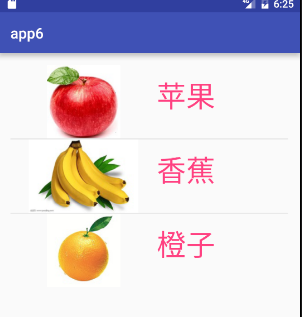
2.activiy_main.xml
 <?xml version="1.0" encoding="utf-8"?>

 <LinearLayout xmlns:android="http://schemas.android.com/apk/res/android"

     xmlns:tools="http://schemas.android.com/tools"

     android:layout_width="match_parent"

     android:layout_height="match_parent"

     android:paddingBottom="@dimen/activity_vertical_margin"

     android:paddingLeft="@dimen/activity_horizontal_margin"

     android:paddingRight="@dimen/activity_horizontal_margin"

     android:paddingTop="@dimen/activity_vertical_margin"

     tools:context="com.example.app6.MainActivity">

     <ListView

         android:id="@+id/lv"

         android:layout_width="wrap_content"

         android:layout_height="wrap_content" />

 </LinearLayout>
3.item.xml
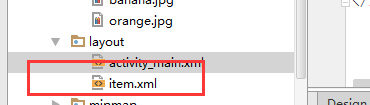
<?xml version="1.0" encoding="utf-8"?>

<LinearLayout xmlns:android="http://schemas.android.com/apk/res/android"

    android:layout_width="match_parent"

    android:layout_height="match_parent"

    android:orientation="horizontal">

    <ImageView

        android:layout_width="wrap_content"

        android:layout_height="wrap_content"

        android:id="@+id/iv"/>

    <TextView

        android:id="@+id/tv"

        android:layout_width="wrap_content"

        android:layout_height="wrap_content"></TextView>

</LinearLayout>
3.MianActivity.java
 package com.example.app6;

 import android.support.v7.app.AppCompatActivity;

 import android.os.Bundle;

 import android.widget.ListView;

 import android.widget.SimpleAdapter;

 import java.util.ArrayList;

 import java.util.HashMap;

 import java.util.List;

 import java.util.Map;

 import java.util.Objects;

 public class MainActivity extends AppCompatActivity {

     private ListView listView;

     private List<Map<String,Object>> list;

     private Map<String,Object> map;

     private int[] pics = {R.drawable.apple,R.drawable.banana,R.drawable.orange};

     private String[] texts={"苹果","香蕉","橙子"};

     private SimpleAdapter simpleAdapter;

     @Override

     protected void onCreate(Bundle savedInstanceState) {

         super.onCreate(savedInstanceState);

         setContentView(R.layout.activity_main);

         listView = (ListView)findViewById(R.id.lv);

         //新建数据源

         list = new ArrayList<>();

         for(int i=0;i<3;i++){

             map = new HashMap<>();

             map.put("pic",pics[i]);

             map.put("text",texts[i]);

             list.add(map);

         }

         //新建适配器,适配器绑定数据

         simpleAdapter = new SimpleAdapter(MainActivity.this,list,R.layout.item,new String[]{"pic","text"},new int[]{R.id.iv,R.id.tv});

         //视图加载适配器

         listView.setAdapter(simpleAdapter);

     }

 }
ListView控件(下)简单适配器的更多相关文章
- Android中ListView 控件与 Adapter 适配器如何使用?
一个android应用的成功与否,其界面设计至关重要.为了更好的进行android ui设计,我们常常需要借助一些控件和适配器.今天小编在android培训网站上搜罗了一些有关ListView 控件与 ...
- android中ListView控件最简单的用法
创建一个活动,在xml文件中添加一个ListView控件,id定义为list1,并且设置为满屏显示,代码如下: <ListView android:id="@+id/list1&quo ...
- asp.net ListView控件的简单实用和配置
1 web窗体界面代码 ItemType:控件要绑定的实体模型 SelectMethod:控件获取实体集合的后台方法 DataKeyNames:实体的主键 UpdateProduct:设置跟新的方法 ...
- ListView控件(上)数据适配器:ListView绑定监听是SetOnItemClickListener
(一) 1.效果图: 2.MainActivity.java package com.example.app5; import android.support.v7.app.AppCompatActi ...
- 【Android基础】listview控件的使用(1)------最简单的listview的使用
listview控件是项目开发中最常用的空间之一,我将慢慢推出关于listview的一系列的文章,先从最简单的,系统自带的listview开始吧! 先上效果图: activity_one.xml &l ...
- WP8.1开发中ListView控件加载图列表的简单使用(1)
我也是刚接触WP编程没几个月,就是在这段时间一直闲着没事,然后又比较喜欢WP这款系统,就学习了WP这方面的开发言语,自学是很困难的,掌握这方面的资料不多,很初级,就是自己在网上找资料学习过程中,看到别 ...
- Android ListView列表控件的简单使用
ListView 列表是我们经常会使用的控件, 如果想要自定义里面的显示的话是挺麻烦的, 需要新建XML.Class SimpleAdapter这两个文件, 较为麻烦. 如果我们只是想显示两.三行文字 ...
- 【Android基础】listview控件的使用(4)-----自定义布局的listview的使用
前面我介绍了listview控件的不同用法,但是这些用法在实际的开发项目中是不足以满足需求的,因为前面的几种用法只能简单的显示文本信息,而且布局都比较单一,很难做出复杂的结果,在实际的开发项目中,90 ...
- Android学习之基础知识五—ListView控件(最常用和最难用的控件)
ListView控件允许用户通过上下滑动来将屏幕外的数据拉到屏幕内,把屏幕内的数据拉到屏幕外. 一.ListView的简单用法第一步:先创建一个ListViewTest项目,在activity_mia ...
随机推荐
- 初识 spl_autoload_register
spl_autoload_register 一.首先我们看来自官网的定义 版本要求:php版本为5.1.2+ 说明:注册给定的函数作为__autoload的实现.即自动加载 函数参数说明: bool ...
- SpringBoot入门学习(一): Idea 创建 SpringBoot 的 HelloWorld
创建项目: 项目结构: 程序启动入口: 正式开始: package com.example.demo; import org.springframework.boot.SpringApplicatio ...
- 第一次做的jsp分页,详细代码。。。。
自己学jsp也有了一段时间,而且自己现在上的课是java web现在雪儿基础做了一个最简单的jsp页面,代码都放在一个页面,自己准备在改进,一步步来,这里的代码可能不是很完美,没事,下面接下来会有大概 ...
- 前端导出文件功能document.execCommand命令
参照 http://blog.csdn.net/woshinia/article/details/18664903
- 如何让 linux unzip 命令 不输出结果
unzip xx.zip > /dev/null 2>&1 unzip xx.zip > /dev/null前半部分是将标准输出重定向到空设备, 后面的2>&1 ...
- 02-更改窗口的根控制器
Demo示例程序源代码
源代码下载链接:02-更改窗口的根控制器.zip18.0 KB // MJAppDelegate.h // // MJAppDelegate.h // 02-更改窗口的根控制器 // // ...
- Xcode5根控制器使用xib展示的步骤
#error:Xcode5根控制器使用xib展示,步骤 ⓵取消mainInterface ⓶右击file's owner对xib进行view-view连线,否则: Terminating app du ...
- python 学习笔记 多进程
要让python程序实现多进程,我们先了解操作系统的相关知识 Unix/Linux操作系统提供了一个fork()系统调用,他非常特殊,普通的函数调用,调用一次,返回一次,但是fork调用一次, 返回两 ...
- UVA 10385 Duathlon
Problem HDuathlonInput: standard inputOutput: standard outputTime Limit: 15 seconds A duathlon is a ...
- 虚拟机VMware 安装CentOS6.5
对linux完全小白的情况下,也能依据下面的文章,一步一步安装使用成功! CentOS 6.5 下载http://www.linuxdown.net/CentOS/2014/0928/3371.htm ...