
SharePoint 开发TimerJob 介绍
项目需要写TimerJob,以前也大概知道原理,不过,开发过程中,还是遇到一些问题,网上看了好多博客,也有写的灰常好的,不过,自己还是想再写一下,也算是给自己一个总结,也算给大家多一个参考吧。
TimerJob项目结构,主要有两个Class,一个是用来定义TimerJob功能的,一个是用来部署开发好的TimerJob的,分别继承两个不同的类。如下图,先建一个如下结构的项目:
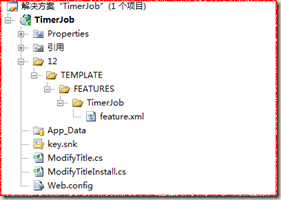
文件描述:
TimerJob定义类:ModifyTitle.cs(继承自SPJobDefinition)
TimerJob安装类:ModifyTitleInstall.cs(继承自SPFeatureReceiver)
激活TimerJob的Feature.xml
添加强命名,因为将来生成的dll是要放到GAC里面去的
添加引用:
引用Microsoft.SharePoint.dll文件,两个Class都需要添加下面命名空间
using Microsoft.SharePoint;
using Microsoft.SharePoint.Administration;
ModifyTitleInstall类
|
public class ModifyTitleInstall : SPFeatureReceiver { const string TimerJobName = "ModifyTitleTimerJob";//TimerJob的标题 //激活TimerJob的方法 public override void FeatureActivated(SPFeatureReceiverProperties properties) { SPSite site = properties.Feature.Parent as SPSite; foreach (SPJobDefinition job in site.WebApplication.JobDefinitions) { //如果有相同的TimerJob,先删除 if (job.Title == TimerJobName) { job.Delete(); } } ModifyTitle modifyTitle = new ModifyTitle(TimerJobName, site.WebApplication); SPMinuteSchedule minuteSchedule = new SPMinuteSchedule();//计时器对象 minuteSchedule.BeginSecond = 0; minuteSchedule.EndSecond = 59; minuteSchedule.Interval = 1; modifyTitle.Schedule = minuteSchedule; modifyTitle.Update(); //throw new NotImplementedException(); } public override void FeatureDeactivating(SPFeatureReceiverProperties properties) { SPSite site = properties.Feature.Parent as SPSite; foreach (SPJobDefinition job in site.WebApplication.JobDefinitions) { if (job.Title == TimerJobName) { job.Delete(); } } //throw new NotImplementedException(); } public override void FeatureInstalled(SPFeatureReceiverProperties properties) { //throw new NotImplementedException(); } public override void FeatureUninstalling(SPFeatureReceiverProperties properties) { //throw new NotImplementedException(); } |
ModifyTitle类
|
public class ModifyTitle : SPJobDefinition { public ModifyTitle():base(){} public ModifyTitle(string TimerName, SPWebApplication webapp) : base(TimerName, webapp, null, SPJobLockType.ContentDatabase) { //TimerJob的标题 this.Title = "定期修改Title的TimerJob"; } public override void Execute(Guid targetInstanceId) { SPWebApplication webapp = this.Parent as SPWebApplication; SPContentDatabase contentDB=webapp.ContentDatabases[targetInstanceId]; foreach (SPItem item in contentDB.Sites[0].RootWeb.Lists["TimerJob"].Items) { DateTime dt = Convert.ToDateTime(item["创建时间"].ToString()); item["标题"] = "今天是这个月的第" + dt.Day.ToString() + "天"; item.Update(); } //base.Execute(targetInstanceId); } } |
Feature.xml(Id是需要重新生成的Guid)
|
<?xml version="1.0" encoding="utf-8" ?> <Feature xmlns="http://schemas.microsoft.com/sharepoint/" Id="f0c813e8-68e0-4ad2-82cd-292b1b7222cd" Title="Modify Title Timer Job" Description="Modify Title Timer Job" Scope="Site" Hidden="TRUE" Version="1.0.0.0" ReceiverAssembly="TimerJob, Version=1.0.0.0, Culture=neutral, PublicKeyToken=f7436af6afb9480b" ReceiverClass="TimerJob.ModifyTitleInstall"> </Feature> |
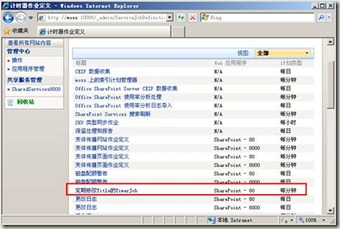
添加结果:
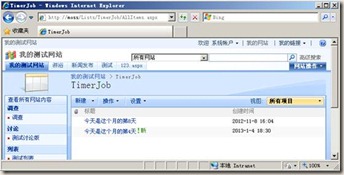
运行结果:无论标题是什么,都改成今天是这个月的第N天。
添加配置文件:
|
<?xml version="1.0" encoding="utf-8" ?> <configuration> <appSettings> <add key="AAString" value="http://localhost"/> </appSettings> </configuration> |
获取配置文件:
string AAString = ConfigurationManager.AppSettings.Get("AAString");
注:配置文件格式不对的话,可能造成Timer服务启动错误,所以,可以拷一个控制台程序debug下面的Consoleapp.exe.config文件,然后改成OWSTIMER.exe.config,然后放到12/bin(C:\Program Files\Common Files\Microsoft Shared\Web Server Extensions\12\BIN)下就可以了
部署TimerJob脚本:
|
@echo off SET TEMPLATE="c:\program files\common files\microsoft shared\web server extensions\12\Template" Echo Copying files to TEMPLATES directory xcopy /e /y 12\TEMPLATE\* %TEMPLATE% Echo Copying TimerJob.dll to GAC "C:\Program Files\Microsoft SDKs\Windows\v6.0A\Bin\gacutil.exe" -if bin\TimerJob.dll iisreset "C:\Program Files\Common Files\Microsoft Shared\Web Server Extensions\12\bin\stsadm" -o installfeature -filename TimerJob\feature.xml -force "C:\Program Files\Common Files\Microsoft Shared\Web Server Extensions\12\bin\stsadm" -o deactivatefeature -filename TimerJob\feature.xml -url http://localhost -force "C:\Program Files\Common Files\Microsoft Shared\Web Server Extensions\12\bin\stsadm" -o activatefeature -filename TimerJob\feature.xml -url http://localhost -force net stop SPTimerV3 net start SPTimerV3 PAUSE |
注:新的TimerJob运行一定要重启SPTimerV3服务,在windows服务里面,如下图:
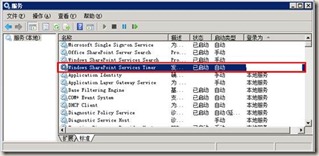
调试:TimerJob程序和WebPart等SharePoint程序,运行的进程不一样,如果需要调试,需要重新安装TimerJob,然后附加到SharePoint计时器进程(下图),进行调试!

体会:
开发完TimerJob感觉,和SharePoint的东西有一样的特点,就是代码开发比较简单,但是杂七杂八的事情很多,部署、调试起来比较麻烦,而且非常需要细心,如果其间遇到各种bug,可以建议重启下机器(我就是头天晚上,各种报错,转天就好了)。
还有就是,我的代码是SharePoint2007环境开发的,如果在2010或者更高版本,代码基本是类似的,注意目录即可,部署方式可能需要PowerShell,可以网上查一下。
SharePoint 开发TimerJob 介绍的更多相关文章
- SharePoint开发 - TimerJob简单实例讲解
博客地址 http://blog.csdn.net/foxdave SharePoint中的TimerJob类似于Windows系统的计划任务,可以实现定时执行指定操作的功能. 本篇所述的实例为在Sh ...
- SharePoint Server 2013开发之旅(一):新的开发平台和典型开发场景介绍
我终于开始写这个系列文章,实际上确实有一段时间没有动笔了.最近重新安装了一套SharePoint Server 2013的环境,计划利用工作之余的时间为大家写一点新的东西. SharePoint Se ...
- [转]SharePoint开发中可能用到的各种Context(上下文)
SharePoint是一个B/S结构的产品,所以在开发过程中会使用到各种各样的上下文(Context)信息,借此机会来总结一下.特别是Javascript的Ctx非常实用,这里记录一下! 一.Http ...
- SharePoint开发中可能用到的各种Context(上下文)
转载: http://www.cnblogs.com/erucy/archive/2012/08/25/2655600.html 电脑正在以无比慢的速度从微软网站上安装Office Component ...
- SharePoint Add-in Model 介绍 - 引文(先导篇)
1. SharePoint 平台 如果你已经很熟悉 SharePoint 平台,可跳过本章节. 1.1 SharePoint 是什么 在介绍 Add-in Model 之前,简要提一下 SharePo ...
- SharePoint常用目录介绍
SharePoint常用目录介绍 stsadm命令管理程序目录:C:\Program Files\Common Files\Microsoft Shared\web server extensions ...
- cWeb开发框架,基于asp.net的cWeb应用开发平台介绍(二)
cWeb是基于微软的.Net Framework 4框架,数据库是sql server 2008 r2. cWeb开发框架下载,点击这里去下载. cWeb开发框架借鉴三层架构理论分为三层,分别是:cD ...
- cWeb开发框架,基于asp.net的cWeb应用开发平台介绍(一)
cWeb开发框架是基于asp.net的B/S应用开发平台,采用三层架构理论,应用简单.代码简洁.运行快速. cWeb是bubufx提供,是分享资源,无任何版权限制,bubufx继续传承互联网精神,可随 ...
- [推荐]WebService开发知识介绍
[推荐]WebService开发知识介绍 WebService开发手册 http://wenku.baidu.com/view/df3992ce050876323112128a.html WebSe ...
随机推荐
- JS和Jquery操作label标签
获取label值: label标签在JS和Jquery中使用不能像其他标签一样用value获取它的值: 代码如下: var label=document.getElementById("s ...
- 如何在mac OS X中查看Emoji表情的含义
使用ctrl+空格,在搜索框中搜索 TextEdit程序,其实中文是 文本编辑 程序, 运行,在菜单中选择 编辑->特殊字符 然后可以看到每个图标的说明啦
- Centos6.6上源码安装Nodejs V4版本
本来就是想在vps上装一个Ghost博客,这个博客依赖的是Nodejs,然后推荐的是V4版本.然后我就对着官网的步骤安装,发现根本没有Centos6 i386的资源了(64位的还是有的), 我只能在那 ...
- 没想到你是这样的UDP
UDP是国际标准化组织为互联网设定的标准中的传输层中的一个协议.TCP/IP协议簇是一个很庞大的家族,但是今天我们就来看一看这个面向无连接的传输层在Java中是怎样通过编程实现的. 原理性知识 在Ja ...
- Dynamics CRM 2015Online Update1 new feature之表单页Tabs切换
CRM2011的界面相对于CRM4.0进行了比较大的改动,N久没见过4.0的界面了所以忘了表单是什么样子的了,但2011的表单中若含有多个tab的话,是可以通过左侧栏进行切换,话说2013的界面相对2 ...
- 从浏览器直接转跳到APP具体页面---(魔窗)MagicWindow使用教程
想要实现在网页里一键调到你APP的指定页面吗,好比打开 JD的一个商品的网页,从网页调到APP这个商品的页面.APP服务化, 使用魔窗SDK可以轻松实现! 老规矩:效果图奉上 1.注册魔窗账号,创建A ...
- Ubuntu文件中文乱码
如图,该文件在gedit打开中文显示正常 在命令行中用vim打开,显示内容如下: 使用命令进行编码转换 iconv -f gbk -t utf8 ./SogouQ.mini > ./sougou ...
- TCP模型及其重点协议总结
概述 TCP/IP协议族,作为最早的协议模型(后来OSI七层也是在该基础上细分而来),每层都有一些重点的协议,面试时也会被询问,快要找工作,得做一些总结了 [1]TCP4层协议模型概述 [2]各层重点 ...
- Leetcode_19_Remove Nth Node From End of List
本文是在学习中的总结,欢迎转载但请注明出处:http://blog.csdn.net/pistolove/article/details/41778305 Given a linked list, r ...
- 学习tornado:介绍
前言 在python里面,有许多web framework.对于我来说,因为很长一段时间都在使用tornado,所以有了一些心得体会.虽然现在我的工作重点已经转向go了,但是我觉得还是有必要记录一下t ...