
【概念】SVG(1)
ok,我们讲讲svg
学习前提:懂HTML和基本的XML
SVG简介:
1.SVG全称Scable Vector Graphic,可伸缩的矢量图
2.SVG用于定义针对于Web的基于矢量的图形
3.SCG用XML的形式定义了图片
4.SVG在缩放中永远不会失真
5.每个SVG中的元素和属性都可以进行动画设置
5.SVG是W3C大大推荐的!
6.SVG结合了W3C的标准,比如DOM和XSL
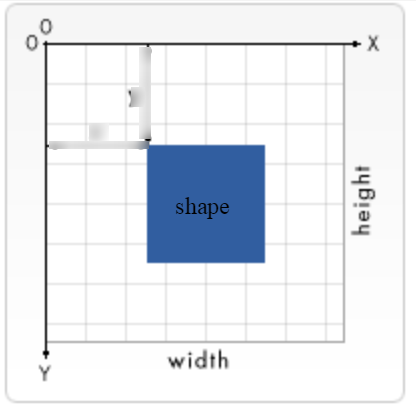
<svg width="widthpx" height="heightpx" viewBox="x1 x2 y1 y2">
注意上图起点是左上角,viewBox则表示了可见的画布区域。
SVG Shapes
SVG 有以下预定义的形状元素:
- Rectangle <rect>
- Circle <circle>
- Ellipse <ellipse>
- Line <line>
- Polyline <polyline>
- Polygon <polygon>
- Path <path>
<svg width="400" height="180">

  <rect x="50" y="20" rx="20" ry="20" width="150" height="150" style="fill:red;stroke:black;stroke-width:5;stroke-opacity:0.5;fill-opacity:0.9">

  Sorry, your browser does not support inline SVG.

</svg>
效果:
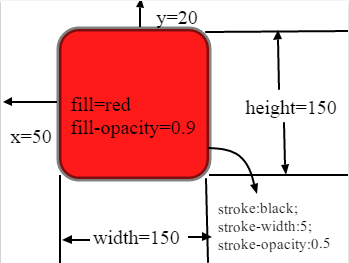
rx和ry表示圆角的轴半径,类似于css 中的 border-radius
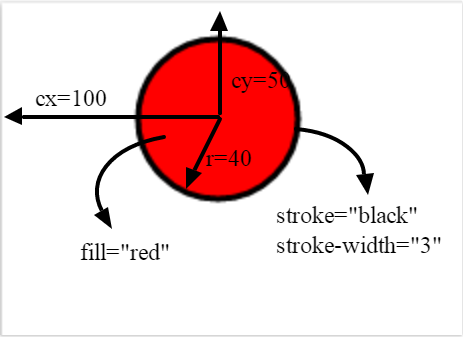
<svg height="100" width="200">

  <circle cx="100" cy="50" r="40" stroke="black" stroke-width="3" fill="red" />

  Sorry, your browser does not support inline SVG.

</svg>
<svg height="140" width="500">

  <ellipse cx="200" cy="80" rx="100" ry="50" style="fill:yellow;stroke:purple;stroke-width:2" />

  Sorry, your browser does not support inline SVG.

</svg>

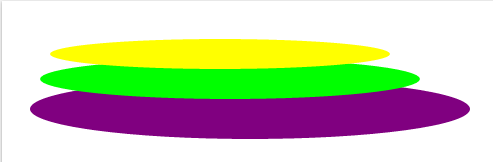
多个椭圆会叠加
<svg height="150" width="500">

  <ellipse cx="240" cy="100" rx="220" ry="30" style="fill:purple" />

  <ellipse cx="220" cy="70" rx="190" ry="20" style="fill:lime" />

  <ellipse cx="210" cy="45" rx="170" ry="15" style="fill:yellow" />

  Sorry, your browser does not support inline SVG.

</svg>
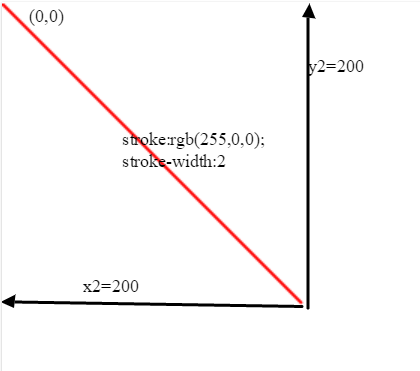
line
<svg height="210" width="500">

  <line x1="0" y1="0" x2="200" y2="200" style="stroke:rgb(255,0,0);stroke-width:2" />

  Sorry, your browser does not support inline SVG.

</svg>
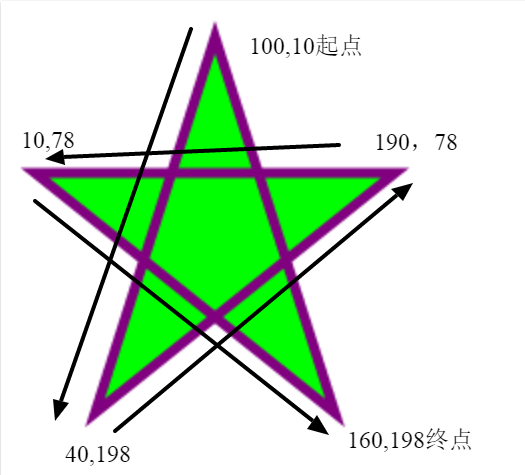
<svg height="210" width="500">

  <polygon points="100,10 40,198 190,78 10,78 160,198" style="fill:lime;stroke:purple;stroke-width:5;fill-rule:nonzero;"/>

  Sorry, your browser does not support inline SVG.

</svg>
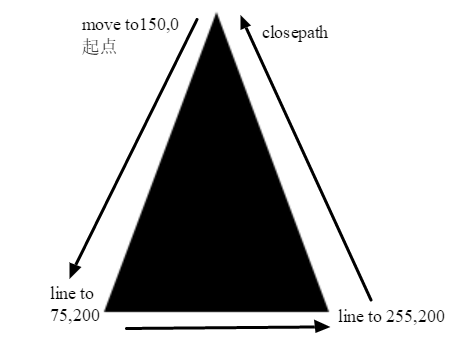
<svg height="210" width="400">

  <path d="M150 0 L75 200 L225 200 Z" />

</svg>
The following commands are available for path data:
- M = moveto
- L = lineto
- H = horizontal lineto
- V = vertical lineto
- C = curveto
- S = smooth curveto
- Q = quadratic Bézier curve
- T = smooth quadratic Bézier curveto
- A = elliptical Arc
- Z = closepath
Note: 上面大写代表绝对位置,小写代表相对位置
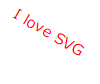
<svg height="60" width="200">

  <text x="0" y="15" fill="red" transform="rotate(30 20,40)">I love SVG</text>

  Sorry, your browser does not support inline SVG.

</svg>
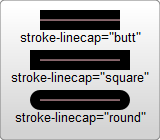
stroke
<?xml version="1.0" standalone="no"?>

<svg width="160" height="140" xmlns="http://www.w3.org/2000/svg" version="1.1">

  <line x1="40" x2="120" y1="20" y2="20" stroke="black" stroke-width="20" stroke-linecap="butt"/>

  <line x1="40" x2="120" y1="60" y2="60" stroke="black" stroke-width="20" stroke-linecap="square"/>

  <line x1="40" x2="120" y1="100" y2="100" stroke="black" stroke-width="20" stroke-linecap="round"/>

</svg>
<?xml version="1.0" standalone="no"?>

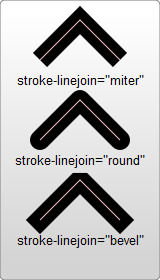
<svg width="160" height="280" xmlns="http://www.w3.org/2000/svg" version="1.1">

  <polyline points="40 60 80 20 120 60" stroke="black" stroke-width="20"

      stroke-linecap="butt" fill="none" stroke-linejoin="miter"/>

  <polyline points="40 140 80 100 120 140" stroke="black" stroke-width="20"

      stroke-linecap="round" fill="none" stroke-linejoin="round"/>

  <polyline points="40 220 80 180 120 220" stroke="black" stroke-width="20"

      stroke-linecap="square" fill="none" stroke-linejoin="bevel"/>

</svg>
<svg width="200" height="150">

  <path d="M 10 75 Q 50 10 100 75 T 190 75" stroke="black"

    stroke-linecap="round" stroke-dasharray="5,15,8" fill="none"/>

  <path d="M 10 75 L 190 75" stroke="red"

    stroke-linecap="round" stroke-width="1" stroke-dasharray="5,5" fill="none"/>

</svg>
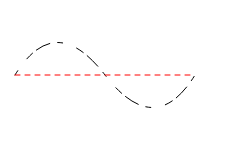
stroke-dasharray="实线段距离,空白线段距离" 如果有多个值,比如5,15,8那么将按照实线,空白这样不断循环。
所以,第一个例子是5实线,15空白,8实线,5空白,15实线,8空白,5实线。。。。。
【概念】SVG(1)的更多相关文章
- HTML5中的SVG
* SVG * 基本内容 * SVG并不属于HTML5专有内容 * HTML5提供有关SVG原生的内容 * 在HTML5出现之前,就有SVG内容 * SVG,简单来说就是矢量图 * SVG文件的扩展名 ...
- SVG 学学就会了。
SVG 随便学学就会了 这两天闲来没事把 Echart 换成 Rechart 感觉世界都清爽了.因为 rechart 使用 svg 来渲染,所以顺带学了下 SVG 感觉很轻松哦. 概念 SVG 是 w ...
- android studio集成融云 SDK 后在部分机型启动对话时崩溃
最初构建项目是 eclipse, 后来切换到 android studio来做开发. 后来多个用户反馈在android4.4机型上存在启动对话崩溃的问题.但是IOS 版工程从来没有重现. 调试报错信息 ...
- H5小内容(四)
SVG 基本内容 SVG并不属于HTML5专有内容 HTML5提供有关SVG原生的内容 在HTML5出现之前,就有SVG内容 SVG,简单来说就是矢量图 ...
- Android Vector曲折的兼容之路
Android Vector曲折的兼容之路 两年前写书的时候,就在研究Android L提出的Vector,可研究下来发现,完全不具备兼容性,相信这也是它没有被广泛使用的一个原因,经过Google的不 ...
- Android Drawable Mipmap Vector使用及Vector兼容
原文地址:http://blog.csdn.net/eclipsexys/article/details/51838119 http://blog.csdn.net/qq_15545283/artic ...
- 【概念】SVG(2)
Style <svg width="200" height="200" xmlns="http://www.w3.org/2000/svg&qu ...
- 关于SVG的viewBox
在SVG中,通过svg标记的 width和height可以规定这段SVG代码所表达的数据在绘制时所占用的空间大小 如下代码svg设置了宽度与高度,rect同样,所以结果自然是全屏 <svg wi ...
- SVG Path高级教程
课程分为四个方面: 1. Path概述 2. 移动和直线命令 3. 弧线命令 4. 贝塞尔曲线命令 Path概述 <path> 标签用来定义路径,Path字符串是由命令及其参数组组成的字符 ...
随机推荐
- HTML5 Canvas实现360度全景图
原文:http://blog.csdn.net/jia20003/article/details/17172571 很多购物网站现在都支持360实物全景图像,可以360度任意选择查看样品,这样 对购买 ...
- 【spring boot】5.spring boot 创建web项目并使用jsp作前台页面
贼烦的是,使用spring boot 创建web项目,然后我再idea下创建的,but 仅仅启动spring boot的启动类,就算整个项目都是好着的,就算是能够进入controller中,也不能成功 ...
- xamarin studio 安装
公司wpf项目移植到mac,用到mono来进行重写,不会,自己开搞 首先一个问题Xamarin怎么读,xaml熟悉吧,xaml读作Zamel,xamarin也就读作Zamerin,恩,就是它了... ...
- asyncTask 的execute和executeOnExecutor 方法
asyncTask.execute Android.os.Build.VERSION_CODES.DONUT, this was changed to a pool of threads allowi ...
- System::String *,char*,string 等的类型转换 [转]
在VC 的编程中,经常会用到各种类型的转换,在MFC中textbox等控件得到的返回类型是System::String *,而写入的文件要求是 const char *类型的,下面介绍一些转换的方法: ...
- Opencv 最小外接矩形合并拼接
前一篇画出了最小外接矩形,但是有时候画出来的矩形由于中间像素干扰或者是其他原因矩形框并不是真正想要的 如图1是一个信号的雨图,被矩形框分割成了多个小框: 需要合并矩形框达到的效果: 主要思想: 扫描两 ...
- myBatis-plus异常提示For input string: "{0=null}"
异常信息 org.mybatis.spring.MyBatisSystemException: nested exception is org.apache.ibatis.exceptions.Per ...
- Java中的BigInteger在ACM中的应用
Java中的BigInteger在ACM中的应用 在ACM中的做题时,常常会遇见一些大数的问题.这是当我们用C或是C++时就会认为比較麻烦.就想有没有现有的现有的能够直接调用的BigInter,那样就 ...
- Git以及github的使用方法(一)安装并设置git用户
最早Git是在Linux上开发的,很长一段时间内,Git也只能在Linux和Unix系统上跑.不过,慢慢地有人把它移植到了Windows上.现在,Git可以在Linux.Unix.Mac和Window ...
- 小白学phoneGap《构建跨平台APP:phoneGap移动应用实战》连载一(PhoneGap中的API)
之前本博连载过<构建跨平台APP:jQuery Mobile移动应用实战>一书.深受移动开发入门人员的喜爱. 从如今開始,连载它的孪生姐妹书phoneGap移动应用实战一书,希望以前是小白 ...