
android闹钟实现原理
闹钟的原理可用下面我自己画的一幅图来概括:(不对的地方,尽管吐槽 )
)
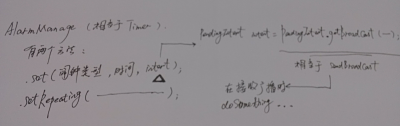
我们来看看新建闹钟到闹钟响铃的步骤:
1、新建一个闹钟:
|
1
2
3
4
5
6
7
8
9
10
11
12
13
14
15
16
17
18
19
20
21
22
23
24
|
// 获得AlarmManager实例
final AlarmManager am = (AlarmManager) getSystemService(ALARM_SERVICE);
// 实例化Intent
Intent intent = new Intent();
// 设置Intent action属性
intent.setAction("com.test.BC_ACTION");
intent.putExtra("msg", "该去开会啦!");
// 实例化PendingIntent
final PendingIntent pi = PendingIntent.getBroadcast(MainActivity.this, 0,
intent, 0);
// 获得系统时间
final long time = System.currentTimeMillis();
am.set(AlarmManager.RTC_WAKEUP, time+5000, sender);//5秒后闹铃
// 设置按钮单击事件
setBtn.setOnClickListener(new OnClickListener() {
@Override
public void onClick(View v) {
// 重复提示,从当前时间开始,间隔5秒
am.setRepeating(AlarmManager.RTC_WAKEUP, time,
5 * 1000, pi);
}
});
|
在AndroidMainfest.xml里注册广播接收器
|
1
2
3
4
5
|
<receiverandroid:name="MyReceiver">
<intent-filter>
<actionandroid:name="com.test.BC_ACTION"/>
</intent-filter>
</receiver>
|
2、定义一个AlarmReceiver extends BroadcastReceiver接收广播,并弹出闹钟提醒视图。
上面用到一个AlarmManage,我们分别来看看它的处理闹钟流程和作用及例子。
处理闹钟流程:对应AlarmManage有一个AlarmManagerServie服务程序,该服务程序才是正真提供闹铃服务的,它主要遍历闹铃列表并设置即将触发的闹铃给闹铃设备,并且一直监听闹铃设备,一旦有闹铃触发或者是闹铃事件发生,AlarmManagerServie服务程序就会遍历闹铃列表找到相应的注册闹铃并发出广播。
作用及例子:AlarmManage中文名闹钟,或者叫做“全局定时器”更合适,它的作用和Timer类似,有两种使用方法:1、在特定时长后(特定时间)执行某任务;2、周期性的执行某任务,AlarmManager对象配合Intent使用,可以定时的开启一个Activity,发送一个BroadCast,或者开启一个Service.
(1)在指定时长后(特定时间)执行某项操作
|
1
2
3
4
5
6
7
8
9
10
11
12
13
14
15
16
17
|
//操作:发送一个广播,广播接收后Toast提示定时操作完成
Intent intent =newIntent(Main.this, alarmreceiver.class);
intent.setAction("short");
PendingIntent sender=
PendingIntent.getBroadcast(Main.this,0, intent,0);
//设定一个五秒后的时间
Calendar calendar=Calendar.getInstance();
calendar.setTimeInMillis(System.currentTimeMillis());
calendar.add(Calendar.SECOND,5);
AlarmManager alarm=(AlarmManager)getSystemService(ALARM_SERVICE);
alarm.set(AlarmManager.RTC_WAKEUP, calendar.getTimeInMillis(), sender);
//或者以下面方式简化
//alarm.set(AlarmManager.RTC_WAKEUP, System.currentTimeMillis()+5*1000, sender);
Toast.makeText(Main.this,"五秒后alarm开启", Toast.LENGTH_LONG).show();
|
(2)周期性的执行某项操作
|
1
2
3
4
5
6
7
8
9
10
11
12
|
Intent intent =new Intent(Main.this, alarmreceiver.class);
intent.setAction("repeating");
PendingIntent sender=PendingIntent
.getBroadcast(Main.this, 0, intent, 0);
//开始时间
long firstime=SystemClock.elapsedRealtime();
AlarmManager am=(AlarmManager)getSystemService(ALARM_SERVICE);
//5秒一个周期,不停的发送广播
am.setRepeating(AlarmManager.ELAPSED_REALTIME_WAKEUP
, firstime, 5*1000, sender);
|
AlarmManager的取消:(其中需要注意的是取消的Intent必须与启动Intent保持绝对一致才能支持取消AlarmManager)
|
1
2
3
4
5
6
|
Intent intent =newIntent(Main.this, alarmreceiver.class);
intent.setAction("repeating");
PendingIntent sender=PendingIntent
.getBroadcast(Main.this,0, intent,0);
AlarmManager alarm=(AlarmManager)getSystemService(ALARM_SERVICE);
alarm.cancel(sender);
|
AlarmManager还将闹钟分为五种类型:
|
1
|
public staticfinalintELAPSED_REALTIME
|
//当系统进入睡眠状态时,这种类型的闹铃不会唤醒系统。直到系统下次被唤醒才传递它,该闹铃所用的时间是相对时间,是从系统启动后开始计时的,包括睡眠
时间,可以通过调用SystemClock.elapsedRealtime()获得。系统值是3 (0x00000003)。
|
1
|
publicstaticfinalintELAPSED_REALTIME_WAKEUP
|
//能唤醒系统,用法同ELAPSED_REALTIME,系统值是2 (0x00000002) 。
|
1
|
public static final int RTC
|
//当系统进入睡眠状态时,这种类型的闹铃不会唤醒系统。直到系统下次被唤醒才传递它,该闹铃所用的时间是绝对时间,所用时间是UTC时间,可以通过调用
System.currentTimeMillis()获得。系统值是1 (0x00000001) 。
|
1
|
publicstaticfinalintRTC_WAKEUP
|
//能唤醒系统,用法同RTC类型,系统值为 0 (0x00000000) 。
|
1
|
PublicstaticfinalintPOWER_OFF_WAKEUP
|
//能唤醒系统,它是一种关机闹铃,就是说设备在关机状态下也可以唤醒系统,所以我们把它称之为关机闹铃。使用方法同RTC类型,系统值为4 (0x00000004)。
综上所述,感觉AlarmManage和NotificationManager差不多,NotificationManager例子请见文章http://my.oschina.net/helu/blog/141728
android闹钟实现原理的更多相关文章
- Android闹钟 AlarmManager的使用
Android闹钟 AlarmManager的使用 AlarmManager介绍 AlarmManager这个类提供对系统闹钟服务的访问接口. 你可以为你的应用设定一个在未来某个时间唤醒的功能. 当闹 ...
- Android闹钟设置的解决方案
Android设置闹钟并不像IOS那样这么简单,做过Android设置闹钟的开发者都知道里面的坑有多深.下面记录一下,我解决Android闹钟设置的解决方案. 主要问题 API19开始AlarmMan ...
- Android Touch事件原理加实例分析
Android中有各种各样的事件,以响应用户的操作.这些事件可以分为按键事件和触屏事件.而Touch事件是触屏事件的基础事件,在进行Android开发时经常会用到,所以非常有必要深入理解它的原理机制. ...
- android handler工作原理
android handler工作原理 作用 便于在子线程中更新主UI线程中的控件 这里涉及到了UI主线程和子线程 UI主线程 它很特别.通常我们会认为UI主线程将页面绘制完成,就结束了.但是它没有. ...
- android MultiDex multidex原理原理下遇见的N个深坑(二)
android MultiDex 原理下遇见的N个深坑(二) 这是在一个论坛看到的问题,其实你不知道MultiDex到底有多坑. 不了解的可以先看上篇文章:android MultiDex multi ...
- android MultiDex multiDex原理(一)
android MultiDex 原理(一) Android分包MultiDex原理详解 转载请注明:http://blog.csdn.net/djy1992/article/details/5116 ...
- 解析 Android Things 技术原理
2012 年 6 月,由 IoT-GSI(Global Standards Initiative on Internet of Things)发布的白皮书“ITU-T Y.4000/Y.2060”[1 ...
- android 闹钟提醒并且在锁屏下弹出Dialog对话框并播放铃声和震动
android 闹钟提醒并且在锁屏下弹出Dialog对话框并播放铃声和震动 1.先简单设置一个闹钟提醒事件: //设置闹钟 mSetting.setOnClickListener ...
- Android闹钟开发与展示Demo
前言: 看过了不少安卓闹钟开发的例子,都是点到为止,都不完整,这次整一个看看. 一.闹钟的设置不需要数据库,但是展示闹钟列表的时候需要,所以需要数据库: public class MySQLiteOp ...
随机推荐
- MyEclipse下怎么配置Maven
这个很简单. 前期博客,请移步: Eclipse下Maven新建项目.自动打依赖jar包(包含普通项目和Web项目) 截图示范:
- SQL 锁 lock
http://www.cnblogs.com/huangxincheng/p/4292320.html 关于sql 中的锁. 1 排他锁 sql中在做 insert update delete 会存在 ...
- idea python notebook连接pyspark
1.启动pyspark 2.查看pyspark服务的token jupyter notebook list 查看正在运行的notebook服务以及他们的token 3.在idea里运行noteboo ...
- Active Data Guard
ADG INTRODUCE Active Data Guard(ADG)是ORACLE 11g企业版的新特性,需要单独的License.可以打开Physical standby至read only模式 ...
- Ubuntu 16.04下的LAMP环境配置
在学习开发过程中,每当遇到新的问题时,通常都能在网上搜到解决的方法,但是网上的方法千千万,有些是已经过时了的,有些是跟自己开发环境不同的,总是不能第一时间能找到答案. 而当时遇到的问题可能在今后的开发 ...
- 用node.js从零开始去写一个简单的爬虫
如果你不会Python语言,正好又是一个node.js小白,看完这篇文章之后,一定会觉得受益匪浅,感受到自己又新get到了一门技能,如何用node.js从零开始去写一个简单的爬虫,十分钟时间就能搞定, ...
- FormatMessage函数的使用方法
使用FormatMessage时假设对一些參数不细致研究.那么就会出错误.首先说下这个函数 1 函数描写叙述 DWORD WINAPI FormatMessage( _In_ DWORD dwFlag ...
- EasyUI——DataGrid中嵌入Radio
前一篇博客写到项目中的广告位管理,当时没有写到今天的问题,这个问题当时也是困扰我好久. 经过自己的努力和同志们的帮助,最后最终解决. 实现要求把全部的广告位后面的单选button设成一组,目的是一个广 ...
- Android Support 包里到底有什么
大家假设喜欢我的博客,请关注一下我的微博,请点击这里(http://weibo.com/kifile),谢谢 转载请标明出处(http://blog.csdn.net/kifile),再次感谢 随着 ...
- javascript创建对象的方法--动态原型模式
javascript创建对象的方法--动态原型模式 一.总结 1.作用:解决组合模式的属性和函数分离问题 2.思路:基本思路和组合模式相同:共用的函数和属性用原型方式,非共用的的函数和属性用构造函数 ...