
winfrom窗体加载控制台程序,可以自定义输出语句颜色
winfrom窗体加载控制台程序,可以自定方输出语句颜色,如下图所示
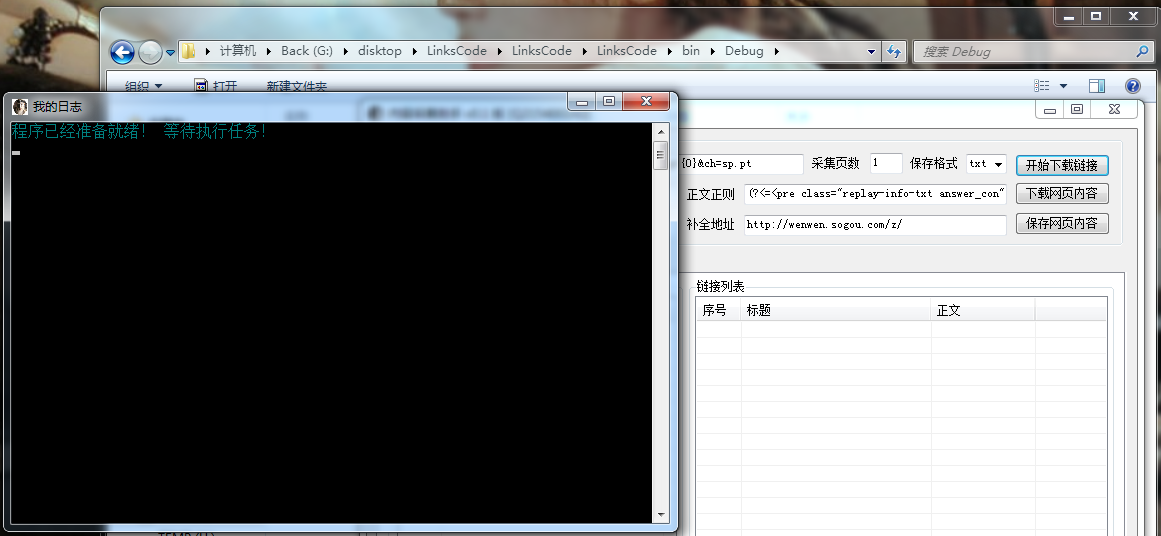
怎么实现的此功能,网上有大把的方法,我这里已经把方法打包成了一个类,只需要引用调用就可以使用了,写的比较粗糙,如有发现需要改进的地方欢迎提出!
至于使用方法很简单,把这个类复制到解决方案中,在引用 LLog , 另外在 程序初始化下面加上 XLog.AllocConsole(); 就可以在想使用的地方调用方法 XLog.Logx() 使用了,
如图所示:
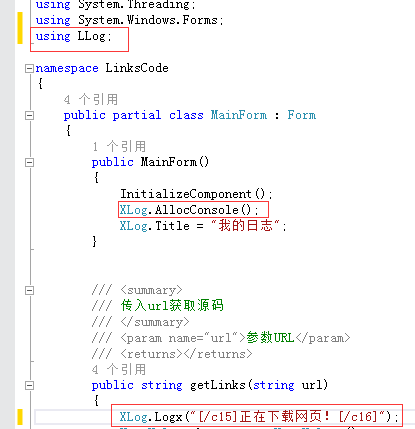
注意:图片中显示 [/c15] xxxxxx[/c16] 必须成对出现才不会出现输出颜色覆盖下一行内容, 此方法效率略低,水平有限还没想出高效方法,如想某行只输出某种颜色必须在语句后面加上 [/c16] 结尾 如:[/c1] 我是内容 [/c16]
 using System;
 using System.Collections.Generic;
 using System.Linq;
 using System.Runtime.InteropServices;
 using System.Text;

 namespace LLog
 {
     /// <summary>
     /// 与控制台交互
     /// </summary>
     static class XLog
     {

         [DllImport("kernel32.dll")]
         public static extern bool AllocConsole();
         [DllImport("kernel32.dll")]
         public static extern bool FreeConsole();

         /// <summary>
         /// 修改控制台标题
         /// </summary>
         public static string Title
         {
             get
             {
                 string result;
                 try
                 {
                     result = Console.Title;
                 }
                 catch
                 {
                     result = "";
                 }
                 return result;
             }
             set
             {
                 Console.Title = value;
             }
         }

         /// <summary>
         /// 调用输出日志方法从c1-c15 共15种颜色
         /// </summary>
         /// <param name="code">[c1]蓝色 [c2]青色(蓝绿色) [c3]藏蓝色 [c4]深紫色(深蓝绿色) [c5]深灰色 [c6]深绿色 [c7]深紫红色 [c8]深红色 [c9]深黄色 [c10]灰色 [c11]绿色 [c12]紫红色 [c13]红色 [c14]白色 [c15]黄色 [c16]默认灰色</param>
         public static void Logx_Console(string code)
         {
             //①②③④⑤⑥⑦⑧⑨⑩⑾⑿⒀⒁⒂
             string str = code;
             string output = str.Replace("[/c1]", "①").Replace("[/c2]", "②").Replace("[/c3]", "③").Replace("[/c4]", "④").Replace("[/c5]", "⑤").Replace("[/c6]", "⑥").Replace("[/c7]", "⑦").Replace("[/c8]", "⑧").Replace("[/c9]", "⑨").Replace("[/c10]", "⑩").Replace("[/c11]", "⑾").Replace("[/c12]", "⑿").Replace("[/c13]", "⒀").Replace("[/c14]", "⒁").Replace("[/c15]", "⒂").Replace("[/c16]","⒃");
             string display = "";
             foreach (char c in output)
             {
                 if (c == '①')
                 {
                     Console.ForegroundColor = ConsoleColor.Blue;
                 }

                 if (c == '②')
                 {
                     Console.ForegroundColor = ConsoleColor.Cyan;
                 }

                 if (c == '③')
                 {
                     Console.ForegroundColor = ConsoleColor.DarkBlue;
                 }
                 if (c == '④')
                 {
                     Console.ForegroundColor = ConsoleColor.DarkCyan;
                 }

                 if (c == '⑤')
                 {
                     Console.ForegroundColor = ConsoleColor.DarkGray;
                 }

                 if (c == '⑥')
                 {
                     Console.ForegroundColor = ConsoleColor.DarkGreen;
                 }

                 if (c == '⑦')
                 {
                     Console.ForegroundColor = ConsoleColor.DarkMagenta;
                 }

                 if (c == '⑧')
                 {
                     Console.ForegroundColor = ConsoleColor.DarkRed;
                 }

                 if (c == '⑨')
                 {
                     Console.ForegroundColor = ConsoleColor.DarkYellow;
                 }

                 if (c == '⑩')
                 {
                     Console.ForegroundColor = ConsoleColor.Gray;
                 }

                 if (c == '⑾')
                 {
                     Console.ForegroundColor = ConsoleColor.Green;
                 }

                 if (c == '⑿')
                 {
                     Console.ForegroundColor = ConsoleColor.Magenta;
                 }

                 if (c == '⒀')
                 {
                     Console.ForegroundColor = ConsoleColor.Red;
                 }

                 if (c == '⒁')
                 {
                     Console.ForegroundColor = ConsoleColor.White;
                 }

                 if (c == '⒂')
                 {
                     Console.ForegroundColor = ConsoleColor.Yellow;
                 }

                 if (c == '⒃')
                 {
                     Console.ForegroundColor = ConsoleColor.Gray;
                 }

                 display = c.ToString();
                 display = display.Replace("①", "").Replace("②", "").Replace("③", "").Replace("④", "").Replace("⑤", "").Replace("⑥", "").Replace("⑦", "").Replace("⑧", "").Replace("⑨", "").Replace("⑩", "").Replace("⑾", "").Replace("⑿", "").Replace("⒀", "").Replace("⒁", "").Replace("⒂", "").Replace("⒃", "");
                 Console.Write(display);
             }
         }

         /// <summary>
         /// 传入字符跟指定的颜色标签
         /// </summary>
         /// <param name="str">[c1]蓝色 [c2]青色(蓝绿色) [c3]藏蓝色 [c4]深紫色(深蓝绿色) [c5]深灰色 [c6]深绿色 [c7]深紫红色 [c8]深红色 [c9]深黄色 [c10]灰色 [c11]绿色 [c12]紫红色 [c13]红色 [c14]白色 [c15]黄色 [c16]默认灰色</param>
         public static void Logx(string str)
         {
             XLog.Logx_Console(str + "\r\n");
         }
     }
 }
winfrom窗体加载控制台程序,可以自定义输出语句颜色的更多相关文章
- jQuery自动加载更多程序
1.1.1 摘要 现在,我们经常使用的微博.微信或其他应用都有异步加载功能,简而言之,就是我们在刷微博或微信时,移动到界面的顶端或低端后程序通过异步的方式进行加载数据,这种方式加快了数据的加载速度,由 ...
- jQuery自动加载更多程序(转)
jQuery自动加载更多程序 1.1.1 摘要 现在,我们经常使用的微博.微信或其他应用都有异步加载功能,简而言之,就是我们在刷微博或微信时,移动到界面的顶端或低端后程序通过异步的方式进行加载数据 ...
- 用UBOOT自带loadb命令加载应用程序到SDRAM中运行的方法
S3C44B0开发板中,用UBOOT自带loadb命令加载应用程序到SDRAM中运行的方法 1.开发板说明: 开发板上已有移植好的UBOOT运行. 2.交叉编译工具链为arm-linu-g ...
- 用window的onload事件,窗体加载完毕的时候
<script type="text/javascript"> //用window的onload事件,窗体加载完毕的时候 window.onload=function( ...
- chrome 安装setupvpn 解决chorme未能成功加载扩展程序的问题
一: vpn文件 https://pan.baidu.com/s/1wZV2HAC3GHlh1bjlvbilRg 提取码: gz72; 二 : 安装步骤 ------请看完以下步骤,不要直接拖 ...
- C#窗体加载和控件加载不同步导致控件闪烁
窗体加载和控件加载不同步导致的控件闪烁现象:// 代码块加在父窗体中的任意位置,解决窗体加载和控件加载不同步导致的控件闪烁问题 protected override CreatePara ...
- spring-boot 如何加载rsources下面的自定义配置文件
spring-boot 如何加载resources下面的自定义配置文件 https://segmentfault.com/q/1010000006828771?_ea=1144561
- DevExpress窗体加载等待
using DevExpress.XtraEditors; using DevExpress.XtraSplashScreen; using System; using System.Collecti ...
- C#Winfrom中,窗体加载时会自动执行一次控件的textchange事件,怎么让它不执行?
http://zhidao.baidu.com/link?url=iTSyfa5_RJBSb37S8efdWoL5eDMrnxeAm-prhGSNBXqdP9r7PzNDQTc7gVzJgCNdzli ...
随机推荐
- Oracle_Sequence如何初始化开始值
Sequence的start with 值如何确定才能保证生成的主键不会冲突??? 我的项目中最开始数据库表主键的生成策略是 increment,但由于后来采用了集群部署的方式,出现了主键冲突的问题. ...
- 比较JqGrid与XtraGrid
此只能比较两者的功能优劣,实现某种功能.效果的方便性和效率.首先分别粗略介绍XtraGrid和jqGrid DevExpress是目前.net下最为强大和完整的UI控件库, XtraGrid是这个控件 ...
- 最详细的cookie和浏览隐私之间的关系
本文所说的"cookie",指的是浏览器相关的 cookie(也叫"HTTP cookie"). 浏览器 cookie 的主要功能是:帮助网站保存一些小片段的信 ...
- 线段树初步__ZERO__.
线段树,顾名思义,就是指一个个线段组成的树. 线段树的定义就是: 线段树是一种二叉搜索树,与区间树相似,它将一个区间划分成一些单元区间,每个单元区间对应线段树中的一个叶结点.使用线段树可以快速的查找某 ...
- 【京东账户】——Mysql/PHP/Ajax爬坑之产品列表显示
一.引言 实现京东的账户项目,功能模块之一,产品列表显示.要用到的是Apach环境,Mysql.PHP以及Ajax. 二.依据功能创建库.表.记录 创建库:jd 创建表:产品表 添加多条记录 /**产 ...
- touch.js——常见应用操作
touch.js--常见应用操作 基本事件: touchstart //手指刚接触屏幕时触发 touchmove //手指在屏幕上移动时触发 touchend //手指从屏幕上移开时 ...
- web应用中的异常处理
楼主前几天写了一篇“Java子线程中的异常处理(通用)”文章,介绍了在多线程环境下3种通用的异常处理方法. 但是平时大家的工作一般是基于开发框架进行的(比如Spring MVC,或Spring Boo ...
- hdu3974 找上属的模拟
There is a company that has N employees(numbered from 1 to N),every employee in the company has a im ...
- uva11538
解题思路: 1. 计数问题, 有三种相对摆放方式: 水平, 竖直, 对角线. 根据加法原理即可, 并且没有交集. 水平和竖直是一样的, 只要n*m矩形旋转90度. 所以结果是: n*m*(m-1)+n ...
- 决策树模型组合之随机森林与GBDT
版权声明: 本文由LeftNotEasy发布于http://leftnoteasy.cnblogs.com, 本文可以被全部的转载或者部分使用,但请注明出处,如果有问题,请联系wheeleast@gm ...