
html5 storage事件
HTML5 虽然很多年了,但是真的了解不不够不够。主题说的是 storage时间,说起对 storage 事件的了解还是从 QQ音乐 说起。
QQ音乐的主页是 https://y.qq.com , 而实际播放的页面是 https://y.qq.com/portal/player.html。你在其他里面点击播放或者添加的时候,你会发现 https://y.qq.com/portal/player.html 会实时的变化。当前我想,这个神奇啊,
当前想法是如下,可是怎么想都比较low啊。
1. 存入 localStorage 或者 indexedDB里面,然后定期读取呢?
2. socket开启呢?
3. 中间服务中转呢?
曾有同事偶然间提到到storage事件,当时也上心。前两天无意中看到一篇 h5 storage事件监听 的文章。
顺便再去探究一下 QQ音乐。

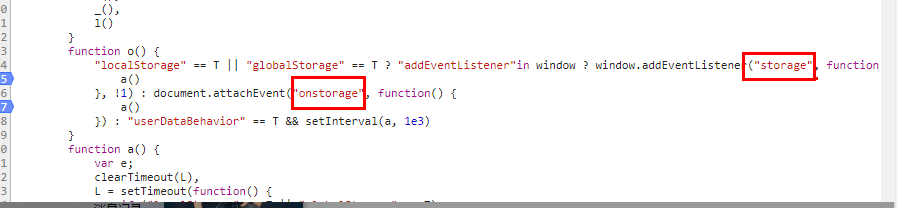
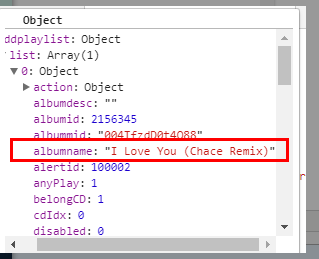
点击播放歌曲的时候,在player.html页面即播放页面捕获的数据。这就完全验证了 QQ音乐这个添加音乐的实现就是基于 storage事件来完成的。
那么我们先来看一下, storage event的定义 The storage event。 简单就是说 session storage 和 local storage 的值变化的时候,会触发该事件。
The storage event is fired on a Document's Window object when a storage area changes, as described in the previous two sections (for session storage, for local storage).
When a user agent is to send a storage notification for a Document, the user agent must queue a task to fire an event named storage at the Document object's Windowobject, using StorageEvent.
怎么使用呢:
A页面
window.addEventListener("storage", function (e) {

        console.log(e)

    });
B 页面
localStorage.setItem('key1', 'vakue1')
B页面执行这段代码的时候, A页面就会打出e整个对象。
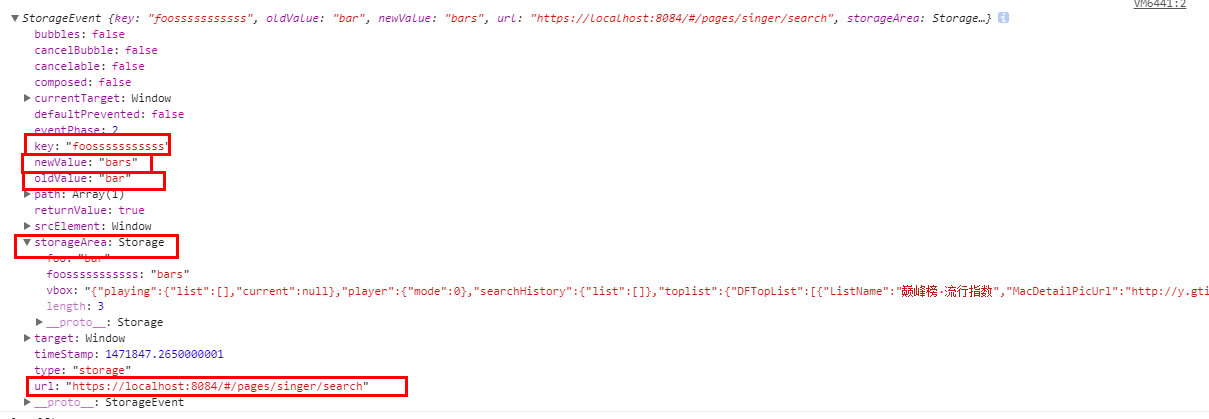
我们看一下e究竟有哪些属性或者方法,注意标红的五个属性,其实的都是普通事件都有的属性,
key: 不用解释,更新的属性名
newValue: 新值
oldValue : 旧值
storageArea: 我这里理解就是localStorage的值
url: 触发该事件的网址
这里有两点:
1. 当localStorage调用 setItem, removeItem ,clear方法的时候,调用的页面本身是不会触发storage事件的。
2. 如果想调用页面也能监听localStorage的变化,可以像如下,当然removeItem ,clear方法也得重写。显得有点麻烦
   var _setItem = localStorage.setItem;

    localStorage.setItem = function(key,newValue){

        var setItemEvent = new Event("setItemEvent");

        setItemEvent.newValue = newValue;

        window.dispatchEvent(setItemEvent);

        _setItem .apply(this,arguments);

    }

    window.addEventListener("setItemEvent", function (e) {

        console.log(e)

    });

    localStorage.setItem("key1","value1");
当然,我自己也用过另外一种方式
   var ls = new Proxy(localStorage, {

            get: function (target, key, receiver) {

                var val = Reflect.get(target, key, receiver)

                return typeof val === 'function' ? val.bind(localStorage) : val

            },

            set: function (target, key, value, receiver) {

                var evt = document.createEvent('StorageEvent');

                evt.initStorageEvent('storage', false, false, key, window.localStorage.getItem(key), value, window.location.href, window.localStorage);

                window.dispatchEvent(evt);

                return Reflect.set(target, key, value , receiver)

            },

            deleteProperty: function (target, key) {

                var evt = document.createEvent('StorageEvent');

                evt.initStorageEvent('storage', false, false, key, window.localStorage.getItem(key), null, window.location.href, window.localStorage);

                window.dispatchEvent(evt)

                Reflect.deleteProperty(target, key)

            }

        })

        window.addEventListener('storage', function (e) {

            console.log(e)

        })

        ls.a = 2

        delete ls.a
已知的一些问题:
- Storing large amounts of data in Safari (on OSX & iOS) can result in freezing the browser see bug
- IE10 in Windows 8 has an issue where localStorage can fail with the error message "SCRIPT5: Access is denied" if "integrity" settings are not set correctly. see details
- Internet Explorer does not support storing most of the ASCII characters with codes under x20.
- The "storage" event is completely wrong in IE:
IE10 : The storage event is fired even on the originating document where it occurred. Causes problems with multiple windows websites, and huge problems with iframes.
IE11 : The storage event's oldValue and newValue are identical (newValue is supposed to contain the storage's updated value).Partial workaround: regularly probe the storage's value and compare with the last known value on all pages where you want to listen to this event, and track the last submitted value to determine if the modification was triggered locally.
- In IE attempting to access localStorage on HTML files served from the file system results in the localStorage object being
undefined - In iOS 5 & 6 localStorage data is stored in a location that may occasionally be cleared out by the OS.
- In private browsing mode, Safari and iOS Safari up to including version 10.x as well as the Android browser (not include Chrome for Android) do not support setting sessionStorage or localStorage.
- IE 8 and 9 store data based only on hostname, ignoring the scheme (http vs https) and port number as required by the specification.
参考:
html5 storage事件的更多相关文章
- HTML5 storage事件监听
引用<h5移动web开发指南>上的话: “当同源页面的某个页面修改了localStorage,其余的同源页面只要注册了storage事件,就会触发” 所以,localStorage st ...
- sessionStorage html5客户端本地存储之sessionStorage及storage事件
可以看一下<JavaScript本地存储实践(html5的localStorage和ie的userData)>sessionStorage和上文中提到的localStorage非常相识,方 ...
- html5客户端本地存储之sessionStorage及storage事件
首先您可以看一下<JavaScript本地存储实践(html5的localStorage和ie的userData)>sessionStorage和上文中提到的localStorage非常相 ...
- Web Storage事件无法触发
不管是在同源其他页面还是在本页面都不能触发storage事件. <!DOCTYPE html> <html> <head> <meta charset=&qu ...
- localStorage、sessionStorage详解,以及storage事件使用
有关localStorage和sessionStorage的特性. localStorage本身带有方法有 添加键值对:localStorage.setItem(key,value),如果key存在时 ...
- localStore的storage事件
两个浏览器窗口间通信 两个浏览器窗口间通信 补充一下,这里的通讯指遵守同源策略情况下. 为了吸引读者的兴趣,先把demo放到前面:下面有几个我自己写的演示多页面通讯的demo, 为了正常运行,请用 ...
- 一篇文章图文并茂地带你轻松学会 HTML5 storage
html5 storage api localStorage 和 sessionStorage 是 html5 新增的用来存储数据的对象,他们让我们可以以键值对的形式存储信息. 为什么要有 stora ...
- html5 touch事件实现触屏页面上下滑动(二)
五一小长假哪都没去,睡了三天,今天晕晕沉沉的投入工作了,但还是做出了一点点效果 上周用html5的touch事件把简单的滑动做出来了,实现了持续页面上下滑动的效果,参考之前 的文章及代码html5 t ...
- HTML5 Storage API
原文:HTML5 Storage API Web Storage是HTML5引入的一个非常重要的功能,可以在客户端本地存储数据,类似HTML4的cookie,但可实现功能要比cookie强大的多. 在 ...
随机推荐
- salesforce零基础学习(八十四)配置篇: 自定义你的home page layout
当我们进入salesforce系统或者切换app后,默认第一个看到的就是home页面.home页面简单的来说可以包括左侧(narrow component)和右侧(wide component)两部分 ...
- Unity3D中通过Animator动画状态机获取任意animation clip的准确播放持续时长
Unity3d 4及之前的版本中动画的播放用的animation,可直接获取其播放持续长度.但5.x及以后的版本中都是用animator来播放动画了. https://docs.unity3d.com ...
- SpringBoard 无法启动应用程序(错误:-3)
临时不知道错误的细节原因,重新启动模拟器就好了. 先记录下.
- Java后台实现方法
Java后台实现方法 首先后台结构分为四个部分(以表schedule为例) entity>mapper>service>controller 1. 在entity里面写好实体,新建目 ...
- inline-block并列排序时候的影响
当两个设置了inline-block属性的元素并列排放时,它们的位置能够互相影响. 元素结构: <div class="container"> <div clas ...
- effective java学习笔记之不可实例化的类
在没有显式声明一个类的构造方法时,编译器会生成默认的无参构造方法,在设计工具类时,我们通常将方法设置成静态方法,以类名.方法名的形式调用,此时这个类就没有必要创建实例,我们知道抽象类不可以被实例化,但 ...
- MyBatis:lazy loading
懒加载的原理 mybatis 会循环处理结果集中返回的每行数据的,在处理之前首先会通过反射调用构造方法来创建 result 对象,结果集中的一行数据最终会映射为一个 result 对象(严格的来说是不 ...
- Swift 3.0在集合类数据结构上的一些新变化
一.Array数组的更改 array数组中修改的API示例如下: //创建大量相同元素的数组//创建有10个String类型元素的数组,并且每个元素都为字符串"Hello"//sw ...
- Protocol Buffer 时间类型定义
ProtoBuf3中新增了TimeStamp类型,使用示例如下: syntax = "proto3"; import public "google/protobuf/ti ...
- 【java设计模式】【创建模式Creational Pattern】工厂方法模式Factory Method Pattern(多态性工厂模式Polymorphic Factory Pattern、虚拟构造子模式Virtual Constructor Pattern)
public class Test { public static void main(String[] args){ Creator ca=new ConcreteCreatorA(); ca.cr ...