
Error starting daemon: error initializing graphdriver: devmapper: Device docker-thinpool is not a thin pool
Error starting daemon: error initializing graphdriver: devmapper: Device docker-thinpool is not a thin pool
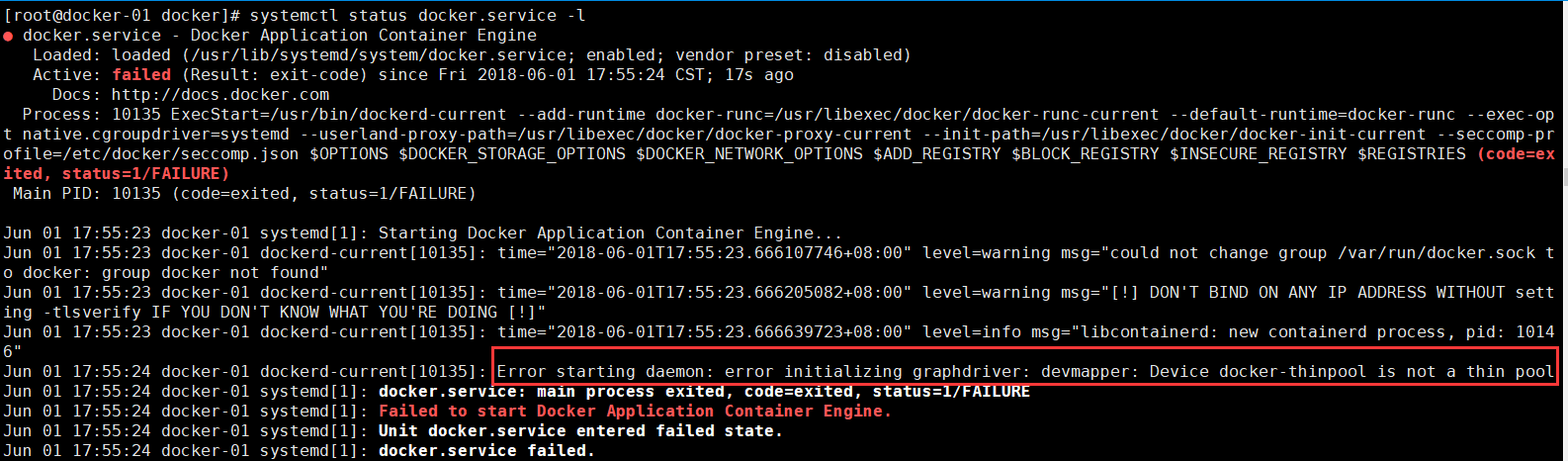
解决办法:
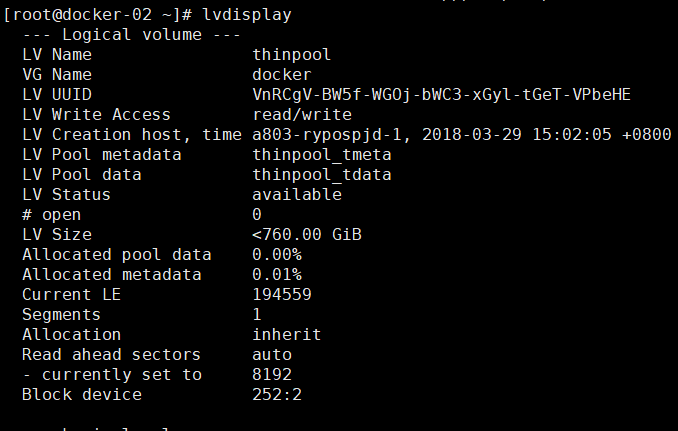
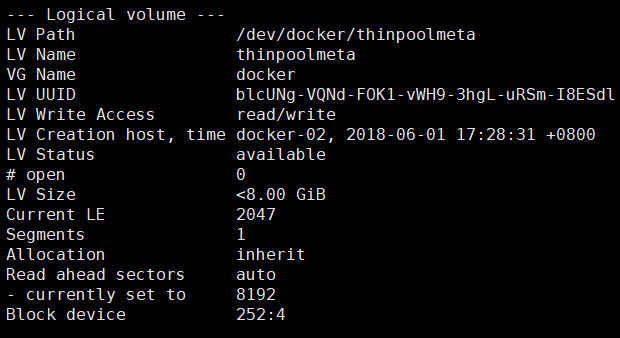
删除以上逻辑卷:
lvremove /dev/docker/thinpool
lvremove /dev/docker/thinpoolmeta

查看机器挂载明细
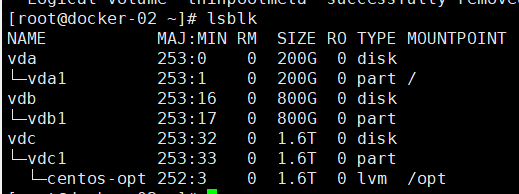
lvdisplay

docker info

lsblk

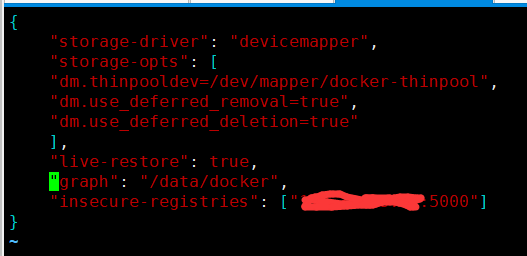
pvcreate /dev/vdb1

vgcreate docker /dev/vdb1

vgdisplay docker

lvcreate --wipesignatures y -n thinpool docker -l 95%VG

lvcreate --wipesignatures y -n thinpoolmeta docker -l 1%VG

lvconvert -y --zero n -c 512K --thinpool docker/thinpool --poolmetadata docker/thinpoolmeta

vi /etc/lvm/profile/docker-thinpool.profile

lvs -o+seg_monitor

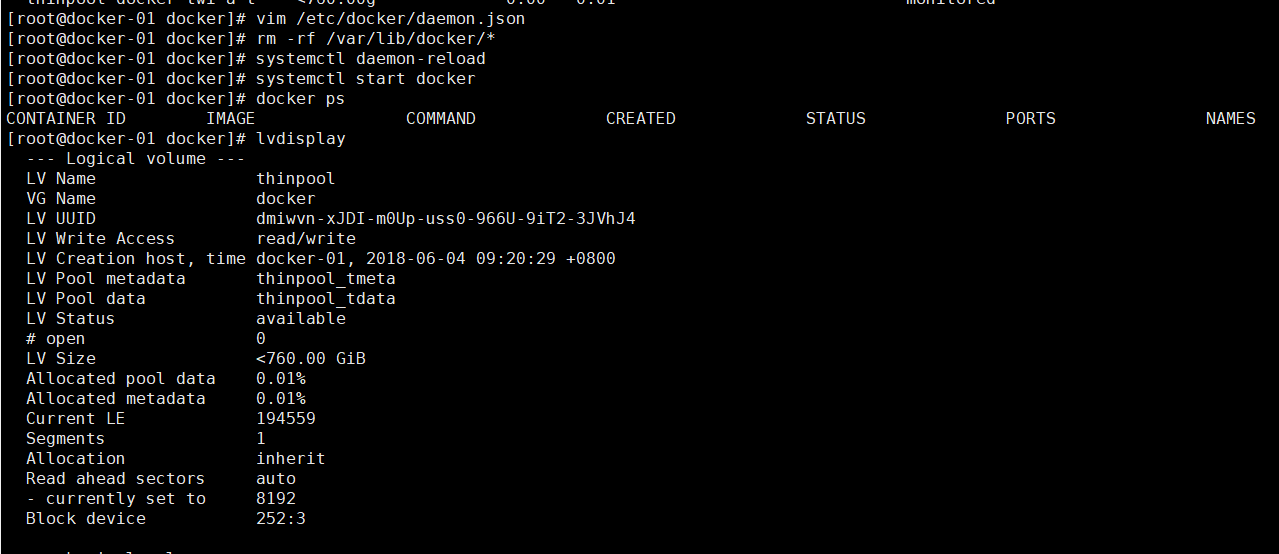
vim /etc/docker/daemon.json

rm -rf /var/lib/docker/*

systemctl daemon-reload

systemctl start docker

docker ps
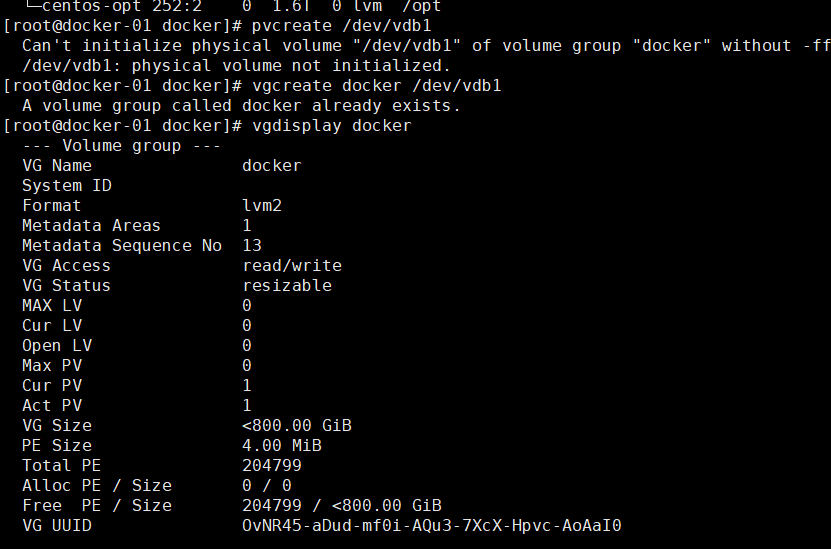

vi /etc/lvm/profile/docker-thinpool.profile
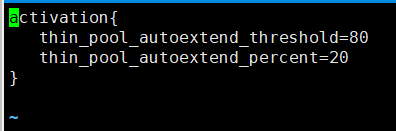
vim /etc/docker/daemon.json
Error starting daemon: error initializing graphdriver: devmapper: Device docker-thinpool is not a thin pool的更多相关文章
- 解决 docker 报错: Error starting daemon: error initializing graphdriver: backing file system is unsupported for this graph driver
CentOS 7.5 x64下 sudo yum install docker -y systemctl enable docker systemctl start docker 发现启动失败 jou ...
- Error starting daemon: error initializing graphdriver: driver not supported
Error starting daemon: error initializing graphdriver: driver not supported systemctl stop docker rm ...
- Docker 启动遇到 Error starting daemon: Error initializing network controller 错误
docker 版本 1.10.3 一台装有 docker 的机器重启后,没法启动,/var/log/messages 展示如下错误信息: May 17 11:11:14 gziba-hc03 syst ...
- Error response from daemon ... no space left on device docker启动容器服务报错
docker 启动容器服务的时候,报错no space left on device 1. 检查磁盘是否用光 3.检查inode是否耗光,从截图看到是inode耗光导致出现问题: 进入到/run里面看 ...
- devmapper: Thin Pool has 162394 free data blocks which is less than minimum required 163840 free data blocks. Create more free space in thin pool or use dm.min_free_space option to change behavior
问题: 制作镜像的时候报错 devmapper: Thin Pool has 162394 free data blocks which is less than minimum required 1 ...
- 转 MySQL: Starting MySQL….. ERROR! The server quit without updating PID file解决办法
http://blog.sina.com.cn/s/blog_637e04c9010117ri.html 1 问题 [root@localhost mysql]# /etc/rc.d/init.d/m ...
- [转]MySQL: Starting MySQL….. ERROR! The server quit without updating PID file
转自: http://icesquare.com/wordpress/mysql-starting-mysql-error-the-server-quit-without-updating-pid-f ...
- MySQL: Starting MySQL….. ERROR! The server quit without updating PID file解决办法
MySQL: Starting MySQL….. ERROR! The server quit without updating PID file解决办法 1 问题 [root@localhost m ...
- Docker 在转发端口时的这个错误Error starting userland proxy: mkdir /port/tcp:0.0.0.0:3306:tcp:172.17.0.2:3306: input/output error.
from:https://www.v2ex.com/amp/t/463719 系统环境是 Windows 10 Pro,Docker 版本 18.03.1-ce,电脑开机之后第一次运行 docker ...
随机推荐
- phpstorm+xdebug安装配置
这个问题也困惑了我好久 烦死了 今天看了qing师傅的博客 跟着安装 运行环境: phpStorm 2018 PHP 5.45 nts VC9 Xdebug 2.4.1 0x01 PHP安装xdebu ...
- pycham更换主题
在pycham的file-->Setting-->Editor-->Colors&Fonts
- csp-s模拟99
考前10天了... 昨天晚上真的不清醒,什么也码不对,心态爆炸. T1调了一个多小时没出来,T2因为少了一出q.pop()没A掉,T3随便写了几个sort竟然A了.十分懵逼. 最后20分钟想调T1,结 ...
- 【零基础】风格迁移之deep-painterly-harmonization的安装和使用
注:原项目名叫deep-painterly-harmonization,这里我缩写下称呼其为“DPH” 注:原项目GIT链接:https://github.com/luanfujun/deep-pai ...
- pwn学习日记Day10 《程序员自我修养》读书笔记
第一章 从 Hello world 说起 抛出问题: 1.程序为什么要被编译器编译后才能执行? 2.编译器在把C语言程序转换成可以执行的机器码的过程中做了什么,怎么做的? 3.最后编译出来的可执行文件 ...
- git常用操作方法
在实际开发,测试中,会使用git作为版本控制工具来完成团队协作.因此,对基本的git操作指令进行总结是十分有必要的,本文对一些术语或者理论基础,不重新码字,可以参考廖雪峰老师的博文,本文只对命令做归纳 ...
- C++ unique
#include <iostream>#include <algorithm>#include <list>#include <iterator>#in ...
- Qt编写自定义控件22-蚂蚁线
一.前言 关于蚂蚁线控件,相信很多用过PS的人都知道,在选中某个区域以后,边上的线条会有一种动态流动的效果,这种效果就叫做蚂蚁线,百科的解释是:动物的一种本能现象,领头的蚂蚁以随机的路线走向食物或洞穴 ...
- tomcat加载java程序非常慢解决
解决: 下面两种方式都要添加上,速度会很快,启动妙级的 1)在Tomcat环境中解决 可以通过配置JRE使用非阻塞的Entropy Source. 在catalina.sh中加入这么一行: JAVA_ ...
- 【leetcode】520. Detect Capital
problem 520. Detect Capital 题意: 题目中给出的三种情况,分别是全是大写.全是小写.首字母大写,这三种情况返回True;否则返回False; solution: class ...