
学习C#自作计算器,菜鸟初学,有大神的指点,希望做的不够好的地方请大家多多指导。同时希望非常无聊的大神能加些其它计算进去
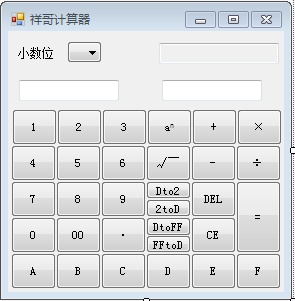 可以做幂运算,根号运算,十进制与二进制互转,16进制与十进制互转
namespace WindowsFormsApplication15
{
public partial class 祥哥计算器 : Form
{
public 祥哥计算器()
{
InitializeComponent();
} #region 数字点击事件
/// <summary>
/// 按钮点击事件
/// </summary>
/// <param name="sender"></param>
/// <param name="e"></param>
private void button1_Click(object sender, EventArgs e)
{
if (string.IsNullOrWhiteSpace(label1.Text))
{
if (textBox1.Text.Length < 10)
textBox1.Text += "1";
SetNum(textBox1.Text);
}
else
{
if (textBox2.Text.Length < 10)
textBox2.Text += "1";
SetNum(textBox2.Text);
}
}
private void button2_Click(object sender, EventArgs e)
{
if (string.IsNullOrWhiteSpace(label1.Text))
{
if (textBox1.Text.Length < 10)
textBox1.Text += "2";
SetNum(textBox1.Text);
}
else
{
if (textBox2.Text.Length < 10)
textBox2.Text += "2";
SetNum(textBox2.Text);
}
}
private void button3_Click(object sender, EventArgs e)
{
if (string.IsNullOrWhiteSpace(label1.Text))
{
if (textBox1.Text.Length < 10)
textBox1.Text += "3";
SetNum(textBox1.Text);
}
else
{
if (textBox2.Text.Length < 10)
textBox2.Text += "3";
SetNum(textBox2.Text);
}
}
private void button4_Click(object sender, EventArgs e)
{
if (string.IsNullOrWhiteSpace(label1.Text))
{
if (textBox1.Text.Length < 10)
textBox1.Text += "4";
SetNum(textBox1.Text);
}
else
{
if (textBox2.Text.Length < 10)
textBox2.Text += "4";
SetNum(textBox2.Text);
}
}
private void button5_Click(object sender, EventArgs e)
{
if (string.IsNullOrWhiteSpace(label1.Text))
{
if (textBox1.Text.Length < 10)
textBox1.Text += "5";
SetNum(textBox1.Text);
}
else
{
if (textBox2.Text.Length < 10)
textBox2.Text += "5";
SetNum(textBox2.Text);
}
}
private void button7_Click(object sender, EventArgs e)
{
if (string.IsNullOrWhiteSpace(label1.Text))
{
if (textBox1.Text.Length < 10)
textBox1.Text += "7";
SetNum(textBox1.Text);
}
else
{
if (textBox2.Text.Length < 10)
textBox2.Text += "7";
SetNum(textBox2.Text);
}
}
private void button6_Click(object sender, EventArgs e)
{
if (string.IsNullOrWhiteSpace(label1.Text))
{
if (textBox1.Text.Length < 10)
textBox1.Text += "6";
SetNum(textBox1.Text);
}
else
{
if (textBox2.Text.Length < 10)
textBox2.Text += "6";
SetNum(textBox2.Text);
}
}
private void button8_Click(object sender, EventArgs e)
{
if (string.IsNullOrWhiteSpace(label1.Text))
{
if (textBox1.Text.Length < 10)
textBox1.Text += "8";
SetNum(textBox1.Text);
}
else
{
if (textBox2.Text.Length < 10)
textBox2.Text += "8";
SetNum(textBox2.Text);
}
}
private void button9_Click(object sender, EventArgs e)
{
if (string.IsNullOrWhiteSpace(label1.Text))
{
if (textBox1.Text.Length < 10)
textBox1.Text += "9";
SetNum(textBox1.Text);
}
else
{
if (textBox2.Text.Length < 10)
textBox2.Text += "9";
SetNum(textBox2.Text);
}
}
private void button14_Click(object sender, EventArgs e)
{
if (string.IsNullOrWhiteSpace(label1.Text))
{
if (textBox1.Text.Length < 10)
textBox1.Text += "0";
SetNum(textBox1.Text);
}
else
{
if (textBox2.Text.Length < 10)
textBox2.Text += "0";
SetNum(textBox2.Text);
}
}
/// <summary>
/// 小数点问题
/// </summary>
/// <param name="sender"></param>
/// <param name="e"></param>
private void buttonpoint_Click(object sender, EventArgs e)
{
if (string.IsNullOrWhiteSpace(label1.Text))
{
if (textBox1.Text.Length < 10)
textBox1.Text += ".";
//if(textBox1.Text.IndexOf(".") >= 1)
// MessageBox.Show("已经有小数点了");
SetNum(textBox1.Text);
}
else
{
if (textBox2.Text.Length < 10)
textBox2.Text += ".";
//if(textBox2.Text.IndexOf(".") >=1)
// MessageBox.Show("已经有小数点了");
SetNum(textBox2.Text);
}
}
private void button00_Click(object sender, EventArgs e)
{
if (string.IsNullOrWhiteSpace(label1.Text))
{
if (textBox1.Text.Length < 10)
textBox1.Text += "00";
SetNum(textBox1.Text);
}
else
{
if (textBox2.Text.Length < 10)
textBox2.Text += "00";
SetNum(textBox2.Text);
}
}
private void buttonA_Click(object sender, EventArgs e)
{
if (string.IsNullOrWhiteSpace(label1.Text))
{
if (textBox1.Text.Length < 10)
textBox1.Text += "A";
SetNum(textBox1.Text);
}
else
{
if (textBox2.Text.Length < 10)
textBox2.Text += "A";
SetNum(textBox2.Text);
}
} private void buttonB_Click(object sender, EventArgs e)
{
if (string.IsNullOrWhiteSpace(label1.Text))
{
if (textBox1.Text.Length < 10)
textBox1.Text += "B";
SetNum(textBox1.Text);
}
else
{
if (textBox2.Text.Length < 10)
textBox2.Text += "B";
SetNum(textBox2.Text);
}
} private void buttonC_Click(object sender, EventArgs e)
{
if (string.IsNullOrWhiteSpace(label1.Text))
{
if (textBox1.Text.Length < 10)
textBox1.Text += "C";
SetNum(textBox1.Text);
}
else
{
if (textBox2.Text.Length < 10)
textBox2.Text += "C";
SetNum(textBox2.Text);
}
} private void buttonD_Click(object sender, EventArgs e)
{
if (string.IsNullOrWhiteSpace(label1.Text))
{
if (textBox1.Text.Length < 10)
textBox1.Text += "D";
SetNum(textBox1.Text);
}
else
{
if (textBox2.Text.Length < 10)
textBox2.Text += "D";
SetNum(textBox2.Text);
}
} private void buttonE_Click(object sender, EventArgs e)
{
if (string.IsNullOrWhiteSpace(label1.Text))
{
if (textBox1.Text.Length < 10)
textBox1.Text += "E";
SetNum(textBox1.Text);
}
else
{
if (textBox2.Text.Length < 10)
textBox2.Text += "E";
SetNum(textBox2.Text);
}
} private void buttonF_Click(object sender, EventArgs e)
{
if (string.IsNullOrWhiteSpace(label1.Text))
{
if (textBox1.Text.Length < 10)
textBox1.Text += "F";
SetNum(textBox1.Text);
}
else
{
if (textBox2.Text.Length < 10)
textBox2.Text += "F";
SetNum(textBox2.Text);
}
}
/// <summary>
/// 清空键与退格键
/// </summary>
/// <param name="sender"></param>
/// <param name="e"></param>
private void button16_Click_1(object sender, EventArgs e) ///清空CE键
{
label1.Text = "";
textBox3.Clear();
textBox1.Clear();
textBox2.Clear();
}
private void buttondelete_Click(object sender, EventArgs e) ///退格键
{
if (string.IsNullOrWhiteSpace(label1.Text))
{
textBox1.Text = textBox1.Text.Substring(0, textBox1.Text.Length - 1);
}
else
{
textBox2.Text = textBox2.Text.Substring(0, textBox2.Text.Length - 1);
}
}
#endregion
/// <summary>
/// 读取数字功能
/// </summary>
/// <param name="text"></param>
private void SetNum(string text) ///调用功能键
{
{
if (string.IsNullOrWhiteSpace(label1.Text))
{
textBox1.Text = text;
}
else
{
textBox2.Text = text;
}
}
}
/// <summary>
/// 四则运算
/// </summary>
/// <param name="sender"></param>
/// <param name="e"></param>
private void button10_Click(object sender, EventArgs e) ///运算符号
{
if (!string.IsNullOrWhiteSpace(textBox1.Text) && !string.IsNullOrWhiteSpace(textBox2.Text))
{
textBox1.Text = textBox3.Text;
textBox2.Text = "";
}
label1.Text = "+";
}
private void button11_Click(object sender, EventArgs e)
{
if (!string.IsNullOrWhiteSpace(textBox1.Text) && !string.IsNullOrWhiteSpace(textBox2.Text)) {
textBox1.Text = textBox3.Text;
textBox2.Text = "";
label1.Text = "-";
}
//else
// label1.Text = "-";
else if (string.IsNullOrWhiteSpace(label1.Text)) if (string.IsNullOrWhiteSpace(textBox1.Text))
{
textBox1.Text += "-";
}
else
label1.Text = "-";
//else if (string.IsNullOrWhiteSpace(textBox2.Text))
else
textBox2.Text += "-";
}
private void button15_Click(object sender, EventArgs e)
{
if (!string.IsNullOrWhiteSpace(textBox1.Text) && !string.IsNullOrWhiteSpace(textBox2.Text))
{
textBox1.Text = textBox3.Text;
textBox2.Text = "";
}
label1.Text = "×";
}
private void button13_Click(object sender, EventArgs e)
{
if (!string.IsNullOrWhiteSpace(textBox1.Text) && !string.IsNullOrWhiteSpace(textBox2.Text))
{
textBox1.Text = textBox3.Text;
textBox2.Text = "";
}
label1.Text = "÷";
}
/// <summary>
/// 幂次与根号运算(目前只运算正根号)
/// </summary>
/// <param name="sender"></param>
/// <param name="e"></param>
private void buttonmi_Click(object sender, EventArgs e)
{
if (!string.IsNullOrWhiteSpace(textBox1.Text) && !string.IsNullOrWhiteSpace(textBox2.Text))
{
textBox1.Text = textBox3.Text;
textBox2.Text = "";
}
label1.Text = "aⁿ";
}
private void buttongenhao_Click(object sender, EventArgs e)
{
if (!string.IsNullOrWhiteSpace(textBox1.Text) && !string.IsNullOrWhiteSpace(textBox2.Text))
{
textBox1.Text = textBox3.Text;
textBox2.Text = "";
}
label1.Text = "√ ̄";
}
/// <summary>
/// 4种数据转换
/// </summary>
/// <param name="sender"></param>
/// <param name="e"></param>
private void buttonBool_Click(object sender, EventArgs e)
{
if (!string.IsNullOrWhiteSpace(textBox1.Text) && !string.IsNullOrWhiteSpace(textBox2.Text))
{
textBox1.Text = textBox3.Text;
textBox2.Text = "";
}
label1.Text = "Dto2";
}
private void buttonHex_Click(object sender, EventArgs e)
{
if (!string.IsNullOrWhiteSpace(textBox1.Text) && !string.IsNullOrWhiteSpace(textBox2.Text))
{
textBox1.Text = textBox3.Text;
textBox2.Text = "";
}
label1.Text = "DtoFF";
}
private void button2toD_Click(object sender, EventArgs e)
{
label1.Text = "2toD";
}
private void buttonFFtoD_Click(object sender, EventArgs e)
{
if (!string.IsNullOrWhiteSpace(textBox1.Text) && !string.IsNullOrWhiteSpace(textBox2.Text))
{
textBox1.Text = textBox3.Text;
textBox2.Text = "";
}
label1.Text = "FFtoD";
}
/// <summary>
/// 计算结果
/// </summary>
/// <param name="sender"></param>
/// <param name="e"></param>
private void button12_Click(object sender, EventArgs e) ///=号控制
{
Int32 sum1; string Str1;
switch (label1.Text)
{
case "Dto2":
sum1 = Convert.ToInt32(textBox1.Text);
textBox3.Text = Convert.ToString(sum1, 2);
break;
case "DtoFF":
sum1 = Convert.ToInt32(textBox1.Text);
textBox3.Text = Convert.ToString(sum1, 16);
textBox3.Text = textBox3.Text.ToUpper();
break;
case "2toD":
Str1 = Convert.ToString(textBox1.Text);
textBox3.Text = Convert.ToInt32(Str1, 2).ToString();
break;
case "FFtoD":
Str1 = Convert.ToString(textBox1.Text);
textBox3.Text = Convert.ToInt32(Str1, 16).ToString();
break;
default:
textBox3.Text = calNum(Convert.ToDouble(textBox1.Text), Convert.ToDouble(textBox2.Text));
break;
}
}
/// <summary>
/// 计算算法
/// </summary>
/// <param name="num1"></param>
/// <param name="num2"></param>
/// <returns></returns>
private string calNum(double num1, double num2) /// 计算
{
double sum = 0;
switch (label1.Text)
{
case "+":
sum = num1 + num2;
break;
case "-":
sum = num1 - num2;
break;
case "×":
sum = num1 * num2;
break;
case "÷":
if (num2 != 0)
sum = num1 / num2;
else
MessageBox.Show("语法错误,除数不能为0,请重新输入...");
break;
case "aⁿ":
sum = Math.Pow(num1, num2);
break;
case "√ ̄":
if (num1 >= 0 && num2 != 0)
sum = Math.Pow(num1, 1 / num2);
else
MessageBox.Show("语法错误,根号内不能小于0且不能开0次方,请重新输入...");
break;
}
switch (PointBit.SelectedIndex) ///小数点控制
{
case 0:
return Convert.ToDouble(sum).ToString("f0");
case 1:
return Convert.ToDouble(sum).ToString("f1");
case 2:
return Convert.ToDouble(sum).ToString("f2");
case 3:
return Convert.ToDouble(sum).ToString("f3");
case 4:
return sum.ToString();
}
return sum.ToString();
}
}
}
namespace WindowsFormsApplication15{ public partial class 祥哥计算器 : Form { public 祥哥计算器() { InitializeComponent(); }
#region 数字点击事件 /// <summary> /// 按钮点击事件 /// </summary> /// <param name="sender"></param> /// <param name="e"></param> private void button1_Click(object sender, EventArgs e) { if (string.IsNullOrWhiteSpace(label1.Text)) { if (textBox1.Text.Length < 10) textBox1.Text += "1"; SetNum(textBox1.Text); } else { if (textBox2.Text.Length < 10) textBox2.Text += "1"; SetNum(textBox2.Text); } } private void button2_Click(object sender, EventArgs e) { if (string.IsNullOrWhiteSpace(label1.Text)) { if (textBox1.Text.Length < 10) textBox1.Text += "2"; SetNum(textBox1.Text); } else { if (textBox2.Text.Length < 10) textBox2.Text += "2"; SetNum(textBox2.Text); } } private void button3_Click(object sender, EventArgs e) { if (string.IsNullOrWhiteSpace(label1.Text)) { if (textBox1.Text.Length < 10) textBox1.Text += "3"; SetNum(textBox1.Text); } else { if (textBox2.Text.Length < 10) textBox2.Text += "3"; SetNum(textBox2.Text); } } private void button4_Click(object sender, EventArgs e) { if (string.IsNullOrWhiteSpace(label1.Text)) { if (textBox1.Text.Length < 10) textBox1.Text += "4"; SetNum(textBox1.Text); } else { if (textBox2.Text.Length < 10) textBox2.Text += "4"; SetNum(textBox2.Text); } } private void button5_Click(object sender, EventArgs e) { if (string.IsNullOrWhiteSpace(label1.Text)) { if (textBox1.Text.Length < 10) textBox1.Text += "5"; SetNum(textBox1.Text); } else { if (textBox2.Text.Length < 10) textBox2.Text += "5"; SetNum(textBox2.Text); } } private void button7_Click(object sender, EventArgs e) { if (string.IsNullOrWhiteSpace(label1.Text)) { if (textBox1.Text.Length < 10) textBox1.Text += "7"; SetNum(textBox1.Text); } else { if (textBox2.Text.Length < 10) textBox2.Text += "7"; SetNum(textBox2.Text); } } private void button6_Click(object sender, EventArgs e) { if (string.IsNullOrWhiteSpace(label1.Text)) { if (textBox1.Text.Length < 10) textBox1.Text += "6"; SetNum(textBox1.Text); } else { if (textBox2.Text.Length < 10) textBox2.Text += "6"; SetNum(textBox2.Text); } } private void button8_Click(object sender, EventArgs e) { if (string.IsNullOrWhiteSpace(label1.Text)) { if (textBox1.Text.Length < 10) textBox1.Text += "8"; SetNum(textBox1.Text); } else { if (textBox2.Text.Length < 10) textBox2.Text += "8"; SetNum(textBox2.Text); } } private void button9_Click(object sender, EventArgs e) { if (string.IsNullOrWhiteSpace(label1.Text)) { if (textBox1.Text.Length < 10) textBox1.Text += "9"; SetNum(textBox1.Text); } else { if (textBox2.Text.Length < 10) textBox2.Text += "9"; SetNum(textBox2.Text); } } private void button14_Click(object sender, EventArgs e) { if (string.IsNullOrWhiteSpace(label1.Text)) { if (textBox1.Text.Length < 10) textBox1.Text += "0"; SetNum(textBox1.Text); } else { if (textBox2.Text.Length < 10) textBox2.Text += "0"; SetNum(textBox2.Text); } } /// <summary> /// 小数点问题 /// </summary> /// <param name="sender"></param> /// <param name="e"></param> private void buttonpoint_Click(object sender, EventArgs e) { if (string.IsNullOrWhiteSpace(label1.Text)) { if (textBox1.Text.Length < 10) textBox1.Text += "."; //if(textBox1.Text.IndexOf(".") >= 1) // MessageBox.Show("已经有小数点了"); SetNum(textBox1.Text); } else { if (textBox2.Text.Length < 10) textBox2.Text += "."; //if(textBox2.Text.IndexOf(".") >=1) // MessageBox.Show("已经有小数点了"); SetNum(textBox2.Text); } } private void button00_Click(object sender, EventArgs e) { if (string.IsNullOrWhiteSpace(label1.Text)) { if (textBox1.Text.Length < 10) textBox1.Text += "00"; SetNum(textBox1.Text); } else { if (textBox2.Text.Length < 10) textBox2.Text += "00"; SetNum(textBox2.Text); } } private void buttonA_Click(object sender, EventArgs e) { if (string.IsNullOrWhiteSpace(label1.Text)) { if (textBox1.Text.Length < 10) textBox1.Text += "A"; SetNum(textBox1.Text); } else { if (textBox2.Text.Length < 10) textBox2.Text += "A"; SetNum(textBox2.Text); } }
private void buttonB_Click(object sender, EventArgs e) { if (string.IsNullOrWhiteSpace(label1.Text)) { if (textBox1.Text.Length < 10) textBox1.Text += "B"; SetNum(textBox1.Text); } else { if (textBox2.Text.Length < 10) textBox2.Text += "B"; SetNum(textBox2.Text); } }
private void buttonC_Click(object sender, EventArgs e) { if (string.IsNullOrWhiteSpace(label1.Text)) { if (textBox1.Text.Length < 10) textBox1.Text += "C"; SetNum(textBox1.Text); } else { if (textBox2.Text.Length < 10) textBox2.Text += "C"; SetNum(textBox2.Text); } }
private void buttonD_Click(object sender, EventArgs e) { if (string.IsNullOrWhiteSpace(label1.Text)) { if (textBox1.Text.Length < 10) textBox1.Text += "D"; SetNum(textBox1.Text); } else { if (textBox2.Text.Length < 10) textBox2.Text += "D"; SetNum(textBox2.Text); } }
private void buttonE_Click(object sender, EventArgs e) { if (string.IsNullOrWhiteSpace(label1.Text)) { if (textBox1.Text.Length < 10) textBox1.Text += "E"; SetNum(textBox1.Text); } else { if (textBox2.Text.Length < 10) textBox2.Text += "E"; SetNum(textBox2.Text); } }
private void buttonF_Click(object sender, EventArgs e) { if (string.IsNullOrWhiteSpace(label1.Text)) { if (textBox1.Text.Length < 10) textBox1.Text += "F"; SetNum(textBox1.Text); } else { if (textBox2.Text.Length < 10) textBox2.Text += "F"; SetNum(textBox2.Text); } } /// <summary> /// 清空键与退格键 /// </summary> /// <param name="sender"></param> /// <param name="e"></param> private void button16_Click_1(object sender, EventArgs e) ///清空CE键 { label1.Text = ""; textBox3.Clear(); textBox1.Clear(); textBox2.Clear(); } private void buttondelete_Click(object sender, EventArgs e) ///退格键 { if (string.IsNullOrWhiteSpace(label1.Text)) { textBox1.Text = textBox1.Text.Substring(0, textBox1.Text.Length - 1); } else { textBox2.Text = textBox2.Text.Substring(0, textBox2.Text.Length - 1); } } #endregion /// <summary> /// 读取数字功能 /// </summary> /// <param name="text"></param> private void SetNum(string text) ///调用功能键 { { if (string.IsNullOrWhiteSpace(label1.Text)) { textBox1.Text = text; } else { textBox2.Text = text; } } } /// <summary> /// 四则运算 /// </summary> /// <param name="sender"></param> /// <param name="e"></param> private void button10_Click(object sender, EventArgs e) ///运算符号 { if (!string.IsNullOrWhiteSpace(textBox1.Text) && !string.IsNullOrWhiteSpace(textBox2.Text)) { textBox1.Text = textBox3.Text; textBox2.Text = ""; } label1.Text = "+"; } private void button11_Click(object sender, EventArgs e) { if (!string.IsNullOrWhiteSpace(textBox1.Text) && !string.IsNullOrWhiteSpace(textBox2.Text))
{ textBox1.Text = textBox3.Text; textBox2.Text = ""; label1.Text = "-"; } //else // label1.Text = "-"; else if (string.IsNullOrWhiteSpace(label1.Text))
if (string.IsNullOrWhiteSpace(textBox1.Text)) { textBox1.Text += "-"; } else label1.Text = "-"; //else if (string.IsNullOrWhiteSpace(textBox2.Text)) else textBox2.Text += "-"; } private void button15_Click(object sender, EventArgs e) { if (!string.IsNullOrWhiteSpace(textBox1.Text) && !string.IsNullOrWhiteSpace(textBox2.Text)) { textBox1.Text = textBox3.Text; textBox2.Text = ""; } label1.Text = "×"; } private void button13_Click(object sender, EventArgs e) { if (!string.IsNullOrWhiteSpace(textBox1.Text) && !string.IsNullOrWhiteSpace(textBox2.Text)) { textBox1.Text = textBox3.Text; textBox2.Text = ""; } label1.Text = "÷"; } /// <summary> /// 幂次与根号运算(目前只运算正根号) /// </summary> /// <param name="sender"></param> /// <param name="e"></param> private void buttonmi_Click(object sender, EventArgs e) { if (!string.IsNullOrWhiteSpace(textBox1.Text) && !string.IsNullOrWhiteSpace(textBox2.Text)) { textBox1.Text = textBox3.Text; textBox2.Text = ""; } label1.Text = "aⁿ"; } private void buttongenhao_Click(object sender, EventArgs e) { if (!string.IsNullOrWhiteSpace(textBox1.Text) && !string.IsNullOrWhiteSpace(textBox2.Text)) { textBox1.Text = textBox3.Text; textBox2.Text = ""; } label1.Text = "√ ̄"; } /// <summary> /// 4种数据转换 /// </summary> /// <param name="sender"></param> /// <param name="e"></param> private void buttonBool_Click(object sender, EventArgs e) { if (!string.IsNullOrWhiteSpace(textBox1.Text) && !string.IsNullOrWhiteSpace(textBox2.Text)) { textBox1.Text = textBox3.Text; textBox2.Text = ""; } label1.Text = "Dto2"; } private void buttonHex_Click(object sender, EventArgs e) { if (!string.IsNullOrWhiteSpace(textBox1.Text) && !string.IsNullOrWhiteSpace(textBox2.Text)) { textBox1.Text = textBox3.Text; textBox2.Text = ""; } label1.Text = "DtoFF"; } private void button2toD_Click(object sender, EventArgs e) { label1.Text = "2toD"; } private void buttonFFtoD_Click(object sender, EventArgs e) { if (!string.IsNullOrWhiteSpace(textBox1.Text) && !string.IsNullOrWhiteSpace(textBox2.Text)) { textBox1.Text = textBox3.Text; textBox2.Text = ""; } label1.Text = "FFtoD"; } /// <summary> /// 计算结果 /// </summary> /// <param name="sender"></param> /// <param name="e"></param> private void button12_Click(object sender, EventArgs e) ///=号控制 { Int32 sum1; string Str1; switch (label1.Text) { case "Dto2": sum1 = Convert.ToInt32(textBox1.Text); textBox3.Text = Convert.ToString(sum1, 2); break; case "DtoFF": sum1 = Convert.ToInt32(textBox1.Text); textBox3.Text = Convert.ToString(sum1, 16); textBox3.Text = textBox3.Text.ToUpper(); break; case "2toD": Str1 = Convert.ToString(textBox1.Text); textBox3.Text = Convert.ToInt32(Str1, 2).ToString(); break; case "FFtoD": Str1 = Convert.ToString(textBox1.Text); textBox3.Text = Convert.ToInt32(Str1, 16).ToString(); break; default: textBox3.Text = calNum(Convert.ToDouble(textBox1.Text), Convert.ToDouble(textBox2.Text)); break; } } /// <summary> /// 计算算法 /// </summary> /// <param name="num1"></param> /// <param name="num2"></param> /// <returns></returns> private string calNum(double num1, double num2) /// 计算 { double sum = 0; switch (label1.Text) { case "+": sum = num1 + num2; break; case "-": sum = num1 - num2; break; case "×": sum = num1 * num2; break; case "÷": if (num2 != 0) sum = num1 / num2; else MessageBox.Show("语法错误,除数不能为0,请重新输入..."); break; case "aⁿ": sum = Math.Pow(num1, num2); break; case "√ ̄": if (num1 >= 0 && num2 != 0) sum = Math.Pow(num1, 1 / num2); else MessageBox.Show("语法错误,根号内不能小于0且不能开0次方,请重新输入..."); break; } switch (PointBit.SelectedIndex) ///小数点控制 { case 0: return Convert.ToDouble(sum).ToString("f0"); case 1: return Convert.ToDouble(sum).ToString("f1"); case 2: return Convert.ToDouble(sum).ToString("f2"); case 3: return Convert.ToDouble(sum).ToString("f3"); case 4: return sum.ToString(); } return sum.ToString(); } }}
学习C#自作计算器,菜鸟初学,有大神的指点,希望做的不够好的地方请大家多多指导。同时希望非常无聊的大神能加些其它计算进去的更多相关文章
- 初学jquery,自己写的一个jquery幻灯片,代码有些笨拙,希望有大神可以指点一二,精简一下代码
html代码 <div class="picCon"> <div class="bigPic"> <ul> <li c ...
- jQuery实现购物车多物品数量的加减+总价计算
<!DOCTYPE html PUBLIC "-//W3C//DTD XHTML 1.0 Transitional//EN" "http://www.w3. ...
- 忘记block格式 xib加载没有计算导航栏和tabbar的大小
敲inlineBlock xib加载没有计算导航栏和tabbar的大小 /将这个属性改为no self.tabBarController.tabBar.translucent = NO; 判断优化,两 ...
- zw·10倍速大数据与全内存计算
zw·10倍速大数据与全内存计算 zw全内存10倍速计算blog,早就在博客园机器视觉栏目发过,大数据版的一直挂着,今天抽空补上. 在<零起点,python大数据与量化交易>目录中 htt ...
- PCB 加投率计算实现基本原理--K最近邻算法(KNN)
PCB行业中,客户订购5000pcs,在投料时不会直接投5000pcs,因为实际在生产过程不可避免的造成PCB报废, 所以在生产前需计划多投一定比例的板板, 例:订单 量是5000pcs,加投3%,那 ...
- JQuery购物车多物品数量的加减+总价计算
<!DOCTYPE html PUBLIC "-//W3C//DTD XHTML 1.0 Transitional//EN" "http://www.w3.org/ ...
- 学习STM32单片机,从菜鸟到牛人就是这样简单(配视频资料)
我想说,为了学习单片机而去学习单片机的思路不对. 你问,如何系统地入门学习stm32? 本身就是一个错误的问题.假如你会使用8051 , 会写C语言,那么STM32本身并不需要刻意的学习. 你要考虑的 ...
- PHP学习笔记02——简易计算器
<!DOCTYPE html> <html> <head> <title>PHP简易计算器</title> </head> &l ...
- C#基础学习第一天(.net菜鸟的成长之路-零基础到精通)
1.Net平台和C#编程语言的概念 2.桌面应用程序: 我们要使用桌面应用程序,必须要安装该应用程序的客户端. winform应用程序. Application:应用程序 Internet:互联网应用 ...
随机推荐
- (三)OpenCV-Python学习—图像平滑
由于种种原因,图像中难免会存在噪声,需要对其去除.噪声可以理解为灰度值的随机变化,即拍照过程中引入的一些不想要的像素点.噪声可分为椒盐噪声,高斯噪声,加性噪声和乘性噪声等,参见:https://zhu ...
- p2p通信原理及实现
1.简介 当今互联网到处存在着一些中间件(MIddleBoxes),如NAT和防火墙,导致两个(不在同一内网)中的客户端无法直接通信.这些问题即便是到了IPV6时代也会存在,因为即使不需要NAT,但还 ...
- 移动端安卓和 IOS 开发框架 Framework7 布局
对应的各种效果,Framework7 里面实现的方式比较多,这里我就只写我用的一种,样式有的自己修改了的,想看官方详细的参见 http://framework7.cn 一.手风琴布局Accordion ...
- KL距离(相对熵)
KL距离,是Kullback-Leibler差异(Kullback-Leibler Divergence)的简称,也叫做相对熵(Relative Entropy).它衡量的是相同事件空间里的两个概率分 ...
- [AI] 深度数学 - Bayes
数学似宇宙,韭菜只关心其中实用的部分. scikit-learn (sklearn) 官方文档中文版 scikit-learn Machine Learning in Python 一个新颖的onli ...
- 123457123456#0#-----com.threeapp.SuanShuXiaoTianCai01----数学算术小天才
com.threeapp.SuanShuXiaoTianCai01----数学算术小天才
- matlab学习——05插值和拟合(黄河小浪底调水调沙问题)
05插值和拟合 黄河小浪底调水调沙问题 data3.txt 1800 1900 2100 2200 2300 2400 2500 2600 2650 2700 2720 2650 32 60 75 8 ...
- Mysql安装、查看密码、修改密码、初始化、修改字符类型
安装mysql 参照python篇一键安装lnmp.安装完之后再按照下面修改密码,修改配置文件,否则安装的时候就修改配置文件会出错. 注意:这也是二进制安装mysql.另一种二进制安装容易出错,生产环 ...
- self-attention详解
编写你自己的 Keras 层 对于简单.无状态的自定义操作,你也许可以通过 layers.core.Lambda 层来实现.但是对于那些包含了可训练权重的自定义层,你应该自己实现这种层. 这是一个 K ...
- vue项目中导出Excel文件功能的前端代码实现
在项目中遇到了两种不同情况, 1.get请求导出文件,实现起来相对简单 // 导出数据 exportData() { window.location.href = `/oes-content-mana ...