
使用ViewFlipper实现广告信息栏的上下翻滚效果
import android.os.Bundle;

import android.support.v7.app.AppCompatActivity;

import android.view.GestureDetector;

import android.view.View;

import android.widget.ViewFlipper;

public class MainActivity extends AppCompatActivity {

    ViewFlipper flipper;

    @Override

    protected void onCreate(Bundle savedInstanceState) {

        super.onCreate(savedInstanceState);

        setContentView(R.layout.activity_main);

        ViewFlipper vf = (ViewFlipper) findViewById(R.id.vf);

        vf.addView(View.inflate(this, R.layout.guanggao, null));

        vf.addView(View.inflate(this, R.layout.guanggao2, null));

        vf.addView(View.inflate(this, R.layout.guanggao3, null));

        vf.startFlipping();

    }

}
activity_main.xml
<?xml version="1.0" encoding="utf-8"?>

<RelativeLayout

    xmlns:android="http://schemas.android.com/apk/res/android"

    xmlns:tools="http://schemas.android.com/tools"

    android:id="@+id/activity_main"

    android:layout_width="match_parent"

    android:layout_height="match_parent"

    tools:context="com.loaderman.viewflipperdemo.MainActivity">

    <ViewFlipper

        android:id="@+id/vf"

        android:layout_width="match_parent"

        android:layout_height="wrap_content"

        android:autoStart="true"

        android:flipInterval="3000"

        android:inAnimation="@anim/anim_marque_in"

        android:outAnimation="@anim/anim_marque_out"

        />

</RelativeLayout>
guanggao.xml
<?xml version="1.0" encoding="utf-8"?>

<LinearLayout xmlns:android="http://schemas.android.com/apk/res/android"

              android:layout_width="match_parent"

              android:layout_height="match_parent"

              android:orientation="vertical">

    <LinearLayout

        android:layout_width="match_parent"

        android:layout_height="wrap_content"

        android:orientation="horizontal">

        <TextView

            android:layout_width="wrap_content"

            android:layout_height="wrap_content"

            android:layout_marginLeft="10dp"

            android:text="热议"

            android:textColor="#f00"

            android:textSize="18sp"/>

        <TextView

            android:textSize="18sp"

            android:layout_width="wrap_content"

            android:layout_height="wrap_content"

            android:layout_marginLeft="10dp"

            android:text="小米手机降价了"/>

    </LinearLayout>

</LinearLayout>
guanggao2.xml
<?xml version="1.0" encoding="utf-8"?>

<LinearLayout xmlns:android="http://schemas.android.com/apk/res/android"

              android:layout_width="match_parent"

              android:layout_height="match_parent"

              android:orientation="vertical">

    <LinearLayout

        android:layout_width="match_parent"

        android:layout_height="wrap_content"

        android:orientation="horizontal">

        <TextView

            android:layout_marginLeft="10dp"

            android:layout_width="wrap_content"

            android:layout_height="wrap_content"

            android:textSize="18sp"

            android:textColor="#00f"

            android:text="爆料"/>

        <TextView

            android:textSize="18sp"

            android:layout_marginLeft="10dp"

            android:layout_width="wrap_content"

            android:layout_height="wrap_content"

            android:text="小米手机降价了"/>

    </LinearLayout>

</LinearLayout>
guanggao3.xml
<?xml version="1.0" encoding="utf-8"?>

<LinearLayout xmlns:android="http://schemas.android.com/apk/res/android"

              android:layout_width="match_parent"

              android:layout_height="match_parent"

              android:orientation="vertical">

    <LinearLayout

        android:layout_width="match_parent"

        android:layout_height="wrap_content"

        android:orientation="horizontal">

        <TextView

            android:layout_marginLeft="10dp"

            android:layout_width="wrap_content"

            android:layout_height="wrap_content"

            android:textSize="18sp"

            android:textColor="#0f0"

            android:text="最新"/>

        <TextView

            android:textSize="18sp"

            android:layout_marginLeft="10dp"

            android:layout_width="wrap_content"

            android:layout_height="wrap_content"

            android:text="苹果手机发布了"/>

    </LinearLayout>

</LinearLayout>
在res/anim下创建anim_marque_in.xml
<?xml version="1.0" encoding="utf-8"?>

<set xmlns:android="http://schemas.android.com/apk/res/android"

     android:duration="1500">

    <!--anim_marque_in-->

    <translate

        android:fromYDelta="100%p"

        android:toYDelta="0"/>

    <alpha

        android:duration="300"

        android:fromAlpha="0.0"

        android:toAlpha="1.0" />

</set>
在res/anim下创建anim_marque_out.xml
<?xml version="1.0" encoding="utf-8"?>

<set xmlns:android="http://schemas.android.com/apk/res/android"

     android:duration="1500">

    <!--anim_marque_out-->

    <translate

        android:fromYDelta="0%p"

        android:toYDelta="-100%p"/>

    <alpha

        android:duration="300"

        android:fromAlpha="1.0"

        android:toAlpha="0.0" />

</set>
效果图:
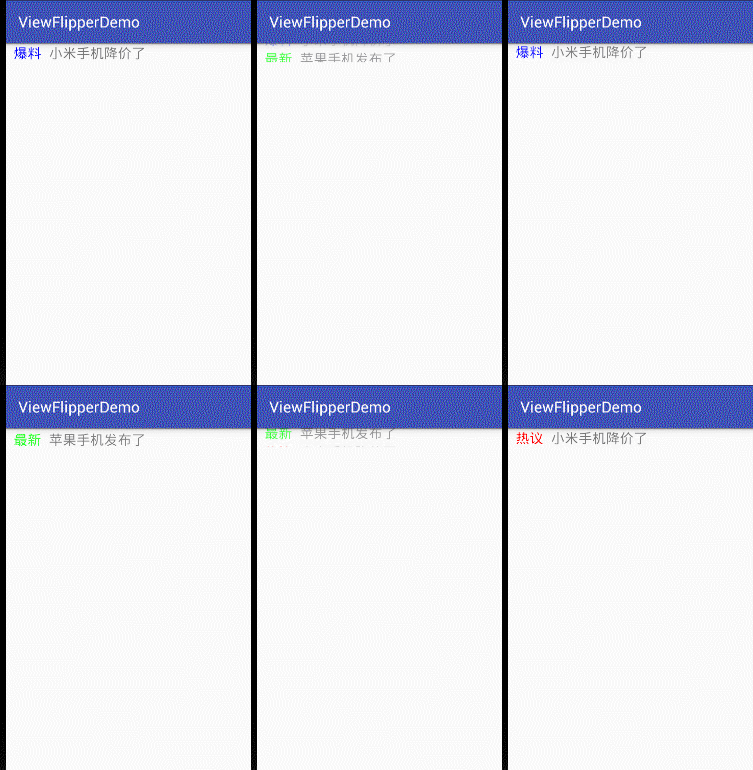
使用ViewFlipper实现广告信息栏的上下翻滚效果的更多相关文章
- fiddler工具条、状态栏、请求信息栏各按钮的作用
1.fiddler工具条 2.fiddler状态栏 3.请求信息栏
- Android 通过ViewFlipper实现广告轮播功能并可以通过手势滑动进行广告切换
为了实现广告轮播功能,在网上找了很多方法,有的效果很好,但是代码太麻烦,并且大多是用的viewpager,总之不是很满意. 于是看了一下sdk有个控件是ViewFlipper,使用比较方便,于是尝试了 ...
- 使用ViewFlipper实现广告图片的自动轮播的效果
轮播资源图片的实现 package com.loaderman.viewflipperdemo; import android.os.Bundle; import android.support.v7 ...
- leanote 信息栏显示笔记本和笔记类型
本文解决如下两个问题: 1. 在列表视图下使用搜索时,不知道搜出来的笔记属于哪个笔记本.(摘要视图下是有显示的) 2. 增加显示笔记类型(markdown 或 富文本) 修改resources\app ...
- 自定义有焦点的TextView实现广告信息左右一直滚动的跑马灯效果
import android.content.Context; import android.text.TextUtils; import android.util.AttributeSet; imp ...
- 仿知乎/途家导航栏渐变文字动画效果-b
demo.gif 效果图如上,简单分析下 1.导航栏一开始是隐藏的,随着scrollView滚动而渐变 2.导航栏左右两边的navigationItem是一直显示的 3.导航栏参考了途家app,使用了 ...
- ViewFlipper的简单使用实现图片轮播效果
/** * ViewFlipper: * 安卓系统自带的一个多页面管理控件,它可以实现子页面的自动切换 * 为ViewFlipper加入View: * (1)在layout布局文件静态导入子View ...
- 不可思议的纯CSS导航栏下划线跟随效果
先上张图,如何使用纯 CSS 制作如下效果? 在继续阅读下文之前,你可以先缓一缓.尝试思考一下上面的效果或者动手尝试一下,不借助 JS ,能否巧妙的实现上述效果. OK,继续.这个效果是我在业务开发的 ...
- 奇妙的CSS3—导航栏下划线跟随效果
先来看一下效果: 1.基本效果就是这样的 ,鼠标悬停,下划线划入.鼠标离开,下划线划出 2.下划线的划入是有方向的,从左侧划入悬停,下划线由左向右伸长.从右侧划入,下划线由又往左伸长 实现思路 1.导 ...
随机推荐
- java指定运行jar包中的其中一个main方法
java -cp jar包 类名 java -cp ******.jar com.******.EsEtl
- linux之网络命令
本文整理了在实践过程中使用的Linux网络工具,这些工具提供的功能非常强大,我们平时使用的只是冰山一角,比如lsof.ip.tcpdump.iptables等. 本文不会深入研究这些命令的强大用法,因 ...
- BLE 5协议栈-直接测试模式
文章转载自:http://www.sunyouqun.com/2017/04/page/3/ BLE协议充分考虑了设备的测试问题,在协议栈层面提供了直接测试模式,用于执行BLE设备的RF物理层一致性的 ...
- c++ 常用数据类型转换
1.int型与string型的互相转换 int型转string型 void int2str(const int &int_temp,string &string_temp) { str ...
- Cubase如何进行音频移调
- npm run build后如何打开index.html跑起项目
Tip: built files are meant to be served over an HTTP server. Opening index.html over file:// won't ...
- Introduction to Restricted Boltzmann Machines
转载,原贴地址:Introduction to Restricted Boltzmann Machines,by Edwin Chen, 2011/07/18. Suppose you ask a b ...
- Spring事务源码分析
首先看例子,这例子摘抄自开涛的跟我学spring3. @Test public void testPlatformTransactionManager() { DefaultTransactionDe ...
- anaconda应答文件
一.anaconda和isolinux anaconda是linux安装程序的安装想到,在我们的系统安装光盘内有一个isolinux的目录,这个目录是用来启动光盘镜像的,下面我们说一下这个目录下的文件 ...
- Hadoop-No.15之Flume基于事件的数据收集和处理
Flume是一种分布式的可靠开源系统,用于流数据的高效收集,聚集和移动.Flume通常用于移动日志数据.但是也能移动大量事件数据.如社交媒体订阅,消息队列事件或者网络流量数据. Flume架构 Flu ...