
vue 使用高德地图vue-amap组件
首先 npm install -S vue-amap
然后在 main.js
import VueAMap  from 'vue-amap';  //注意不要和 AMap原始名称覆盖

Vue.use(VueAMap);

// 初始化vue-amap

VueAMap.initAMapApiLoader({

  // 高德的key

  key: 'you key',

  // 插件集合

  plugin: ['AMap.Autocomplete', 'AMap.PlaceSearch', 'AMap.Scale', 'AMap.OverView', 'AMap.ToolBar', 'AMap.MapType', 'AMap.PolyEditor', 'AMap.CircleEditor','AMap.Geolocation'],

  v: '1.4.4'

});
map.vue文件
其中有个BUS.js,是基于观察者模式的发布订阅封装
<template>

    <div class="_map">

    	<div class="amap-page-container">

	    	<el-amap-search-box class="search-box" :search-option="searchOption" :on-search-result="onSearchResult" ></el-amap-search-box>

	      <el-amap ref="map"  vid="amapDemo" :plugin="plugin"  :zoom="zoom" :center="center" class="amap-demo" :events="events">

	        <el-amap-marker vid="component-marker" :position="makerConf.position" :content="makerConf.content"  ></el-amap-marker>

	      </el-amap>

	    </div>

	    <div class="adrs">

	    	<ul>

		    	<li class="" v-for="(item,index) in list" :key="index" :class="currIndex == index ? 'active':''"  @click="select(item,index)">

		    		<p class="address">{{item.address}}</p>

		    		<p class="nm">{{item.name}}</p>

		    	</li>

	    	</ul>

	    </div>

    </div>

  </template>

  <style>

  	.amap-page-container{

  		height: 300px;

  		position: relative;

  	}

  	.search-box {

      position: absolute !important;

      top: 25px;

      left: 20px;

      z-index: 200 !important;

    }

    .amap-demo {

      height: 300px;

    }

    .amap-logo {

            display: none;

     }

   .amap-copyright {

          bottom:-100px;

           display: none;

    }

    .amap-scalecontrol{

    	bottom: 4px !important;

    }

    .amap-geolocation-con{

    	bottom: 30px !important;

    	z-index: 199 !important;

    }

    ul li.active{

    	color: deeppink;

    }

  </style>

  <script>

    export default {

      name: 'amap-page',

      components: {},

      data() {

      	var me = this;

      	me.city = me.city || '武汉';

        return {

          list:[],

          currIndex:0,

          zoom: 16,

          center: [114.397169, 30.50576],

          events:{

          	 init: (o) => {

        	 o.setCity(me.city,result => {

                console.log("----------setCity",result);

                if(result && result.length > 0){

                	me.zoom = 16;

                	me.makerConf.position = result;

                	me.getList(result);

                }

             });

             //去掉logo

             document.getElementsByClassName("amap-logo")[0].style.display = "none";

            },

         	"dragend":function(e){

				//console.log("dragging",e,this.getCenter());

         		var point = this.getCenter();

	      		var pos = [point.lng,point.lat];

	      		me.makerConf.position =  [point.lng,point.lat];

         		me.getList(pos);

         	}

          },

          makerConf: {

            position:  [114.397169, 30.50576],

            content:""

          },

		 searchOption: {

            city: me.city,

            citylimit: true

         },

         plugin:[

         	'ToolBar',

         	'Scale',

         	{

            pName: 'Geolocation',

            events: {

              init(o) {

              },

              complete:function(result){

              	//定位成功

              	var address = result.formattedAddress

              	var point = result.position;

              	var obj = {

              		address:address,

              		name:"",

              		location:point

              	}

              	me.list = [obj];

              	me.makerConf.position =  [point.lng,point.lat];

              },

              error:function(){

              }

            }

          }

         ]

        };

      },

      created(){

      	var me = this;

      },

      mounted(){

      },

      methods: {

      	select:function(item,index){

      		var me = this;

      		me.currIndex = index;

      		var point = item.location;

      		me.makerConf.position =  [point.lng,point.lat];

      		me.center = [point.lng,point.lat];

      	},

      	//this.$refs.map.$$getCenter()

  	   getList:function(result){

  	   		//获取列表

  	   		var me = this;

  	   		me.$Geocoder({

  	   			lnglatXY:result,

  	   			success:function(res){

  	   				if(res.regeocode && res.regeocode.pois){

  	   					me.list = res.regeocode.pois;

  	   				}else{

  	   					me.list = [];

  	   				}

  	   			},

  	   			error:function(res){

  	   				me.list = [];

  	   			}

  	   		});

  	   },

       onSearchResult(pois) {

       	   //搜索

          let latSum = 0;

          let lngSum = 0;

          var me = this;

          var mymap = me.$refs.map.$$getInstance();

          if (pois && pois.length > 0) {

            //如果长度为1则无需转化

            	var poi = pois[0];

            	var lng = poi["lng"];

            	var lat = poi["lat"];

            	me.center = [lng, lat];

            	me.makerConf.position  = [lng, lat];

            	//me.makerConf.content = poi.name;

            	me.list = pois;

	        }else{

	        	me.list = [];

	        }

       },

        $Geocoder(options){

        	//将坐标点转化为,详细地址

      	 	options = options || {};

      	 	if(AMap){

      	 		AMap.plugin(['AMap.Geocoder'], () => {

		        const geocoder = new AMap.Geocoder({

	        	    radius: options.radius || 1000,

        		    extensions: options.extensions || "all"

		   		})

		        var  lnglatXY = options.lnglatXY || [114.397169, 30.50576]; //已知点坐标

	            geocoder.getAddress(lnglatXY, function(status, result) {

		            if (status === 'complete' && result.info === 'OK') {

		                options.success && options.success(result);

		            }else{

		            	options.error && options.error(status,result);

		            }

    			});

				});

      	 	}

      	 }

       },

       "watch":{

       	 list:function(){

       	 	this.currIndex = 0;

       	 }

       }

    };

    /*

      me.$Geocoder({

	            	lnglatXY:[center.lng, center.lat],

	            	success:function(res){

	            		console.log(res);

	            	}

	    });

     *

     * */

</script>
bus.js
let instance = null;

class EventBus {

    constructor() {

        if (!instance) {

            this.events = {};

            instance = this;

        }

        return instance;

    }

    $emit(event, message) {

        if (!this.events[event])

            return;

        const callbacks = this.events[event];

        for (let i = 0, l = callbacks.length; i < l; i++) {

            const callback = callbacks[i];

            callback.call(this, message);

        }

    }

    $on(event, callback) {

        if (!this.events[event])

            this.events[event] = [];

        this.events[event].push(callback);

    }

}

export default new EventBus();
效果图
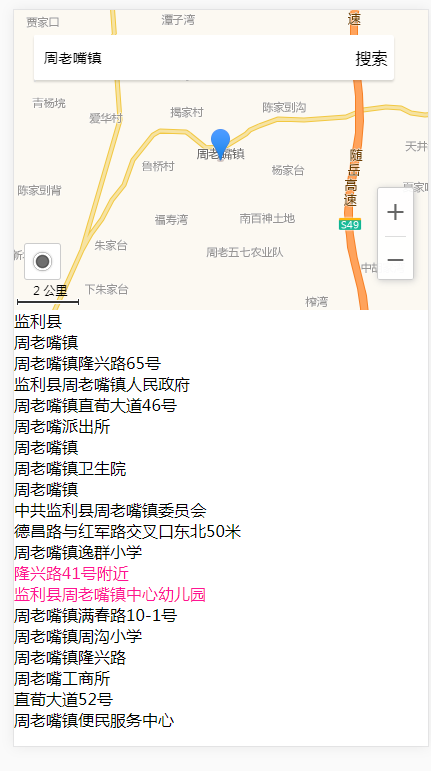
相关文档地址: https://elemefe.github.io/vue-amap/#/zh-cn/introduction/install
vue 使用高德地图vue-amap组件的更多相关文章
- 基于vue 2.X和高德地图的vue-amap组件获取经纬度
今天我就讲了一下怎么通过vue和高德地图开发的vue-amap组件来获取经纬度. 这是vue-amap的官网文档:https://elemefe.github.io/vue-amap/#/ 这是我的码 ...
- vue调用高德地图:vue-amap
前言:之前没有接触过页面调用地图的项目,某次面试,老板要求我用vue-amap调用高德地图,回家以后,我去网上查了一些案例和教程,看似很简单的引入调用,我却整整弄了一宿,还没弄出来!!!百般无奈之下, ...
- vue集成高德地图
vue集成高德地图 前言 二.使用步骤 1.注册高德开发平台 2.vue 结尾 前言 之前玩Thymeleaf的时候玩过高德地图,现在无聊Vue项目也整个地图进去~ 二.使用步骤 1.注册高德开发平台 ...
- Android 编程 AMapLocationClientOption 类中的 setNeedAddress 方法用处 (高德地图 com.amap.api.location.AMapLocationClientOption 中的类)
最近在用高德地图来写Android App, 其中有一些 方法是不太理解的,这里写一下 对 高德地图 com.amap.api.location.AMapLocationClientOption ...
- VUE 高德地图选取地址组件开发
高德地图文档地址 http://lbs.amap.com/api/lightmap/guide/picker/ 结合步骤: 1.通过iframe内嵌引入高德地图组件 key就选你自己申请的key &l ...
- VUE 2.0 引入高德地图,自行封装组件
1. 高德地图官网 申请帐号, 申请相应(JavaScript API)的 Key 2. 在项目中引入, 这里和其他的引入不同的是 直接在 index.html, 不是在 main.js 引入, 博主 ...
- vue+vant ui+高德地图的选址组件
首先在index.html引入高德地图的js <script src="https://webapi.amap.com/maps?v=1.4.14&key=你的key" ...
- vue 调用高德地图
一. vue-amap,一个基于 Vue 2.x 和高德地图的地图组件 https://elemefe.github.io/vue-amap/#/ 这个就不细说了,按照其文档,就能够安装下来. 二. ...
- 前端vue使用高德地图
首先,注册Key 1.注册开发者账号,成为高德开放平台开发者 2.登陆之后,在进入「应用管理」 页面「创建新应用」 3.为应用添加 Key,「服务平台」一项请选择「 Web 端 ( JSAPI ) 」 ...
- Android 编程 AMapLocationClientOption 类中的 setMockEnable (高德地图 com.amap.api.location.AMapLocationClientOption 中的类)
setMockEnable 高德地图中 AMapLocationClientOption 中有一个方法是设置APP是否接受模拟定位的设置,就是方法 setMockEnable //设置是否允许模拟位置 ...
随机推荐
- Web(一)
Tomcat 服务器 B/S 浏览器/服务器 C/S 客户端/服务器 URI :大 广 /项目名 URL: 小 http://lo ...
- [实战]MVC5+EF6+MySql企业网盘实战(4)——上传头像
写在前面 最近又开始忙了,工期紧比较赶,另外明天又要去驾校,只能一个功能一个功能的添加了,也许每次完成的功能确实不算什么,等将功能都实现了,然后在找一个好点的ui对前端重构一下. 系列文章 [EF]v ...
- ARM Linux Oops使用小结(转)
出现Oops消息的大部分错误时因为对NULL指针取值或者因为用了其他不正确的指针值. Oops如何产生的解释如下: 由于处理器使用的地址几乎都是虚拟地址,这些地址通过一个被称为“页表”的结构被 ...
- Linux内核编译指定输出目录
# kbuild supports saving output files in a separate directory.# To locate output files in a separate ...
- db2 reorg(转)
DB2 reorg RUNSTATS: db2 connect to rmdb11 user rmadmin using rmadmin 对所有用户表执行runstats(reorgchk加updat ...
- .NET Core错误:The specified framework 'Microsoft.NETCore.App', version '1.0.0-rc2-3002702' was not found.
本地Dos命令行中,cd到你的项目目录下,生成, dotnet {U_Project_Name}.dll 发布 dotnet publish ,然后将发布的文件夹中的文件全部拷贝到服务器中,至此,问题 ...
- Hive中的order by、sort by、distribute by、cluster by解释及测试
结论: order by:全局排序,这也是4种排序手段中唯一一个能在终端输出中看出全局排序的方法,只有一个reduce,可能造成renduce任务时间过长,在严格模式下,要求必须具备limit子句. ...
- innodb表锁情况
MySQL InnoDB默认行级锁.行级锁都是基于索引的 行级锁变为表级锁情况如下: 1.如果一条SQL语句用不到索引是不会使用行级锁的,会使用表级锁把整张表锁住. 2.表字段进行变更. 3.进行整表 ...
- [adminitrative][archlinux][setfont] 设置console的字体大小
电脑的分辨率高了之后,用命令行进入的时候,完全看不清楚,是否容易导致眼瞎. 第一步便把字体调大就成了很必要的操作. 使用一个命令能马上生效: setfont 使用配置文件 /etc/vconsole. ...
- 使用uibesizerpath + Cashaplayer画椭圆
使用uibesizerpath Cashaplayer画椭圆: + (void)drawOvalAnimSourceView:(UIView *)sourceView { //view是曲线的背景vi ...