
部署NTP服务器进行时间同步
NTP服务概述
1、原理
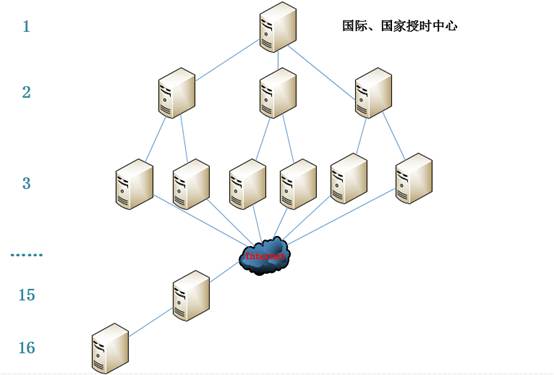
2、端口(123)
 [root@linl_S ~]# vim /etc/services

 nntp            119/tcp         readnews untp   # USENET News Transfer Protocol

 nntp            119/udp         readnews untp   # USENET News Transfer Protocol

 ntp             123/tcp

 ntp             123/udp                         # Network Time Protocol
 [root@linl_S ~]# ls /mnt/Packages/ntp*

 /mnt/Packages/ntp-4.2.6p5-1.el6.x86_64.rpm         #NTP服务端软件包

 /mnt/Packages/ntpdate-4.2.6p5-1.el6.x86_64.rpm     #NTP客户端软件包
 [root@linl_S ~]# yum -y install ntp         #NTP两个软件包都会安装上

 ...

 Installed:

   ntp.x86_64 0:4.2.6p5-1.el6

 Dependency Installed:

   ntpdate.x86_64 0:4.2.6p5-1.el6

 Complete!
 [root@linl_C ~]# rpm -ivh /mnt/Packages/ntpdate-4.2.6p5-1.el6.x86_64.rpm     #只安装ntpdate安装包

 warning: /mnt/Packages/ntpdate-4.2.6p5-1.el6.x86_64.rpm: Header V3 RSA/SHA256 Signature, key ID fd431d51: NOKEY

 Preparing...                ########################################### [100%]

     package ntpdate-4.2.6p5-1.el6.x86_64 is already installed
 [root@linl_S ~]# ls /etc/ntp.conf

 /etc/ntp.conf
 [root@linl_S ~]# service ntpd start          #启动ntp服务

 Starting ntpd:                                             [  OK  ]

 [root@linl_S ~]# netstat -anptu |grep 123    #查看端口123是否开放

 udp        0      0 10.0.0.15:123               0.0.0.0:*                               5846/ntpd

 udp        0      0 127.0.0.1:123               0.0.0.0:*                               5846/ntpd

 udp        0      0 0.0.0.0:123                 0.0.0.0:*                               5846/ntpd

 udp        0      0 fe80::20c:29ff:fea9:c1ae:123 :::*                                    5846/ntpd

 udp        0      0 ::1:123                     :::*                                    5846/ntpd

 udp        0      0 :::123                      :::*                                    5846/ntpd

 [root@linl_S ~]# chkconfig ntpd on           #开机自启动
实战1:手动同步NTP时间服务器
 [root@linl_S ~]# vi /etc/ntp.conf

 # Use public servers from the pool.ntp.org project.

 # Please consider joining the pool (http://www.pool.ntp.org/join.html).

 server 0.rhel.pool.ntp.org iburst       #找一个可以使用的NTP时间服务器

 server 1.rhel.pool.ntp.org iburst

 server 2.rhel.pool.ntp.org iburst

 server 3.rhel.pool.ntp.org iburst
 [root@linl_C ~]# ntpdate 0.rhel.pool.ntp.org

 22 May 22:04:41 ntpdate[5733]: adjust time server 202.118.1.130 offset 0.027428 sec
 [root@linl_S ~]# ntpdate 0.rhel.pool.ntp.org

 22 May 22:06:17 ntpdate[2464]: the NTP socket is in use, exiting
 [root@linl_S ~]# service ntpd stop

 Shutting down ntpd:                                        [  OK  ]

 [root@linl_S ~]# ntpdate 0.rhel.pool.ntp.org

 22 May 22:13:27 ntpdate[2495]: adjust time server 202.118.1.130 offset -0.068183 sec
实战2:搭建内网NTP服务器,内网服务器通过此NTP服务器进行时间同步
 [root@linl_S ~]# vi /etc/ntp.conf

 # Permit all access over the loopback interface.  This could

 # be tightened as well, but to do so would effect some of

 # the administrative functions.

 restrict 127.0.0.1

 restrict -6 ::1

 restrict 10.0.0.0 mask 255.255.255.0       #允许10.0.0.0 网段中的服务器访问本ntp服务器进行时间同步

 restrict 10.0.0.16                         #允许单个IP地址访问本ntp服务器

 # Use public servers from the pool.ntp.org project.

 # Please consider joining the pool (http://www.pool.ntp.org/join.html).

 server 210.72.145.44    #指定本ntp服务器的上游ntp服务器为210.72.145.44,并且设置为首先服务器。同步时间为:从上到下,写的越靠上,优先级越高。(此服务器同步不了时间,寻找下一个ntp服务器)。此IP地址是中国国家授时中心ntp服务器。

 server 133.100.11.8     #当上面服务器同步不了,则寻找第二个。此IP地址是日本福冈大学ntp服务器。

 server 0.rhel.pool.ntp.org iburst

 server 1.rhel.pool.ntp.org iburst

 server 2.rhel.pool.ntp.org iburst

 server 3.rhel.pool.ntp.org iburst

 server 127.127.1.0           #local clock 如果上面的服务器都无法同步时间,就和本地系统时间同步。127.127.1.0在这里是一个IP地址,不是网段。

 fudge 127.127.1.0 stratum 10    #127.127.1.0 为第10层。ntp 和127.127.1.0同步完后,就变成了11层。  ntp是层次阶级的。同步上层服务器的stratum 大小不能超过或等于16。
 [root@linl_S ~]# /etc/init.d/ntpd start

 Starting ntpd:                                             [  OK  ]

 [root@linl_S ~]# netstat -ln |grep 123

 udp        0      0 10.0.0.15:123               0.0.0.0:*

 udp        0      0 127.0.0.1:123               0.0.0.0:*

 udp        0      0 0.0.0.0:123                 0.0.0.0:*

 udp        0      0 fe80::20c:29ff:fea9:c1ae:123 :::*

 udp        0      0 ::1:123                     :::*

 udp        0      0 :::123                      :::*
 [root@linl_S ~]# ntpq -p         #列出本NTP服务器与上游服务器的连接状态

      remote           refid      st t when poll reach   delay   offset  jitter

 ==============================================================================

  210.72.145.44   .INIT.          16 u    -   64    0    0.000    0.000   0.000

  133.100.11.8    .INIT.          16 u    -   64    0    0.000    0.000   0.000

 *dns1.synet.edu. 202.118.1.47     2 u   32   64    3   60.058    7.261   6.860

  news.neu.edu.cn .INIT.          16 u    -   64    0    0.000    0.000   0.000

  202.118.1.130   .INIT.          16 u    -   64    0    0.000    0.000   0.000

  42.96.167.209   .INIT.          16 u    -   64    0    0.000    0.000   0.000

  LOCAL(0)        .LOCL.          10 l   96   64    2    0.000    0.000   0.000

 [root@linl_S ~]# ntpstat         #列出是否与上游服务器连接。需要过5分钟

 synchronised to NTP server (202.112.29.82) at stratum 3     #可以看到我们当前在3层

    time correct to within 257 ms    #ms 毫秒是一种较为微小的时间单位,是一秒的千分之一。

    polling server every 64 s
 [root@linl_C ~]# date -s "2015-5-23 11:30"    #先设置一个错误的时间点

 Sat May 23 11:30:00 CST 2015

 [root@linl_C ~]# ntpdate lin_S    #进行ntp时间同步

 23 May 11:34:10 ntpdate[6686]: step time server 10.0.0.15 offset 31622622.275270 sec

 [root@linl_C ~]# date

 Mon May 23 11:34:16 CST 2016      #时间同步成功
 [root@linl_C ~]# ntpdate lin_S

 23 May 11:38:02 ntpdate[6694]: no server suitable for synchronization found
 [root@linl_S ~]# cat /etc/sysconfig/clock

 # The time zone of the system is defined by the contents of /etc/localtime.

 # This file is only for evaluation by system-config-date, do not rely on its

 # contents elsewhere.

 ZONE="Asia/Shanghai"
 [root@linl_C ~]# date -s "2016-5-22 13:50"

 Sun May 22 13:50:00 CST 2016

 [root@linl_C ~]# hwclock -r

 Mon 23 May 2016 01:53:50 PM CST  -0.110948 seconds

 [root@linl_C ~]# hwclock -w

 [root@linl_C ~]# hwclock -r

 Sun 22 May 2016 01:50:48 PM CST  -0.783098 seconds     #已将系统date时间写入到BIOS时间
 [root@linl_C ~]# ntpdate lin_S

 23 May 19:50:44 ntpdate[7507]: step time server 10.0.0.15 offset 1.239826 sec
 [root@linl_C ~]# crontab -e

 0 12 * * * /usr/sbin/ntpdate lin_S
部署NTP服务器进行时间同步的更多相关文章
- CentOS 7.2部署NTP服务器实现时间同步
CentOS 7.2部署NTP服务器实现时间同步 [日期:2017-12-18] 来源:Linux社区 作者:梁明远 [字体:大 中 小] 1. 前言 对于容器编排系统,前段时间主要研究kube ...
- Centos7部署ntp服务器同步时间以及直接将本地时间同步为北京时间
一.查看配置 查看时区列表: timedatectl list-timezones|grep Asia 查看当前时间: date 查看当前设置: [root@localhost ~]# timedat ...
- Linux配置NTP服务器,时间同步
当服务器多了,时间准确与否,一致与否是个大问题.虽然这个问题总是被忽略,但是统一一致的时间是很有必要的.下面说一下在局域网内配置Linux时间服务器的方法. 配置的环境及要求: 假设在192.168. ...
- centos7.2 配置内网ntp服务器进行时间同步
(一)修改/etc/ntp.conf 配置文件,注意红色部分,其他部分不需要改 ########################################################### ...
- CentOS7部署ntp服务器
主机 角色 192.168.48.128 Server 192.168.48.129 Client 192.168.48.130 Client 所有主机安装ntp服务 yum install -y n ...
- ntp服务器同步时间详细配置
部署NTP服务器进行时间同步 NTP服务端:linl_S IP:10.0.0.15 NTP客户端:lin_C IP:10.0.0.16 NTP服务概述 1.原理 NTP(Network ...
- L01-RHEL6.5中部署NTP(ntp server + client)
RHEL6.5集群中部署NTP NTP全称为Network Time Protocol,即网络时间协议.一般在Linux系统中用来同步集群中不同机器的时间. 本文描述的ntp服务部署框架如下图示 如上 ...
- 95、配置ntp服务器
95.1.ntp简介: ntp服务使用的是udp的123端口,如果开启了防火墙要记得放开这个端口: NTP(Network Time Protocol,网络时间协议)是用来使网络中的各个计算机时间同步 ...
- 使用阿里云镜像站NTP服务搭建NTP服务器(基于CentOS 7系统)
镜像下载.域名解析.时间同步请点击 阿里云开源镜像站 一.NTP服务器介绍 网络时间协议(Network Time Protocol,NTP)服务器,也就是日常所说的NTP服务器,用来提供同步时间服务 ...
随机推荐
- MyEclipse项目的jquery.js发生[Multiple markers at this line - Missing semicolon]的解决方案
问题描述: 导入jquery库后,发现提示错误信息:Multiple markers at this line - Missing semicolon,如下截图所示: 解决方案: 选中该jquery. ...
- c++ STL中的next_permutation
default (1) template <class BidirectionalIterator> bool next_permutation (BidirectionalIterato ...
- Linux FreeTDS的安装与配置
Linux FreeTDS的安装与配置 一.简介 官方网站:http://www.freetds.org 版本:0.64 下载地址:http://ibiblio.org/pub/Linux/ALPHA ...
- TCP 的那些事儿(上)(转)
原文地址:http://kb.cnblogs.com/page/209100/ TCP是一个巨复杂的协议,因为他要解决很多问题,而这些问题又带出了很多子问题和阴暗面.所以学习TCP本身是个比较痛苦的过 ...
- 给自己的程序添加BugReport
转载:https://www.easyicon.net/(免费icon) 转载:https://www.codeproject.com/Articles/5260/XCrashReport-Excep ...
- topcoder srm 445 div1
problem1 link 这个的结论是只需要考虑坐标是整数或者是整数.5,比如(2.5,3),(4,3.5),(1.5,4.5)这样的时候.这个详细证明起来应该挺麻烦的.这里有一些讨论. probl ...
- What are the differences between Flyweight and Object Pool patterns?
What are the differences between Flyweight and Object Pool patterns? They differ in the way they are ...
- 【系列教程1】Gradle入门系列三:依赖管理
在现实生活中,要创造一个没有任何外部依赖的应用程序并非不可能,但也是极具挑战的.这也是为什么依赖管理对于每个软件项目都是至关重要的一部分. 这篇教程主要讲述如何使用Gradle管理我们项目的依赖,我们 ...
- 查找第K大的数
类快排 第一种方法 o(n) #include <bits/stdc++.h> using namespace std; const int N = 1000; int s[N]; int ...
- P4609 [FJOI2016]建筑师
思路 裸的第一类斯特林数,思路和CF960G相同 预处理组合数和第一类斯特林数回答即可 代码 #include <cstdio> #include <cstring> #inc ...