
Luncene学习 第一天 《入门程序》
整个luncene 流程
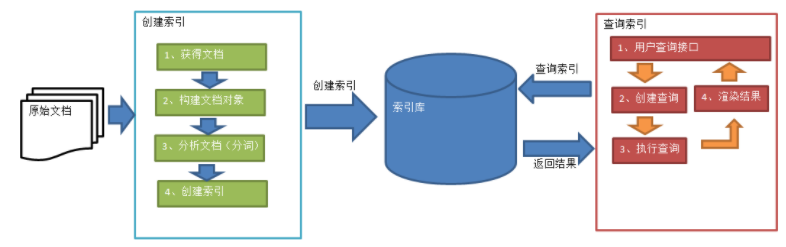
下面贴出代码
package com.zuoyan.lucene.demo;

import java.io.File;

import org.apache.commons.io.FileUtils;

import org.apache.lucene.analysis.Analyzer;

import org.apache.lucene.document.Document;

import org.apache.lucene.document.Field;

import org.apache.lucene.document.Field.Store;

import org.apache.lucene.document.LongField;

import org.apache.lucene.document.StoredField;

import org.apache.lucene.document.TextField;

import org.apache.lucene.index.IndexWriter;

import org.apache.lucene.index.IndexWriterConfig;

import org.apache.lucene.store.Directory;

import org.apache.lucene.store.FSDirectory;

import org.apache.lucene.util.Version;

import org.junit.Test;

import org.wltea.analyzer.lucene.IKAnalyzer;

/**

 * Lucene 的第一个程序

 *

 * @author zuoyan

 *

 */

public class LuceneDemo01 {

    /*

     * 创建索引 1.首先创建IndexWriter对象 他有两个参数 1.Directory 2.IndexWriterConfig

     */

    @Test

    public void testCreateIndex() throws Exception {

        String filePath = "G:\\temp\\index";

        Directory directory = FSDirectory.open(new File(filePath));

        Analyzer analyzer = new IKAnalyzer();

        IndexWriterConfig config = new IndexWriterConfig(Version.LATEST, analyzer);

        IndexWriter indexWriter = new IndexWriter(directory, config);

        // 创建field对象,将field添加到document对象中

        File f = new File("G:\\temp\\files");

        File[] listFiles = f.listFiles();

        for (File file : listFiles) {

            // 创建Document对象。

            Document document = new Document();

            // 文件名称

            String fileName = file.getName();

            Field fileNameField = new TextField("fileName", fileName, Store.YES);

            // 文件大小

            long fileSize = FileUtils.sizeOf(file);

            Field fileSizeField = new LongField("fileSize", fileSize, Store.YES);

            // 文件路径

            String file_path = file.getPath();

            Field filePathField = new StoredField("filePath", file_path);

            // 文件内容

            String file_content = FileUtils.readFileToString(file);

            Field fileContentField = new TextField("fileContent", file_content, Store.NO);

            document.add(fileNameField);

            document.add(fileSizeField);

            document.add(filePathField);

            document.add(fileContentField);

            // 第四步:使用indexwriter对象将document对象写入索引库,此过程进行索引创建。并将索引和document对象写入索引库。

            indexWriter.addDocument(document);

        }

    }

}
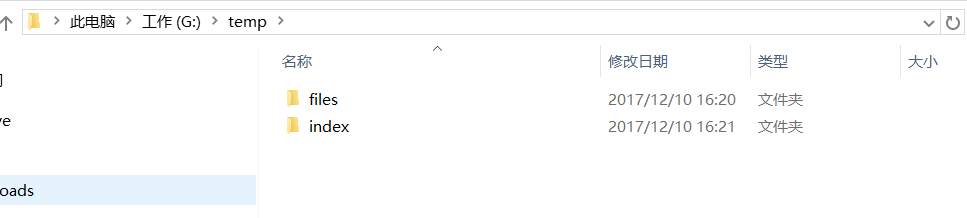
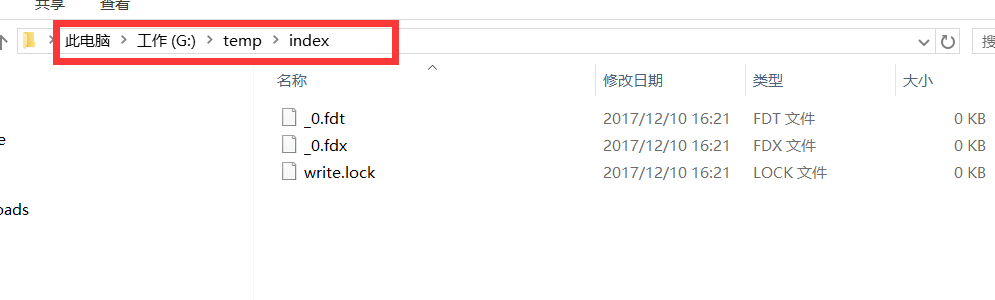
创建出来的文件索引
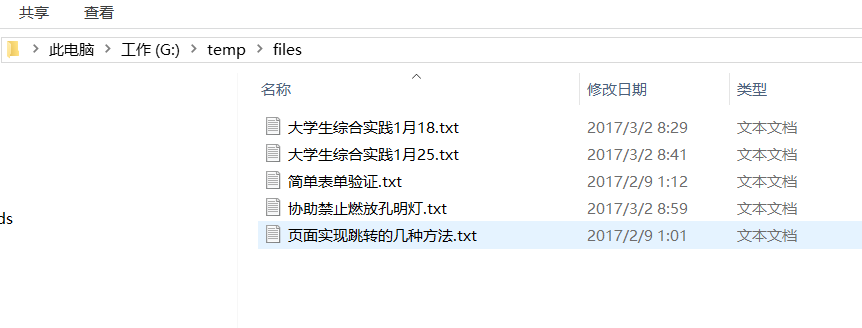
原来的文件
Luncene学习 第一天 《入门程序》的更多相关文章
- mybais学习记录一——入门程序
一.传统连接数据库和执行sql的不足 1.数据库连接,使用时就创建,不使用立即释放,对数据库进行频繁连接开启和关闭,造成数据库资源浪费,影响 数据库性能. 设想:使用数据库连接池管理数据库连接. 2. ...
- Delphi第一个入门程序——鼠标点击计数 - imsoft.cnblogs
实现的效果如下: 制作要点: 添加一个按钮Button1和一个标签Label1,并双击按钮进入编程界面在var Form1: TForm1;下面一行加上 n:integer;//定义变量. 然后在 ...
- Python第一个入门程序
#!usr/bin/env python3 #在UNIX上,当某程序在控制台中被引用时,该文件的头两个字节先被读入.如果这两个字节是ASCII字符 #!, #shell就会认为该文件将要由解释器执行, ...
- Bootstrap3.0学习第一轮(入门)
详情请查看 http://aehyok.com/Blog/Detail/7.html 个人网站地址:aehyok.com QQ 技术群号:206058845,验证码为:aehyok 本文文章链接:ht ...
- JAVAEE——Mybatis第一天:入门、jdbc存在的问题、架构介绍、入门程序、Dao的开发方法、接口的动态代理方式、SqlMapConfig.xml文件说明
1. 学习计划 第一天: 1.Mybatis的介绍 2.Mybatis的入门 a) 使用jdbc操作数据库存在的问题 b) Mybatis的架构 c) Mybatis的入门程序 3.Dao的开发方法 ...
- JAVAEE——SpringMVC第一天:介绍、入门程序、架构讲解、SpringMVC整合MyBatis、参数绑定、SpringMVC和Struts2的区别
1. 学习计划 第一天 1.SpringMVC介绍 2.入门程序 3.SpringMVC架构讲解 a) 框架结构 b) 组件说明 4.SpringMVC整合MyBatis 5.参数绑定 a) Sp ...
- C语言编程入门之--第一章初识程序
第一章 初识程序 导读:计算机程序无时不刻的影响着人类的生活,现代社会已经离不开程序,程序的作用如此巨大,那么程序到底是什么呢?本章主要讨论程序的概念,唤起读者对程序的兴趣,同时对C语言程序与其它语言 ...
- Elasticsearch7.X 入门学习第一课笔记----基本概念
原文:Elasticsearch7.X 入门学习第一课笔记----基本概念 版权声明:本文为博主原创文章,遵循CC 4.0 BY-SA版权协议,转载请附上原文出处链接和本声明. 本文链接:https: ...
- AndroidStudio学习笔记-第一个安卓程序
要带一个本科生做一部分跟安卓有点关系的项目,于是趁着机会学习一下编写安卓程序. 第一篇材料来自谷歌官方,传送门:https://developer.android.com/training/basic ...
随机推荐
- caffe_ssd学习-用自己的数据做训练
几乎没用过linux操作系统,不懂shell编程,linux下shell+windows下UltraEdit勉勉强强生成了train.txt和val.txt期间各种错误辛酸不表,照着examples/ ...
- ElasticSearch相关文章推荐
1. ElasticSearch查询:http://www.cnblogs.com/ljhdo/p/4486978.html 2. Elasticsearch Java API 的使用—多条件查询:h ...
- SQL 语法速记
----------------------------------DML(数据操作语言)---------------------------------- -- 一.INSERT VALUES语句 ...
- SQL知识点、SQL语句学习
一. 数据库简介和创建1. 系统数据库在安装好SQL SERVER后,系统会自动安装5个用于维护系统正常运行的系统数据库: (1)master:记录了SQL SERVER实例的所有系统级消息,包括实例 ...
- Django后端项目---- Rest Framework(2)
一.认证(补充的一个点) 认证请求头 #!/usr/bin/env python # -*- coding:utf-8 -*- from rest_framework.views import API ...
- Django框架----Object Relational Mapping(ORM)
Django中的ORM Django项目使用MySQL数据库 1. 在Django项目的settings.py文件中,配置数据库连接信息: DATABASES = { "default&qu ...
- ubuntu_python_environment
参考:http://blog.csdn.net/kingppy/article/details/13080919 参考:http://blog.csdn.net/zhaobig/article/det ...
- QRegExp 正则表达式详解
引言 正则表达式(regular expression)就是用一个“字符串”来描述一个特征,然后去验证另一个“字符串”是否符合这个特征.比如 表达式“ab+” 描述的特征是“一个 'a' 和 任意个 ...
- Linux的远程连接工具:SSH的安装
在Linux执行命令很不方便,另外我们需要将自己计算机中的文件上传到Linux中,因此使用远程连接工具还是比较方便的. SSH安装 SSH的使用 打开安装好的软件:SSH Secure File Tr ...
- NLTK 知识整理
NLTK 知识整理 nltk.corpus模块自带语料 NLTK comes with many corpora, toy grammars, trained models, etc. A compl ...